disk1 initialize failure in windows 7

cyberjinni

New member
Local time
11:20 PM
Messages
2
Hi
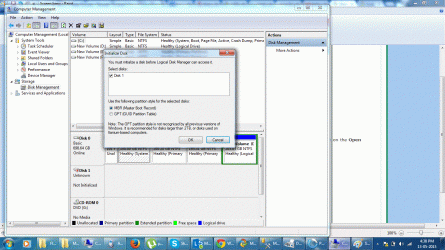
I am using WD digital 1 TB external hard drive, I was browsing through it and suddenly it stopped responding. I restarted my DELL inspiron notebook and the windows 7 failed to load the drive. I opened disk manager and it immediately gave me a message to initialize the disk 1 using MBR or GPT option. Now through various threads I know that MBR would erase my all data, however, I am not finding any good clue how to recover the drive. I am attaching the screen shot

Can anyone help me please in this regard
 

Attachments
  • screen.gif
    screen.gif
    282.5 KB · Views: 3

My Computer

Computer type
PC/Desktop
OS
windows 7 64 bit
Welcome to Seven Forums.

OK, need more details of your drive. Desktop drive with a power brick? Portable drive? Elements/ Passport/Passport Ultra? In short exact model number/name.

What happens when you plug it in into another working computer?

Answers required alongwith the screenshot of how that drive looks in Partition Wizard Free Edition.

Best Free Partition Manager for Windows PC | MiniTool Partition Wizard Free Edition
 

My Computer

OS
Windows 7 Home Premium 32 bit
Hello cyberjinni and I am sorry for your problem!

Jumanji has actually mentioned and asked what's most relevant to know at this point, so we would appreciate it to give us the more detail on the drive and situation, in order to help you further. :)

You have found correct, that Initializing your drive would erase the data off of it, so don't do it just yet.

For now this seems to be a very common problem, it could be that your drive's partition table or file system have gone corrupt and thus the system is unable to read the drive or present it as it should be, therefor is asking to Initialize the drive.

You should try using a different cable and a USB 3.0 port. Another thing to try would be finding the drive in Device Manager, Uninstalling it, unplugging and replugging it and letting automatically reinstall its drivers.

Still, I would advise first going for the data, most likely with a software just like the one Jumanji has given as link.

Please post with update. :)

CK_WD
 

My Computer

Computer type
PC/Desktop
OS
Windows 7 Home Premium x64
Thanks Jumanji and CK_WD for your reply
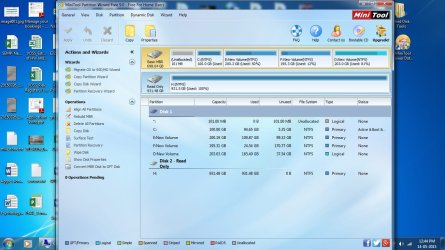
well its Western Digital Elements wd e101559 portal HDD size 1 TB I am attaching the image of Partition Wizard. Its the H drive which is not visibile anymore in windows but being visible over here in PW
 

Attachments

  • PWScreen.jpg
    PWScreen.jpg
    130.7 KB · Views: 2

My Computer

Computer type
PC/Desktop
OS
windows 7 64 bit
What is strange here is that the drive says it's 100% used, which I highly doubt. It's unlikely all full and unlikely this much used by the system. This shows for an error with the drive.

I see this is the WD Elements desktop version?

I would suggest you download the WD Data Lifeguard support program and scan the drive, do both Quick and Extended tests.

WD DLG:
Support Answers

Post the results here afterwards. Did you change the cable? Do so and try the drive on another system.

You could also try and get back the data from the drive using a data recovery software. But this could be risky as it could damage the drive more. Or try to make a back up using a back up sofwtare like the WD Smartware, see if it works.

WD Smartware:
Support Answers

Note that troubleshooting before having a safe copy of your data could result in its further damage, all depending on the depth of the problem.

This could also be useful:
Support Answers

Good luck!

CK_WD
 

My Computer

Computer type
PC/Desktop
OS
Windows 7 Home Premium x64
Back
Top