
Solved diskpart/clean by accident....need to recover partitions,begging :'(

Yes, sure I will follow. And thank you.

F5ing - about restore, I didnt know that it could harm D and E, because it was all there and isn't restore also something like copy and paste. Thatz why I execute and I knew that macrium wouldnt touch anything rather than what was commanded to do. Then I asked to be more precise and got a okay and so I didnt wait.

Backups - yes I will keep a exdrive. But like I said, there are some data, I can't have a second copy. So, backup applies to 3/4 of data. Even once I had to ful format my disk, I copied it to my friend's hard and after finishing my work, first I shred them with folder lock and then used clean all for the entire drive.

About comment on SIW , It was for fun :D i didn't mean any disrespect. It sounds fun the way he talks. So take it as a compliment.

About greg - yes, it is a little heartache to hear you tells me I lied. If it was geting the os back up again, I would just recover the table, then install some data recovery and would take as much as I can. This post wouldnt go over 50 comment. Now its 170 i gues.

Greg - Iam no expertise to your level. No way near :) but I think you should believe there is a chance if its not 'clean all' and if the user have not overwritten anything. Like me I didnt even boot a windows disk thinking that it would write even some few blocks. And this way, a lot has confirmed it to be work. And thank you very much for the safty of my data. I do get your point. It was a stupid act.

Finaly, yes I know the value here. 1st thing I learned was macrium from whs, kado, and ignatzatsonic. I knw each one of you go way end to help someone. So thank you all again.
 
Last edited:

My Computer My Computer

At a glance

Windows 7 Ultimate x64Core I5 - 24306GB DDR3 1333Intel HD 3000 with ATI Radeon HD 6470
Computer Manufacturer/Model Number
HP Pavilion G6
OS
Windows 7 Ultimate x64
CPU
Core I5 - 2430
Memory
6GB DDR3 1333
Graphics Card(s)
Intel HD 3000 with ATI Radeon HD 6470
Monitor(s) Displays
HP BrightView LED
Screen Resolution
1366x768
Hard Drives
Hitachi 5400RPM 640GB
Cooling
Sitting on custom made laptop cooler
Internet Speed
21mbps downlink, 2mbps uplink
You will not put words in my mouth. No one said you lied, as F5ing has already made clear to you. The point is that data that important to you should have been copied out at the first opportunity.

I am glad you got your data back. Enjoy Windows 7. .
 
thank you greg, I did not mean any offence to you. I admire you for your knowledge and skills. Look at that MVP mark and 25 000 posts record. would I b dare to question you? I myself dont think so. let us put this behind and go on. again thank you for everything. :)
 

My Computer My Computer

At a glance

Windows 7 Ultimate x64Core I5 - 24306GB DDR3 1333Intel HD 3000 with ATI Radeon HD 6470
Computer Manufacturer/Model Number
HP Pavilion G6
OS
Windows 7 Ultimate x64
CPU
Core I5 - 2430
Memory
6GB DDR3 1333
Graphics Card(s)
Intel HD 3000 with ATI Radeon HD 6470
Monitor(s) Displays
HP BrightView LED
Screen Resolution
1366x768
Hard Drives
Hitachi 5400RPM 640GB
Cooling
Sitting on custom made laptop cooler
Internet Speed
21mbps downlink, 2mbps uplink
You are welcome. We learned a very important lesson here about Diskpart Clean command being recoverable. :geek: It will help countless others here and via web searches.
 
F5ing - about restore, I didnt know that it could harm D and E, because it was all there and isn't restore also something like copy and paste. Thatz why I execute and I knew that macrium wouldnt touch anything rather than what was commanded to do. Then I asked to be more precise and got a okay and so I didnt wait.

No, not like copy/paste. Always a risk that something won't go right when writing to the MBR and partition table.

Backups - yes I will keep a exdrive. But like I said, there are some data, I can't have a second copy. So, backup applies to 3/4 of data. Even once I had to ful format my disk, I copied it to my friend's hard and after finishing my work, first I shred them with folder lock and then used clean all for the entire drive.

You can keep a second copy. Just use something like TrueCrypt - Free Open-Source On-The-Fly Disk Encryption Software for Windows 7/Vista/XP, Mac OS X and Linux.

About greg - yes, it is a little heartache to hear you tells me I lied. If it was geting the os back up again, I would just recover the table, then install some data recovery and would take as much as I can. This post wouldnt go over 50 comment. Now its 170 i gues.

Well, put it this way. You said that the data on there was the most important thing in your whole life. You'd die without it. Exaggerated maybe, but you get the idea. If that's really true you wouldn't see that person knowingly subjecting their data to even more risk.

When someone gives me a machine/disk to recover their "important" data I've got to treat it as "critically important". Before I "touch" it I check disk status and if okay make a clone. Cloning can take many hours because it's reading/copying every single bit, whether it's used or free space. Worth it knowing I've got a backup of what it looked like when it was given to me.

Greg - Iam no expertise to your level. No way near :) but I think you should believe there is a chance if its not 'clean all' and if the user have not overwritten anything. Like me I didnt even boot a windows disk thinking that it would write even some few blocks. And this way, a lot has confirmed it to be work. And thank you very much for the safty of my data. I do get your point. It was a stupid act.

But one never knows unless they "know". For me, I can read mounds of info and finally become "convinced" of something. But I'd not say I "know" until I reproduce it myself. And technology changes (disk types) and even functionality of a given command can change over the years. People sometimes get siloed into specialties and even then learn new stuff almost every day for the rest of their life.

So would you rather have the answer that you want or the answer that's honest?

Finaly, yes I know the value here. 1st thing I learned was macrium from whs, kado, and igsomzontias. I knw each one of you go way end to help someone. So thank you all again.

And you're welcome of course.

By the way, got a real question or two: when you finally had PW make the corrections to the disk how long did it actually take to do the write? Have you opened a bunch of your recovered files (you may have mentioned it but if so I missed it)?

EDIT: missed the last few posts before posting this...
 
Last edited:

My Computer My Computer

At a glance

Windows 7 Ultimate x64
OS
Windows 7 Ultimate x64
thank you F5ing, thats really professional, I do not quote the comment as it would get very long.

so for the final question as its something more important, ' No, it didnt even took a minute to recover partitions first and and to run the rebuild mbr command. it was just click - apply - wait 10 seconds - done. I think its because it dint recover an entire partion, it just recovered the mbr and partition table as par to to my knowledge. dont know exactly though. and then, I cant open any files but to see them with their existence path and names and modified created dates with size. I think that bootable cd doesnt allow that feature. maybe windows version have that.

and about what I said to the greg about that chance of recovering, I do get your point sir. thats actually I didint thinking as a 3rd party whose trying to help. sure we need to take every precaution in a situation like that :) and I think I did mention the word 'Chance' there :D thank you for correcting me.

and thank you for your valuable advises, I do take notice of all these and add them to my life. im not a big head to ignore and live by myself. thank you for helping me.

ryt now im thinking should I clean install windows just by formating C: and sys reserved or should I copy all these to some where else and then clean all my partitions, then re install. because I dont know and can't figure out why I am having these lags even after a image restore. this is 3rd tym I restored and ever time its same( 3rd time means not after this clean. like 1st was 3 weeks ago, 2nd was 2 weeks ago, and now.)
 

My Computer My Computer

At a glance

Windows 7 Ultimate x64Core I5 - 24306GB DDR3 1333Intel HD 3000 with ATI Radeon HD 6470
Computer Manufacturer/Model Number
HP Pavilion G6
OS
Windows 7 Ultimate x64
CPU
Core I5 - 2430
Memory
6GB DDR3 1333
Graphics Card(s)
Intel HD 3000 with ATI Radeon HD 6470
Monitor(s) Displays
HP BrightView LED
Screen Resolution
1366x768
Hard Drives
Hitachi 5400RPM 640GB
Cooling
Sitting on custom made laptop cooler
Internet Speed
21mbps downlink, 2mbps uplink
so for the final question as its something more important, ' No, it didnt even took a minute to recover partitions first and and to run the rebuild mbr command. it was just click - apply - wait 10 seconds - done. I think its because it dint recover an entire partion, it just recovered the mbr and partition table as par to to my knowledge. dont know exactly though. and then, I cant open any files but to see them with their existence path and names and modified created dates with size. I think that bootable cd doesnt allow that feature. maybe windows version have that.

Just wanted to make sure because when you asked (when your power was out) I told you it should take a minute or less. I typically rely on Testdisk for this and when the corrections are made they go so fast (like maybe a second) it makes you think it didn't do anything. And you're right, it's not restoring the partition itself, only the definition for it so that it can be found and used.

ryt now im thinking should I clean install windows just by formating C: and sys reserved or should I copy all these to some where else and then clean all my partitions, then re install. because I dont know and can't figure out why I am having these lags even after a image restore. this is 3rd tym I restored and ever time its same( 3rd time means not after this clean. like 1st was 3 weeks ago, 2nd was 2 weeks ago, and now.)

Do as Greg just said, backup that data before trying to fix the OS. Once you've got your data backed up somewhere reliable, you can clean that disk and start fresh. Follow the tutorials he posted after you BACK UP.
 

My Computer My Computer

At a glance

Windows 7 Ultimate x64
OS
Windows 7 Ultimate x64
yeah, I just awake. Haven't sleep much yesterday and day before :D yes, I decided to stick with that plan. Now need a exhard for the work. Until then, I wil work like this. Thank you F5ing. Take care.
 

My Computer My Computer

At a glance

Windows 7 Ultimate x64Core I5 - 24306GB DDR3 1333Intel HD 3000 with ATI Radeon HD 6470
Computer Manufacturer/Model Number
HP Pavilion G6
OS
Windows 7 Ultimate x64
CPU
Core I5 - 2430
Memory
6GB DDR3 1333
Graphics Card(s)
Intel HD 3000 with ATI Radeon HD 6470
Monitor(s) Displays
HP BrightView LED
Screen Resolution
1366x768
Hard Drives
Hitachi 5400RPM 640GB
Cooling
Sitting on custom made laptop cooler
Internet Speed
21mbps downlink, 2mbps uplink
yeah, I just awake. Haven't sleep much yesterday and day before :D yes, I decided to stick with that plan. Now need a exhard for the work. Until then, I wil work like this. Thank you F5ing. Take care.

You too, and good luck!
 

My Computer My Computer

At a glance

Windows 7 Ultimate x64
OS
Windows 7 Ultimate x64
You are welcome. We learned a very important lesson here about Diskpart Clean command being recoverable. :geek: It will help countless others here and via web searches.
"Diskpart clean" just puts zeros in first megabyte of physical drive.
Sometimes (not always) partitions are aligned to the MB border so not in that area. Don't know where win7 starts the first partition by default. My partition starts at block 63.... so is unrecoverable after "clean"

C:\Windows\system32>diskpart
Microsoft DiskPart-versie 6.1.7601
Copyright (C) 1999-2008 Microsoft Corporation.
Op computer: LAPTOPRON
DISKPART> sel dis 0
Schijf 0 is nu de geselecteerde schijf.
DISKPART> list par
Partitie ### Type Grootte Offset
------------- ---------------- ------- -------
Partitie 1 Primair 113 GB 32 KB
Partitie 0 Uitgebreid 352 GB 113 GB
Partitie 2 Logisch 352 GB 113 GB
DISKPART>
 

My Computer My Computer

At a glance

Microsoft Windows 7 Home Premium 64-bits 7601...Intel(R) Core(TM) i3 CPU M 370 @ 2.40GHz4,00 GBATI Mobility Radeon HD 5400 Series
Computer type
Laptop
Computer Manufacturer/Model Number
ACER ASPIRE 5742G
OS
Microsoft Windows 7 Home Premium 64-bits 7601 Multiprocessor Free Service Pack 1
CPU
Intel(R) Core(TM) i3 CPU M 370 @ 2.40GHz
Motherboard
Acer Aspire 5742G
Memory
4,00 GB
Graphics Card(s)
ATI Mobility Radeon HD 5400 Series
Sound Card
(1) AMD High Definition Audio Device (2) Realtek High Defi
Screen Resolution
1366 x 768 x 32 bits (4294967296 colors) @ 60 Hz
Hard Drives
WDC WD5000BEVT-22ZAT0
You are welcome. We learned a very important lesson here about Diskpart Clean command being recoverable. :geek: It will help countless others here and via web searches.
"Diskpart clean" just puts zeros in first megabyte of physical drive.
Sometimes (not always) partitions are aligned to the MB border so not in that area. Don't know where win7 starts the first partition by default. My partition starts at block 63.... so is unrecoverable after "clean"

C:\Windows\system32>diskpart
Microsoft DiskPart-versie 6.1.7601
Copyright (C) 1999-2008 Microsoft Corporation.
Op computer: LAPTOPRON
DISKPART> sel dis 0
Schijf 0 is nu de geselecteerde schijf.
DISKPART> list par
Partitie ### Type Grootte Offset
------------- ---------------- ------- -------
Partitie 1 Primair 113 GB 32 KB
Partitie 0 Uitgebreid 352 GB 113 GB
Partitie 2 Logisch 352 GB 113 GB
DISKPART>

wow, that means I got lucky :) phew!!!!!! :)thanks for the explanation mate.
 

My Computer My Computer

At a glance

Windows 7 Ultimate x64Core I5 - 24306GB DDR3 1333Intel HD 3000 with ATI Radeon HD 6470
Computer Manufacturer/Model Number
HP Pavilion G6
OS
Windows 7 Ultimate x64
CPU
Core I5 - 2430
Memory
6GB DDR3 1333
Graphics Card(s)
Intel HD 3000 with ATI Radeon HD 6470
Monitor(s) Displays
HP BrightView LED
Screen Resolution
1366x768
Hard Drives
Hitachi 5400RPM 640GB
Cooling
Sitting on custom made laptop cooler
Internet Speed
21mbps downlink, 2mbps uplink
You PW screenshot showed a LBA start 2048 (first partition). So it starts at 2048*512 bytes=2048*0.5kB=1024kB=1MB

I think win7 starts partitions at 1MB boundary by default(?) In my case it has probably changed due to some partition resizing software.

once again... recovery software can rebuild partition tabel very easy. And refresh mbr code as well.
It doesn't touch the partitions themself!

But "diskpart clean" didn't clean the partition table/mbr code only (first 512 bytes on disk). It cleared the first MB. Luckily there was no partition there.

You could have recovered D and E anyway even in that situation!! And then use Macrium to restore.

But ALWAYS Backup! Human errors or software failures happen everyday
 

My Computer My Computer

At a glance

Microsoft Windows 7 Home Premium 64-bits 7601...Intel(R) Core(TM) i3 CPU M 370 @ 2.40GHz4,00 GBATI Mobility Radeon HD 5400 Series
Computer type
Laptop
Computer Manufacturer/Model Number
ACER ASPIRE 5742G
OS
Microsoft Windows 7 Home Premium 64-bits 7601 Multiprocessor Free Service Pack 1
CPU
Intel(R) Core(TM) i3 CPU M 370 @ 2.40GHz
Motherboard
Acer Aspire 5742G
Memory
4,00 GB
Graphics Card(s)
ATI Mobility Radeon HD 5400 Series
Sound Card
(1) AMD High Definition Audio Device (2) Realtek High Defi
Screen Resolution
1366 x 768 x 32 bits (4294967296 colors) @ 60 Hz
Hard Drives
WDC WD5000BEVT-22ZAT0
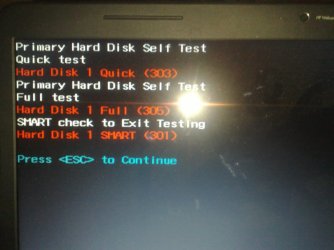
guys, Im having hard disk error warning from windows. Ran file system checks with PW on every partition, just had a 1 error and it was corrected. And now ran bios hard drive self test, and it came up with the SMART CHECK ERROR.

I saw what to do when i searched the forum, but my case is little different here cuz you guys know what happened exactly.

Is this due to recent recoveries or is my hard drive failing?
I have planned out to do a full hard drive wipe with a help of my friend's note for backup purposes.

So, should I worry or is this normal after such a rough ride to file systems :) im planing on delete all my partitions and do a full wipe clean and start from scratch of the scratch.

I wil post a screen shot below and tell me should I worry? And would rebuilding everything work?

EDIT : More info.

*ran check file system on PW in every partition. C and sys reserved didnt had any errors. D and E had 1 eror per each and corected.

*restarted. And so checked C.

*again checked 2 times per partition and 0 errors.
*ran windows check, no errors.

* but hard error message keep appearing, so ran from bios,
1. memory test and its ok, then
2. Hard drive self test - gave smart error. So now note isn't in use. i have shut down it.
 

My Computer My Computer

At a glance

Windows 7 Ultimate x64Core I5 - 24306GB DDR3 1333Intel HD 3000 with ATI Radeon HD 6470
Computer Manufacturer/Model Number
HP Pavilion G6
OS
Windows 7 Ultimate x64
CPU
Core I5 - 2430
Memory
6GB DDR3 1333
Graphics Card(s)
Intel HD 3000 with ATI Radeon HD 6470
Monitor(s) Displays
HP BrightView LED
Screen Resolution
1366x768
Hard Drives
Hitachi 5400RPM 640GB
Cooling
Sitting on custom made laptop cooler
Internet Speed
21mbps downlink, 2mbps uplink
06072012393-001.jpg
 

My Computer My Computer

At a glance

Windows 7 Ultimate x64Core I5 - 24306GB DDR3 1333Intel HD 3000 with ATI Radeon HD 6470
Computer Manufacturer/Model Number
HP Pavilion G6
OS
Windows 7 Ultimate x64
CPU
Core I5 - 2430
Memory
6GB DDR3 1333
Graphics Card(s)
Intel HD 3000 with ATI Radeon HD 6470
Monitor(s) Displays
HP BrightView LED
Screen Resolution
1366x768
Hard Drives
Hitachi 5400RPM 640GB
Cooling
Sitting on custom made laptop cooler
Internet Speed
21mbps downlink, 2mbps uplink
guys, Im having hard disk error warning from windows. Ran file system checks with PW on every partition, just had a 1 error and it was corrected. And now ran bios hard drive self test, and it came up with the SMART CHECK ERROR.

I saw what to do when i searched the forum, but my case is little different here cuz you guys know what happened exactly.

Is this due to recent recoveries or is my hard drive failing?
I have planned out to do a full hard drive wipe with a help of my friend's note for backup purposes.

So, should I worry or is this normal after such a rough ride to file systems :) im planing on delete all my partitions and do a full wipe clean and start from scratch of the scratch.

I wil post a screen shot below and tell me should I worry? And would rebuilding everything work?
why did you run file system check within PW? Normally you simply do:
chkdsk/f c:
from elevated command prompt. Anyway what kind error did it find? Now no more errors, so corrected?
 

My Computer My Computer

At a glance

Microsoft Windows 7 Home Premium 64-bits 7601...Intel(R) Core(TM) i3 CPU M 370 @ 2.40GHz4,00 GBATI Mobility Radeon HD 5400 Series
Computer type
Laptop
Computer Manufacturer/Model Number
ACER ASPIRE 5742G
OS
Microsoft Windows 7 Home Premium 64-bits 7601 Multiprocessor Free Service Pack 1
CPU
Intel(R) Core(TM) i3 CPU M 370 @ 2.40GHz
Motherboard
Acer Aspire 5742G
Memory
4,00 GB
Graphics Card(s)
ATI Mobility Radeon HD 5400 Series
Sound Card
(1) AMD High Definition Audio Device (2) Realtek High Defi
Screen Resolution
1366 x 768 x 32 bits (4294967296 colors) @ 60 Hz
Hard Drives
WDC WD5000BEVT-22ZAT0

My Computer My Computer

At a glance

Microsoft Windows 7 Home Premium 64-bits 7601...Intel(R) Core(TM) i3 CPU M 370 @ 2.40GHz4,00 GBATI Mobility Radeon HD 5400 Series
Computer type
Laptop
Computer Manufacturer/Model Number
ACER ASPIRE 5742G
OS
Microsoft Windows 7 Home Premium 64-bits 7601 Multiprocessor Free Service Pack 1
CPU
Intel(R) Core(TM) i3 CPU M 370 @ 2.40GHz
Motherboard
Acer Aspire 5742G
Memory
4,00 GB
Graphics Card(s)
ATI Mobility Radeon HD 5400 Series
Sound Card
(1) AMD High Definition Audio Device (2) Realtek High Defi
Screen Resolution
1366 x 768 x 32 bits (4294967296 colors) @ 60 Hz
Hard Drives
WDC WD5000BEVT-22ZAT0
added more info on privious comment.
I forgot chkdsk/f. I can't remembes what was the error exactly, as far as I thnk, it was just a bad sector found.

Now, no more errors in file system. But bios hard disk self test gave above picture.
Repeat, had restarted 2 times, C, D, E or sys reserved has no eror showing in PW or windows checking tool.
 

My Computer My Computer

At a glance

Windows 7 Ultimate x64Core I5 - 24306GB DDR3 1333Intel HD 3000 with ATI Radeon HD 6470
Computer Manufacturer/Model Number
HP Pavilion G6
OS
Windows 7 Ultimate x64
CPU
Core I5 - 2430
Memory
6GB DDR3 1333
Graphics Card(s)
Intel HD 3000 with ATI Radeon HD 6470
Monitor(s) Displays
HP BrightView LED
Screen Resolution
1366x768
Hard Drives
Hitachi 5400RPM 640GB
Cooling
Sitting on custom made laptop cooler
Internet Speed
21mbps downlink, 2mbps uplink

My Computer My Computer

At a glance

Windows 7 Ultimate x64Core I5 - 24306GB DDR3 1333Intel HD 3000 with ATI Radeon HD 6470
Computer Manufacturer/Model Number
HP Pavilion G6
OS
Windows 7 Ultimate x64
CPU
Core I5 - 2430
Memory
6GB DDR3 1333
Graphics Card(s)
Intel HD 3000 with ATI Radeon HD 6470
Monitor(s) Displays
HP BrightView LED
Screen Resolution
1366x768
Hard Drives
Hitachi 5400RPM 640GB
Cooling
Sitting on custom made laptop cooler
Internet Speed
21mbps downlink, 2mbps uplink
All abou SMART
S.M.A.R.T. - Wikipedia, the free encyclopedia.
Visibility to host systems
Depending on the type of interface being used, some S.M.A.R.T.-enabled motherboards and related software may not communicate with certain S.M.A.R.T.-capable drives. For example, few external drives connected via USB and Firewire correctly send S.M.A.R.T. data over those interfaces. With so many ways to connect a hard drive (SCSI, Fibre Channel, ATA, SATA, SAS, SSA, and so on), it is difficult to predict whether S.M.A.R.T. reports will function correctly in a given system.
Even with a hard drive and interface that implements the specification, the computer's operating system may not see the S.M.A.R.T. information because the drive and interface are encapsulated in a lower layer. For example, they may be part of a RAID subsystem in which the RAID controller sees the S.M.A.R.T.-capable drive, but the main computer sees only a logical volume generated by the RAID controller.
On the Windows platform, many programs designed to monitor and report S.M.A.R.T. information will function only under an administrator account. At present, S.M.A.R.T. is implemented individually by manufacturers, and while some aspects are standardized for compatibility, others are not.
 

My Computer My Computer

At a glance

Microsoft Windows 7 Home Premium 64-bits 7601...Intel(R) Core(TM) i3 CPU M 370 @ 2.40GHz4,00 GBATI Mobility Radeon HD 5400 Series
Computer type
Laptop
Computer Manufacturer/Model Number
ACER ASPIRE 5742G
OS
Microsoft Windows 7 Home Premium 64-bits 7601 Multiprocessor Free Service Pack 1
CPU
Intel(R) Core(TM) i3 CPU M 370 @ 2.40GHz
Motherboard
Acer Aspire 5742G
Memory
4,00 GB
Graphics Card(s)
ATI Mobility Radeon HD 5400 Series
Sound Card
(1) AMD High Definition Audio Device (2) Realtek High Defi
Screen Resolution
1366 x 768 x 32 bits (4294967296 colors) @ 60 Hz
Hard Drives
WDC WD5000BEVT-22ZAT0
Can't see message SMART CHECK ERROR.!! Sure it was there? Even after power off/on?


Ah, no, I didnt run it two times.
Isn't that red lines of text and numbers means any error??
BIOS can talk to the disk directly and asked to SMART firmware on harddrive... "What are the failure statistics" . You never did that before I assume? If not ... I do neither ... maybe this is the case a long time
 

My Computer My Computer

At a glance

Microsoft Windows 7 Home Premium 64-bits 7601...Intel(R) Core(TM) i3 CPU M 370 @ 2.40GHz4,00 GBATI Mobility Radeon HD 5400 Series
Computer type
Laptop
Computer Manufacturer/Model Number
ACER ASPIRE 5742G
OS
Microsoft Windows 7 Home Premium 64-bits 7601 Multiprocessor Free Service Pack 1
CPU
Intel(R) Core(TM) i3 CPU M 370 @ 2.40GHz
Motherboard
Acer Aspire 5742G
Memory
4,00 GB
Graphics Card(s)
ATI Mobility Radeon HD 5400 Series
Sound Card
(1) AMD High Definition Audio Device (2) Realtek High Defi
Screen Resolution
1366 x 768 x 32 bits (4294967296 colors) @ 60 Hz
Hard Drives
WDC WD5000BEVT-22ZAT0
Back
Top