

When it comes to setting up multiple monitors on an SLI config you need to follow the port layout that is displayed in the control panel. You also need to read the manual, it should tell which ports to use when using SLI and multiple monitors.
The first port displayed is the primary, where the bootup process will display.
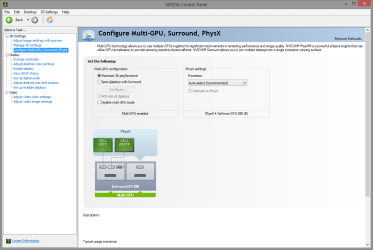
The first port displayed is the primary, where the bootup process will display.
Last edited:
My Computer
- Computer type
- PC/Desktop
- Computer Manufacturer/Model Number
- Alienware Aurora ALX R4
- OS
- Windows 10 Pro (x64)
- CPU
- Intel Core i7-3930K (3.2GHz - 4.5GHz)
- Motherboard
- Alienware Aurora-R4 x79
- Memory
- 4x Samsung 4GB PC3-12800 DDR3 (16GB 1600MHz)
- Graphics Card(s)
- Nvidia Geforce GTX 690
- Sound Card
- SteelSeries Siberia Elite
- Monitor(s) Displays
- Dell UltraSharp U3011
- Screen Resolution
- 2560x1600
- Hard Drives
- Samsung 850 Pro 256 GB, Seagate 1TB Desktop Hybrid HDD, 2x Western Digital 4TB Green HDD
- PSU
- 875W Some Dell PSU <.<
- Case
- Alienware Aurora ALX
- Cooling
- Custom Liquid Cooling (EK CPU & GPU blocks) dual EK 480RAD
- Keyboard
- Logitech G710+ Mechanical
- Mouse
- Logitech G700s
- Internet Speed
- Verizon Fios (50 mbps average)
- Other Info
- Server: Intel NUC D54250WYK: i5-4250U, 16GB, 256 GB mSATA, Windows Server 2012 R2


