
Do I Have A Virus?

woodbine

New member
Member
VIP
Local time
11:39 PM
Messages
178
Location
Bristol, UK
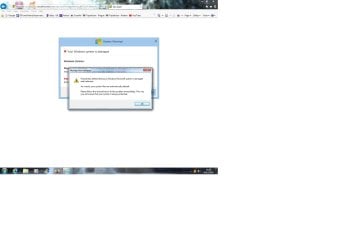
Several times recently when using IE11 browser, some strange things have popped up on screen. They seem to be saying my system is outdated or problems with firewall. Also say that files will be deleted/destroyed. A couple even had a countdown timer on them. Seem to remember that the address bar at top left of screen on one of them said something like Wink or Winx.

Are the warnings on screen genuinely from my desktop, or is there something malicious going on? After the previous one, I ran the full Avast scan and it found a PUP which it removed. Not sure what that was. Below are screen shots of the one that appeared today.
 

Attachments
  • Virus.jpg
    Virus.jpg
    68 KB · Views: 17
  • Virus 2.jpg
    Virus 2.jpg
    28.7 KB · Views: 41
  • Virus 3.jpg
    Virus 3.jpg
    7.4 KB · Views: 41

My Computer

Computer type
PC/Desktop
Computer Manufacturer/Model Number
Acer Aspire Desktop M3910
OS
Windows 7 Home Premium 64 bit SP1
CPU
Intel i3 540
Memory
3GB DDR3SD
Monitor(s) Displays
LG Flatron L1960TR
Screen Resolution
1280x1024
Keyboard
Acer
Mouse
Genius
Antivirus
Avast (Free)
Browser
I E 11
Hi woodbine,

Several times recently when using IE11 browser, some strange things have popped up on screen. They seem to be saying my system is outdated or problems with firewall. Also say that files will be deleted/destroyed. A couple even had a countdown timer on them. Seem to remember that the address bar at top left of screen said something like Wink or Winx.

Are the warnings on screen genuinely from my desktop, or is there something malicious going on? After the previous one, I ran the full Avast scan and it found a PUP which it removed. Not sure what that was.

Download and run Malwarebytes [FREE] from here => Malwarebytes.

I hope this helps!
 

My Computer

Computer type
Laptop
Computer Manufacturer/Model Number
Fujitsu LIFEBOOK
OS
Win 7 HP SP1 64-bit Vista HB SP2 32-bit Linux Mint 18.3
CPU
Intel(R) Pentium(R) CPU P6200 @ 2.13GHz
Motherboard
FUJITSU FJNBB06
Memory
4.00 GB
Graphics Card(s)
Intel(R) Graphics Media Accelerator HD
Sound Card
[1] Realtek High Definition Audio [2] Intel(R) Display Audio
Screen Resolution
1366 x 768 x 32 bits (4294967296 colors) @ 59 Hz
Hard Drives
TOSHIBA MK5076GSX
Antivirus
AVG FREE
Hi Paul. Thanks for your quick reply. I seem to remember I had problems with Malwarebytes and my pc. I have Superantispyware. Will this be just as good?
 

My Computer

Computer type
PC/Desktop
Computer Manufacturer/Model Number
Acer Aspire Desktop M3910
OS
Windows 7 Home Premium 64 bit SP1
CPU
Intel i3 540
Memory
3GB DDR3SD
Monitor(s) Displays
LG Flatron L1960TR
Screen Resolution
1280x1024
Keyboard
Acer
Mouse
Genius
Antivirus
Avast (Free)
Browser
I E 11
Hi woodbine,

I seem to remember I had problems with Malwarebytes and my pc. I have Superantispyware. Will this be just as good?

It wouldn't hurt running it and trying it!
 

My Computer

Computer type
Laptop
Computer Manufacturer/Model Number
Fujitsu LIFEBOOK
OS
Win 7 HP SP1 64-bit Vista HB SP2 32-bit Linux Mint 18.3
CPU
Intel(R) Pentium(R) CPU P6200 @ 2.13GHz
Motherboard
FUJITSU FJNBB06
Memory
4.00 GB
Graphics Card(s)
Intel(R) Graphics Media Accelerator HD
Sound Card
[1] Realtek High Definition Audio [2] Intel(R) Display Audio
Screen Resolution
1366 x 768 x 32 bits (4294967296 colors) @ 59 Hz
Hard Drives
TOSHIBA MK5076GSX
Antivirus
AVG FREE
Hi Woodbine,

thats a scam, certainly NOT an MS pop-up,

would also suggest you run ESET on-line, dissable any other AV whilst your running it.


Roy
 

My Computer

Computer type
PC/Desktop
Computer Manufacturer/Model Number
medionl/Aspire 6930G/acer x55a
OS
W7 home premium 32bit/W7HP 64bit/w10 tp insider ring
CPU
E5300 dual core
Motherboard
medion MS7366
Memory
3gb
Graphics Card(s)
Nvidia Geforce 7100 Nforce 630i
Monitor(s) Displays
avixc
Internet Speed
n (isp resticted to 72)
Antivirus
mse/pands
Browser
palemoon
Other Info
Belkin Fd7050 n USB using Railink RT2870 drivers, more upto date
Hi woodbine,


It wouldn't hurt running it and trying it!

Thanks, Paul.

I ran a full SAS scan, and it found 283 tracking cookies. Removed them. I'm guessing they weren't the cause of my problems?
 

My Computer

Computer type
PC/Desktop
Computer Manufacturer/Model Number
Acer Aspire Desktop M3910
OS
Windows 7 Home Premium 64 bit SP1
CPU
Intel i3 540
Memory
3GB DDR3SD
Monitor(s) Displays
LG Flatron L1960TR
Screen Resolution
1280x1024
Keyboard
Acer
Mouse
Genius
Antivirus
Avast (Free)
Browser
I E 11
Hi Woodbine,

thats a scam, certainly NOT an MS pop-up,

would also suggest you run ESET on-line, dissable any other AV whilst your running it.


Roy

Hi Torchwood

Presuming I can use the free one time scan from ESET? I have free Avast and free Superantispyware. Would it be just the Avast that I need to disable?

Many thanks.
 

My Computer

Computer type
PC/Desktop
Computer Manufacturer/Model Number
Acer Aspire Desktop M3910
OS
Windows 7 Home Premium 64 bit SP1
CPU
Intel i3 540
Memory
3GB DDR3SD
Monitor(s) Displays
LG Flatron L1960TR
Screen Resolution
1280x1024
Keyboard
Acer
Mouse
Genius
Antivirus
Avast (Free)
Browser
I E 11
Hi woodbine,

I ran a full SAS scan, and it found 283 tracking cookies. Removed them. I'm guessing they weren't the cause of my problems?

Could possibly of been!

I ran the full Avast scan and it found a PUP which it removed. Not sure what that was.

PUP is Potentially Unwanted Program!

I hope this helps!
 

My Computer

Computer type
Laptop
Computer Manufacturer/Model Number
Fujitsu LIFEBOOK
OS
Win 7 HP SP1 64-bit Vista HB SP2 32-bit Linux Mint 18.3
CPU
Intel(R) Pentium(R) CPU P6200 @ 2.13GHz
Motherboard
FUJITSU FJNBB06
Memory
4.00 GB
Graphics Card(s)
Intel(R) Graphics Media Accelerator HD
Sound Card
[1] Realtek High Definition Audio [2] Intel(R) Display Audio
Screen Resolution
1366 x 768 x 32 bits (4294967296 colors) @ 59 Hz
Hard Drives
TOSHIBA MK5076GSX
Antivirus
AVG FREE
Hi Woodbine,

dissable BOTH.

Roy
 

My Computer

Computer type
PC/Desktop
Computer Manufacturer/Model Number
medionl/Aspire 6930G/acer x55a
OS
W7 home premium 32bit/W7HP 64bit/w10 tp insider ring
CPU
E5300 dual core
Motherboard
medion MS7366
Memory
3gb
Graphics Card(s)
Nvidia Geforce 7100 Nforce 630i
Monitor(s) Displays
avixc
Internet Speed
n (isp resticted to 72)
Antivirus
mse/pands
Browser
palemoon
Other Info
Belkin Fd7050 n USB using Railink RT2870 drivers, more upto date
Nothing to worry about, at all.

What you're seeing are normal, malicious popups intended to trick you into thinking your computer is infected and only that program will save you, while in fact what you have in front is a a random webpage asking you to install a virus in your computer in disguise.

If you look closely at the screenshot, you'll see many clues that the message is not geniune:
- The message is entirely contained in a browser windo, it's not on its on on the desktop.
- The gigantic "system warning" window uses a Windows 8 Metro style. The rest of your system uses Windows 7 Aero Glass.
- The small message in front of it is titled "Message from webpage".
- The message in itself makes no sense. A firewall cannot "define" a system as damaged, much less as "irrelevant".
- If your system files were deleted, you wouldn't be taking screen captures and posting here, your computer would be bricked.
- "Please follo the instructions to fix the problem immediately" is a typical plea to create fear in you and blindly click where they want you to. The whole thing makes zero sense and there is no objetive reason to follow that "advice".

A real warning won't show up without reasonable explanation and won't be that urgent in nature, Windows is simply not that intrusive, and in many way it hasn't the means to detect such problems even when they're real. Fancy messages like this appear on the web all the time, it's called Phishing and should always be ignored and closed away. They by no means indicate an infection or any compromise on your computer, but often are sign of malicious advetising networks being exploited.

TL;DR; Just close the window and move on, you're safe.


and it found 283 tracking cookies. Removed them. I'm guessing they weren't the cause of my problems?

They might have something to do with the popups, but in any case, a cookie is at most a privacy problem, not a security one. Cookies are often used by tracking advertising networks and partner websites (Google and Facebook being the main offenders) but other than trying to spy on you they won't compromise the security in any way. You can always delete cookies without any negative consequences, but they aren't the root cause of malicious popups, although malicious popups could have dropped cookies.
 

My Computer

Computer type
Laptop
Computer Manufacturer/Model Number
Toshiba Sattelite A665-S6092
OS
Windows 7 Ultimate x64
CPU
Intel Core i7-740QM
Memory
8 GB DDR3
Graphics Card(s)
NVIDIA GeForce 330GT
Screen Resolution
1366x768
Hard Drives
Samsung 840 SSD 500GB
1TB USB3 external HD
Cooling
Coolermaster Notepal U3 notebook cooling pad
Internet Speed
3mbps ASDL
Antivirus
ClamWin 0.98.7
Browser
Opera 12.17 x86 (main), Firefox 38 (sec), IE11 (last resort)
Apologies for disappearing. Had to go away unexpectedly over Xmas and NY, so my pc woes took a back seat. Happy New Year to all, by the way.

Looking at the last post from Alejandro, it looks like there isn't a virus, and that I just have to be alert to these incursions and not be worried by them. Sometimes I get one a day, usually not long after starting my pc and opening IE. On the other hand, I can go for days with nothing. Sometimes my Avast spots and blocks them saying it was a URL:MAL - but obviously others get through my AV. When the AV misses them and the malicious pop up gets through, I normally re-start my pc and all is well for the rest of the day. I never get more than one per day.

I'm guessing that there's not a lot I can do about them, unless anyone has suggestions. And thanks to all who have given their time, help and advice - it's much appreciated.
 

My Computer

Computer type
PC/Desktop
Computer Manufacturer/Model Number
Acer Aspire Desktop M3910
OS
Windows 7 Home Premium 64 bit SP1
CPU
Intel i3 540
Memory
3GB DDR3SD
Monitor(s) Displays
LG Flatron L1960TR
Screen Resolution
1280x1024
Keyboard
Acer
Mouse
Genius
Antivirus
Avast (Free)
Browser
I E 11
Hi Woodbine,

We all love family Xmas time, other things do take a back seat NO worries.

If i was you i would still run MalwareBytes, and the ESET scans, it CERTAINLY wont hurt
any concerns post the the logs.


Roy
 

My Computer

Computer type
PC/Desktop
Computer Manufacturer/Model Number
medionl/Aspire 6930G/acer x55a
OS
W7 home premium 32bit/W7HP 64bit/w10 tp insider ring
CPU
E5300 dual core
Motherboard
medion MS7366
Memory
3gb
Graphics Card(s)
Nvidia Geforce 7100 Nforce 630i
Monitor(s) Displays
avixc
Internet Speed
n (isp resticted to 72)
Antivirus
mse/pands
Browser
palemoon
Other Info
Belkin Fd7050 n USB using Railink RT2870 drivers, more upto date
Back
Top
