Does readyboost help at all?

yadielfeliciano

New member
Local time
9:16 PM
Messages
107
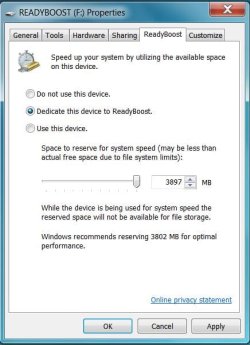
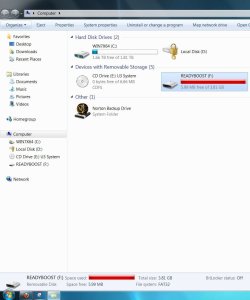
I have 2gigs of ram and I just set up readyboost with 2GB, will it help at all with system performance? oh and I have always wondered, how does readyboost help system performance?
 

My Computer

Computer Manufacturer/Model Number
Dell Dimension 9200
OS
Windows 7 Ultimate
Memory
512mb ram runs GREAT
Graphics Card(s)
NVIDIA GeForce 7300le

My Computer

Computer type
PC/Desktop
Computer Manufacturer/Model Number
Dell XPS 420
OS
Windows 10, Home Clean Install
CPU
Intel Core2 processsor Q8200(2.33Ghz 1333FSB) Quad Core Tech
Motherboard
Dell
Memory
6 gb
Graphics Card(s)
ATI Radeon 256MB HD3650
Sound Card
Intergrated 7.1 Channel Audio
Monitor(s) Displays
Dell SP2009W 20"
Hard Drives
640 GB Serial ATA Hard drive
Cooling
Fan
Keyboard
Dell USB Keyboard
Mouse
Dell Premium Optical USB
Internet Speed
DSL 2.85
Thanks for the link
-Yad
 

My Computer

Computer Manufacturer/Model Number
Dell Dimension 9200
OS
Windows 7 Ultimate
Memory
512mb ram runs GREAT
Graphics Card(s)
NVIDIA GeForce 7300le
Truly glad to be able to help.
 

My Computer

Computer type
PC/Desktop
Computer Manufacturer/Model Number
Dell XPS 420
OS
Windows 10, Home Clean Install
CPU
Intel Core2 processsor Q8200(2.33Ghz 1333FSB) Quad Core Tech
Motherboard
Dell
Memory
6 gb
Graphics Card(s)
ATI Radeon 256MB HD3650
Sound Card
Intergrated 7.1 Channel Audio
Monitor(s) Displays
Dell SP2009W 20"
Hard Drives
640 GB Serial ATA Hard drive
Cooling
Fan
Keyboard
Dell USB Keyboard
Mouse
Dell Premium Optical USB
Internet Speed
DSL 2.85
I have 2gigs of ram and I just set up readyboost with 2GB, will it help at all with system performance? oh and I have always wondered, how does readyboost help system performance?

I have dedicated my 4gb USB stick just for readyboost.
and yes, it does help overall with system performance:D
 

Attachments

  • READYBOOST1.JPG
    READYBOOST1.JPG
    34.4 KB · Views: 81
  • READYBOOST2.JPG
    READYBOOST2.JPG
    43 KB · Views: 79
  • READYBOOST3.JPG
    READYBOOST3.JPG
    69.9 KB · Views: 167

My Computer

Computer Manufacturer/Model Number
custom of course...built by grimreaper
OS
Windows 7 Ultimate X64
CPU
Intel Core 2 Quad Q9650 3.0GHz (3.6GHz 24/7) maxed 4.05GHz
Motherboard
EVGA 790i Ultra SLi Model#132-CK-NF79-A1 BIOS P10
Memory
8GB OCZ DDR3 PC3-14400 @ 1800MHz NVIDIA SLi-Ready
Graphics Card(s)
2XBFG GeForce GTX 280 OC Edition SLi'd
Sound Card
SoundBlaster X-Fi Titanium Fatal1ty Pro Series
Monitor(s) Displays
Samsung 52" 1080P LCD HDTV (LN52B550)
Screen Resolution
1920X1080 @ 60Hz
Hard Drives
3xWestern Digital WD1001FALS Caviar Black 1TB Hard Drive(s) RAID 0 x2 encased in 3xMasscool KuFormula SHF1 HDD Cooler(s)
PSU
ThermalTake ToughPower 1200W P/N:W0133RU Modularized
Case
ThermalTake P/N: VH6000BWS Armor Full-Tower
Cooling
ThermalTake SpinQ P/N: P0466 CPU Cooler
Keyboard
Logitech cordless Y-RAJ56A piece of ****
Mouse
Logitech G7 Laser Cordless mouse black
Internet Speed
10 Mbps DL-1Mbps UL wirelessly DWA-552 extreme N
Other Info
1XSamsung DVD burner SH-S223Q/BEBN SATA
1XSamsung DVD burner SH-S223L/BEBN SATA
1XLG GGW-H20L Blu-Ray burner
4XCooler Master 120mm Blue LED SickleFlow 2000 RPM
1XBelkin UPS F6C1500TWRK) backup power supply
But your system lags like hell in the first 20 minutes of every boot.

Overall not worth it. Stick to physical ram and tweaks.

:p
 
Last edited:

My Computer

OS
Windows 7 Professional
CPU
Intel Core i7-2670QM
Memory
Samsung 8GB
Graphics Card(s)
NVIDIA GT 555M
Hard Drives
Intel 525 120GB | HGST Travelstar 1TB
Mouse
CM Storm Xornet | Microsoft Sculpt Comfort
Internet Speed
25 Mbps | 600 Kbps
Other Info
Centrino 6205 | Seagate Backup Plus 1TB
My guess would be the quality of the Flash drive you use has a great impact as well.

My USB drive is really slow, so it hurts more than help anything.
 

My Computer

Computer Manufacturer/Model Number
Custom (Self Build)
OS
Windows 7 Home Premium 64bit
CPU
Intel Core i7 2700k
Motherboard
eVGA P67 SLI
Memory
8GB Mushkin Redline Ridgebacks @1866
Graphics Card(s)
EVGA GTX570 SC
Sound Card
XiFi Titanium HD
Monitor(s) Displays
LG W2453V
Screen Resolution
1920x1080
Hard Drives
Intel 320 80GB -- Intel X25-V 40GB --WD Black 1TB x2 -- WD Blue 640GB
PSU
Seasonic x750
Case
Corsair 600T SE White
Cooling
eVGA Superclocked CPU Cooler
Keyboard
Saitek Cyborg
Antivirus
Kaspersky
Browser
IE
Other Info
LG BD/DVD
I use a Sandisk Cruzer Titanium 4gb and i don't need it every day my system is running very well.
I use this when using serious apps like CS4, or AutoCad, it does help:) as for lags not a chance...smooth as silk.
 

My Computer

Computer Manufacturer/Model Number
custom of course...built by grimreaper
OS
Windows 7 Ultimate X64
CPU
Intel Core 2 Quad Q9650 3.0GHz (3.6GHz 24/7) maxed 4.05GHz
Motherboard
EVGA 790i Ultra SLi Model#132-CK-NF79-A1 BIOS P10
Memory
8GB OCZ DDR3 PC3-14400 @ 1800MHz NVIDIA SLi-Ready
Graphics Card(s)
2XBFG GeForce GTX 280 OC Edition SLi'd
Sound Card
SoundBlaster X-Fi Titanium Fatal1ty Pro Series
Monitor(s) Displays
Samsung 52" 1080P LCD HDTV (LN52B550)
Screen Resolution
1920X1080 @ 60Hz
Hard Drives
3xWestern Digital WD1001FALS Caviar Black 1TB Hard Drive(s) RAID 0 x2 encased in 3xMasscool KuFormula SHF1 HDD Cooler(s)
PSU
ThermalTake ToughPower 1200W P/N:W0133RU Modularized
Case
ThermalTake P/N: VH6000BWS Armor Full-Tower
Cooling
ThermalTake SpinQ P/N: P0466 CPU Cooler
Keyboard
Logitech cordless Y-RAJ56A piece of ****
Mouse
Logitech G7 Laser Cordless mouse black
Internet Speed
10 Mbps DL-1Mbps UL wirelessly DWA-552 extreme N
Other Info
1XSamsung DVD burner SH-S223Q/BEBN SATA
1XSamsung DVD burner SH-S223L/BEBN SATA
1XLG GGW-H20L Blu-Ray burner
4XCooler Master 120mm Blue LED SickleFlow 2000 RPM
1XBelkin UPS F6C1500TWRK) backup power supply
The lags have to happen at system boot, what do you think happens ReadyBoost just magically caches onto the USB/SD Drive?

Same goes for SuperFetch but it takes much less CPU cycles to cache the ram, on the other hand ReadyBoost uses much more CPU cycles to cache from hard drive to USB/SD drive not too mention USB/SD is so much slower than ram.

First 20 minutes at system boot live with it!

:p
 

My Computer

OS
Windows 7 Professional
CPU
Intel Core i7-2670QM
Memory
Samsung 8GB
Graphics Card(s)
NVIDIA GT 555M
Hard Drives
Intel 525 120GB | HGST Travelstar 1TB
Mouse
CM Storm Xornet | Microsoft Sculpt Comfort
Internet Speed
25 Mbps | 600 Kbps
Other Info
Centrino 6205 | Seagate Backup Plus 1TB
First 20 minutes at system boot live with it!
I'm not a readyboost user.
But I would ahve to agree with the other post, it depends on the USB you use. Get som generic slow junk and yeah, expect it.
A good quality fast USB stick should not present as much a problem.

You get what you pay for.
 

My Computer

Computer Manufacturer/Model Number
Self Built
OS
Win 7 Ultimate 32bit
CPU
C2D E6600 2.4Ghz
Motherboard
Intel D965WH
Memory
4G Kingston KHX5400D2
Graphics Card(s)
EVGA GTX 570 HD SC (012-P3-1573-KR)
Sound Card
On-Board
Monitor(s) Displays
Samsung 226BW
Screen Resolution
1680 x 1050
Hard Drives
2 x 250 Seagate Barracuda
2 x 500 Seagate Barracuda (Raid1)
PSU
Corsair TX750W
Case
In-Win C589
Cooling
Stock Intel Cooling
Back
Top