Don't Know Why

treadhead194

New member
Member
Local time
4:09 PM
Messages
31
I have a Seagate Barracuda 500gig drive that knocks my C (Western Digital Velociraptor 300gig)drive from Disk 0 to Disk 1. Originally the Seagate was my C but after getting my Velociraptor I changed.
I have run DISKPART-Clean[all] on the Seagate but it doesn't do any good, it still knocks C out. I have run DISKPART-select disk - list partition- active on C drive and then attached the Seagate. If I go to Administrative Tools\Computer Management\Disk Management, it will list C drive as 0 and the Seagate as Disk 1, but if I do a restart and check again the Seagate is listed as Disk 0 and C drive as Disk 1.
I have 3 other drives, 2 Western Digital and 1 is my DVD and I can do the same, install, check, restart, check and they don't touch the C drive only the Seagate.
Has anyone ever run into this before and if so how did you fix it?
 

My Computer

Computer Manufacturer/Model Number
Intel I7 860
OS
Windows 7 home premium 64bit
CPU
Intel I7 860
Motherboard
EVGA P55 200 Classified 3x SLI
Memory
16 gig Corsair Vengence
Graphics Card(s)
EVGA GTX 560 TI
Sound Card
Soundblaster X-FI
Monitor(s) Displays
Asus, Sony Bravia
Hard Drives
C; WD Velociraptor 300gig
D; Seagate, 500gig
E; WD 500gig
PSU
Kingwin ABT-1000MA1S
Case
Thermaltake Armor+
Cooling
Noctua NH-D14
Keyboard
MS 4000
Mouse
Logitech Trackman Wheel
Internet Speed
Insight BroadBand 20.0
Oops, I forgot to mention I'm running Windows 7 Home Premium with all updates
 

My Computer

Computer Manufacturer/Model Number
Intel I7 860
OS
Windows 7 home premium 64bit
CPU
Intel I7 860
Motherboard
EVGA P55 200 Classified 3x SLI
Memory
16 gig Corsair Vengence
Graphics Card(s)
EVGA GTX 560 TI
Sound Card
Soundblaster X-FI
Monitor(s) Displays
Asus, Sony Bravia
Hard Drives
C; WD Velociraptor 300gig
D; Seagate, 500gig
E; WD 500gig
PSU
Kingwin ABT-1000MA1S
Case
Thermaltake Armor+
Cooling
Noctua NH-D14
Keyboard
MS 4000
Mouse
Logitech Trackman Wheel
Internet Speed
Insight BroadBand 20.0

My Computer

Computer type
PC/Desktop
OS
Microsoft Windows 10 Professional / Windows 7 Professional
CPU
Intel i5-3570
Motherboard
Lenovo Mahobay
Memory
16GB DDR3
Graphics Card(s)
AMD Radeon HD 7850 2GB
Sound Card
(1) Realtek HD Audio (2) AMD HD Audio
Monitor(s) Displays
LG LS192WS
Screen Resolution
1440 x 900 @ 32bit color
Hard Drives
(1) SUV300S37A/120G (2) ST3500413AS SATA Disk Device AHCI mode enabled.
PSU
Corsair HX620
Case
Thermaltake V4 Black Edition
Cooling
Cooler Master Hyper 212 + Artic Silver 5 on CPU/GPU
Keyboard
Dell SK-8115
Mouse
Razer Copperhead with MAPED mat (awesome!)
Internet Speed
100 Mbps up/down
Browser
Chrome
Hello treadhead194, welcome to Seven Forums!


I have the same issues, it happens (for me) when I add / re-arrange HDDs after Windows 7 has been installed, I'm in the process of more work on this, I'll post back here if I get anything conclusive.
 

My Computer

Computer Manufacturer/Model Number
* BFK Customs *
OS
W 7 64-bit Ultimate
CPU
Intel Q9550 Yorkfield
Motherboard
ASUS P5Q Pro
Memory
8GB Dominator 8500C5D
Graphics Card(s)
ATI : XFX 5870
Sound Card
Realtek HD Audio 7-1
Monitor(s) Displays
1x 47" LCD HDMI & 3x 26" LCD HDMI
Screen Resolution
1920x1080P & 1920x1200
Hard Drives
1x 80GB Intel X25-M G2 SSD : 1x 500GB & 1x 640GB WD Caviar Black(s)
PSU
Corsair 620HX
Case
Cooler Master RC-690
Cooling
Tuniq Tower 120, 2x 140mm and 3x 120mm case fans
Keyboard
Microsoft 500
Mouse
Razer Diamondback 3G
Internet Speed
14 Mb/s
Other Info
1x Koutech 3Gb/s SATA HDD Hot Swap Rack
I'm glad to see I'm not the only one having this kind of trouble. I also posted in the Seagate forums to see if someone there has seen the same problem. If I hear anything I'll post and let you know.
 

My Computer

Computer Manufacturer/Model Number
Intel I7 860
OS
Windows 7 home premium 64bit
CPU
Intel I7 860
Motherboard
EVGA P55 200 Classified 3x SLI
Memory
16 gig Corsair Vengence
Graphics Card(s)
EVGA GTX 560 TI
Sound Card
Soundblaster X-FI
Monitor(s) Displays
Asus, Sony Bravia
Hard Drives
C; WD Velociraptor 300gig
D; Seagate, 500gig
E; WD 500gig
PSU
Kingwin ABT-1000MA1S
Case
Thermaltake Armor+
Cooling
Noctua NH-D14
Keyboard
MS 4000
Mouse
Logitech Trackman Wheel
Internet Speed
Insight BroadBand 20.0
OK mate, I'll be around!
 

My Computer

Computer Manufacturer/Model Number
* BFK Customs *
OS
W 7 64-bit Ultimate
CPU
Intel Q9550 Yorkfield
Motherboard
ASUS P5Q Pro
Memory
8GB Dominator 8500C5D
Graphics Card(s)
ATI : XFX 5870
Sound Card
Realtek HD Audio 7-1
Monitor(s) Displays
1x 47" LCD HDMI & 3x 26" LCD HDMI
Screen Resolution
1920x1080P & 1920x1200
Hard Drives
1x 80GB Intel X25-M G2 SSD : 1x 500GB & 1x 640GB WD Caviar Black(s)
PSU
Corsair 620HX
Case
Cooler Master RC-690
Cooling
Tuniq Tower 120, 2x 140mm and 3x 120mm case fans
Keyboard
Microsoft 500
Mouse
Razer Diamondback 3G
Internet Speed
14 Mb/s
Other Info
1x Koutech 3Gb/s SATA HDD Hot Swap Rack
Hey, Bare Foot Kid, do you have mixed disks or are they all the same? I have two external Western digitals for a total of 5 disks connected, yet the are not interfering with C. Now, maybe they have to be internal and not external to cause the problem. I'm going to shut down and install the internally and see what happens. Let you know how it goes.
 

My Computer

Computer Manufacturer/Model Number
Intel I7 860
OS
Windows 7 home premium 64bit
CPU
Intel I7 860
Motherboard
EVGA P55 200 Classified 3x SLI
Memory
16 gig Corsair Vengence
Graphics Card(s)
EVGA GTX 560 TI
Sound Card
Soundblaster X-FI
Monitor(s) Displays
Asus, Sony Bravia
Hard Drives
C; WD Velociraptor 300gig
D; Seagate, 500gig
E; WD 500gig
PSU
Kingwin ABT-1000MA1S
Case
Thermaltake Armor+
Cooling
Noctua NH-D14
Keyboard
MS 4000
Mouse
Logitech Trackman Wheel
Internet Speed
Insight BroadBand 20.0
My Disk 0 is on sata port 6 (3G) containing system reserved & the boot/OS partition.
My Port 1 is a 6G.
My BIOS HDD boot priority is port 6 first.

I'm aware of the MS link given earlier but does it really matter as long as your BIOS port boot priority is set correctly.
 

My Computer

Computer type
PC/Desktop
Computer Manufacturer/Model Number
Own build
OS
Windows 7x64 Home Premium SP1
CPU
Intel i7 2600k
Motherboard
ASUS P8Z68 Deluxe
Memory
G.Skill Ripjaws (DDR3-1600) 2x4GB
Graphics Card(s)
Nvidia GeForce GTS 450; Intel HD Graphics 3000(GT2+)
Monitor(s) Displays
Dell Ultrasharp IPS panel U2311H, Samsung SyncMaster P2350
Screen Resolution
1920x1080
Hard Drives
Samsung 850 Pro SSD 256GB, Samsung SSD 840 120GB, Seagates 1TB Barracuda ST31000528AS x2
PSU
Seasonic M12II 520W
Case
Lian Li Lancool PC-K60
Cooling
Case: 1x120mm, 3x140mm CPU: Hyper 212+
Keyboard
Logitech MK520 (wireless)
Mouse
Logitech MK520
Internet Speed
6-7 Mbps
Antivirus
Norton Security Premium, Malwarebytes on 2 (MSE on 3rd PC)
Browser
FireFox
Other Info
Audio: Logitech Z523 2.1
I just found out that SATA disks can (virtually of course) switch positions when they feel like it and out of nowhere you end up booting from ''physical disk 1'' instead of 0. :shock: A reboot reversed the change. Google delivered this splendid consolation.

Mega-weird.

I've been saying this for a while but no one pays me any attention.

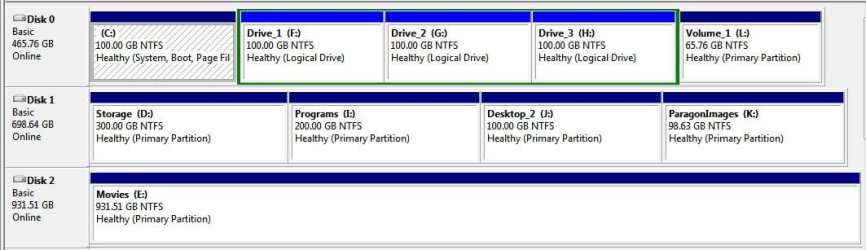
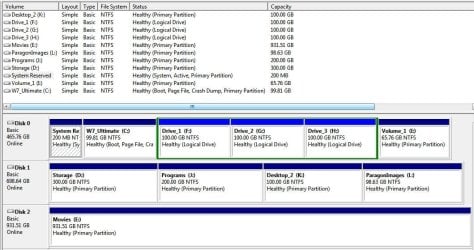
This is connected to the #1 SATA port of the mobo and set as the first boot device and it was the only HDD connected for the clean install.

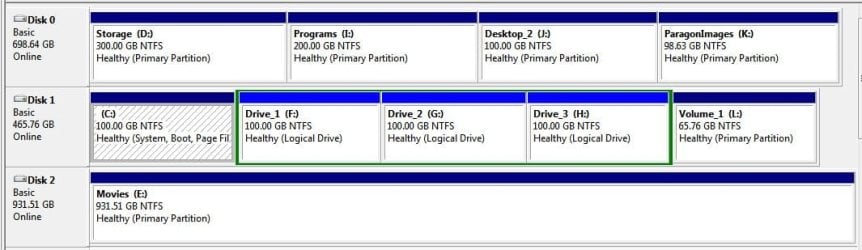
Originally the "Movies" HDD was Disk 2 after the others were reconnected but that changed also at a later time.
click to enlarge


Have a look at this.
 

My Computer

Computer Manufacturer/Model Number
* BFK Customs *
OS
W 7 64-bit Ultimate
CPU
Intel Q9550 Yorkfield
Motherboard
ASUS P5Q Pro
Memory
8GB Dominator 8500C5D
Graphics Card(s)
ATI : XFX 5870
Sound Card
Realtek HD Audio 7-1
Monitor(s) Displays
1x 47" LCD HDMI & 3x 26" LCD HDMI
Screen Resolution
1920x1080P & 1920x1200
Hard Drives
1x 80GB Intel X25-M G2 SSD : 1x 500GB & 1x 640GB WD Caviar Black(s)
PSU
Corsair 620HX
Case
Cooler Master RC-690
Cooling
Tuniq Tower 120, 2x 140mm and 3x 120mm case fans
Keyboard
Microsoft 500
Mouse
Razer Diamondback 3G
Internet Speed
14 Mb/s
Other Info
1x Koutech 3Gb/s SATA HDD Hot Swap Rack
The MS KB article
The disk drive numbers may not correspond as expected to the SATA channel numbers when you set up Windows Vista, Windows Server 2008, Windows Server 2008 R2, or Windows 7 on a computer that has multiple SATA or RAID disks

states
"By default, the 100MB system partition is created on the disk that is detected as Disk 0. If you install Windows to a disk other than Disk 0, the 100MB system partition will still be created on Disk 0 during the installation."

Is it a separate System Reserved partition which is triggering the Disk 0 allocation?

BFK in your example you don't have a separate System reserved.
 

My Computer

Computer type
PC/Desktop
Computer Manufacturer/Model Number
Own build
OS
Windows 7x64 Home Premium SP1
CPU
Intel i7 2600k
Motherboard
ASUS P8Z68 Deluxe
Memory
G.Skill Ripjaws (DDR3-1600) 2x4GB
Graphics Card(s)
Nvidia GeForce GTS 450; Intel HD Graphics 3000(GT2+)
Monitor(s) Displays
Dell Ultrasharp IPS panel U2311H, Samsung SyncMaster P2350
Screen Resolution
1920x1080
Hard Drives
Samsung 850 Pro SSD 256GB, Samsung SSD 840 120GB, Seagates 1TB Barracuda ST31000528AS x2
PSU
Seasonic M12II 520W
Case
Lian Li Lancool PC-K60
Cooling
Case: 1x120mm, 3x140mm CPU: Hyper 212+
Keyboard
Logitech MK520 (wireless)
Mouse
Logitech MK520
Internet Speed
6-7 Mbps
Antivirus
Norton Security Premium, Malwarebytes on 2 (MSE on 3rd PC)
Browser
FireFox
Other Info
Audio: Logitech Z523 2.1
If you install Windows 7 32bit it does create a 100mb system partition however I notice that if you install Win 7 64bit there is no 100mb system partition. I just happen to notice this when I had installed Win 7 32bit and was changing to the 64bit OS. If the 32bit creates the partition why not the 64bit? I checked this out using DISKPART. Also when I did a clean install I had disconnected all other hard drives so a seperate partition could not have been created on another hard drive. Yet when another hard drive is connected, and you check, C is disk 0, however when you reboot, C is kicked out and Disk 0 is now Disk 1. I also noticed something a few minutes ago when Windows boots, after connecting another disk a message came up on the boot screen saying something about "Windows Machine". I couldn't read it all cause it went by so fast. I'm not a computer whiz but I would venture to say something is screwy with the OS and if Microsoft doesn't know how to fix it, then I guess we'll just have to live with it. As long as my system works, I'm happy, even though it's wrong.
 

My Computer

Computer Manufacturer/Model Number
Intel I7 860
OS
Windows 7 home premium 64bit
CPU
Intel I7 860
Motherboard
EVGA P55 200 Classified 3x SLI
Memory
16 gig Corsair Vengence
Graphics Card(s)
EVGA GTX 560 TI
Sound Card
Soundblaster X-FI
Monitor(s) Displays
Asus, Sony Bravia
Hard Drives
C; WD Velociraptor 300gig
D; Seagate, 500gig
E; WD 500gig
PSU
Kingwin ABT-1000MA1S
Case
Thermaltake Armor+
Cooling
Noctua NH-D14
Keyboard
MS 4000
Mouse
Logitech Trackman Wheel
Internet Speed
Insight BroadBand 20.0
Is it a separate System Reserved partition which is triggering the Disk 0 allocation?

BFK in your example you don't have a separate System reserved.


I know mate, I've just done about 4 straight back to back clean installs to this PC and I'm seeing (in my case) when I change the installer issued drive letters the disk numbers change.

I've changed HDDs to a couple brand new ones but that has had no inpact on this as the 'new' HDDs (disk numbers) are acting the same as the 'old' HDDs did.

No I have no System Reserved added, so image creation and use will be way easier.

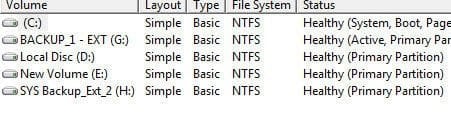
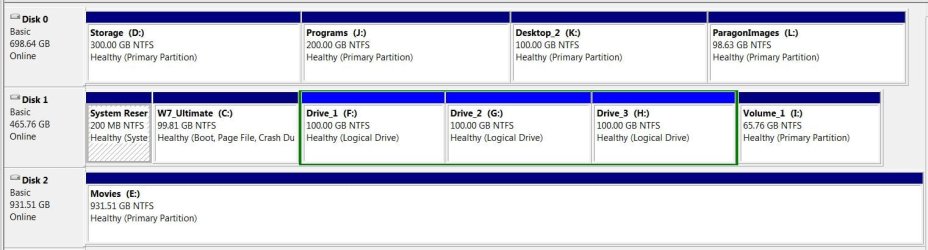
Here's with the installer issued drive letters, I'm not going to change them to see if the Disk numbers slip again.
click to enlarge
now.JPG
 

My Computer

Computer Manufacturer/Model Number
* BFK Customs *
OS
W 7 64-bit Ultimate
CPU
Intel Q9550 Yorkfield
Motherboard
ASUS P5Q Pro
Memory
8GB Dominator 8500C5D
Graphics Card(s)
ATI : XFX 5870
Sound Card
Realtek HD Audio 7-1
Monitor(s) Displays
1x 47" LCD HDMI & 3x 26" LCD HDMI
Screen Resolution
1920x1080P & 1920x1200
Hard Drives
1x 80GB Intel X25-M G2 SSD : 1x 500GB & 1x 640GB WD Caviar Black(s)
PSU
Corsair 620HX
Case
Cooler Master RC-690
Cooling
Tuniq Tower 120, 2x 140mm and 3x 120mm case fans
Keyboard
Microsoft 500
Mouse
Razer Diamondback 3G
Internet Speed
14 Mb/s
Other Info
1x Koutech 3Gb/s SATA HDD Hot Swap Rack
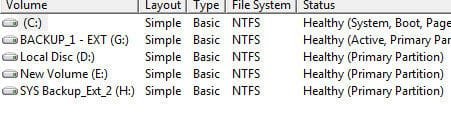
Now look at this POS, I just did a restart and see what it is now! :shock:


click to enlarge
now2.JPG
 

My Computer

Computer Manufacturer/Model Number
* BFK Customs *
OS
W 7 64-bit Ultimate
CPU
Intel Q9550 Yorkfield
Motherboard
ASUS P5Q Pro
Memory
8GB Dominator 8500C5D
Graphics Card(s)
ATI : XFX 5870
Sound Card
Realtek HD Audio 7-1
Monitor(s) Displays
1x 47" LCD HDMI & 3x 26" LCD HDMI
Screen Resolution
1920x1080P & 1920x1200
Hard Drives
1x 80GB Intel X25-M G2 SSD : 1x 500GB & 1x 640GB WD Caviar Black(s)
PSU
Corsair 620HX
Case
Cooler Master RC-690
Cooling
Tuniq Tower 120, 2x 140mm and 3x 120mm case fans
Keyboard
Microsoft 500
Mouse
Razer Diamondback 3G
Internet Speed
14 Mb/s
Other Info
1x Koutech 3Gb/s SATA HDD Hot Swap Rack
No I have no System Reserved added, so image creation and use will be way easier.

Here's with the installer issued drive letters, I'm not going to change them to see if the Disk numbers slip again.

I take your first point. But your last post says they did slip again.
I know it's a long shot but you could try putting in a separate system reserved and see what happens. My curiosity - your effort!
 

My Computer

Computer type
PC/Desktop
Computer Manufacturer/Model Number
Own build
OS
Windows 7x64 Home Premium SP1
CPU
Intel i7 2600k
Motherboard
ASUS P8Z68 Deluxe
Memory
G.Skill Ripjaws (DDR3-1600) 2x4GB
Graphics Card(s)
Nvidia GeForce GTS 450; Intel HD Graphics 3000(GT2+)
Monitor(s) Displays
Dell Ultrasharp IPS panel U2311H, Samsung SyncMaster P2350
Screen Resolution
1920x1080
Hard Drives
Samsung 850 Pro SSD 256GB, Samsung SSD 840 120GB, Seagates 1TB Barracuda ST31000528AS x2
PSU
Seasonic M12II 520W
Case
Lian Li Lancool PC-K60
Cooling
Case: 1x120mm, 3x140mm CPU: Hyper 212+
Keyboard
Logitech MK520 (wireless)
Mouse
Logitech MK520
Internet Speed
6-7 Mbps
Antivirus
Norton Security Premium, Malwarebytes on 2 (MSE on 3rd PC)
Browser
FireFox
Other Info
Audio: Logitech Z523 2.1
To mfj: After installing Win 7 32bit (which I didn't want in the first place, I wanted Win 7 64bit), and after finding out about DISKPART (I'm not a computer whiz) I found that Win 7 32 does create a 100mb system partition on disk 0. However, Win 7 64bit does not, again using DISKPART. When I did a clean install I disconnected all drives but C and did a clean install. Checking again with DISKPART there is no 100mb system partition in Win 7 64bit, it is all one partition. WHY does Win 32 create a partition where Win 64 does not? If the system partition is truely needed then Win 64 needs to be fixed.
Now, in my situation I think I figured out how to keep C as Disk 0. My motherboard is a P55 FTW 200 made by EVGA. There are 3 rows of sata ports. The sata ports are set as: (top set) 0 next to the motherboard, 1-on top of 0,(middle set) 2 next to the mb, 3 on top of 2, (bottom set) 4 next to mb and 5 -on top of 4.
My understanding is that C is to be set to sata 0, D to sata 1, E to sata 2 and so on. Whell, I did just that and I kept loosing C from Disk 0 to Disk 1. So I tried something else. I connected C to sata 0 and D to sata 2, did a reeboot and C was still Disk 0. I connected D drive to sata 4, did a reboot and C was still Disk 0, I connected my DVD to sata 1, did a reeboot and C was still Disk 0, I did another reeboot cause I couldn't believe it and C was still Disk 0. Now I'm not saying that all is well in Never Never land cause I do believe in Murphy's law, but for now everything is where it should be, but who knows, I may shut down tonight and tomorrow C drive just may be disk 5.
 

My Computer

Computer Manufacturer/Model Number
Intel I7 860
OS
Windows 7 home premium 64bit
CPU
Intel I7 860
Motherboard
EVGA P55 200 Classified 3x SLI
Memory
16 gig Corsair Vengence
Graphics Card(s)
EVGA GTX 560 TI
Sound Card
Soundblaster X-FI
Monitor(s) Displays
Asus, Sony Bravia
Hard Drives
C; WD Velociraptor 300gig
D; Seagate, 500gig
E; WD 500gig
PSU
Kingwin ABT-1000MA1S
Case
Thermaltake Armor+
Cooling
Noctua NH-D14
Keyboard
MS 4000
Mouse
Logitech Trackman Wheel
Internet Speed
Insight BroadBand 20.0
Windows 7 x64 will create the system reserved. Your problem must have something to do with the state of the HDD you installed to.
If you clean install to an unallocated disk it will create the 100MB partition.

I decided to have a system reserved but wanted 200MB (better to avoid some Windows imaging problems).
1) create a 200MB primary partition and mark it active. This will be your system reserved.
2) create an adjacent X GB (X= 100-200GB say) partition to hold your OS (Boot,...) partition.

Do a clean install and that's it.
 

My Computer

Computer type
PC/Desktop
Computer Manufacturer/Model Number
Own build
OS
Windows 7x64 Home Premium SP1
CPU
Intel i7 2600k
Motherboard
ASUS P8Z68 Deluxe
Memory
G.Skill Ripjaws (DDR3-1600) 2x4GB
Graphics Card(s)
Nvidia GeForce GTS 450; Intel HD Graphics 3000(GT2+)
Monitor(s) Displays
Dell Ultrasharp IPS panel U2311H, Samsung SyncMaster P2350
Screen Resolution
1920x1080
Hard Drives
Samsung 850 Pro SSD 256GB, Samsung SSD 840 120GB, Seagates 1TB Barracuda ST31000528AS x2
PSU
Seasonic M12II 520W
Case
Lian Li Lancool PC-K60
Cooling
Case: 1x120mm, 3x140mm CPU: Hyper 212+
Keyboard
Logitech MK520 (wireless)
Mouse
Logitech MK520
Internet Speed
6-7 Mbps
Antivirus
Norton Security Premium, Malwarebytes on 2 (MSE on 3rd PC)
Browser
FireFox
Other Info
Audio: Logitech Z523 2.1
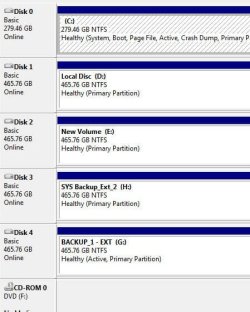
After 6 reboots and 1 complete shutdown here's what I got:


Image1.jpg


Image2.jpg
 

My Computer

Computer Manufacturer/Model Number
Intel I7 860
OS
Windows 7 home premium 64bit
CPU
Intel I7 860
Motherboard
EVGA P55 200 Classified 3x SLI
Memory
16 gig Corsair Vengence
Graphics Card(s)
EVGA GTX 560 TI
Sound Card
Soundblaster X-FI
Monitor(s) Displays
Asus, Sony Bravia
Hard Drives
C; WD Velociraptor 300gig
D; Seagate, 500gig
E; WD 500gig
PSU
Kingwin ABT-1000MA1S
Case
Thermaltake Armor+
Cooling
Noctua NH-D14
Keyboard
MS 4000
Mouse
Logitech Trackman Wheel
Internet Speed
Insight BroadBand 20.0
After 6 reboots and 1 complete shutdown here's what I got:

Image1.jpg


Image2.jpg
 

My Computer

Computer Manufacturer/Model Number
Intel I7 860
OS
Windows 7 home premium 64bit
CPU
Intel I7 860
Motherboard
EVGA P55 200 Classified 3x SLI
Memory
16 gig Corsair Vengence
Graphics Card(s)
EVGA GTX 560 TI
Sound Card
Soundblaster X-FI
Monitor(s) Displays
Asus, Sony Bravia
Hard Drives
C; WD Velociraptor 300gig
D; Seagate, 500gig
E; WD 500gig
PSU
Kingwin ABT-1000MA1S
Case
Thermaltake Armor+
Cooling
Noctua NH-D14
Keyboard
MS 4000
Mouse
Logitech Trackman Wheel
Internet Speed
Insight BroadBand 20.0
OK your suggestion and my work, perhaps they won't slip now.


@treadhead194, sorry mate, I'm not ignoring you, I'm going to go back and read through your posts and communicate with you over this.


Here's my current situation.

click to enlarge
now3.JPG
 

My Computer

Computer Manufacturer/Model Number
* BFK Customs *
OS
W 7 64-bit Ultimate
CPU
Intel Q9550 Yorkfield
Motherboard
ASUS P5Q Pro
Memory
8GB Dominator 8500C5D
Graphics Card(s)
ATI : XFX 5870
Sound Card
Realtek HD Audio 7-1
Monitor(s) Displays
1x 47" LCD HDMI & 3x 26" LCD HDMI
Screen Resolution
1920x1080P & 1920x1200
Hard Drives
1x 80GB Intel X25-M G2 SSD : 1x 500GB & 1x 640GB WD Caviar Black(s)
PSU
Corsair 620HX
Case
Cooler Master RC-690
Cooling
Tuniq Tower 120, 2x 140mm and 3x 120mm case fans
Keyboard
Microsoft 500
Mouse
Razer Diamondback 3G
Internet Speed
14 Mb/s
Other Info
1x Koutech 3Gb/s SATA HDD Hot Swap Rack
Oh well, that didn't do it. :confused:


click to enlarge
now4.JPG
 

My Computer

Computer Manufacturer/Model Number
* BFK Customs *
OS
W 7 64-bit Ultimate
CPU
Intel Q9550 Yorkfield
Motherboard
ASUS P5Q Pro
Memory
8GB Dominator 8500C5D
Graphics Card(s)
ATI : XFX 5870
Sound Card
Realtek HD Audio 7-1
Monitor(s) Displays
1x 47" LCD HDMI & 3x 26" LCD HDMI
Screen Resolution
1920x1080P & 1920x1200
Hard Drives
1x 80GB Intel X25-M G2 SSD : 1x 500GB & 1x 640GB WD Caviar Black(s)
PSU
Corsair 620HX
Case
Cooler Master RC-690
Cooling
Tuniq Tower 120, 2x 140mm and 3x 120mm case fans
Keyboard
Microsoft 500
Mouse
Razer Diamondback 3G
Internet Speed
14 Mb/s
Other Info
1x Koutech 3Gb/s SATA HDD Hot Swap Rack
Back
Top