Solved Drive gone at installing Windows 7

straubalexander

New member
Local time
12:10 AM
Messages
12
When I installed Windows 7 on my Computer,it asked where I want to install Windows 7. I had 3 drives to choose there!50GB,20GB, and 500GB.I chose the 50GB.After I did all the stuff after installing,The 20GB Drive is gone.It was never there after I installed Windows.I ignored it as it is only 20GB.But I need it back now!What do I need to do?
Thanks
 

My Computer My Computer

At a glance

Windows 7 Home Premium 64bitIntel Duo Core 2 P9000 or something like that...4GBAMD Radeon HD 4670
Computer type
Laptop
Computer Manufacturer/Model Number
Dell
OS
Windows 7 Home Premium 64bit
CPU
Intel Duo Core 2 P9000 or something like that...
Memory
4GB
Graphics Card(s)
AMD Radeon HD 4670
Hard Drives
500GB
Antivirus
Avast
Browser
Google Chrome
How did you determine that the 20GB drive is "gone"?

Open the Disk Management tool, scroll down through the list of drives -- and confirm that the 20GB is not listed lower in the list and simply not assigned a drive letter.
 

My Computer My Computer

At a glance

Win7 Pro 32-bit, Win8 Pro 32-bitAMD Phenom II X6 1090T4GB ddr3 1300AMD HD 4290 onboard
Computer type
PC/Desktop
Computer Manufacturer/Model Number
Custom
OS
Win7 Pro 32-bit, Win8 Pro 32-bit
CPU
AMD Phenom II X6 1090T
Motherboard
Gigabyte
Memory
4GB ddr3 1300
Graphics Card(s)
AMD HD 4290 onboard
Sound Card
Builtin Realtek HD Audio
Monitor(s) Displays
Samsung 24" widescreen, LG 23" widescreen
Screen Resolution
1920x1200/1920x1080
Hard Drives
Kingston 256GB SSD
Keyboard
Logitech Illuminated Keyboard
Mouse
Logitech M705 wireless mouse
Antivirus
Norton Av 2013
Browser
IE v10

My Computer My Computer

At a glance

64-bit Windows 11 Pro for WorkstationsIntel i7-8700K OC'd to 5 GHz64 GB (4x16GB) G.SKILL TridentZ RGB DDR4 3600...ASUS ROG-STRIX-GTX1080TI-O11G-GAMING
Computer type
PC/Desktop
Computer Manufacturer/Model Number
Self built custom
OS
64-bit Windows 11 Pro for Workstations
CPU
Intel i7-8700K OC'd to 5 GHz
Motherboard
ASUS ROG Maximus XI Formula Z390
Memory
64 GB (4x16GB) G.SKILL TridentZ RGB DDR4 3600 MHz
Graphics Card(s)
ASUS ROG-STRIX-GTX1080TI-O11G-GAMING
Sound Card
Integrated
Monitor(s) Displays
2 x Samsung Odyssey G7 27"
Screen Resolution
2560x1440
Hard Drives
1TB Samsung 990 PRO M.2,
4TB Samsung 990 PRO PRO M.2,
TerraMaster F8 SSD Plus NAS
PSU
Seasonic Prime Titanium 850W
Case
Thermaltake Core P3
Cooling
Corsair Hydro H115i
Keyboard
Logitech wireless K800
Mouse
Logitech MX Master 4
Internet Speed
2 Gb/s Download and 100 Mb/s Upload
Antivirus
Malwarebyte Anti-Malware Premium
Browser
Google Chrome
Other Info
Logitech Z625 speaker system,
Logitech BRIO 4K Pro webcam,
HP Color LaserJet Pro MFP M477fdn,
APC SMART-UPS RT 1000 XL - SURT1000XLI,
Galaxy S23 Plus phone
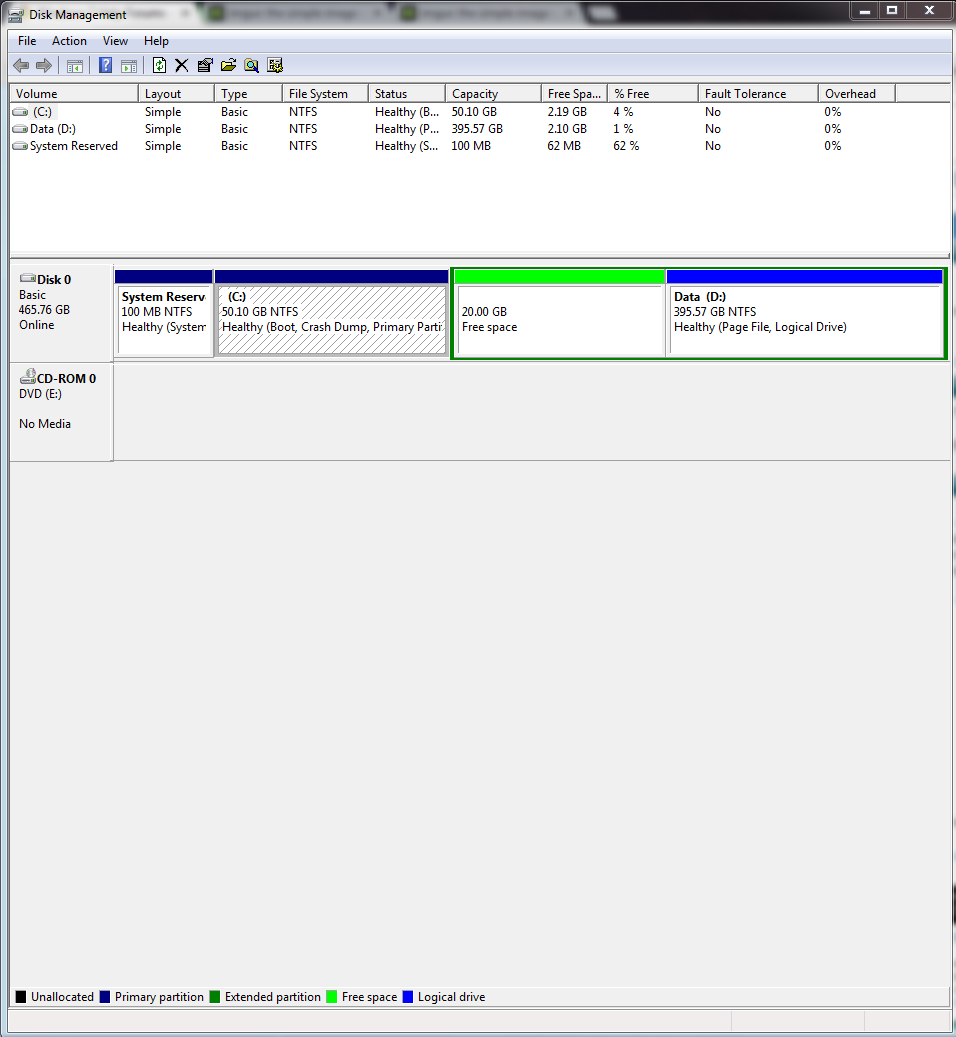
The 20GB drive isn't there.There is only 2 Drives there(Except System Reserve).Here is the photo:
TeJuEKP.png


Mark,the drive was there when I installed windows 7,where I want to install windows 7.But it's not in here:
nJvgORI.png
(I forgot the name)
 

My Computer My Computer

At a glance

Windows 7 Home Premium 64bitIntel Duo Core 2 P9000 or something like that...4GBAMD Radeon HD 4670
Computer type
Laptop
Computer Manufacturer/Model Number
Dell
OS
Windows 7 Home Premium 64bit
CPU
Intel Duo Core 2 P9000 or something like that...
Memory
4GB
Graphics Card(s)
AMD Radeon HD 4670
Hard Drives
500GB
Antivirus
Avast
Browser
Google Chrome
The 20gb has been deleted as it is now Free Space meaning nothing is there. What is it that was there that you need now?

If you know for sure the 20gb partition was there before and can't do without it then you can try to undelete it using Partition Wizard Partition Recovery Wizard - Video Help.

Once you've dealt with that: your Win7 partition is also too small and needs to borrow some space from D. This can be done easily using Partition Wizard which will allow borrowing space from a partition of another type (Logical): How to extend partition easily with Partition Wizard - video help.

This is why its best during an install to back up all of your files and delete all partitions to start fresh. Your files should always be backed up anyway since they could be lost if the HD dies.
 
The 20gb has been deleted as it is now Free Space meaning nothing is there. What is it that was there that you need now?

If you know for sure the 20gb partition was there before and can't do without it then you can try to undelete it using Partition Wizard Partition Recovery Wizard - Video Help.

Once you've dealt with that: your Win7 partition is also too small and needs to borrow some space from D. This can be done easily using Partition Wizard which will allow borrowing space from a partition of another type (Logical): How to extend partition easily with Partition Wizard - video help.

This is why its best during an install to back up all of your files and delete all partitions to start fresh. Your files should always be backed up anyway since they could be lost if the HD dies.

Thanks,the drive was only unlocated.Problem solved.Close this Topic or I dunno what...
 

My Computer My Computer

At a glance

Windows 7 Home Premium 64bitIntel Duo Core 2 P9000 or something like that...4GBAMD Radeon HD 4670
Computer type
Laptop
Computer Manufacturer/Model Number
Dell
OS
Windows 7 Home Premium 64bit
CPU
Intel Duo Core 2 P9000 or something like that...
Memory
4GB
Graphics Card(s)
AMD Radeon HD 4670
Hard Drives
500GB
Antivirus
Avast
Browser
Google Chrome
Back
Top