Drive Icon - Change

How to Change a Drive Icon in Vista, Windows 7, and Windows 8


   Information
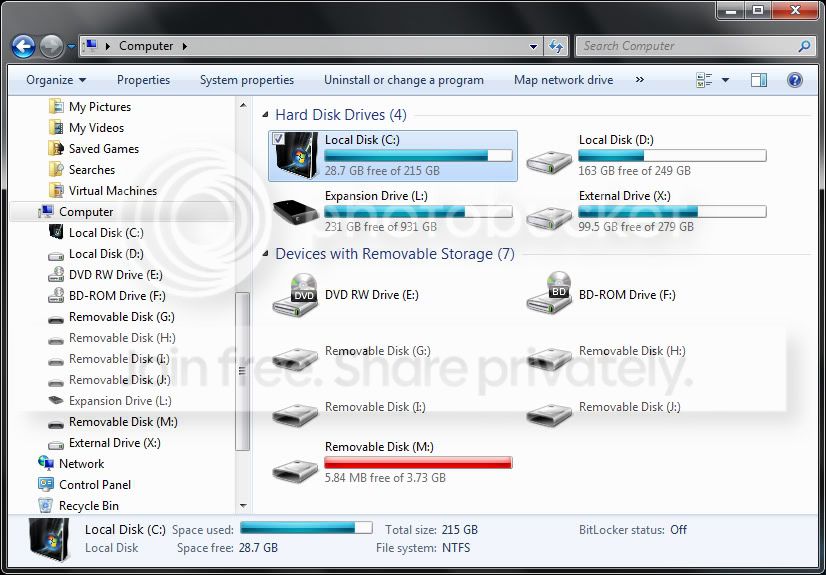
This tutorial will show you how to change a drive icon for an internal or external drive that has a drive letter in the Computer window to any icon you want for just your or all user accounts in Vista, Windows 7, and Windows 8.

   Tip
If your default drive icon is missing or was changed and you did not do it with the methods below, then look for a hidden (not always hidden though) autorun.inf file (OPTION ONE below) in the root directory of the affected drive, right click on the autorun.inf file, and click on Delete. Next, approve the deletion. If this was an external device, then you may need to disconnect and reconnect the device for the icon to appear afterwards.

   Warning
If you select to use a custom icon of your own, then it must be a 256x256 pixel icon (.ico) file for it to display properly in all icon sizes.


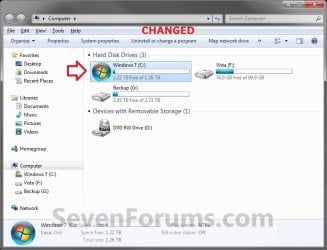
EXAMPLE: C Drive icon - Default and Changed
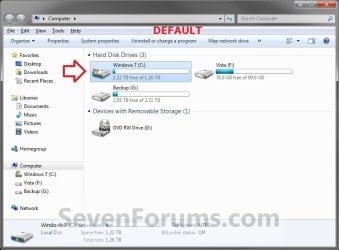
Default.jpg

Changed.jpg


OPTION ONE

Change a Drive Icon using a "autorun.inf" File


NOTE: While this option can be used for any drive, it is really useful for external drives like a USB flash drive.
1. Set your known file extentions to no longer be hidden.
NOTE: This way you will be able to rename the file extension in step 3 below.

2. Connect and/or open the drive that you want to change the icon of.

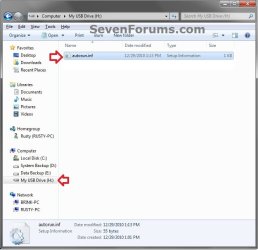
3. In the root of the drive that you want to change the icon of, right click or press and hold on an empty space, and click/tap on New and Text Document. Rename this .txt file to autorun.inf, and press Enter. (see screenshots below)
NOTE: If you already have a autorun.inf file in the root of this drive, then skip this step and proceed to step 4.
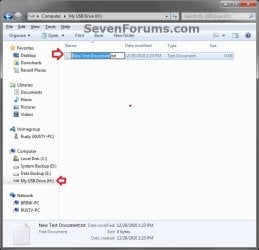
Step1.jpg

Step2.jpg

4. Copy the icon .ico file (ex: Thumb_Drive.ico) that you want to use to the root of the drive that you want to change the icon of. (see right screenshot below)
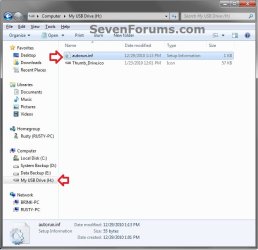
Step3.jpg
5. If this is a New autorun.inf File
A) Open the autorun.inf file, then type each line below followed by pressing enter. (see screenshot below)
NOTE: Substitute icon file name with the actual name of your icon file (ex: Thumb_Drive.ico) from step 4.
Code:
[autorun]
icon="[B][COLOR=red]icon file name[/COLOR][/B].ico"
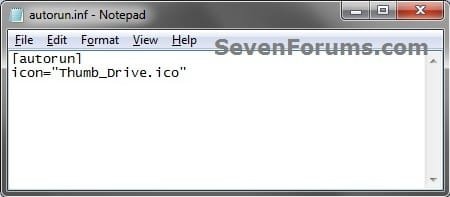
Icon.jpg
B) Click/tap on File (menu bar) and Save, then close the autorun.inf file. (see screenshot above)
6. If you already have an autorun.inf File
NOTE: Be sure that you also check the Show hidden files, folders, and drives option in Folder Options in case the existing autorun.inf file (if there) may have been hidden.
A) Open the autorun.inf file, then add or change the icon= line below. (see screenshots below)
NOTE: Substitute icon file name with the actual name of your icon file (ex: Thumb_Drive.ico) from step 4.
Code:
[autorun]
[B]icon="[COLOR=red]icon file name[/COLOR].ico"[/B]
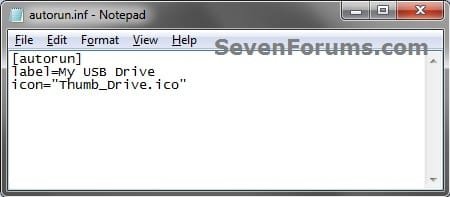
Icon.jpg

TXT_file.jpg

B) Click/tap on File (menu bar) and Save, then close the autorun.inf file. (see screenshots above)
7. If this is for an Internal or eSATA Dive
A) Restart the computer to apply.
8. If this is for an External Dive
A) Unplug and plug in the drive to apply.
9. Open the Computer window to see the changes.

   Note
To Restore the Default Icon


You would just need to do either option below and repeat steps 7 to 9 above.
  • Delete the autorun.inf and .ico file.
OR

  • If you have other lines (ex: label=) in the autorun.inf while editing it that you wish to continue using, then remove the icon= line entry for the drive, and save the changes.


OPTION TWO

Change a Drive Icon in Registry Editor for Current User Account Only


1. If you did OPTION ONE previously, then you will need to either remove the icon=icon file name.ico entry from the autorun.inf file, or delete the autorun.inf file in the root of the drive that you want to change the icon of.

2. Press the Windows + R keys to open the Run dialog, type regedit, and press Enter.

3. If prompted by UAC, then click/tap on Yes (Windows 7/8) or Continue (Vista).

4. In regedit, navigate to the location below. (see screenshot below)
HKEY_CURRENT_USER\Software\Classes
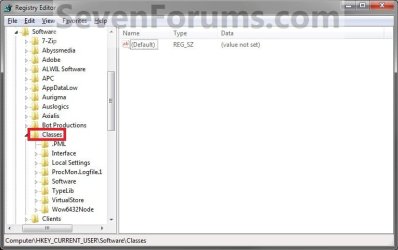
Current_Step1.jpg
5. In the left pane, right click on Classes, click/tap on New and Key, type Applications, and press Enter.
NOTE: If you already have the Applications key under Classes, then go to step 6. (see screenshot above and below)
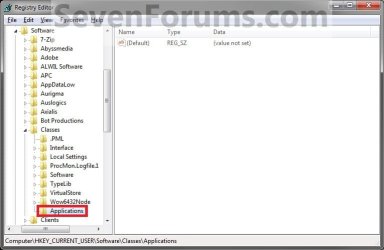
Current_Step2.jpg
6. In the left pane, right click on Applications, click/tap on New and Key, type Explorer.exe, and press Enter.
NOTE: If you already have the Explorer.exe key under Applications, then go to step 7. (see screenshot above and below)
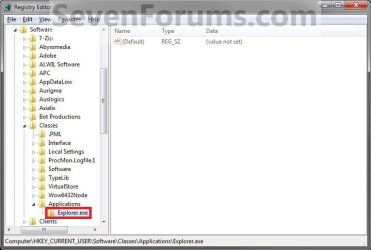
Current_Step3.jpg
7. In the left pane, right click on Explorer.exe, click/tap on New and Key, type Drives, and press Enter.
NOTE: If you already have the Drives key under Explorer.exe, then go to step 8. (see screenshot above and below)
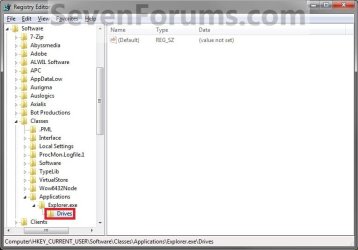
Current_Step4.jpg
8. In the left pane, right click on Drives, click/tap on New and Key, type the drive letter (ex: C ) that you want to change the icon for, and press Enter.
NOTE: If you already have the drive letter (ex: C ) key under Drives, then go to step 9. (see screenshot above and below)
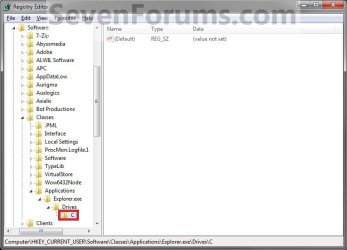
Current_Step5.jpg
9. In the left pane, right click on the drive letter (ex: C ), click/tap on New and Key, type DefaultIcon, and press Enter.
NOTE: If you already have the DefaultIcon key under the drive letter (ex: C ), then go to step 10, 11, or 12. (see screenshot above and below)
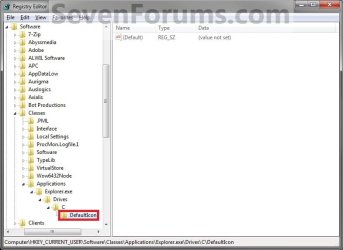
Current_Step6.jpg
10. To Restore the Default Drive Icon
A) Right click on the drive letter (ex: C ) from step 8 above that you want to restore, and click/tap on Delete and Yes. (see screenshot below step 8)

B) Go to step 14.
11. To Use a Custom Icon of Your Own
A) Make sure that the icon is unblocked if not already.

B) Make sure that the icon is located in a folder where you have access permission rights. The icon will need to stay here for as long as you are using it for the drive icon, otherwise it will break the link and no longer display as the drive's icon.

C) In the right pane of DefaultIcon, double click/tap on (Default) to modify it. (see screenshot below step 9)

D) In the Modify window, type this below, and click/tap on OK. (see screenshot below)
NOTE: Substitute with your icons full path and name with file extension in quotes instead.

Code:
"[B][COLOR=red]full path of the icon file with file extension[/COLOR][/B]"
FOR EXAMPLE:
Code:
"G:\Windows 7 PNG Files\Start_Orb.ico"
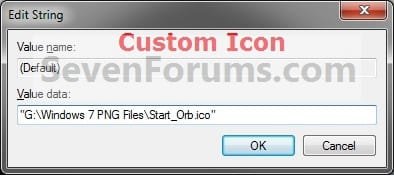
Current_Step7.jpg
E) Go to step 13.
12. To Use another Icon Included in Windows 7
A) Download and install the free program IconViewer for your 32-bit or 64-bit Windows 7.
NOTE: This program will add a Icons tab to files (ex: imageres.dll) that contain a icon library in them so you can see the icons available in it.

B) In Windows Explorer, navigate to C:\Windows\System32\imageres.dll and right click on imageres.dll, click on Properties, and click on the Icons tab.
NOTE: You can use any of the Windows 7 files that include icons in them that you want though. This is just the most common one.

C) Scroll through the icons and make note of the icon number of the one you want to use to replace the default file extension icon with, then close the properties window. (see screenshot below)
NOTE: For example, icon number 36 for the default C drive icon.
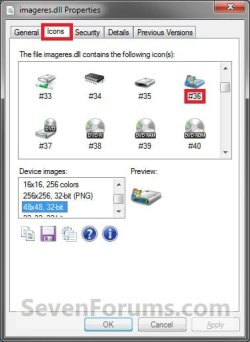
Icon_Viewer.jpg
D) In the right pane of DefaultIcon, double click/tap on (Default) to modify it. (see screenshot below step 9)

E) In the Modify window, type in the location below, and click/tap on OK. (see screenshot below)

Code:
[B][COLOR=red](full path of the Windows 7 file with file extension)[/COLOR][/B],-[B][COLOR=red]####[/COLOR][/B]
FOR EXAMPLE:
Code:
C:\Windows\System32\imageres.dll,-36
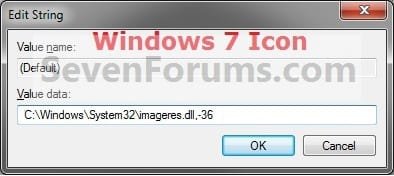
Windows7_Icon.jpg
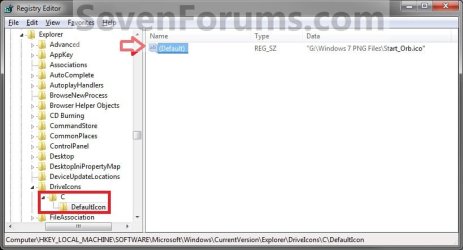
13. The registry should look similar to this now depending on the icon path you entered in either step 11 or 12. (see screenshot below)
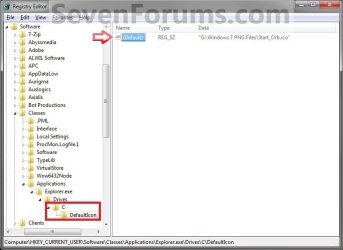
Current_Step8.jpg
12. Close Regedit.

13. The changes should be immediate, but in some cases you may need to restart the computer to apply the changes. If the drive icon does not change for you using this option, then try OPTION ONE or OPTION THREE to change it instead.


OPTION THREE

Change a Drive Icon in Registry Editor for All User Accounts


NOTE: You must be logged in as an administrator to be able to do this option.
1. If you did OPTION ONE previously, then you will need to either remove the icon=icon file name.ico entry from the autorun.inf file, or delete the autorun.inf file in the root of the drive that you want to change the icon of.

2. Press the Windows + R keys to open the Run dialog, type regedit, and press Enter.

3. If prompted by UAC, then click/tap on Yes (Windows 7/8) or Continue (Vista).

4. In regedit, navigate to the location below. (see screenshot below)
HKEY_LOCAL_MACHINE\SOFTWARE\Microsoft\Windows\CurrentVersion\Explorer
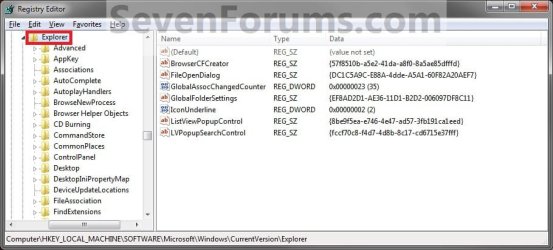
All_Step1.jpg
5. In the left pane, right click on Explorer, click/tap on New and Key, type DriveIcons, and press Enter.
NOTE: If you already have the DriveIcons key under Explorer, then go to step 6. (see screenshot above and below)
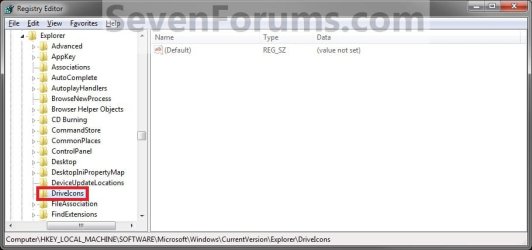
All_Step2.jpg
6. In the left pane, right click on DriveIcons and click/tap on New and Key, type the drive letter (ex: C ) that you want to change the icon for, and press Enter.
NOTE: If you already have the drive letter (ex: C ) key under DriveIcons, then go to step 7. (see screenshot above and below)
All_Step3.jpg
7. In the left pane, right click on the drive letter (ex: C ), click/tap on New and Key, type DefaultIcon, and press Enter.
NOTE: If you already have the DefaultIcon key under the drive letter (ex: C ), then go to step 8, 9, or 10. (see screenshot above and below)
All_Step4.jpg
8. To Restore the Default Drive Icon
A) Right click on the drive letter (ex: C ) from step 6 above that you want to restore, and click/tap on Delete and Yes. (see screenshot below step 6)

B) Go to step 12.
9. To Use a Custom Icon of Your Own
A) Make sure that the icon is unblocked if not already.

B) Make sure that the icon is located in a folder (ex: a C:\Users\Public folder) where all users (everyone) have access permission rights. The icon will need to stay here for as long as you are using it for the drive icon, otherwise it will break the link and no longer display as the drive's icon.

C) In the right pane of DefaultIcon, double click/tap on (Default) to modify it. (see screenshot below step 7)

D) In the Modify window, type this below, and click/tap on OK. (see screenshot below)
NOTE: Substitute with your icons full path and name with file extension in quotes instead.

Code:
"[B][COLOR=red]full path of the icon file with file extension[/COLOR][/B]"
FOR EXAMPLE:
Code:
"G:\Windows 7 PNG Files\Start_Orb.ico"
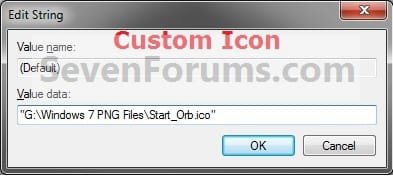
All_Step5.jpg
   Warning
The custom icon file that you are using must be saved at a location that can be accessed by all user accounts for it to be displayed in all user accounts. For example, in the C:\Users\Public folder.


E) Go to step 11.
10. To Use another Icon Included in Windows 7
A) Download and install the free program IconViewer for your 32-bit or 64-bit Windows 7.
NOTE: This program will add a Icons tab to files (ex: imageres.dll) that contain a icon library in them so you can see the icons available in it.

B) In Windows Explorer, navigate to C:\Windows\System32\imageres.dll and right click on imageres.dll, click on Properties, and click on the Icons tab.
NOTE: You can use any of the Windows 7 files that include icons in them that you want though. This is just the most common one.

C) Scroll through the icons and make note of the icon number of the one you want to use to replace the default file extension icon with, then close the properties window. (see screenshot below)
NOTE: For example, icon number 36 for the default C drive icon.
Icon_Viewer.jpg
D) In the right pane of DefaultIcon, double click/tap on (Default) to modify it. (see screenshot below step 7)

E) In the Modify window, type in the location below, and click/tap on OK. (see screenshot below)

Code:
[B][COLOR=red](full path of the Windows 7 file with file extension)[/COLOR][/B],-[B][COLOR=red]####[/COLOR][/B]
FOR EXAMPLE:
Code:
C:\Windows\System32\imageres.dll,-36
Windows7_Icon.jpg
11. The registry should look similar to this now depending on the icon path you entered in either step 9 or 10. (see screenshot below)
All_Step6.jpg
12. Close Regedit.

13. The changes should be immediate, but in some cases you may need to restart the computer to apply the changes.
That's it,
Shawn


Last edited:
Brink, i followed ur guide, the icon never changed for me =/

HKEY_CURRENT_USER\Software\Classes\Applications\Explorer.exe\Drives\C\DefaultIcon

"C:\Users\Mike\Documents\Stardock\IconPackager\Themes\icons\Hdd.ico"

the .ico is 256x256 pixel

tried to restart several times, using win7 ulti 64bit =/

what did i miss?
 

My Computer

Computer Manufacturer/Model Number
LG Notebook
OS
Windows 7 Ultimate x64
CPU
2.1Ghz
Motherboard
N/A
Memory
3Gb
Graphics Card(s)
nVidia 8600M GT
Sound Card
Realtek HD Audio
Monitor(s) Displays
17.1" TFT ( WSXGA+ ) - Glare
Screen Resolution
17.1"
Hard Drives
320Gig disc
PSU
N/A
Case
Laptop Case =)
Cooling
Laptop again xD
Keyboard
Builtin @ Laptop =)
Mouse
Razer Copperhead
Internet Speed
100/100Mb :) Swe Connection =D
Other Info
i eat metal :D
Hello xTL,

Could you place the .ico in a ZIP file and upload it here? I'll do some testing with it to see how it works with me to help eliminate that as a possibility. :)
 

My Computer

Computer type
PC/Desktop
Computer Manufacturer/Model Number
Self built custom
OS
64-bit Windows 11 Pro for Workstations
CPU
Intel i7-8700K OC'd to 5 GHz
Motherboard
ASUS ROG Maximus XI Formula Z390
Memory
64 GB (4x16GB) G.SKILL TridentZ RGB DDR4 3600 MHz
Graphics Card(s)
ASUS ROG-STRIX-GTX1080TI-O11G-GAMING
Sound Card
Integrated
Monitor(s) Displays
2 x Samsung Odyssey G7 27"
Screen Resolution
2560x1440
Hard Drives
1TB Samsung 990 PRO M.2,
4TB Samsung 990 PRO PRO M.2,
TerraMaster F8 SSD Plus NAS
PSU
Seasonic Prime Titanium 850W
Case
Thermaltake Core P3
Cooling
Corsair Hydro H115i
Keyboard
Logitech wireless K800
Mouse
Logitech MX Master 4
Internet Speed
2 Gb/s Download and 100 Mb/s Upload
Antivirus
Malwarebyte Anti-Malware Premium
Browser
Google Chrome
Other Info
Logitech Z625 speaker system,
Logitech BRIO 4K Pro webcam,
HP Color LaserJet Pro MFP M477fdn,
APC SMART-UPS RT 1000 XL - SURT1000XLI,
Galaxy S23 Plus phone
Thx alot Brink :) will do right away
 

Attachments

My Computer

Computer Manufacturer/Model Number
LG Notebook
OS
Windows 7 Ultimate x64
CPU
2.1Ghz
Motherboard
N/A
Memory
3Gb
Graphics Card(s)
nVidia 8600M GT
Sound Card
Realtek HD Audio
Monitor(s) Displays
17.1" TFT ( WSXGA+ ) - Glare
Screen Resolution
17.1"
Hard Drives
320Gig disc
PSU
N/A
Case
Laptop Case =)
Cooling
Laptop again xD
Keyboard
Builtin @ Laptop =)
Mouse
Razer Copperhead
Internet Speed
100/100Mb :) Swe Connection =D
Other Info
i eat metal :D
xTL,

The icon that you loaded is actually a 128x128 pixel icon instead. If you do not have a 256x256 icon for it, then post back the PNG file for it, and I'll be happy to convert it to a 256x256 icon. :)
 

My Computer

Computer type
PC/Desktop
Computer Manufacturer/Model Number
Self built custom
OS
64-bit Windows 11 Pro for Workstations
CPU
Intel i7-8700K OC'd to 5 GHz
Motherboard
ASUS ROG Maximus XI Formula Z390
Memory
64 GB (4x16GB) G.SKILL TridentZ RGB DDR4 3600 MHz
Graphics Card(s)
ASUS ROG-STRIX-GTX1080TI-O11G-GAMING
Sound Card
Integrated
Monitor(s) Displays
2 x Samsung Odyssey G7 27"
Screen Resolution
2560x1440
Hard Drives
1TB Samsung 990 PRO M.2,
4TB Samsung 990 PRO PRO M.2,
TerraMaster F8 SSD Plus NAS
PSU
Seasonic Prime Titanium 850W
Case
Thermaltake Core P3
Cooling
Corsair Hydro H115i
Keyboard
Logitech wireless K800
Mouse
Logitech MX Master 4
Internet Speed
2 Gb/s Download and 100 Mb/s Upload
Antivirus
Malwarebyte Anti-Malware Premium
Browser
Google Chrome
Other Info
Logitech Z625 speaker system,
Logitech BRIO 4K Pro webcam,
HP Color LaserJet Pro MFP M477fdn,
APC SMART-UPS RT 1000 XL - SURT1000XLI,
Galaxy S23 Plus phone
xTL,

The icon that you loaded is actually a 128x128 pixel icon instead. If you do not have a 256x256 icon for it, then post back the PNG file for it, and I'll be happy to convert it to a 256x256 icon. :)

thats very wierd, i'm a 100% sure i saved the .ico to 256x256 but i do belive you so i redid the icon also uploading images, mabye something happned when i was saving the .ico ? if possible please check the new Hdd256.rar i uploaded :)
 

Attachments

  • Hdd_256.rar
    Hdd_256.rar
    61.3 KB · Views: 120
  • 2.png
    2.png
    199.2 KB · Views: 345
  • 1.png
    1.png
    172 KB · Views: 390

My Computer

Computer Manufacturer/Model Number
LG Notebook
OS
Windows 7 Ultimate x64
CPU
2.1Ghz
Motherboard
N/A
Memory
3Gb
Graphics Card(s)
nVidia 8600M GT
Sound Card
Realtek HD Audio
Monitor(s) Displays
17.1" TFT ( WSXGA+ ) - Glare
Screen Resolution
17.1"
Hard Drives
320Gig disc
PSU
N/A
Case
Laptop Case =)
Cooling
Laptop again xD
Keyboard
Builtin @ Laptop =)
Mouse
Razer Copperhead
Internet Speed
100/100Mb :) Swe Connection =D
Other Info
i eat metal :D
Yep, that one is 256x256 and works just fine with it for me. :)

If OPION ONE still does not work for you, then give OPTION TWO a try instead to see if it may work.
 

My Computer

Computer type
PC/Desktop
Computer Manufacturer/Model Number
Self built custom
OS
64-bit Windows 11 Pro for Workstations
CPU
Intel i7-8700K OC'd to 5 GHz
Motherboard
ASUS ROG Maximus XI Formula Z390
Memory
64 GB (4x16GB) G.SKILL TridentZ RGB DDR4 3600 MHz
Graphics Card(s)
ASUS ROG-STRIX-GTX1080TI-O11G-GAMING
Sound Card
Integrated
Monitor(s) Displays
2 x Samsung Odyssey G7 27"
Screen Resolution
2560x1440
Hard Drives
1TB Samsung 990 PRO M.2,
4TB Samsung 990 PRO PRO M.2,
TerraMaster F8 SSD Plus NAS
PSU
Seasonic Prime Titanium 850W
Case
Thermaltake Core P3
Cooling
Corsair Hydro H115i
Keyboard
Logitech wireless K800
Mouse
Logitech MX Master 4
Internet Speed
2 Gb/s Download and 100 Mb/s Upload
Antivirus
Malwarebyte Anti-Malware Premium
Browser
Google Chrome
Other Info
Logitech Z625 speaker system,
Logitech BRIO 4K Pro webcam,
HP Color LaserJet Pro MFP M477fdn,
APC SMART-UPS RT 1000 XL - SURT1000XLI,
Galaxy S23 Plus phone
Yep, that one is 256x256 and works just fine with it for me. :)

If OPION ONE still does not work for you, then give OPTION TWO a try instead to see if it may work.

These settings are correct right ? i shouldn't have to change anything ?


HKEY_CURRENT_USER\Software\Classes\Applications\Explorer.exe\Drives\C\DefaultIcon

"C:\Users\Mike\Documents\Stardock\IconPackager\Themes\icons\Hdd.ico"
 

My Computer

Computer Manufacturer/Model Number
LG Notebook
OS
Windows 7 Ultimate x64
CPU
2.1Ghz
Motherboard
N/A
Memory
3Gb
Graphics Card(s)
nVidia 8600M GT
Sound Card
Realtek HD Audio
Monitor(s) Displays
17.1" TFT ( WSXGA+ ) - Glare
Screen Resolution
17.1"
Hard Drives
320Gig disc
PSU
N/A
Case
Laptop Case =)
Cooling
Laptop again xD
Keyboard
Builtin @ Laptop =)
Mouse
Razer Copperhead
Internet Speed
100/100Mb :) Swe Connection =D
Other Info
i eat metal :D
That is the correct entries.

If it's still not working, then try Option Two since it is at the HKEY_LOCAL_MACHINE registry location instead of HKEY_CURRENT_USER (Option One).
 

My Computer

Computer type
PC/Desktop
Computer Manufacturer/Model Number
Self built custom
OS
64-bit Windows 11 Pro for Workstations
CPU
Intel i7-8700K OC'd to 5 GHz
Motherboard
ASUS ROG Maximus XI Formula Z390
Memory
64 GB (4x16GB) G.SKILL TridentZ RGB DDR4 3600 MHz
Graphics Card(s)
ASUS ROG-STRIX-GTX1080TI-O11G-GAMING
Sound Card
Integrated
Monitor(s) Displays
2 x Samsung Odyssey G7 27"
Screen Resolution
2560x1440
Hard Drives
1TB Samsung 990 PRO M.2,
4TB Samsung 990 PRO PRO M.2,
TerraMaster F8 SSD Plus NAS
PSU
Seasonic Prime Titanium 850W
Case
Thermaltake Core P3
Cooling
Corsair Hydro H115i
Keyboard
Logitech wireless K800
Mouse
Logitech MX Master 4
Internet Speed
2 Gb/s Download and 100 Mb/s Upload
Antivirus
Malwarebyte Anti-Malware Premium
Browser
Google Chrome
Other Info
Logitech Z625 speaker system,
Logitech BRIO 4K Pro webcam,
HP Color LaserJet Pro MFP M477fdn,
APC SMART-UPS RT 1000 XL - SURT1000XLI,
Galaxy S23 Plus phone
:D works perfect Brink :) Thank you so much man :)

tho when i had quotation marks, the .ico file i chose didnt work so i had to go with this,
C:\Users\Mike\Documents\Stardock\IconPackager\Themes\icons\Hdd.ico

Thx again :)
 

My Computer

Computer Manufacturer/Model Number
LG Notebook
OS
Windows 7 Ultimate x64
CPU
2.1Ghz
Motherboard
N/A
Memory
3Gb
Graphics Card(s)
nVidia 8600M GT
Sound Card
Realtek HD Audio
Monitor(s) Displays
17.1" TFT ( WSXGA+ ) - Glare
Screen Resolution
17.1"
Hard Drives
320Gig disc
PSU
N/A
Case
Laptop Case =)
Cooling
Laptop again xD
Keyboard
Builtin @ Laptop =)
Mouse
Razer Copperhead
Internet Speed
100/100Mb :) Swe Connection =D
Other Info
i eat metal :D
You're most welcome xTL. I'm happy to hear that it worked for you. Thank you posting back about the quotation marks. :)
 

My Computer

Computer type
PC/Desktop
Computer Manufacturer/Model Number
Self built custom
OS
64-bit Windows 11 Pro for Workstations
CPU
Intel i7-8700K OC'd to 5 GHz
Motherboard
ASUS ROG Maximus XI Formula Z390
Memory
64 GB (4x16GB) G.SKILL TridentZ RGB DDR4 3600 MHz
Graphics Card(s)
ASUS ROG-STRIX-GTX1080TI-O11G-GAMING
Sound Card
Integrated
Monitor(s) Displays
2 x Samsung Odyssey G7 27"
Screen Resolution
2560x1440
Hard Drives
1TB Samsung 990 PRO M.2,
4TB Samsung 990 PRO PRO M.2,
TerraMaster F8 SSD Plus NAS
PSU
Seasonic Prime Titanium 850W
Case
Thermaltake Core P3
Cooling
Corsair Hydro H115i
Keyboard
Logitech wireless K800
Mouse
Logitech MX Master 4
Internet Speed
2 Gb/s Download and 100 Mb/s Upload
Antivirus
Malwarebyte Anti-Malware Premium
Browser
Google Chrome
Other Info
Logitech Z625 speaker system,
Logitech BRIO 4K Pro webcam,
HP Color LaserJet Pro MFP M477fdn,
APC SMART-UPS RT 1000 XL - SURT1000XLI,
Galaxy S23 Plus phone
Nice, fun tutorial Brink, very clearly written as usual. I especially like how the icon is shown changed in three locations in the Explorer > My Computer view in this screen grab. Little tweaks and customizations like this make for a much more enjoyable Windows 7 user experience in my opinion ;)

Drive_Icon_changed.jpg
 

My Computer

Computer Manufacturer/Model Number
Acer Aspire 4730Z
OS
Windows 7 Ultimate
CPU
Intel Pentium Dual CPU T3400 @ 2.16GHz
Motherboard
Acer Aspire 4730Z V1.22 GL40
Memory
4.0GB Dual-Channel DDR2 @ 332MHz
Graphics Card(s)
Mobile Intel(R) 4 Series Express Chipset Family 1309 MB
Sound Card
Realtek High Definition Audio
Monitor(s) Displays
AOC 2795V
Screen Resolution
1920 x 1080
Hard Drives
500GB Hitachi HTS545050B9A300 ATA Travelstar
Thank you Dick. I'm happy that you found it useful and fun. :)
 

My Computer

Computer type
PC/Desktop
Computer Manufacturer/Model Number
Self built custom
OS
64-bit Windows 11 Pro for Workstations
CPU
Intel i7-8700K OC'd to 5 GHz
Motherboard
ASUS ROG Maximus XI Formula Z390
Memory
64 GB (4x16GB) G.SKILL TridentZ RGB DDR4 3600 MHz
Graphics Card(s)
ASUS ROG-STRIX-GTX1080TI-O11G-GAMING
Sound Card
Integrated
Monitor(s) Displays
2 x Samsung Odyssey G7 27"
Screen Resolution
2560x1440
Hard Drives
1TB Samsung 990 PRO M.2,
4TB Samsung 990 PRO PRO M.2,
TerraMaster F8 SSD Plus NAS
PSU
Seasonic Prime Titanium 850W
Case
Thermaltake Core P3
Cooling
Corsair Hydro H115i
Keyboard
Logitech wireless K800
Mouse
Logitech MX Master 4
Internet Speed
2 Gb/s Download and 100 Mb/s Upload
Antivirus
Malwarebyte Anti-Malware Premium
Browser
Google Chrome
Other Info
Logitech Z625 speaker system,
Logitech BRIO 4K Pro webcam,
HP Color LaserJet Pro MFP M477fdn,
APC SMART-UPS RT 1000 XL - SURT1000XLI,
Galaxy S23 Plus phone
Thanks!
 

My Computer

Computer Manufacturer/Model Number
Compaq Presario CQ60 Notebook PC
OS
Windows 7 Ultimate 32bit
CPU
AMD Turion Dual-Core RM-70 2.00GHz
Memory
4.00 GB
Graphics Card(s)
NVIDIA GeForce 8200M G
You're most welcome Snuffy, and welcome to Seven Forums. :)
 

My Computer

Computer type
PC/Desktop
Computer Manufacturer/Model Number
Self built custom
OS
64-bit Windows 11 Pro for Workstations
CPU
Intel i7-8700K OC'd to 5 GHz
Motherboard
ASUS ROG Maximus XI Formula Z390
Memory
64 GB (4x16GB) G.SKILL TridentZ RGB DDR4 3600 MHz
Graphics Card(s)
ASUS ROG-STRIX-GTX1080TI-O11G-GAMING
Sound Card
Integrated
Monitor(s) Displays
2 x Samsung Odyssey G7 27"
Screen Resolution
2560x1440
Hard Drives
1TB Samsung 990 PRO M.2,
4TB Samsung 990 PRO PRO M.2,
TerraMaster F8 SSD Plus NAS
PSU
Seasonic Prime Titanium 850W
Case
Thermaltake Core P3
Cooling
Corsair Hydro H115i
Keyboard
Logitech wireless K800
Mouse
Logitech MX Master 4
Internet Speed
2 Gb/s Download and 100 Mb/s Upload
Antivirus
Malwarebyte Anti-Malware Premium
Browser
Google Chrome
Other Info
Logitech Z625 speaker system,
Logitech BRIO 4K Pro webcam,
HP Color LaserJet Pro MFP M477fdn,
APC SMART-UPS RT 1000 XL - SURT1000XLI,
Galaxy S23 Plus phone
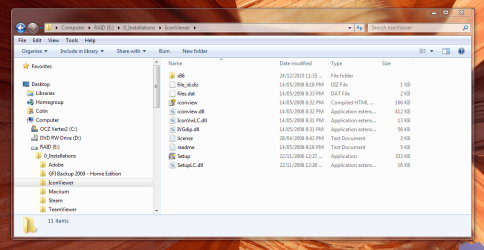
You can download and install (using Run as administrator) the free program IconViewer to add a Icons tab in the Properties page of files that contains icons in them.

Hi Brink,

Sorry to drag up such an old post. I downloaded and installed IconViewer (installed succesfully), but can't find a shortcut to actually run the program. Nothing on the desktop, and nothing under Start.

Here you can see it installed. If I try to run Setup, it tells me it has to be installed, but it already is.....am I being stupid?

Regards,
Golden
 

Attachments

  • Capture2.PNG
    Capture2.PNG
    82.3 KB · Views: 417

My Computer

Computer type
PC/Desktop
Computer Manufacturer/Model Number
Golden Mk. I.4
OS
Windows 10 Pro x64 ; Xubuntu x64
CPU
Intel i7 860 @ 2.80 GHz O/C'ed to 4.0GHz
Motherboard
Gigabyte P55A-UD3R Rev.1. Award BIOS F13
Memory
16GB Corsair Vengance DDR3 @ 661 MHz Dual Channel (9-9-9-24)
Graphics Card(s)
EVGA NVidia GTX 560 1024MB
Sound Card
Realtek Integrated
Monitor(s) Displays
Dual Samsung SyncMaster 2494HS
Screen Resolution
1920*1080 and 1920*1080
Hard Drives
1*Samsung 840 EVO 120GB SSD;
1*OCZ Vertex 2 60GB SSD;
2*Samsung F3 SpinPoint 1TB in RAID0;
1*Samsung F1 SpinPoint 1TB;
2*Western Digital 1TB External USB 3.0
1*Western Digital 500GB External USB 3.0
1*Seagate 500GB External USB 2.0
PSU
Thermaltake ToughPower QFan 750W
Case
Thermaltake Element S VK60001W2Z
Cooling
Corsair H60 Water Cooling, 2*230mm and 2*80mm case fans
Keyboard
Logitech G110
Mouse
Logitech MX518
Hello Golden,

The program IconViewer doesn't have a shortcut or EXE that you run. Instead it adds a Icon tab in the properties pages of files (ex: EXE or DLL) that contain icons in them, as in the screenshot under step 11C in Option One.

Hope this helps,
Shawn
 

My Computer

Computer type
PC/Desktop
Computer Manufacturer/Model Number
Self built custom
OS
64-bit Windows 11 Pro for Workstations
CPU
Intel i7-8700K OC'd to 5 GHz
Motherboard
ASUS ROG Maximus XI Formula Z390
Memory
64 GB (4x16GB) G.SKILL TridentZ RGB DDR4 3600 MHz
Graphics Card(s)
ASUS ROG-STRIX-GTX1080TI-O11G-GAMING
Sound Card
Integrated
Monitor(s) Displays
2 x Samsung Odyssey G7 27"
Screen Resolution
2560x1440
Hard Drives
1TB Samsung 990 PRO M.2,
4TB Samsung 990 PRO PRO M.2,
TerraMaster F8 SSD Plus NAS
PSU
Seasonic Prime Titanium 850W
Case
Thermaltake Core P3
Cooling
Corsair Hydro H115i
Keyboard
Logitech wireless K800
Mouse
Logitech MX Master 4
Internet Speed
2 Gb/s Download and 100 Mb/s Upload
Antivirus
Malwarebyte Anti-Malware Premium
Browser
Google Chrome
Other Info
Logitech Z625 speaker system,
Logitech BRIO 4K Pro webcam,
HP Color LaserJet Pro MFP M477fdn,
APC SMART-UPS RT 1000 XL - SURT1000XLI,
Galaxy S23 Plus phone
Ahh. It's OK, you could have said I was just being stuoid and not reading the thread properly :D
 

My Computer

Computer type
PC/Desktop
Computer Manufacturer/Model Number
Golden Mk. I.4
OS
Windows 10 Pro x64 ; Xubuntu x64
CPU
Intel i7 860 @ 2.80 GHz O/C'ed to 4.0GHz
Motherboard
Gigabyte P55A-UD3R Rev.1. Award BIOS F13
Memory
16GB Corsair Vengance DDR3 @ 661 MHz Dual Channel (9-9-9-24)
Graphics Card(s)
EVGA NVidia GTX 560 1024MB
Sound Card
Realtek Integrated
Monitor(s) Displays
Dual Samsung SyncMaster 2494HS
Screen Resolution
1920*1080 and 1920*1080
Hard Drives
1*Samsung 840 EVO 120GB SSD;
1*OCZ Vertex 2 60GB SSD;
2*Samsung F3 SpinPoint 1TB in RAID0;
1*Samsung F1 SpinPoint 1TB;
2*Western Digital 1TB External USB 3.0
1*Western Digital 500GB External USB 3.0
1*Seagate 500GB External USB 2.0
PSU
Thermaltake ToughPower QFan 750W
Case
Thermaltake Element S VK60001W2Z
Cooling
Corsair H60 Water Cooling, 2*230mm and 2*80mm case fans
Keyboard
Logitech G110
Mouse
Logitech MX518
LOL, I would never say that. :)
 

My Computer

Computer type
PC/Desktop
Computer Manufacturer/Model Number
Self built custom
OS
64-bit Windows 11 Pro for Workstations
CPU
Intel i7-8700K OC'd to 5 GHz
Motherboard
ASUS ROG Maximus XI Formula Z390
Memory
64 GB (4x16GB) G.SKILL TridentZ RGB DDR4 3600 MHz
Graphics Card(s)
ASUS ROG-STRIX-GTX1080TI-O11G-GAMING
Sound Card
Integrated
Monitor(s) Displays
2 x Samsung Odyssey G7 27"
Screen Resolution
2560x1440
Hard Drives
1TB Samsung 990 PRO M.2,
4TB Samsung 990 PRO PRO M.2,
TerraMaster F8 SSD Plus NAS
PSU
Seasonic Prime Titanium 850W
Case
Thermaltake Core P3
Cooling
Corsair Hydro H115i
Keyboard
Logitech wireless K800
Mouse
Logitech MX Master 4
Internet Speed
2 Gb/s Download and 100 Mb/s Upload
Antivirus
Malwarebyte Anti-Malware Premium
Browser
Google Chrome
Other Info
Logitech Z625 speaker system,
Logitech BRIO 4K Pro webcam,
HP Color LaserJet Pro MFP M477fdn,
APC SMART-UPS RT 1000 XL - SURT1000XLI,
Galaxy S23 Plus phone
Updated to add OPTION ONE to change the drive icon with a autorun.inf file. :)
 

My Computer

Computer type
PC/Desktop
Computer Manufacturer/Model Number
Self built custom
OS
64-bit Windows 11 Pro for Workstations
CPU
Intel i7-8700K OC'd to 5 GHz
Motherboard
ASUS ROG Maximus XI Formula Z390
Memory
64 GB (4x16GB) G.SKILL TridentZ RGB DDR4 3600 MHz
Graphics Card(s)
ASUS ROG-STRIX-GTX1080TI-O11G-GAMING
Sound Card
Integrated
Monitor(s) Displays
2 x Samsung Odyssey G7 27"
Screen Resolution
2560x1440
Hard Drives
1TB Samsung 990 PRO M.2,
4TB Samsung 990 PRO PRO M.2,
TerraMaster F8 SSD Plus NAS
PSU
Seasonic Prime Titanium 850W
Case
Thermaltake Core P3
Cooling
Corsair Hydro H115i
Keyboard
Logitech wireless K800
Mouse
Logitech MX Master 4
Internet Speed
2 Gb/s Download and 100 Mb/s Upload
Antivirus
Malwarebyte Anti-Malware Premium
Browser
Google Chrome
Other Info
Logitech Z625 speaker system,
Logitech BRIO 4K Pro webcam,
HP Color LaserJet Pro MFP M477fdn,
APC SMART-UPS RT 1000 XL - SURT1000XLI,
Galaxy S23 Plus phone
Brink,


I recently installed Acronis True Image Home 2011 and now the drive icons for all my hard drive's partitions are not showing. See the picture attached below. Any ideas on how to restore the default icons.The registry is empty.

HKEY_LOCAL_MACHINE\SOFTWARE\Microsoft\Windows\CurrentVersion\Explorer\DriveIcons

clipboard01.png


Thanks.
 
Last edited by a moderator:

My Computer

OS
W7 x64
Back
Top