
Drive image question!

You really need a place to back up your files more often, unless you plan to regularly clone your HD as backup.
I understand. I have several drives from previous machines that I use externally for that purpose.
Also, being retired, there is no vital current business stuff on my PC any longer. Another few years, and nobody will care about what was on my drives. :sarc:
 

My Computer

Computer Manufacturer/Model Number
HP p6347c
OS
W7
CPU
AMD Athlon(tm) II X4 630 Processor
Motherboard
AMD RS780/RS880
Memory
8 GB
Graphics Card(s)
ATI Radeon HD 4200
Sound Card
Realtek High Definition Audio
Monitor(s) Displays
HP w2338h (HP w2338h Wide LCD Monitor)
Hard Drives
WDC WD6400AAKS-65A7B SCSI Disk Device
Read or reread this tutorial. You will find that by making a system image of your hard drive, that you will be able to a restore to another drive if the need ever arises, assuming that you will restore to a drive of equal or greater size.

You might find following of interest:
________________________________________
DISK – COPY/CLONE/PARTITION/BACKUP/RESTORE SOFTWARE

PARTITION WIZARD (a favorite of many SevenForum contributors)
Free download. Move/resize/delete/etc partitions.
Go to their web page and download the “bootable CD” version.
Free Download Magic Partition Manager Software – Partition Wizard Online

MACRIUM REFLECT
Macrium Reflect Backup and Hard Disk Imaging for Windows 7, Vista, XP and Server 2003/2008
Hard disk image and backup software.

PARAGON BACKUP AND RECOVERY SOFTWARE
Free Backup Software: Paragon Backup & Recovery Free Advanced Edition - Overview
Backup & Recovery Free Edition
Based on the commercial backup and recovery software from Paragon.

EASEUS DISK COPY
Free hard disk copy, disk clone, partition copy, backup.
EASEUS Disk Copy: Free Disk Copy, Disk Clone, Partition Copy Software. Sector by Sector for hard drive backup freeware.
 

My Computer

Computer Manufacturer/Model Number
Toshiba Satellite S875D-S7239 laptop
OS
MS Windows 7 Ultimate SP1 64-bit
CPU
AMD A10-4600M
Motherboard
AMD Pumori (Socket FT1)
Memory
6.00 GB Dual-Channel DDR3 @ 798MHz (11-11-12-28)
Graphics Card(s)
AMD Radeon HD 7660G
Sound Card
High Definition Audio Device
Monitor(s) Displays
Generic PnP Monitor (1600x900@60Hz)
Screen Resolution
1600x900@60Hz
Hard Drives
SSD 119GB Corsair CSSD-V128GB2 ATA Device
Keyboard
Standard PS/2 Keyboard
Mouse
HP Wireless Optical Mobile Mouse Model FHA-3410
Internet Speed
What the local pub, local coffee shop offers.
Other Info
Optical Drive:MATSHITA BD-CMB UJ160B ATA Device


Also have an Asus ha1002xp netbook with Win 7 Ultimate installed.
Read or reread this tutorial. You will find that by making a system image of your hard drive, that you will be able to a restore to another drive if the need ever arises, assuming that you will restore to a drive of equal or greater size.
Yes, and therein lies the problem. If your main HD is 650, and your second drive is only 500, you can't do it.
 

My Computer

Computer Manufacturer/Model Number
HP p6347c
OS
W7
CPU
AMD Athlon(tm) II X4 630 Processor
Motherboard
AMD RS780/RS880
Memory
8 GB
Graphics Card(s)
ATI Radeon HD 4200
Sound Card
Realtek High Definition Audio
Monitor(s) Displays
HP w2338h (HP w2338h Wide LCD Monitor)
Hard Drives
WDC WD6400AAKS-65A7B SCSI Disk Device

Read again.

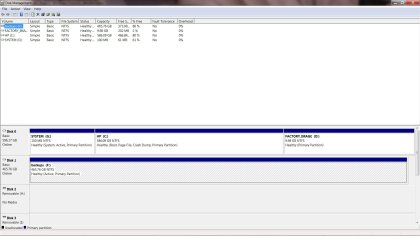
How many partitions/volumes on that drive? How much space does your C drive occupy?. Post the maximized output of a snapshot of the output of Disk Management. I've gone from big to small a couple of times.
 

My Computer

Computer Manufacturer/Model Number
Toshiba Satellite S875D-S7239 laptop
OS
MS Windows 7 Ultimate SP1 64-bit
CPU
AMD A10-4600M
Motherboard
AMD Pumori (Socket FT1)
Memory
6.00 GB Dual-Channel DDR3 @ 798MHz (11-11-12-28)
Graphics Card(s)
AMD Radeon HD 7660G
Sound Card
High Definition Audio Device
Monitor(s) Displays
Generic PnP Monitor (1600x900@60Hz)
Screen Resolution
1600x900@60Hz
Hard Drives
SSD 119GB Corsair CSSD-V128GB2 ATA Device
Keyboard
Standard PS/2 Keyboard
Mouse
HP Wireless Optical Mobile Mouse Model FHA-3410
Internet Speed
What the local pub, local coffee shop offers.
Other Info
Optical Drive:MATSHITA BD-CMB UJ160B ATA Device


Also have an Asus ha1002xp netbook with Win 7 Ultimate installed.
I'm awaiting the snapshot. And yes, cloning.
 

My Computer

Computer Manufacturer/Model Number
Toshiba Satellite S875D-S7239 laptop
OS
MS Windows 7 Ultimate SP1 64-bit
CPU
AMD A10-4600M
Motherboard
AMD Pumori (Socket FT1)
Memory
6.00 GB Dual-Channel DDR3 @ 798MHz (11-11-12-28)
Graphics Card(s)
AMD Radeon HD 7660G
Sound Card
High Definition Audio Device
Monitor(s) Displays
Generic PnP Monitor (1600x900@60Hz)
Screen Resolution
1600x900@60Hz
Hard Drives
SSD 119GB Corsair CSSD-V128GB2 ATA Device
Keyboard
Standard PS/2 Keyboard
Mouse
HP Wireless Optical Mobile Mouse Model FHA-3410
Internet Speed
What the local pub, local coffee shop offers.
Other Info
Optical Drive:MATSHITA BD-CMB UJ160B ATA Device


Also have an Asus ha1002xp netbook with Win 7 Ultimate installed.

Attachments

  • snapshot.jpg
    snapshot.jpg
    148.9 KB · Views: 8

My Computer

Computer Manufacturer/Model Number
HP p6347c
OS
W7
CPU
AMD Athlon(tm) II X4 630 Processor
Motherboard
AMD RS780/RS880
Memory
8 GB
Graphics Card(s)
ATI Radeon HD 4200
Sound Card
Realtek High Definition Audio
Monitor(s) Displays
HP w2338h (HP w2338h Wide LCD Monitor)
Hard Drives
WDC WD6400AAKS-65A7B SCSI Disk Device
With shrinking and the use of Partition Wizard, you can reduce your big drive to less space required than the small one. When you do you want the space at the end of the the big one to be unallocated.

As an example, after shrinking then I'd be able to "clone" to a 100 GB drive.

mydrive.PNG
 

My Computer

Computer Manufacturer/Model Number
Toshiba Satellite S875D-S7239 laptop
OS
MS Windows 7 Ultimate SP1 64-bit
CPU
AMD A10-4600M
Motherboard
AMD Pumori (Socket FT1)
Memory
6.00 GB Dual-Channel DDR3 @ 798MHz (11-11-12-28)
Graphics Card(s)
AMD Radeon HD 7660G
Sound Card
High Definition Audio Device
Monitor(s) Displays
Generic PnP Monitor (1600x900@60Hz)
Screen Resolution
1600x900@60Hz
Hard Drives
SSD 119GB Corsair CSSD-V128GB2 ATA Device
Keyboard
Standard PS/2 Keyboard
Mouse
HP Wireless Optical Mobile Mouse Model FHA-3410
Internet Speed
What the local pub, local coffee shop offers.
Other Info
Optical Drive:MATSHITA BD-CMB UJ160B ATA Device


Also have an Asus ha1002xp netbook with Win 7 Ultimate installed.
With shrinking and the use of Partition Wizard, you can reduce your big drive to less space required than the small one. When you do you want the space at the end of the the big one to be unallocated.

As an example, after shrinking then I'd be able to "clone" to a 100 GB drive.

View attachment 96286
If you have successfully done that it would be great, and I'll try it too. Have to see it to believe it though.
 

My Computer

Computer Manufacturer/Model Number
HP p6347c
OS
W7
CPU
AMD Athlon(tm) II X4 630 Processor
Motherboard
AMD RS780/RS880
Memory
8 GB
Graphics Card(s)
ATI Radeon HD 4200
Sound Card
Realtek High Definition Audio
Monitor(s) Displays
HP w2338h (HP w2338h Wide LCD Monitor)
Hard Drives
WDC WD6400AAKS-65A7B SCSI Disk Device
Quite understandable and correct.

Let me know if you have any questions. I did use Windows 7 Backup and Restore with a System Restore Disc for the restore portion.
 

My Computer

Computer Manufacturer/Model Number
Toshiba Satellite S875D-S7239 laptop
OS
MS Windows 7 Ultimate SP1 64-bit
CPU
AMD A10-4600M
Motherboard
AMD Pumori (Socket FT1)
Memory
6.00 GB Dual-Channel DDR3 @ 798MHz (11-11-12-28)
Graphics Card(s)
AMD Radeon HD 7660G
Sound Card
High Definition Audio Device
Monitor(s) Displays
Generic PnP Monitor (1600x900@60Hz)
Screen Resolution
1600x900@60Hz
Hard Drives
SSD 119GB Corsair CSSD-V128GB2 ATA Device
Keyboard
Standard PS/2 Keyboard
Mouse
HP Wireless Optical Mobile Mouse Model FHA-3410
Internet Speed
What the local pub, local coffee shop offers.
Other Info
Optical Drive:MATSHITA BD-CMB UJ160B ATA Device


Also have an Asus ha1002xp netbook with Win 7 Ultimate installed.
  • Like
Reactions: mjf
Read or reread this tutorial. You will find that by making a system image of your hard drive, that you will be able to a restore to another drive if the need ever arises, assuming that you will restore to a drive of equal or greater size.
Yes, and therein lies the problem. If your main HD is 650, and your second drive is only 500, you can't do it.

With Acronis you can, reagrdless of the partion size. Provided the "Used" space does not exceed the capacity of the smaller drive.

It will simply resize the partiton during the restore.
 

My Computer

Computer Manufacturer/Model Number
Custom (Self Build)
OS
Windows 7 Home Premium 64bit
CPU
Intel Core i7 2700k
Motherboard
eVGA P67 SLI
Memory
8GB Mushkin Redline Ridgebacks @1866
Graphics Card(s)
EVGA GTX570 SC
Sound Card
XiFi Titanium HD
Monitor(s) Displays
LG W2453V
Screen Resolution
1920x1080
Hard Drives
Intel 320 80GB -- Intel X25-V 40GB --WD Black 1TB x2 -- WD Blue 640GB
PSU
Seasonic x750
Case
Corsair 600T SE White
Cooling
eVGA Superclocked CPU Cooler
Keyboard
Saitek Cyborg
Antivirus
Kaspersky
Browser
IE
Other Info
LG BD/DVD
Back
Top