Drivers - Clean Left over Files after Uninstalling

How to Clean Left Over Driver Files with DDU or Driver Sweeper


   Information
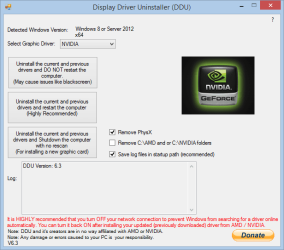
This tutorial will show you how to clean driver files left over after uninstalling hardware such as: Graphic Card, Sound, Microsoft mouse and even PhysX using the free Display Driver Uninstaller (DDU) or Driver Sweeper. Not cleaning left over files from uninstalling drivers can result in problems when utilizing the hardware.

   Note
Driver Sweeper is very easy to use. You only have to select the drivers you want to clean up.
The best way to clean drivers is to first uninstall the drivers using the official uninstallers, reboot in Safe Mode and run Driver Sweeper. However, rebooting and not going into Safe Mode also works, but can cause some files not to be cleaned.

What can it be used for ?
The current supported drivers are NVIDIA (Display and Chipset), ATI (Display), Creative (Sound), Ageia (PhysX), MMouse, Realtek (Sound), NEC (USB), Fresco Logic (USB), Marvell (Storage), JMicron (Storage), HP (Printer).

All the settings are saved in an ini file. Nothing is created in the registry, so it's possible to use it as a portable program. Log files can be saved to the hard disk and viewed as well. You can find the logs under the Tools menu.

System requirements:
Operating Systems - Any Windows version (32-bit and 64 bit) with Microsoft .NET Framework 3.5 from Official Microsoft Download Center or higher installed.
Disk Space (Downloaded) - 5MB
Disk Space (Installed) - 20MB


1. Click on Download below to download the Display Driver Uninstaller (DDU) file to your desktop.

Download


OR


Download


   Note
If you wanted the older Drive Sweeper 2.1.0, then:


Download


2. Extract (drag and drop) the contents of the .zip folder into a "New Folder" on your desktop, and run the DDU or Driver Sweeper.exe.

3. If prompted by UAC, then click on Yes.

4. Uninstall the driver from Programs and Features within the Control Panel as your usually would, restart the computer if needed.

5. Run DDU or Driver Sweeper, check the driver(s) you wish to clean, then click either the Analyse button to see what is left over or click Clean to clean the left over files and registry entries straight away.
Driver_Sweeper.jpg

6m57.png

6. When finished, you will be prompted to Restart the computer.

7. When the computer has finished restarting, you can now install the new drivers if you like.


Attachments

Last edited by a moderator:
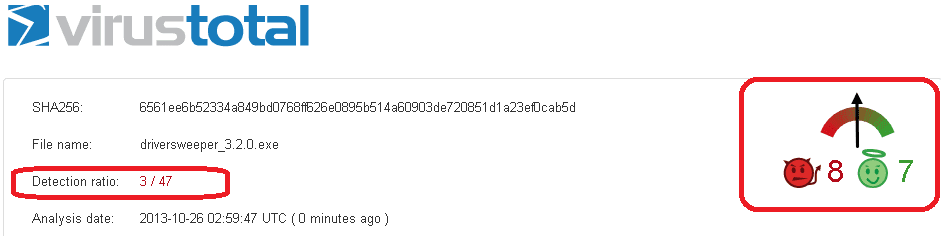
Just ran "driversweeper_3.2.0.exe" through VirusTotal
Should I be concerned ? :shock:

driversweeper.PNG

I have uninstalled "Java" ready to install latest "Java" versionWhy would I install Java?
Java required to test NVIDIA driver through GeForce site.
Otherwise Java will be disabled


I uninstalled "Java 6" with Revouninstaller.
Deleted residual registry items but no files were "found"

What to do next ?
 
Last edited:

My Computer My Computer

Computer type
PC/Desktop
Computer Manufacturer/Model Number
Toshiba, Lenovo (laptops) + 4 rigs
OS
XP Pro (x86) | 7 HP (x86) & (x64) | 7 Pro (x64)

My Computer My Computer

Computer type
PC/Desktop
Computer Manufacturer/Model Number
Dell optiplex 740
OS
Win 7 Home Premium SP1 32 bit
CPU
AMD Athlon 64 X2 5000B
Motherboard
Dell Inc. 0YP696 (Socket M2 )
Memory
4.00 GB Dual-Channel DDR2 @ 370MHz (6-6-6-18)
Graphics Card(s)
Acer E181H (1366x768@60Hz) 64MB GeForce 6150 LE (Dell)
Sound Card
SigmaTel High Definition Audio CODEC
Monitor(s) Displays
Acer E181H (1366x768@60Hz) 64MB GeForce 6150 LE (Dell)
Hard Drives
699GB Seagate ST375064 0NS SCSI Disk Device (ATA)
Case
Mini tower
Internet Speed
Ping 36 ms, Download 57.71 mbps , Upload 11.79mbps
Antivirus
Free Avast. Pro paid Mbam , Free Sas
Browser
Palemoon .

My Computer My Computer

Computer type
PC/Desktop
Computer Manufacturer/Model Number
Golden Mk. I.4
OS
Windows 10 Pro x64 ; Xubuntu x64
CPU
Intel i7 860 @ 2.80 GHz O/C'ed to 4.0GHz
Motherboard
Gigabyte P55A-UD3R Rev.1. Award BIOS F13
Memory
16GB Corsair Vengance DDR3 @ 661 MHz Dual Channel (9-9-9-24)
Graphics Card(s)
EVGA NVidia GTX 560 1024MB
Sound Card
Realtek Integrated
Monitor(s) Displays
Dual Samsung SyncMaster 2494HS
Screen Resolution
1920*1080 and 1920*1080
Hard Drives
1*Samsung 840 EVO 120GB SSD;
1*OCZ Vertex 2 60GB SSD;
2*Samsung F3 SpinPoint 1TB in RAID0;
1*Samsung F1 SpinPoint 1TB;
2*Western Digital 1TB External USB 3.0
1*Western Digital 500GB External USB 3.0
1*Seagate 500GB External USB 2.0
PSU
Thermaltake ToughPower QFan 750W
Case
Thermaltake Element S VK60001W2Z
Cooling
Corsair H60 Water Cooling, 2*230mm and 2*80mm case fans
Keyboard
Logitech G110
Mouse
Logitech MX518
Just ran "driversweeper_3.2.0.exe" through VirusTotal
Should I be concerned ?

View attachment 291188

I noticed driversweeper incorporated OpenCandy which Malwarebytes has flagged on computers I've scanned before. I've run several scans of my PC with Malwarebytes & MSE since installing driversweeper & didn't detect anything. But now that you've reminded me I might go ahead & remove it anyway.

Google driver sweeper opencandy & see results like this from Wikipedia:
OpenCandy has attracted criticism because of privacy concerns.[4] Past versions of OpenCandy were considered adware by Microsoft Security Essentials as they "may send user-specific information ... without obtaining adequate user consent".[5] OpenCandy have claimed that this is because another company used OpenCandy without the formal warning in their EULA.

Edit: suppose I'm not entirely sure that will remove OpenCandy tho.
 

My Computer My Computer

Computer type
PC/Desktop
Computer Manufacturer/Model Number
Dell XPS 435MT
OS
Windows 7 Ultimate x64
CPU
Intel Core i7-950
Motherboard
Dell 0R849J
Memory
Elpida DDR3 12 Gb 1066
Graphics Card(s)
EVGA nVidia GeForce GTX 760 2GB GDDR5
Sound Card
Syba PCI-e VIA VT1723 Envy24DT
Monitor(s) Displays
Dell 3007WFP-HC, Nixeus Vue 30
Screen Resolution
1920 x 1200
Hard Drives
Crucial M500 240GB
1TB Seagate Barracuda
PSU
Corsair CX500M
Keyboard
Logitech MX 5500 combo
Mouse
Logitech MX 5500
Internet Speed
300Mbps
Antivirus
MSE
Browser
IE11 & Chrome
Other Info
MBAM Premium
Hi "YardDog" :)
Interesting?
I downloaded "driversweeper_3.2.0.exe" by clicking on the "Download" link in step_1 of How to Clean Left Over Driver Files with Driver Sweeper
Saved to my desktop.
Opened "VirusTotal" and tested the downloaded EXE file
I am not an expert, just cautious.
After then testing "driversweeper_3.2.0.exe" with my own Bitdefender Internet Security + Malwarebytes both returned "driversweeper_3.2.0.exe" as clean. :confused:

Then ran "driversweeper_3.2.0.exe" ... and buried at the bottom of "Terms and Conditions" is "OpenCandy" with no option-out as far as I got with the install wizard, ie "Install"

I have had "OpenCandy" dumped on me before, and it was a pest to remove.
 

My Computer My Computer

Computer type
PC/Desktop
Computer Manufacturer/Model Number
Toshiba, Lenovo (laptops) + 4 rigs
OS
XP Pro (x86) | 7 HP (x86) & (x64) | 7 Pro (x64)
Tutorial updated with an older free copy of Driver Sweeper 2.1.0 that does not include OpenCandy, and is a standalone .exe that doesn't install. :)
 

My Computer My Computer

Computer type
PC/Desktop
Computer Manufacturer/Model Number
Self built custom
OS
64-bit Windows 11 Pro for Workstations
CPU
Intel i7-8700K OC'd to 5 GHz
Motherboard
ASUS ROG Maximus XI Formula Z390
Memory
64 GB (4x16GB) G.SKILL TridentZ RGB DDR4 3600 MHz
Graphics Card(s)
ASUS ROG-STRIX-GTX1080TI-O11G-GAMING
Sound Card
Integrated
Monitor(s) Displays
2 x Samsung Odyssey G7 27"
Screen Resolution
2560x1440
Hard Drives
1TB Samsung 990 PRO M.2,
4TB Samsung 990 PRO PRO M.2,
TerraMaster F8 SSD Plus NAS
PSU
Seasonic Prime Titanium 850W
Case
Thermaltake Core P3
Cooling
Corsair Hydro H115i
Keyboard
Logitech wireless K800
Mouse
Logitech MX Master 4
Internet Speed
2 Gb/s Download and 100 Mb/s Upload
Antivirus
Malwarebyte Anti-Malware Premium
Browser
Google Chrome
Other Info
Logitech Z625 speaker system,
Logitech BRIO 4K Pro webcam,
HP Color LaserJet Pro MFP M477fdn,
APC SMART-UPS RT 1000 XL - SURT1000XLI,
Galaxy S23 Plus phone
Just updated information.
Driver Sweeper has been replaced with Display Driver Uninstaller. The software also has extensive AMD support threads and NVidia supports as well. Same website. Different navigation. Might be worth a look and update.
 

My Computer My Computer

Computer type
Laptop
Computer Manufacturer/Model Number
Toshiba
OS
Windows 7 Home Premium 64-bit
Thank you Kenna. Tutorial updated for DDU. :)
 

My Computer My Computer

Computer type
PC/Desktop
Computer Manufacturer/Model Number
Self built custom
OS
64-bit Windows 11 Pro for Workstations
CPU
Intel i7-8700K OC'd to 5 GHz
Motherboard
ASUS ROG Maximus XI Formula Z390
Memory
64 GB (4x16GB) G.SKILL TridentZ RGB DDR4 3600 MHz
Graphics Card(s)
ASUS ROG-STRIX-GTX1080TI-O11G-GAMING
Sound Card
Integrated
Monitor(s) Displays
2 x Samsung Odyssey G7 27"
Screen Resolution
2560x1440
Hard Drives
1TB Samsung 990 PRO M.2,
4TB Samsung 990 PRO PRO M.2,
TerraMaster F8 SSD Plus NAS
PSU
Seasonic Prime Titanium 850W
Case
Thermaltake Core P3
Cooling
Corsair Hydro H115i
Keyboard
Logitech wireless K800
Mouse
Logitech MX Master 4
Internet Speed
2 Gb/s Download and 100 Mb/s Upload
Antivirus
Malwarebyte Anti-Malware Premium
Browser
Google Chrome
Other Info
Logitech Z625 speaker system,
Logitech BRIO 4K Pro webcam,
HP Color LaserJet Pro MFP M477fdn,
APC SMART-UPS RT 1000 XL - SURT1000XLI,
Galaxy S23 Plus phone
Thanks Kenna and Brink for a resolution :)

Display Driver Uninstaller DDUv96-[Guru3D.com].exe v9.6.1 (using mirror #1)

Today VirusTotal returned DDUv96-[Guru3D.com].exe as PERFECT 0/47 (rating 0/0)
SHA256 = 7c74b7c57903d01694697aee78af6034d06ac1fd1792dd88feaf9542b9beea58

Observation:
Curiously I just followed up on check sums of the notorious "DriverSweeper.exe" v3.2.0
Both Yard Dog's and my experience returned identical checksums
ie, SHA256: 6561ee6b52334a849bd0768ff626e0895b514a60903de720851d1a23ef0cab5d
BUT our VirusTotal results are vastly different ...
Yard Dog: 0/49
Mine: 3/47 ... rating 8/7

I don't expect an answer ...
Since using VirusTotal to check downloads my experiences have been a lot "cleaner"
I still check downloads with desktop AV and anti-malware.
All learnt from this forum :)
 

My Computer My Computer

Computer type
PC/Desktop
Computer Manufacturer/Model Number
Toshiba, Lenovo (laptops) + 4 rigs
OS
XP Pro (x86) | 7 HP (x86) & (x64) | 7 Pro (x64)

My Computer My Computer

Computer type
PC/Desktop
Computer Manufacturer/Model Number
Airbot 2.0
OS
Windows 7 Ultimate x64 SP1
CPU
Core i7 920 (D0) @ 4Ghz, *26c idle *65c full load on air
Motherboard
Asus P6X58D Premium - Sata 6Gb/s - USB 3.0
Memory
12GB DDR3 Corsair Dominator -CMD12GX3M6A1600C8 at 1600MHz
Graphics Card(s)
Zotac Geforce GTX 770
Sound Card
ASUS Xonar D2X
Monitor(s) Displays
1 LG 24" Flatron W2453V-PF 1 Samsung 24" P2450H both 2ms RT
Screen Resolution
1920x1080@60hz
Hard Drives
1 Samsung 250GB 840 Evo SSD
1 OCZ Vertex2 180GB SSD
1 TB Samsung Spinpoint F1 7200RPM 32MB cache
2 500GB WD Caviar Blacks 7200RPM 32MB cache (WD5001AALS)

Pioneer DVD Burner DVR-S18M
PSU
Corsair HX1000W
Case
Cooler Master HAF 932
Cooling
Case Fans *3 230mm, *1 140mm/CPU - *Tuniq Tower 120 Extreme
Keyboard
Logitech Wireless MK700
Mouse
Logitech Wireless MK700
Internet Speed
DL 15 Mbps UL 0.98 Mbps
Antivirus
None
Browser
Firefox Nightly
Other Info
Processor-7.7 *RAM- 7.9 *Graphics-7.9 *Gaming Graphics- 7.9 *SSD- 7.8 W.E.I final score= 7.7
*Phone- LG Nexus 5
Thank you Aaron. First post updated. :)
 

My Computer My Computer

Computer type
PC/Desktop
Computer Manufacturer/Model Number
Self built custom
OS
64-bit Windows 11 Pro for Workstations
CPU
Intel i7-8700K OC'd to 5 GHz
Motherboard
ASUS ROG Maximus XI Formula Z390
Memory
64 GB (4x16GB) G.SKILL TridentZ RGB DDR4 3600 MHz
Graphics Card(s)
ASUS ROG-STRIX-GTX1080TI-O11G-GAMING
Sound Card
Integrated
Monitor(s) Displays
2 x Samsung Odyssey G7 27"
Screen Resolution
2560x1440
Hard Drives
1TB Samsung 990 PRO M.2,
4TB Samsung 990 PRO PRO M.2,
TerraMaster F8 SSD Plus NAS
PSU
Seasonic Prime Titanium 850W
Case
Thermaltake Core P3
Cooling
Corsair Hydro H115i
Keyboard
Logitech wireless K800
Mouse
Logitech MX Master 4
Internet Speed
2 Gb/s Download and 100 Mb/s Upload
Antivirus
Malwarebyte Anti-Malware Premium
Browser
Google Chrome
Other Info
Logitech Z625 speaker system,
Logitech BRIO 4K Pro webcam,
HP Color LaserJet Pro MFP M477fdn,
APC SMART-UPS RT 1000 XL - SURT1000XLI,
Galaxy S23 Plus phone
Tutorial updated with an older free copy of Driver Sweeper 2.1.0 that does not include OpenCandy, and is a standalone .exe that doesn't install. :)

Use Unchecky to help prevent these third party installs. Nothing is perfect, the badies are always ahead of the goodies, so be vigilant.
Unchecky Free Download
Unchecky Screenshots
Unchecky - Keeps your checkboxes clear

How to download from Softpedia.
http://i.imgur.com/iZ3Fzmc.gif
http://i.imgur.com/NNgm1rF.gif
A reliable application that aims to protect your computer against third-party components often offered during software installations.
 

My Computer My Computer

OS
Windows 7 32bit
Back
Top