Dual Boot Installation with Windows 7 and Vista

How to Setup a Dual Boot Installation with Windows 7 and Vista

   Information
This will show you how to install Windows 7 and Vista to dual boot with when you already have either Windows 7 or Vista installed first.
   Note
With a dual boot installaton, you will have two operating systems (OS) installed. When you start the computer, you will have the choice to choose which OS you would like to start up to. This method is the easiest way of doing a dual boot with these two operating systems.
   Tip
When dual booting with another OS (ex: Vista or XP), you may not always have that OS partition show up in Computer with a driver letter in Windows 7. If this happens, then you will just need to add a drive letter to the OS (ex: Vista or XP) partition in Windows 7 Disk Management for it to show up in Computer with a driver letter.
   Warning
Windows 7 Minimum Hardware Requirements:

NOTE: For more iformation on this, see: Windows 7 system requirements
  • 1 GHz 32-bit or 64-bit processor
  • 1 GB RAM for 32-bit Windows 7 OR 2 GB RAM for 64-bit Windows 7
  • 16 GB available disk space 32-bit Windows 7 OR 20 GB for 64-bit Windows 7
  • Support for DirectX 9 graphics with 128 MB memory (in order to enable Aero theme)
  • DVD-R/W Drive
  • Internet or phone access to activate Windows 7.
Vista Minimum Hardware Requirements:
NOTE: For more information, see: Microsoft Windows Vista: Recommended System Requirements

Vista Home Basic
  • Processor: 1GHz (32 or 64 bit)
  • System Memory (RAM): 512MB
  • Hard Drive: 20GB with 15GB available for Vista
  • Video Card: 32MB Memory and DirectX 9 Support
  • DVD-ROM Drive
Vista Home Premium, Business, or Ultimate
  • Processor: 1GHz (32 or 64 bit)
  • System Memory (RAM): 1GB
  • Hard Drive: 40GB with 15GB available for Vista
  • Video Card: 128MB Memory, DirectX 9 Support with: WDDM Driver, Pixel Shader 2.0, 32bits per pixel
  • DVD-ROM Drive

EXAMPLE: Windows Boot Manager
NOTE: This is the boot screen where you select what operating system that you would like to start. By default, you have 30 seconds to choose another operating system before the default operating system will start automatically.
Boot_Manager.jpg


Here's How:
1. If Installing Second OS on a Separate Hard Drive
NOTE: This is if you are going to install the second OS (Windows 7 or Vista) on a separate hard drive than the first OS in installed on.
A) Go to step 3.
2. If Installing Second OS on another Partition on the Same Hard Drive
NOTE: This is if you are going to install the second OS (Windows 7 or Vista) on a different partition on the same hard drive than the first OS is installed on.
A) If Vista was installed first, then create a new partition for Windows 7 (second OS) to be installed on later if you do not already have one to use. (See screenshot below)
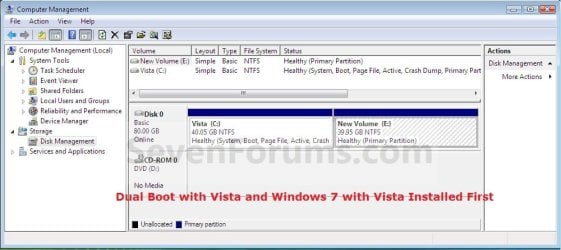
Create_Windows7_Partition_.jpg
B) If Windows 7 was installed first, then create a new partition for Vista (second OS) to be installed on later if you do not already have one to use. (See screenshot below)
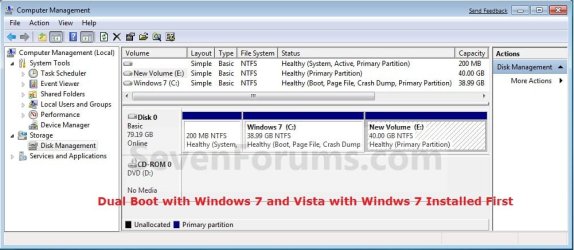
Create_Vista_Partition_.jpg
3. Insert the second OS (Windows 7 or Vista) installation DVD, and restart the computer to start installing it.
A) If Vista was installed first, then select the new partition (step 2A) or drive and do a clean install of Windows 7 (second OS) on it. (See screenshot below)
Windows7_Partition.jpg
B) If Windows 7 was installed first, then select the new partition (step 2B) or drive and do a clean install of Vista (second OS) on it. (See screenshot below)
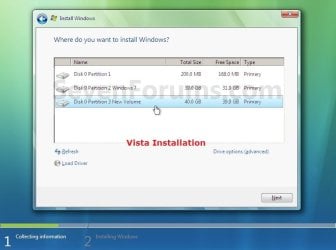
Vista_Partition.jpg
4. When the second OS is finished installing you will now have the option to select which OS to start to in the Windows Boot Manager screen at start up. (See example screenshot at the top of the tutorial)
NOTE: Whatever OS you install last will be the OS listed first in the Windows Boot Manager screen at startup.

5. This is what you will see in Disk Management below if you installed the second OS on another partition on the same hard drive (step 2).
A) If Vista was installed first. (See screenshot below)
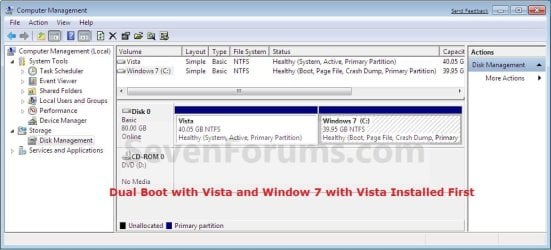
Disk_Management-Windows7.jpg
B) If Windows 7 was installed first. (See screenshot below)
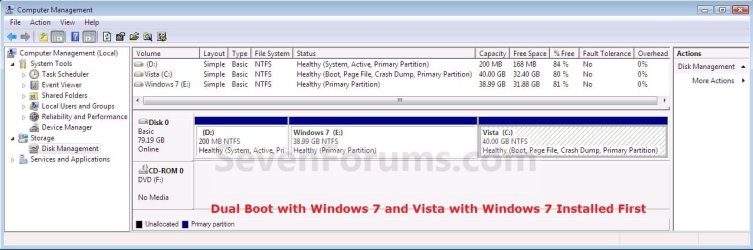
Disk_Management-Vista.jpg
That's it,
Shawn


Last edited:
Hello Roy,

Sorry, but it is required to reboot when dual booting operating systems to select and startup in the other one.

However, you can use virtual machines to have a operating system installed in to run another OS within a window in Windows 7.

Hope this helps,
Shawn
 

My Computer My Computer

At a glance

64-bit Windows 11 Pro for WorkstationsIntel i7-8700K OC'd to 5 GHz64 GB (4x16GB) G.SKILL TridentZ RGB DDR4 3600...ASUS ROG-STRIX-GTX1080TI-O11G-GAMING
Computer type
PC/Desktop
Computer Manufacturer/Model Number
Self built custom
OS
64-bit Windows 11 Pro for Workstations
CPU
Intel i7-8700K OC'd to 5 GHz
Motherboard
ASUS ROG Maximus XI Formula Z390
Memory
64 GB (4x16GB) G.SKILL TridentZ RGB DDR4 3600 MHz
Graphics Card(s)
ASUS ROG-STRIX-GTX1080TI-O11G-GAMING
Sound Card
Integrated
Monitor(s) Displays
2 x Samsung Odyssey G7 27"
Screen Resolution
2560x1440
Hard Drives
1TB Samsung 990 PRO M.2,
4TB Samsung 990 PRO PRO M.2,
TerraMaster F8 SSD Plus NAS
PSU
Seasonic Prime Titanium 850W
Case
Thermaltake Core P3
Cooling
Corsair Hydro H115i
Keyboard
Logitech wireless K800
Mouse
Logitech MX Master 4
Internet Speed
2 Gb/s Download and 100 Mb/s Upload
Antivirus
Malwarebyte Anti-Malware Premium
Browser
Google Chrome
Other Info
Logitech Z625 speaker system,
Logitech BRIO 4K Pro webcam,
HP Color LaserJet Pro MFP M477fdn,
APC SMART-UPS RT 1000 XL - SURT1000XLI,
Galaxy S23 Plus phone
Hi Shawn

Can I ask a couple of more fairly basic questions (as already mentioned dual booting is a new experience for me but I am learning!!!).
When deciding on the size of the new partition on the Vista C drive should I make allowances for any programmes I will want to load onto the new Windows 7 operating system or is it sufficient to allow just enough space for the new installation?
If in the future I need to do a complete reinstal of Vista (the existing operating system) will this delete the Windows 7 installation and remove the partition?
Many thanks for your excellent guidance thus far.

Regards

Roy
 

My Computer My Computer

At a glance

Winows XP Media
OS
Winows XP Media
Hi Roy,

Depends what you want to have on that partition.

Many people have just the o/s and installed programs, and keep all their data on a separate partition. 30 - 40 gb is enough in that case.


If you reinstall Vista, you can either just reinstall it to the partition it is already on - in which case the 7 partition will remain.

You would need to add an entry to Vista bcd to get the option to boot either Vista or 7.

Or, after reinstalling Vista, you could use Disk Management to delete the 7 partition if you no longer want it.

Alternatively, while reinstalling Vista, select Drive Options (advanced) and delete and repartition as you like.
 

My Computers My Computers

  • At a glance

    7 X64i5 84002x8gb 3200mhz
    Computer type
    PC/Desktop
    OS
    7 X64
    CPU
    i5 8400
    Motherboard
    gigabyte b365m ds3h
    Memory
    2x8gb 3200mhz
    Hard Drives
    various
    PSU
    pure power 11 400w cm
    Case
    Coolermaster
    Cooling
    cryorig m9i
  • At a glance

    7x64g54008gb ddr4 2400
    Computer type
    PC/Desktop
    OS
    7x64
    CPU
    g5400
    Motherboard
    ga b365m ds3h
    Memory
    8gb ddr4 2400
    PSU
    xfx pro 450w
Hi..
I was able to work with dual boot.
Then when I upgraded the win 7100 to 7127 I got aditional boot option including the previous seven.
I intend to remove the previous win seven boot option, should I used the Easy BCD from XP or edit it from win seven?

Kevin
 

My Computers My Computers

  • At a glance

    Windows 11 PrereleaseCORE i5 1040016GBGTX 750Ti
    Computer type
    PC/Desktop
    Computer Manufacturer/Model Number
    MSI
    OS
    Windows 11 Prerelease
    CPU
    CORE i5 10400
    Motherboard
    MSI H510M Pro
    Memory
    16GB
    Graphics Card(s)
    GTX 750Ti
    Sound Card
    Realtek HD Integrated
    Monitor(s) Displays
    Samsung Curved 24"; Samsung TV 50"
    Screen Resolution
    1920 x 1080
    Hard Drives
    Vi-Gen NVMe 256GB
    WD 3 TB
    Seagate 2 TB
    Seagate 4TB
    PSU
    Power Striker
    Case
    VBR
    Cooling
    Conventional
    Keyboard
    Logitech Wireless
    Mouse
    Logitech Wireless
    Internet Speed
    2MBPs
  • At a glance

    BigSurCore i58 GB
    Computer type
    Laptop
    System Manufacturer/Model Number
    Apple MacBook
    OS
    BigSur
    CPU
    Core i5
    Memory
    8 GB
    Monitor(s) Displays
    13 "
    Screen Resolution
    1366 x 768
    Hard Drives
    SSD 256 GB

My Computer My Computer

At a glance

64-bit Windows 11 Pro for WorkstationsIntel i7-8700K OC'd to 5 GHz64 GB (4x16GB) G.SKILL TridentZ RGB DDR4 3600...ASUS ROG-STRIX-GTX1080TI-O11G-GAMING
Computer type
PC/Desktop
Computer Manufacturer/Model Number
Self built custom
OS
64-bit Windows 11 Pro for Workstations
CPU
Intel i7-8700K OC'd to 5 GHz
Motherboard
ASUS ROG Maximus XI Formula Z390
Memory
64 GB (4x16GB) G.SKILL TridentZ RGB DDR4 3600 MHz
Graphics Card(s)
ASUS ROG-STRIX-GTX1080TI-O11G-GAMING
Sound Card
Integrated
Monitor(s) Displays
2 x Samsung Odyssey G7 27"
Screen Resolution
2560x1440
Hard Drives
1TB Samsung 990 PRO M.2,
4TB Samsung 990 PRO PRO M.2,
TerraMaster F8 SSD Plus NAS
PSU
Seasonic Prime Titanium 850W
Case
Thermaltake Core P3
Cooling
Corsair Hydro H115i
Keyboard
Logitech wireless K800
Mouse
Logitech MX Master 4
Internet Speed
2 Gb/s Download and 100 Mb/s Upload
Antivirus
Malwarebyte Anti-Malware Premium
Browser
Google Chrome
Other Info
Logitech Z625 speaker system,
Logitech BRIO 4K Pro webcam,
HP Color LaserJet Pro MFP M477fdn,
APC SMART-UPS RT 1000 XL - SURT1000XLI,
Galaxy S23 Plus phone
OK then
I did ask you as a self assurance and for being cautious.
Because I do exercising all this stuff either with my offline home PC and my workplace PC. Just wanting to achieve both work and fun in exploring this OS with minimal risk.
Thanks Brink

Kevin
 

My Computers My Computers

  • At a glance

    Windows 11 PrereleaseCORE i5 1040016GBGTX 750Ti
    Computer type
    PC/Desktop
    Computer Manufacturer/Model Number
    MSI
    OS
    Windows 11 Prerelease
    CPU
    CORE i5 10400
    Motherboard
    MSI H510M Pro
    Memory
    16GB
    Graphics Card(s)
    GTX 750Ti
    Sound Card
    Realtek HD Integrated
    Monitor(s) Displays
    Samsung Curved 24"; Samsung TV 50"
    Screen Resolution
    1920 x 1080
    Hard Drives
    Vi-Gen NVMe 256GB
    WD 3 TB
    Seagate 2 TB
    Seagate 4TB
    PSU
    Power Striker
    Case
    VBR
    Cooling
    Conventional
    Keyboard
    Logitech Wireless
    Mouse
    Logitech Wireless
    Internet Speed
    2MBPs
  • At a glance

    BigSurCore i58 GB
    Computer type
    Laptop
    System Manufacturer/Model Number
    Apple MacBook
    OS
    BigSur
    CPU
    Core i5
    Memory
    8 GB
    Monitor(s) Displays
    13 "
    Screen Resolution
    1366 x 768
    Hard Drives
    SSD 256 GB
It's no problem Kevin. That's what we are here for. :)
 

My Computer My Computer

At a glance

64-bit Windows 11 Pro for WorkstationsIntel i7-8700K OC'd to 5 GHz64 GB (4x16GB) G.SKILL TridentZ RGB DDR4 3600...ASUS ROG-STRIX-GTX1080TI-O11G-GAMING
Computer type
PC/Desktop
Computer Manufacturer/Model Number
Self built custom
OS
64-bit Windows 11 Pro for Workstations
CPU
Intel i7-8700K OC'd to 5 GHz
Motherboard
ASUS ROG Maximus XI Formula Z390
Memory
64 GB (4x16GB) G.SKILL TridentZ RGB DDR4 3600 MHz
Graphics Card(s)
ASUS ROG-STRIX-GTX1080TI-O11G-GAMING
Sound Card
Integrated
Monitor(s) Displays
2 x Samsung Odyssey G7 27"
Screen Resolution
2560x1440
Hard Drives
1TB Samsung 990 PRO M.2,
4TB Samsung 990 PRO PRO M.2,
TerraMaster F8 SSD Plus NAS
PSU
Seasonic Prime Titanium 850W
Case
Thermaltake Core P3
Cooling
Corsair Hydro H115i
Keyboard
Logitech wireless K800
Mouse
Logitech MX Master 4
Internet Speed
2 Gb/s Download and 100 Mb/s Upload
Antivirus
Malwarebyte Anti-Malware Premium
Browser
Google Chrome
Other Info
Logitech Z625 speaker system,
Logitech BRIO 4K Pro webcam,
HP Color LaserJet Pro MFP M477fdn,
APC SMART-UPS RT 1000 XL - SURT1000XLI,
Galaxy S23 Plus phone
I got a couple of questions...ahem a question. This is my first time trying to dual boot a system and I'm trying to figure out if it'll do me any good. First off I have a lot of programs installed on my Vista installation. Will Windows 7 be able to use those applications or am I going to have to double install the programs?

I guess my biggest question is will I have to double install programs in order for both OS's to use them? That'll take up quite a bit of memory. I've got a lot of multimedia software and they can take up a lot of space, so that's why I'm concerned.

Thanks,

PW
 

My Computer My Computer

At a glance

Windows Vista 6 UltimateIntel Core 2 Quad4 x Ballistix 1GB DDR32 x EVGA nVidia GeForce 8800 GTX | Ageia Phys...
Computer Manufacturer/Model Number
Custom built for Reliability and Longevity
OS
Windows Vista 6 Ultimate
CPU
Intel Core 2 Quad
Motherboard
EVGA nForce 780i SLI
Memory
4 x Ballistix 1GB DDR3
Graphics Card(s)
2 x EVGA nVidia GeForce 8800 GTX | Ageia Physx Card
Sound Card
Onboard Realtek HD Audio
Monitor(s) Displays
Hanns G HG216D HDMI
Screen Resolution
1680 x 1050
Hard Drives
2 x WD 400GB 7200rpm |
Raptor 100GB 10,000rpm
PSU
XClio 850w PSU
Case
XClio Windtunnel Case 2 x 250mm
Cooling
AC Freezer 7 Pro 92mm CPU Cooler
Keyboard
Kensington Slim Keyboard
Mouse
Microsoft Mobile Memory 8000
Other Info
Built in spite of a $3000 overheating Notebook (Poor Product Testing). Built this Rig for much more power and better reliability for the same price. Built to stand a test of time and remain fairly up-to-date and tried to minimize random restarts and system hard faults. Born July 17, 2006. Motherboard replaced once, all else origin build.
Hello PW, and welcome to Vista Forums.

Unfortunately, on separate installations like that, you will need to reinstall the programs in each OS that you want to run them in. :(

On the bright side however, if your computer supports virtualization, then you could install Windows Virtual PC in Windows 7 with Vista installed as a virtual PC (VM). The programs that you have installed on the Vista VM can have a shortcut of them placed in Windows 7 to be able to run them in Windows 7 from Vista.

http://www.sevenforums.com/tutorials/8254-windows-virtual-pc-create-virtual-machine.html

Hope this helps,
Shawn
 

My Computer My Computer

At a glance

64-bit Windows 11 Pro for WorkstationsIntel i7-8700K OC'd to 5 GHz64 GB (4x16GB) G.SKILL TridentZ RGB DDR4 3600...ASUS ROG-STRIX-GTX1080TI-O11G-GAMING
Computer type
PC/Desktop
Computer Manufacturer/Model Number
Self built custom
OS
64-bit Windows 11 Pro for Workstations
CPU
Intel i7-8700K OC'd to 5 GHz
Motherboard
ASUS ROG Maximus XI Formula Z390
Memory
64 GB (4x16GB) G.SKILL TridentZ RGB DDR4 3600 MHz
Graphics Card(s)
ASUS ROG-STRIX-GTX1080TI-O11G-GAMING
Sound Card
Integrated
Monitor(s) Displays
2 x Samsung Odyssey G7 27"
Screen Resolution
2560x1440
Hard Drives
1TB Samsung 990 PRO M.2,
4TB Samsung 990 PRO PRO M.2,
TerraMaster F8 SSD Plus NAS
PSU
Seasonic Prime Titanium 850W
Case
Thermaltake Core P3
Cooling
Corsair Hydro H115i
Keyboard
Logitech wireless K800
Mouse
Logitech MX Master 4
Internet Speed
2 Gb/s Download and 100 Mb/s Upload
Antivirus
Malwarebyte Anti-Malware Premium
Browser
Google Chrome
Other Info
Logitech Z625 speaker system,
Logitech BRIO 4K Pro webcam,
HP Color LaserJet Pro MFP M477fdn,
APC SMART-UPS RT 1000 XL - SURT1000XLI,
Galaxy S23 Plus phone
Thanks Shawn.

Yeah, I wanted to avoid VM, but that's okay.

I'll just wait till Windows 7 actually comes out so I don't have to worry about formatting my comp again. I reinstalled my 64 Ultimate today and managed folders from my storage drives to get rid of unnecessary clutter. I was going to prepare the system for the dual boot now that I had extra space, but I don't want to lose my programs as soon as the expire date hits. I might still install the OS to play around with it. The only problem is deciding which one I want to be my main workhorse.

I was hoping to utilize Windows 7 until the date, and then just easily plug back into my Vista install with no fuss and continue using my programs until I could pay for the new OS. Sokay though. I'm still deciding on what to do. I'd like a new fresh interface to play with and work in.

PW
 

My Computer My Computer

At a glance

Windows Vista 6 UltimateIntel Core 2 Quad4 x Ballistix 1GB DDR32 x EVGA nVidia GeForce 8800 GTX | Ageia Phys...
Computer Manufacturer/Model Number
Custom built for Reliability and Longevity
OS
Windows Vista 6 Ultimate
CPU
Intel Core 2 Quad
Motherboard
EVGA nForce 780i SLI
Memory
4 x Ballistix 1GB DDR3
Graphics Card(s)
2 x EVGA nVidia GeForce 8800 GTX | Ageia Physx Card
Sound Card
Onboard Realtek HD Audio
Monitor(s) Displays
Hanns G HG216D HDMI
Screen Resolution
1680 x 1050
Hard Drives
2 x WD 400GB 7200rpm |
Raptor 100GB 10,000rpm
PSU
XClio 850w PSU
Case
XClio Windtunnel Case 2 x 250mm
Cooling
AC Freezer 7 Pro 92mm CPU Cooler
Keyboard
Kensington Slim Keyboard
Mouse
Microsoft Mobile Memory 8000
Other Info
Built in spite of a $3000 overheating Notebook (Poor Product Testing). Built this Rig for much more power and better reliability for the same price. Built to stand a test of time and remain fairly up-to-date and tried to minimize random restarts and system hard faults. Born July 17, 2006. Motherboard replaced once, all else origin build.
Well, you have until 3/10/2010 with the RC version to play with it, and Windows 7 is suppose to be released on 10/22/2009.
 

My Computer My Computer

At a glance

64-bit Windows 11 Pro for WorkstationsIntel i7-8700K OC'd to 5 GHz64 GB (4x16GB) G.SKILL TridentZ RGB DDR4 3600...ASUS ROG-STRIX-GTX1080TI-O11G-GAMING
Computer type
PC/Desktop
Computer Manufacturer/Model Number
Self built custom
OS
64-bit Windows 11 Pro for Workstations
CPU
Intel i7-8700K OC'd to 5 GHz
Motherboard
ASUS ROG Maximus XI Formula Z390
Memory
64 GB (4x16GB) G.SKILL TridentZ RGB DDR4 3600 MHz
Graphics Card(s)
ASUS ROG-STRIX-GTX1080TI-O11G-GAMING
Sound Card
Integrated
Monitor(s) Displays
2 x Samsung Odyssey G7 27"
Screen Resolution
2560x1440
Hard Drives
1TB Samsung 990 PRO M.2,
4TB Samsung 990 PRO PRO M.2,
TerraMaster F8 SSD Plus NAS
PSU
Seasonic Prime Titanium 850W
Case
Thermaltake Core P3
Cooling
Corsair Hydro H115i
Keyboard
Logitech wireless K800
Mouse
Logitech MX Master 4
Internet Speed
2 Gb/s Download and 100 Mb/s Upload
Antivirus
Malwarebyte Anti-Malware Premium
Browser
Google Chrome
Other Info
Logitech Z625 speaker system,
Logitech BRIO 4K Pro webcam,
HP Color LaserJet Pro MFP M477fdn,
APC SMART-UPS RT 1000 XL - SURT1000XLI,
Galaxy S23 Plus phone
WIN 7 64bit and vista 32bit ate the same pc!!!

Q- Can I install win 7 64bit on C partition where WIN Vista 32bit installed and get dual boot . my laptop CPU can run 64bit versions. Thanks for the Dual boot tutorial. Cheers
 

My Computer My Computer

At a glance

windows 7 7600 64bit, vista 32bit
Computer Manufacturer/Model Number
Toshiba Qosmio F50
OS
windows 7 7600 64bit, vista 32bit
Hello Qosmio, and welcome to Seven Forums.

Sorry, but you would need to either install Windows 7 on a separate partition or hard drive. It cannot be installed on the same partition that Vista is on without Vista being replaced by Windows 7. If you do not have another hard drive, then you can create a new partition (step 2A) from the Vista partition, if you have enough free space (20 GB), to install Windows 7 on.

Hope this helps,
Shawn
 

My Computer My Computer

At a glance

64-bit Windows 11 Pro for WorkstationsIntel i7-8700K OC'd to 5 GHz64 GB (4x16GB) G.SKILL TridentZ RGB DDR4 3600...ASUS ROG-STRIX-GTX1080TI-O11G-GAMING
Computer type
PC/Desktop
Computer Manufacturer/Model Number
Self built custom
OS
64-bit Windows 11 Pro for Workstations
CPU
Intel i7-8700K OC'd to 5 GHz
Motherboard
ASUS ROG Maximus XI Formula Z390
Memory
64 GB (4x16GB) G.SKILL TridentZ RGB DDR4 3600 MHz
Graphics Card(s)
ASUS ROG-STRIX-GTX1080TI-O11G-GAMING
Sound Card
Integrated
Monitor(s) Displays
2 x Samsung Odyssey G7 27"
Screen Resolution
2560x1440
Hard Drives
1TB Samsung 990 PRO M.2,
4TB Samsung 990 PRO PRO M.2,
TerraMaster F8 SSD Plus NAS
PSU
Seasonic Prime Titanium 850W
Case
Thermaltake Core P3
Cooling
Corsair Hydro H115i
Keyboard
Logitech wireless K800
Mouse
Logitech MX Master 4
Internet Speed
2 Gb/s Download and 100 Mb/s Upload
Antivirus
Malwarebyte Anti-Malware Premium
Browser
Google Chrome
Other Info
Logitech Z625 speaker system,
Logitech BRIO 4K Pro webcam,
HP Color LaserJet Pro MFP M477fdn,
APC SMART-UPS RT 1000 XL - SURT1000XLI,
Galaxy S23 Plus phone
Thank you so much SHAWN

That's what I meant separate partition on driver c there's 80GB free, so I'll make another partition and install WIN 7 on it. Thanks a million for your answer, very help full. Kind Regards
 

My Computer My Computer

At a glance

windows 7 7600 64bit, vista 32bit
Computer Manufacturer/Model Number
Toshiba Qosmio F50
OS
windows 7 7600 64bit, vista 32bit
You're welcome Qosmio. I hope it goes smoothly for you. :)
 

My Computer My Computer

At a glance

64-bit Windows 11 Pro for WorkstationsIntel i7-8700K OC'd to 5 GHz64 GB (4x16GB) G.SKILL TridentZ RGB DDR4 3600...ASUS ROG-STRIX-GTX1080TI-O11G-GAMING
Computer type
PC/Desktop
Computer Manufacturer/Model Number
Self built custom
OS
64-bit Windows 11 Pro for Workstations
CPU
Intel i7-8700K OC'd to 5 GHz
Motherboard
ASUS ROG Maximus XI Formula Z390
Memory
64 GB (4x16GB) G.SKILL TridentZ RGB DDR4 3600 MHz
Graphics Card(s)
ASUS ROG-STRIX-GTX1080TI-O11G-GAMING
Sound Card
Integrated
Monitor(s) Displays
2 x Samsung Odyssey G7 27"
Screen Resolution
2560x1440
Hard Drives
1TB Samsung 990 PRO M.2,
4TB Samsung 990 PRO PRO M.2,
TerraMaster F8 SSD Plus NAS
PSU
Seasonic Prime Titanium 850W
Case
Thermaltake Core P3
Cooling
Corsair Hydro H115i
Keyboard
Logitech wireless K800
Mouse
Logitech MX Master 4
Internet Speed
2 Gb/s Download and 100 Mb/s Upload
Antivirus
Malwarebyte Anti-Malware Premium
Browser
Google Chrome
Other Info
Logitech Z625 speaker system,
Logitech BRIO 4K Pro webcam,
HP Color LaserJet Pro MFP M477fdn,
APC SMART-UPS RT 1000 XL - SURT1000XLI,
Galaxy S23 Plus phone
one more qustion....

Good day,
Can I make partition from D (not c where vista installed ) cuz i have like 100GB on D,
So, can I follow the same instruction you posted before? or not?
I have only one hard drive 320GB with to partitions C & D


Best regards
 

My Computer My Computer

At a glance

windows 7 7600 64bit, vista 32bit
Computer Manufacturer/Model Number
Toshiba Qosmio F50
OS
windows 7 7600 64bit, vista 32bit
Hello Qosmio,

If D is a OEM recovery partition, then you cannot split it to create another partition (ex: F) from without deleting D twice.

If not, then yes you sure can. :)
 

My Computer My Computer

At a glance

64-bit Windows 11 Pro for WorkstationsIntel i7-8700K OC'd to 5 GHz64 GB (4x16GB) G.SKILL TridentZ RGB DDR4 3600...ASUS ROG-STRIX-GTX1080TI-O11G-GAMING
Computer type
PC/Desktop
Computer Manufacturer/Model Number
Self built custom
OS
64-bit Windows 11 Pro for Workstations
CPU
Intel i7-8700K OC'd to 5 GHz
Motherboard
ASUS ROG Maximus XI Formula Z390
Memory
64 GB (4x16GB) G.SKILL TridentZ RGB DDR4 3600 MHz
Graphics Card(s)
ASUS ROG-STRIX-GTX1080TI-O11G-GAMING
Sound Card
Integrated
Monitor(s) Displays
2 x Samsung Odyssey G7 27"
Screen Resolution
2560x1440
Hard Drives
1TB Samsung 990 PRO M.2,
4TB Samsung 990 PRO PRO M.2,
TerraMaster F8 SSD Plus NAS
PSU
Seasonic Prime Titanium 850W
Case
Thermaltake Core P3
Cooling
Corsair Hydro H115i
Keyboard
Logitech wireless K800
Mouse
Logitech MX Master 4
Internet Speed
2 Gb/s Download and 100 Mb/s Upload
Antivirus
Malwarebyte Anti-Malware Premium
Browser
Google Chrome
Other Info
Logitech Z625 speaker system,
Logitech BRIO 4K Pro webcam,
HP Color LaserJet Pro MFP M477fdn,
APC SMART-UPS RT 1000 XL - SURT1000XLI,
Galaxy S23 Plus phone
I can't shrink c but....

Hay,

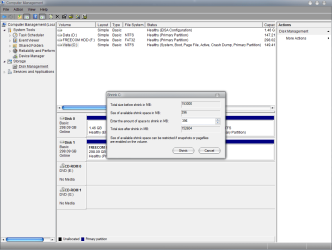
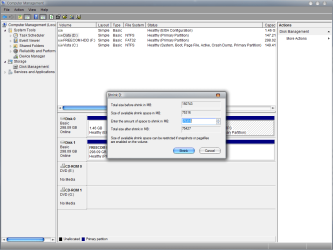
What do you mean by OEM recovery partition? yes my recovery files located on D, but when i tried to shrink D, i can get on 70GB,
Do you mean if i continue i will loose recovery partition? or some thing els?


Kind Regards
 

My Computer My Computer

At a glance

windows 7 7600 64bit, vista 32bit
Computer Manufacturer/Model Number
Toshiba Qosmio F50
OS
windows 7 7600 64bit, vista 32bit
Qosmio,

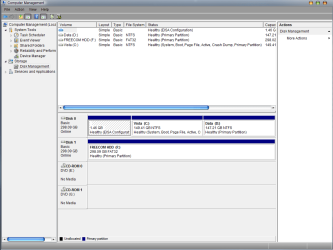
Could you post a screenshot of your Disk Management first?

A OEM recovery partition is what is included in a store bought brand (ex: HP, Gateway, etc...) computer that is used to restore your computer's Vista installation back to factory condition when needed. It's usually not a good idea to mess with the recovery partition unless you have already created a set of recovery discs from it and do not plan on using the recovery partition again.
 

My Computer My Computer

At a glance

64-bit Windows 11 Pro for WorkstationsIntel i7-8700K OC'd to 5 GHz64 GB (4x16GB) G.SKILL TridentZ RGB DDR4 3600...ASUS ROG-STRIX-GTX1080TI-O11G-GAMING
Computer type
PC/Desktop
Computer Manufacturer/Model Number
Self built custom
OS
64-bit Windows 11 Pro for Workstations
CPU
Intel i7-8700K OC'd to 5 GHz
Motherboard
ASUS ROG Maximus XI Formula Z390
Memory
64 GB (4x16GB) G.SKILL TridentZ RGB DDR4 3600 MHz
Graphics Card(s)
ASUS ROG-STRIX-GTX1080TI-O11G-GAMING
Sound Card
Integrated
Monitor(s) Displays
2 x Samsung Odyssey G7 27"
Screen Resolution
2560x1440
Hard Drives
1TB Samsung 990 PRO M.2,
4TB Samsung 990 PRO PRO M.2,
TerraMaster F8 SSD Plus NAS
PSU
Seasonic Prime Titanium 850W
Case
Thermaltake Core P3
Cooling
Corsair Hydro H115i
Keyboard
Logitech wireless K800
Mouse
Logitech MX Master 4
Internet Speed
2 Gb/s Download and 100 Mb/s Upload
Antivirus
Malwarebyte Anti-Malware Premium
Browser
Google Chrome
Other Info
Logitech Z625 speaker system,
Logitech BRIO 4K Pro webcam,
HP Color LaserJet Pro MFP M477fdn,
APC SMART-UPS RT 1000 XL - SURT1000XLI,
Galaxy S23 Plus phone
Screenshots..

7-31-2009 5-03-43 AM.png

7-31-2009 5-07-55 AM.png

7-31-2009 5-08-33 AM.png

Hope that's help.....Regards
 

My Computer My Computer

At a glance

windows 7 7600 64bit, vista 32bit
Computer Manufacturer/Model Number
Toshiba Qosmio F50
OS
windows 7 7600 64bit, vista 32bit
Back
Top