Dual boot lost?

Knowle

New member
Local time
2:47 PM
Messages
6
Hey I've been reading the forum now and then so I decided I finally sign up and see if I could get some help. I'm not sure if this would be the correct section so I apologize in advance.

The problem I'm having is that I had been running WinXP SP3, I used GParted to partition my hdd so I could do a clean install and try out windows 7. The odd thing is though, at first when it would boot up I'd have two option to select from, either "Windows 7" or "Select an older version of windows", then I reinstalled windows 7 at one point(to the same partition used before) and lost that menu all together, now whenever I turn my PC on it just acts like windows 7 is the only OS installed. I know my other partition is still there though, my question is, how would I go about retrieving it if possible. Can I just pop in my WinXP disc and do a repair or recovery on the other partition? Never had this problem dual booting windows and linux so im unsure as to what I should do. :(
 

My Computer

OS
windows 7
win 7 rewrites the masterbootrecord, i guess to break SLI loaders. Best is to do a repair with your xp disk and rebuld the xp bootrecord.
 

My Computer

Computer Manufacturer/Model Number
me and myself
OS
vista x64/ win 7 x64
CPU
phenom 9950 BE
Motherboard
ASUS M2A-VM HDMI
Memory
8 gb
Graphics Card(s)
nvidia gts 250
Sound Card
realtek HD onboard
Monitor(s) Displays
dual hd 19" tft
Screen Resolution
1440x900
Hard Drives
2 x 500 gb WDC
1 x 500 gb Seagate
1 x 1000 gb Seagate
1 80 gb raptor
1 usb 160 gb
Cooling
standard issue
Keyboard
logitech g11
Mouse
usb wireless MS laser 6000
Internet Speed
18 mb (according to my provider :)
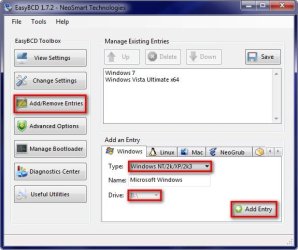
You need to download EasyBCD and recreate your boot file for your XP partition, it's fairly easy just look through all the options, have a play and you will figure it out, here's a clue!

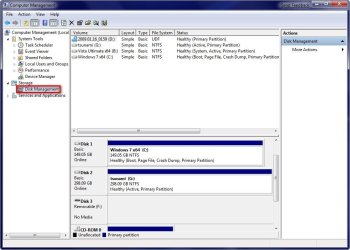
Also you will need to go to computer and right click and select manage to access disk manager, then fine your XP partition and assign a drive letter to it, one you do that remember to recreate the boot file ussing the same drive letter.

Once you are back in XP it will still show as C drive so don't be worried about that.

2009-01-18_041255.jpg

2009-01-18_041409.jpg
 

My Computer

Computer Manufacturer/Model Number
Home Brew
OS
Windows 7 Ultimate Vista Ultimate x64
CPU
Core 2 Duo E8500 3.16Ghz @ 3.8Ghz
Motherboard
eVGA 750i FTW
Memory
2x2Gigs Patriot PC2-6400 LL
Graphics Card(s)
Inno3D GeForce GTX260 216 SP
Monitor(s) Displays
ASUS VW222U 22" 2ms Response time
Screen Resolution
1680x1050
Hard Drives
SATA 150GB
SATA II 250GB
USB IDE 750GB Ext.
PSU
HYTEC 600W & Thermaltake 650W Toughpower Power Exp
Case
Thermaltake Armor LCS (Liquid Cooling System)
Cooling
Liquid Cooling System
Keyboard
Logitech G15 Gaming Keyboard
Mouse
Logitech G9 Gaming Mouse
Hello Knowle and welcome to the Windows Seven forums.

You can bring the menu back by doing the following:

1. Open Disk Management and assign a drive letter to your WinXP partition, if it doesn't have one. (e.g. D: )
2. Close Disk Management.

3. Open Command Prompt (run as administrator)
4. Type :

bcdedit /create {ntldr} /d "Windows XP SP3"

bcdedit /set {ntldr} device partition=d:

(change d: above with the drive letter you have on your winxp partition , as it is seen in windows 7)

bcdedit /set {ntldr} path \ntldr

bcdedit /displayorder {ntldr} /addlast

5. Reboot and you should see the menu and be able to boot to XP too.

Hope it helps
 

My Computer

Computer Manufacturer/Model Number
ENIAC
OS
Windows 7 RC 7100 32bit/64bit
CPU
Intel Core2Duo E4500 2.20 GHz
Motherboard
ASUS P5LD2-X/1333
Memory
2x1GB Kinsgston DDR2 800MHz
Graphics Card(s)
Nvidia 8500GT
Sound Card
Onboard High Definition Audio Device
Monitor(s) Displays
Sony Bravia 42"
Case
LINKW 2222
Cooling
Standard Intel
Keyboard
Some cheap one
Mouse
Microsoft Intellimouse something
Internet Speed
24MBps ADSL
Posted same time, Mr.Grim....I went the manual way :p


Cheers
 

My Computer

Computer Manufacturer/Model Number
ENIAC
OS
Windows 7 RC 7100 32bit/64bit
CPU
Intel Core2Duo E4500 2.20 GHz
Motherboard
ASUS P5LD2-X/1333
Memory
2x1GB Kinsgston DDR2 800MHz
Graphics Card(s)
Nvidia 8500GT
Sound Card
Onboard High Definition Audio Device
Monitor(s) Displays
Sony Bravia 42"
Case
LINKW 2222
Cooling
Standard Intel
Keyboard
Some cheap one
Mouse
Microsoft Intellimouse something
Internet Speed
24MBps ADSL
sigh...I must be doing something wrong. I'm sure you guys will start to hate me. xD

I tried the manual way first, got an error at the command prompt each time. So then I tried using the easyBCD program but I was unable to change the drive letter when I first added it, after I went back to the entry I was able to change the drive letter(F:/ is what I assigned from Computer Management) however it also changes the drive letter for windows 7 as well. Then whenever I reboot and select Windows XP it gives me an error saying the Boot.ini was invalid.

from the command prompt trying to do it manually:
C:\Windows\system32>bcdedit /create {ntldr} /d Windows XP
A description for the new entry must be specified.
Run "bcdedit /?" for command line assistance.
The parameter is incorrect.

C:\Windows\system32>


Also, I just went back and tried to change the drive letter for the fun of it but it said "Windows cannot modify the drive letter of your volume. This may happen if your volume is a system or boot volume, or has page files." O_o

edit: thanks for all the help so far! :D
 

My Computer

OS
windows 7
I have noticed that EasyBCD will do that sometimes, just change the letter again and save it then check both are correct and if not just change it again and save it till it works, it's just a bug with EasyBCD but it will work.
 

My Computer

Computer Manufacturer/Model Number
Home Brew
OS
Windows 7 Ultimate Vista Ultimate x64
CPU
Core 2 Duo E8500 3.16Ghz @ 3.8Ghz
Motherboard
eVGA 750i FTW
Memory
2x2Gigs Patriot PC2-6400 LL
Graphics Card(s)
Inno3D GeForce GTX260 216 SP
Monitor(s) Displays
ASUS VW222U 22" 2ms Response time
Screen Resolution
1680x1050
Hard Drives
SATA 150GB
SATA II 250GB
USB IDE 750GB Ext.
PSU
HYTEC 600W & Thermaltake 650W Toughpower Power Exp
Case
Thermaltake Armor LCS (Liquid Cooling System)
Cooling
Liquid Cooling System
Keyboard
Logitech G15 Gaming Keyboard
Mouse
Logitech G9 Gaming Mouse
Best in these cases is really to revert to the lowest common denominator. Whilst for those savvy with the issue it's feasible using booteditors, for those who just want to boot and go it can seriously mess up your installation.

First rule of preventing permanent issues, always reboot using the disk of the oldest os first. Repair os's in sequence of their releases.
 

My Computer

Computer Manufacturer/Model Number
me and myself
OS
vista x64/ win 7 x64
CPU
phenom 9950 BE
Motherboard
ASUS M2A-VM HDMI
Memory
8 gb
Graphics Card(s)
nvidia gts 250
Sound Card
realtek HD onboard
Monitor(s) Displays
dual hd 19" tft
Screen Resolution
1440x900
Hard Drives
2 x 500 gb WDC
1 x 500 gb Seagate
1 x 1000 gb Seagate
1 80 gb raptor
1 usb 160 gb
Cooling
standard issue
Keyboard
logitech g11
Mouse
usb wireless MS laser 6000
Internet Speed
18 mb (according to my provider :)
Well, finally got it working from the CL, sadly, I still get the same error message when I try to boot into it saying "invalid BOOT.INI" or w/e.

Microsoft Windows [Version 6.1.7000]
Copyright (c) 2006 Microsoft Corporation. All rights reserved.

C:\Windows\system32>bcdedit /set {ntldr} device partition=f:
The operation completed successfully.

C:\Windows\system32>bcdedit /set {ntldr} path \ntldr
The operation completed successfully.

C:\Windows\system32>bcdedit /displayorder {ntldr} /addlast
The operation completed successfully.

C:\Windows\system32>


edit: EasyBCD would continue to change both of the drives letter no matter how many times I tried. lol
 

My Computer

OS
windows 7

My Computer

Computer type
PC/Desktop
Computer Manufacturer/Model Number
Systems by SmartEyeball
OS
8 Pro x64
CPU
i7 3770K 4.6GHz
Motherboard
ASUS P8Z77 WS
Memory
16GB G.Skill Trident X 2666mhz
Graphics Card(s)
x2 EVGA 780 Ti Superclocked SLI
Sound Card
SB X-FI Surround 5.1 PRO USB / ATH-AD900 Headphones
Monitor(s) Displays
x3 Dell U2410 / 58" Samsung
Screen Resolution
5760*1200/ 1920*1200
Hard Drives
2x Intel 520 240GB (RAID 0) * 2x WD Caviar Blacks 2TB (RAID 0) * 2TB WD Caviar Black * Sony Optirac DVD
PSU
Silverstone Strider Evolution 1200W
Case
Thermaltake Level 10 GT Snow Edition
Cooling
Noctua NH-D14
Keyboard
Topre Realforce // Ducky Shine MX Black // Filco Ninja TKL
Mouse
Thermaltake Theron (Highly Recommended) + Razer Imperator
Antivirus
MSE
Browser
IE, FF, WaterFox
Other Info
GT Extreme V2 Sim Racing Cockpit + 40" LCD and K/B Mouse stand ▼
Fanatec CSR Elite Wheel + Clubsport V1 Pedals + CSR shifter/7G-H ▼Saitek X52 Pro ▼ TrackIR 5 Pro
Buttkicker v2 Seat Rumbler with Dedicated 5.1 and Sub Woofer attached to frame ▼
=
Bloody Big Grin
Back
Top