Solved Dual Boot screen with only one OS

Nisroc

New member
Local time
9:36 PM
Messages
8
Hi all

This has been odd for me but I get the dual boot screen when I start up my computer for the last few days. I have tried to turn off this screen using msconfig and Boot tab and also tried to turn it off system properties -> advanced -> startup and recovery -> settings but after I apply the settings the dual boot screen comes back at startup.

system startup settings are:
Default OS: Windows 7 (only)
Time to display list of operating systems (unchecked)
Time to display recovery options when needed (unchecked)

I have also searched google and checked other similar problems nothing seems to work here. Only changes made to the system in last month were trying to solve this problem and updates. The inside of the computer was chassis was cleaned out just before this problem was noticed.

Any help on this?
 

My Computer My Computer

Computer type
PC/Desktop
Computer Manufacturer/Model Number
Custom Build
OS
Windows 7 Pro 64 bit
CPU
i7 2600K CPU @ 3.40Ghz
Motherboard
GIGABYTE GA-Z68A-D3H-B3 LGA 1155 Intel Z68 HDMI SATA 6Gb/s U
Memory
8 GB
Graphics Card(s)
Nivida Geforce GTX 570
Hard Drives
C: 200.34GB / Free 94 GB
D: 500GB / Free 200 GB
E: 213 GB / Free 134 GB
Antivirus
Microsoft
Browser
Chrome, Firefox, IE
Try putting a value in the unchecked items and then check them, 15 seconds for OS choice, 30 seconds for recovery screen.
 

My Computer My Computer

Computer type
PC/Desktop
Computer Manufacturer/Model Number
Lenovo Thinkcenter M92p
OS
Windows 10/Windows 7 (My Idea- Virtual PC)
CPU
Intel(R) Core(TM) i5-3470 CPU @ 3.20GHz
Motherboard
Lenovo MahoBay
Memory
16 GB
Graphics Card(s)
nVidia GeForce GTX 750 Ti (2GB)
Sound Card
nVidia HD Audio
Monitor(s) Displays
RCA 4KTV 50"
Screen Resolution
3840p x 2160p
Hard Drives
Onboard:
Seagate ST500DM009-2F110A 500GB
WDC WD4000FYYZ-01UL1B1 (WD-WCC131910831) [3726 GB]

USB 3.0
My Book 1140 (WCAZAD122454) [1862 GB]
Apple MDT MD10EAVS-00D7B0 (0000AB123473) [931 GB]

External:
WD Blue Innostar/Matsunichi (465 GB)
WD
PSU
Stock Thinkcenter M92p
Case
Stock Thinkcenter M92p
Cooling
Active
Keyboard
BYTEC BY-GA-KT-100-AC
Mouse
BYTEC
Internet Speed
1 GHz Down, 40 Mbps Up
Antivirus
Windows Defender
Browser
EDGE
Other Info
Old Other Info:
I finally have an Intel machine that has more than 8GB of Ram.
My ASUS M2N-SE AMD Windows 7 machine is back to Windows 7. Replaced the AMD 4400+ CPU and maxed out the RAM (4GB).
My Core Duo machine is only 2GB of Ram and it is locked to Windows XP in order to run Pro Tools 6.4, which I have been using since 2004.
I have one other Dell OptiPlex 980 tower, Identical to this one,
Fixed Using EasyBCD I just checked skip boot screen at start up. New problem came up though, I got a windows failed to start screen along with two options start normally or detect problems. Could be hardware or software. Since I just clean out inside the chassis and removed gfx card i think i should try a re seat of the card to try correct the problem
 

My Computer My Computer

Computer type
PC/Desktop
Computer Manufacturer/Model Number
Custom Build
OS
Windows 7 Pro 64 bit
CPU
i7 2600K CPU @ 3.40Ghz
Motherboard
GIGABYTE GA-Z68A-D3H-B3 LGA 1155 Intel Z68 HDMI SATA 6Gb/s U
Memory
8 GB
Graphics Card(s)
Nivida Geforce GTX 570
Hard Drives
C: 200.34GB / Free 94 GB
D: 500GB / Free 200 GB
E: 213 GB / Free 134 GB
Antivirus
Microsoft
Browser
Chrome, Firefox, IE
Reseated the card but no change in the boot. I turn the computer on and it gets the windows 7 boot screen and then restarts. after it restarts it takes me to a start normally or check for errors. here is a list of easy bcd

Windows Boot Manager
--------------------
identifier {9dea862c-5cdd-4e70-acc1-f32b344d4795}
device partition=\Device\HarddiskVolume1
description Windows Boot Manager
locale en-US
inherit {7ea2e1ac-2e61-4728-aaa3-896d9d0a9f0e}
default {492380e1-94a0-11e1-881a-970da5fecb89}
resumeobject {492380e0-94a0-11e1-881a-970da5fecb89}
displayorder {492380e1-94a0-11e1-881a-970da5fecb89}
toolsdisplayorder {b2721d73-1db4-4c62-bf78-c548a880142d}
timeout 0
displaybootmenu No

Windows Boot Loader
-------------------
identifier {492380e1-94a0-11e1-881a-970da5fecb89}
device partition=C:
path \Windows\system32\winload.exe
description Windows 7
locale en-US
inherit {6efb52bf-1766-41db-a6b3-0ee5eff72bd7}
recoverysequence {492380e2-94a0-11e1-881a-970da5fecb89}
recoveryenabled Yes
osdevice partition=C:
systemroot \Windows
resumeobject {492380e0-94a0-11e1-881a-970da5fecb89}
nx OptIn
usefirmwarepcisettings No
 

My Computer My Computer

Computer type
PC/Desktop
Computer Manufacturer/Model Number
Custom Build
OS
Windows 7 Pro 64 bit
CPU
i7 2600K CPU @ 3.40Ghz
Motherboard
GIGABYTE GA-Z68A-D3H-B3 LGA 1155 Intel Z68 HDMI SATA 6Gb/s U
Memory
8 GB
Graphics Card(s)
Nivida Geforce GTX 570
Hard Drives
C: 200.34GB / Free 94 GB
D: 500GB / Free 200 GB
E: 213 GB / Free 134 GB
Antivirus
Microsoft
Browser
Chrome, Firefox, IE
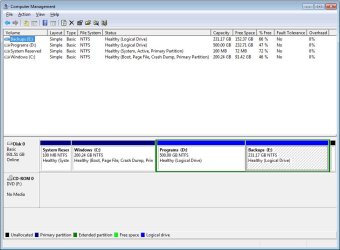
drive.jpg

No OS in the past installed only windows 7
 
Last edited:

My Computer My Computer

Computer type
PC/Desktop
Computer Manufacturer/Model Number
Custom Build
OS
Windows 7 Pro 64 bit
CPU
i7 2600K CPU @ 3.40Ghz
Motherboard
GIGABYTE GA-Z68A-D3H-B3 LGA 1155 Intel Z68 HDMI SATA 6Gb/s U
Memory
8 GB
Graphics Card(s)
Nivida Geforce GTX 570
Hard Drives
C: 200.34GB / Free 94 GB
D: 500GB / Free 200 GB
E: 213 GB / Free 134 GB
Antivirus
Microsoft
Browser
Chrome, Firefox, IE
I did that and come up with a problem that cannot be repaired.

details that best I could write them out
Problem Signatures
01 - 6.1.7600.16385
02 - 6.1.7600.16385
03 - unknown
04 - 272
05 - autoFailOver
06 - 1
07 - no root cause
08 - 6.1.7601.2.1.0.256.1

local ID 1033
 

My Computer My Computer

Computer type
PC/Desktop
Computer Manufacturer/Model Number
Custom Build
OS
Windows 7 Pro 64 bit
CPU
i7 2600K CPU @ 3.40Ghz
Motherboard
GIGABYTE GA-Z68A-D3H-B3 LGA 1155 Intel Z68 HDMI SATA 6Gb/s U
Memory
8 GB
Graphics Card(s)
Nivida Geforce GTX 570
Hard Drives
C: 200.34GB / Free 94 GB
D: 500GB / Free 200 GB
E: 213 GB / Free 134 GB
Antivirus
Microsoft
Browser
Chrome, Firefox, IE
The AIO disk for windows seven that I have has two windows RE start ups that I was able to use to get into bootrec. Previously, I had to use a windows seven install disc, which did not have the bootrec command in sources, so I had to find it in the system 32 folder of my operating system partition.
 

My Computer My Computer

Computer type
PC/Desktop
Computer Manufacturer/Model Number
Lenovo Thinkcenter M92p
OS
Windows 10/Windows 7 (My Idea- Virtual PC)
CPU
Intel(R) Core(TM) i5-3470 CPU @ 3.20GHz
Motherboard
Lenovo MahoBay
Memory
16 GB
Graphics Card(s)
nVidia GeForce GTX 750 Ti (2GB)
Sound Card
nVidia HD Audio
Monitor(s) Displays
RCA 4KTV 50"
Screen Resolution
3840p x 2160p
Hard Drives
Onboard:
Seagate ST500DM009-2F110A 500GB
WDC WD4000FYYZ-01UL1B1 (WD-WCC131910831) [3726 GB]

USB 3.0
My Book 1140 (WCAZAD122454) [1862 GB]
Apple MDT MD10EAVS-00D7B0 (0000AB123473) [931 GB]

External:
WD Blue Innostar/Matsunichi (465 GB)
WD
PSU
Stock Thinkcenter M92p
Case
Stock Thinkcenter M92p
Cooling
Active
Keyboard
BYTEC BY-GA-KT-100-AC
Mouse
BYTEC
Internet Speed
1 GHz Down, 40 Mbps Up
Antivirus
Windows Defender
Browser
EDGE
Other Info
Old Other Info:
I finally have an Intel machine that has more than 8GB of Ram.
My ASUS M2N-SE AMD Windows 7 machine is back to Windows 7. Replaced the AMD 4400+ CPU and maxed out the RAM (4GB).
My Core Duo machine is only 2GB of Ram and it is locked to Windows XP in order to run Pro Tools 6.4, which I have been using since 2004.
I have one other Dell OptiPlex 980 tower, Identical to this one,
Are there any other performance problems? If not you can leave it alone unless you want to renew your boot sector:

If you want to back up your files and a System image you could try the Bootsect commands given for exporting the BCD to rewrite it in Use Bootrec.exe in the Windows RE to troubleshoot startup issues.

I would also run the bootrec commands first to see if they repair anything.

I agree was about to start messing with a reinstall but /fixmbr has worked wonders in past. I am beginning to wonder if it had anything to do with malware. Ill give it a go an see what happens
 

My Computer My Computer

Computer type
PC/Desktop
Computer Manufacturer/Model Number
Custom Build
OS
Windows 7 Pro 64 bit
CPU
i7 2600K CPU @ 3.40Ghz
Motherboard
GIGABYTE GA-Z68A-D3H-B3 LGA 1155 Intel Z68 HDMI SATA 6Gb/s U
Memory
8 GB
Graphics Card(s)
Nivida Geforce GTX 570
Hard Drives
C: 200.34GB / Free 94 GB
D: 500GB / Free 200 GB
E: 213 GB / Free 134 GB
Antivirus
Microsoft
Browser
Chrome, Firefox, IE
Nothing! at first i thought it worked as it did boot the first time. after it booted I lost all connection to the net i checked device manager and it said windows could not load the drivers. I reinstalled those and rebooted... back to square one with the OS loading to boot screen and then restarting.

At this point i am thinking about reinstalling and if that does not work a format
 

My Computer My Computer

Computer type
PC/Desktop
Computer Manufacturer/Model Number
Custom Build
OS
Windows 7 Pro 64 bit
CPU
i7 2600K CPU @ 3.40Ghz
Motherboard
GIGABYTE GA-Z68A-D3H-B3 LGA 1155 Intel Z68 HDMI SATA 6Gb/s U
Memory
8 GB
Graphics Card(s)
Nivida Geforce GTX 570
Hard Drives
C: 200.34GB / Free 94 GB
D: 500GB / Free 200 GB
E: 213 GB / Free 134 GB
Antivirus
Microsoft
Browser
Chrome, Firefox, IE
Put the boot screen back up, choose the OS you chose before you made the changes with EasyBCD.

Does this OS boot up ok ?

If so delete the defunct OS and you should be good.
 

My Computer My Computer

Computer type
PC/Desktop
Computer Manufacturer/Model Number
Skylake Special #666
OS
Windows 10 Pro x64
CPU
Intel Core i7 6700K
Motherboard
Asus Sabertooth Z170 Mark 1
Memory
GSkill TridentZ RGB 16GB 3600 16-16-16-36
Graphics Card(s)
EVGA GTX 980 Ti SC x2
Sound Card
Realtek High Definition
Monitor(s) Displays
AOC G2460PG
Screen Resolution
1920 x 1080 144Hz
Hard Drives
Samsung 860 Pro 256GB, Seagate Barracuda 4TB x2
PSU
EVGA 1000 P2, EVGA White Custom Braided Cables
Case
Corsair Vengeance C70 Gunmetal Black
Cooling
Corsair H100i v2, Corsair ML120 x2, Thermal Grizzly Kryonaut
Keyboard
Logitech G910 Orion Spectrum
Mouse
Logitech G700s
Internet Speed
Verizon Fios Quantum Gateway 75/75
Antivirus
Windows Defender, Malwarebytes Free 3.8.3
Browser
Chrome
Other Info
Corsair SP120 x4, LG Blu-ray Drive, Durabrand HT-395 100 Watt Dolby Digital Amp, Corsair H2100 Wireless 7.1 Headset
He doesn't seem to have another OS, unless its hiding on one of those Data partitions - is there a Windows file on either?

Was there another choice on the Boot Menu or just the extant Win7?

What is the source of this AIO Win7 installer? I see problems regularly with these and would never use one myself.

If Startup Repair can't sort it out and you can't get a stable configuration then I would start over with new media following these same steps in Clean Reinstall - Factory OEM Windows 7 which compile everything that works best in Win7 in tens of thousands of installs we've helped with directly here. As long as you stick with those steps, tools and methods you will keep a perfect install of Win7.
 
Hi all this problem seems to be solved. After all the frustration tonight I gave up and began a format. Sadly after the format I found a weird problem which I dismissed yesterday. When I began typing for the first time after a boot i got a + sign. I found this wired after format and narrowed it down to a hardware problem. I tried a old keyboard and to my luck no dual boot screen or + sign. So now I feel very stupid and sorry I wasted your time. Machine was due for a format in a way anyway and no lost data. Thanks to all for the effort.
 

My Computer My Computer

Computer type
PC/Desktop
Computer Manufacturer/Model Number
Custom Build
OS
Windows 7 Pro 64 bit
CPU
i7 2600K CPU @ 3.40Ghz
Motherboard
GIGABYTE GA-Z68A-D3H-B3 LGA 1155 Intel Z68 HDMI SATA 6Gb/s U
Memory
8 GB
Graphics Card(s)
Nivida Geforce GTX 570
Hard Drives
C: 200.34GB / Free 94 GB
D: 500GB / Free 200 GB
E: 213 GB / Free 134 GB
Antivirus
Microsoft
Browser
Chrome, Firefox, IE
Back
Top