Solved Dual Boot Windows 7 & XP on 2 separate drives on Acer laptop

Removing the hard drives is a pinch as it turns out. What I suspect to be the D: drive slides out exactly like removing a window. C: drive, has a screw to remove first and slides out exactly the same way. I did it this morning with both and I didn't need to "dig for them" under other stuff. If that really is the easier way to go (and that's the impression I got from your earlier posts) I can totally do it.

You said:
For the slipstream you want the XP AHCI and/or SATA drivers added to the image, that's all. If it clearly provides AHCI then use that mode in BIOS under SATA controller.

In the first sentence you've told me what I need to add to the image. Okay..... Sort of. From Kaktussoft's post #12 on this thread, it sounds like he Googled online for these drivers specific for my make and model laptop and has them on hand for when we get to step #8, (he said: "I already found the correct WINXP sata drivers btw. I'll post them later in the process"). I am then to use these drivers for the Copy & Paste in step #10. That's been my understanding from posts so far regarding drivers. I think the most relevant specific questions I need to ask are - where do I need to go to get these drivers AND how do I get them?
The second sentence of yours "if it clearly provides AHCI then use that mode in BIOS under SATA controller". I can't grasp what you are saying or asking me to do. Would you mind restating this a different way, please. Sorry, I'm not trying to be obtuse, I'm just trying to be clear so that all goes well.
 

My Computer My Computer

At a glance

Windows 7 Home Premium 64 bitIntel(R) Core(TM)2 Duo CPU T6400 @ 2.00 GHz4.00 GBNVIDIA GeForce 9600M GT
Computer type
Laptop
Computer Manufacturer/Model Number
Acer Aspire 8730
OS
Windows 7 Home Premium 64 bit
CPU
Intel(R) Core(TM)2 Duo CPU T6400 @ 2.00 GHz
Motherboard
?
Memory
4.00 GB
Graphics Card(s)
NVIDIA GeForce 9600M GT
Hard Drives
Disk partition (C:) 282 GB
Disk partition (D:) 298 GB

these are separate disk drives and not a case of 1 drive being partitioned.
Antivirus
none yet
Browser
Internet Explorer 9
So you know how to detach win7 drive physically from system, correct?
You know how to slipstream, you only want to know the drivers (it's winxp 32bits), correct?

BIOS is already in AHCI mode, otherwise you didn't get the STOP 7B error on install. "device manager" screenshot on win7 confirms that.
 

My Computer My Computer

At a glance

Microsoft Windows 7 Home Premium 64-bits 7601...Intel(R) Core(TM) i3 CPU M 370 @ 2.40GHz4,00 GBATI Mobility Radeon HD 5400 Series
Computer type
Laptop
Computer Manufacturer/Model Number
ACER ASPIRE 5742G
OS
Microsoft Windows 7 Home Premium 64-bits 7601 Multiprocessor Free Service Pack 1
CPU
Intel(R) Core(TM) i3 CPU M 370 @ 2.40GHz
Motherboard
Acer Aspire 5742G
Memory
4,00 GB
Graphics Card(s)
ATI Mobility Radeon HD 5400 Series
Sound Card
(1) AMD High Definition Audio Device (2) Realtek High Defi
Screen Resolution
1366 x 768 x 32 bits (4294967296 colors) @ 60 Hz
Hard Drives
WDC WD5000BEVT-22ZAT0
drivers attached
 

Attachments

My Computer My Computer

At a glance

Microsoft Windows 7 Home Premium 64-bits 7601...Intel(R) Core(TM) i3 CPU M 370 @ 2.40GHz4,00 GBATI Mobility Radeon HD 5400 Series
Computer type
Laptop
Computer Manufacturer/Model Number
ACER ASPIRE 5742G
OS
Microsoft Windows 7 Home Premium 64-bits 7601 Multiprocessor Free Service Pack 1
CPU
Intel(R) Core(TM) i3 CPU M 370 @ 2.40GHz
Motherboard
Acer Aspire 5742G
Memory
4,00 GB
Graphics Card(s)
ATI Mobility Radeon HD 5400 Series
Sound Card
(1) AMD High Definition Audio Device (2) Realtek High Defi
Screen Resolution
1366 x 768 x 32 bits (4294967296 colors) @ 60 Hz
Hard Drives
WDC WD5000BEVT-22ZAT0
Wow, I've got both of you helping me now. Awesome! Okay, It sounds like you're both giving slightly different approaches to this. I do want to go with the slipstream method, please. That's what I've been gearing up for. Kaktussoft, you asked my XP PRO/SP3 disc 32 bit English? I just opened my XP disc to View Files & Folders to try and find out but where can I look to give you a YES or NO answer?

Let's get this answered first, before we dive into the slipstreaming process.
 

My Computer My Computer

At a glance

Windows 7 Home Premium 64 bitIntel(R) Core(TM)2 Duo CPU T6400 @ 2.00 GHz4.00 GBNVIDIA GeForce 9600M GT
Computer type
Laptop
Computer Manufacturer/Model Number
Acer Aspire 8730
OS
Windows 7 Home Premium 64 bit
CPU
Intel(R) Core(TM)2 Duo CPU T6400 @ 2.00 GHz
Motherboard
?
Memory
4.00 GB
Graphics Card(s)
NVIDIA GeForce 9600M GT
Hard Drives
Disk partition (C:) 282 GB
Disk partition (D:) 298 GB

these are separate disk drives and not a case of 1 drive being partitioned.
Antivirus
none yet
Browser
Internet Explorer 9
Wow, I've got both of you helping me now. Awesome! Okay, It sounds like you're both giving slightly different approaches to this. I do want to go with the slipstream method, please. That's what I've been gearing up for. Kaktussoft, you asked my XP PRO/SP3 disc 32 bit English? I just opened my XP disc to View Files & Folders to try and find out but where can I look to give you a YES or NO answer?

Let's get this answered first, before we dive into the slipstreaming process.
What is written on the disk? No sign like x86 or x64 ? winxp 64 bits is very uncommon anyway
 

My Computer My Computer

At a glance

Microsoft Windows 7 Home Premium 64-bits 7601...Intel(R) Core(TM) i3 CPU M 370 @ 2.40GHz4,00 GBATI Mobility Radeon HD 5400 Series
Computer type
Laptop
Computer Manufacturer/Model Number
ACER ASPIRE 5742G
OS
Microsoft Windows 7 Home Premium 64-bits 7601 Multiprocessor Free Service Pack 1
CPU
Intel(R) Core(TM) i3 CPU M 370 @ 2.40GHz
Motherboard
Acer Aspire 5742G
Memory
4,00 GB
Graphics Card(s)
ATI Mobility Radeon HD 5400 Series
Sound Card
(1) AMD High Definition Audio Device (2) Realtek High Defi
Screen Resolution
1366 x 768 x 32 bits (4294967296 colors) @ 60 Hz
Hard Drives
WDC WD5000BEVT-22ZAT0
It's 32 bit English. You also asked about a 7B stop error. Yes I did get that AFTER I installed Windows 7 and just after the files had loaded from my attempted XP install. Take a look at my very first post and you'll see in one of my screenshots (the bluescreen) the words: STOP: 0x0000007B blah blah blah.
 

My Computer My Computer

At a glance

Windows 7 Home Premium 64 bitIntel(R) Core(TM)2 Duo CPU T6400 @ 2.00 GHz4.00 GBNVIDIA GeForce 9600M GT
Computer type
Laptop
Computer Manufacturer/Model Number
Acer Aspire 8730
OS
Windows 7 Home Premium 64 bit
CPU
Intel(R) Core(TM)2 Duo CPU T6400 @ 2.00 GHz
Motherboard
?
Memory
4.00 GB
Graphics Card(s)
NVIDIA GeForce 9600M GT
Hard Drives
Disk partition (C:) 282 GB
Disk partition (D:) 298 GB

these are separate disk drives and not a case of 1 drive being partitioned.
Antivirus
none yet
Browser
Internet Explorer 9
You'll also need XP w/SP3 to have a chance for it to install on modern hardware.

Browse into the file Kaktussoft provided to see which drivers NLite can see. I'd take any and all it detects.
 
it is XP/SP3.
 

My Computer My Computer

At a glance

Windows 7 Home Premium 64 bitIntel(R) Core(TM)2 Duo CPU T6400 @ 2.00 GHz4.00 GBNVIDIA GeForce 9600M GT
Computer type
Laptop
Computer Manufacturer/Model Number
Acer Aspire 8730
OS
Windows 7 Home Premium 64 bit
CPU
Intel(R) Core(TM)2 Duo CPU T6400 @ 2.00 GHz
Motherboard
?
Memory
4.00 GB
Graphics Card(s)
NVIDIA GeForce 9600M GT
Hard Drives
Disk partition (C:) 282 GB
Disk partition (D:) 298 GB

these are separate disk drives and not a case of 1 drive being partitioned.
Antivirus
none yet
Browser
Internet Explorer 9
  1. Make a slipstreamed bootable winxp CD, include drivers I gave you.
  2. physically detach win7 drive form system
  3. Boot from slipstreamed winxp install DVD and install winxp
Post results
 

My Computer My Computer

At a glance

Microsoft Windows 7 Home Premium 64-bits 7601...Intel(R) Core(TM) i3 CPU M 370 @ 2.40GHz4,00 GBATI Mobility Radeon HD 5400 Series
Computer type
Laptop
Computer Manufacturer/Model Number
ACER ASPIRE 5742G
OS
Microsoft Windows 7 Home Premium 64-bits 7601 Multiprocessor Free Service Pack 1
CPU
Intel(R) Core(TM) i3 CPU M 370 @ 2.40GHz
Motherboard
Acer Aspire 5742G
Memory
4,00 GB
Graphics Card(s)
ATI Mobility Radeon HD 5400 Series
Sound Card
(1) AMD High Definition Audio Device (2) Realtek High Defi
Screen Resolution
1366 x 768 x 32 bits (4294967296 colors) @ 60 Hz
Hard Drives
WDC WD5000BEVT-22ZAT0
Once again don't forget to delete all partitions and full format your new XP partition on the target HD before install, using the booted XP CD.
 
But maybe better:
First download all drivers listed in #18 and put on usb stick. Or download from within win7 and put it in C:\drivers folder. So you can access it from within winxp (of course you have to reattach win7 drive to system after installing winxp succesfully). It will be on E:\drivers, F:\drivers or D:\drivers .
 

My Computer My Computer

At a glance

Microsoft Windows 7 Home Premium 64-bits 7601...Intel(R) Core(TM) i3 CPU M 370 @ 2.40GHz4,00 GBATI Mobility Radeon HD 5400 Series
Computer type
Laptop
Computer Manufacturer/Model Number
ACER ASPIRE 5742G
OS
Microsoft Windows 7 Home Premium 64-bits 7601 Multiprocessor Free Service Pack 1
CPU
Intel(R) Core(TM) i3 CPU M 370 @ 2.40GHz
Motherboard
Acer Aspire 5742G
Memory
4,00 GB
Graphics Card(s)
ATI Mobility Radeon HD 5400 Series
Sound Card
(1) AMD High Definition Audio Device (2) Realtek High Defi
Screen Resolution
1366 x 768 x 32 bits (4294967296 colors) @ 60 Hz
Hard Drives
WDC WD5000BEVT-22ZAT0
I downloaded your zip folder of Drivers from #18 and unzipped it, it is in two places at the moment. On a flash drive and in my Downloads folder. I have tried to find my C:\Drivers and even unchecked the box to "hide hidden files and folders". but I can't find C:\Drivers. Once I do find it, what do I do with all those files that I unzipped. Add them to a current folder? Delete Drivers in a current folder and replace the contents with yours?
 

My Computer My Computer

At a glance

Windows 7 Home Premium 64 bitIntel(R) Core(TM)2 Duo CPU T6400 @ 2.00 GHz4.00 GBNVIDIA GeForce 9600M GT
Computer type
Laptop
Computer Manufacturer/Model Number
Acer Aspire 8730
OS
Windows 7 Home Premium 64 bit
CPU
Intel(R) Core(TM)2 Duo CPU T6400 @ 2.00 GHz
Motherboard
?
Memory
4.00 GB
Graphics Card(s)
NVIDIA GeForce 9600M GT
Hard Drives
Disk partition (C:) 282 GB
Disk partition (D:) 298 GB

these are separate disk drives and not a case of 1 drive being partitioned.
Antivirus
none yet
Browser
Internet Explorer 9
I downloaded your zip folder of Drivers from #18 and unzipped it, it is in two places at the moment. On a flash drive and in my Downloads folder. I have tried to find my C:\Drivers and even unchecked the box to "hide hidden files and folders". but I can't find C:\Drivers. Once I do find it, what do I do with all those files that I unzipped. Add them to a current folder? Delete Drivers in a current folder and replace the contents with yours?
Just make a folder called C:\drivers in win7 yourself . Put all zipfiles from post #18 in that folder.
If winxp has been installed and boots successfully you can browse to X:\drivers (the drive letter will be D, E, F etc... I don't know). In winxp you can unzip them How to Zip and Unzip (Beginner Tutorial, Windows XP) - YouTube
and install them.

After installing winxp the network driver isn't installed yet, so you can't download the drivers. That's why I want you to download them from within win7 prior to install winxp.
 

My Computer My Computer

At a glance

Microsoft Windows 7 Home Premium 64-bits 7601...Intel(R) Core(TM) i3 CPU M 370 @ 2.40GHz4,00 GBATI Mobility Radeon HD 5400 Series
Computer type
Laptop
Computer Manufacturer/Model Number
ACER ASPIRE 5742G
OS
Microsoft Windows 7 Home Premium 64-bits 7601 Multiprocessor Free Service Pack 1
CPU
Intel(R) Core(TM) i3 CPU M 370 @ 2.40GHz
Motherboard
Acer Aspire 5742G
Memory
4,00 GB
Graphics Card(s)
ATI Mobility Radeon HD 5400 Series
Sound Card
(1) AMD High Definition Audio Device (2) Realtek High Defi
Screen Resolution
1366 x 768 x 32 bits (4294967296 colors) @ 60 Hz
Hard Drives
WDC WD5000BEVT-22ZAT0
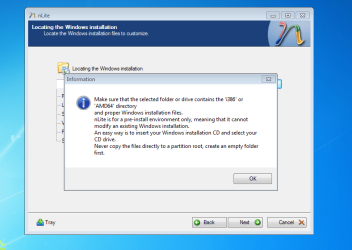
The slipstream instructions might need updating as I have encountered this pop up right after clicking "OK" at step #5 before I even had the chance to click "Next" to proceed to step #6. What is it asking for? The most recent nLite seems to work a bit different?

nLite slipstream instructions.PNG
 
Last edited:

My Computer My Computer

At a glance

Windows 7 Home Premium 64 bitIntel(R) Core(TM)2 Duo CPU T6400 @ 2.00 GHz4.00 GBNVIDIA GeForce 9600M GT
Computer type
Laptop
Computer Manufacturer/Model Number
Acer Aspire 8730
OS
Windows 7 Home Premium 64 bit
CPU
Intel(R) Core(TM)2 Duo CPU T6400 @ 2.00 GHz
Motherboard
?
Memory
4.00 GB
Graphics Card(s)
NVIDIA GeForce 9600M GT
Hard Drives
Disk partition (C:) 282 GB
Disk partition (D:) 298 GB

these are separate disk drives and not a case of 1 drive being partitioned.
Antivirus
none yet
Browser
Internet Explorer 9
Are you browsing from the Add Drivers F-key prompt during XP CD loading? I've not heard that anyone was able to add drivers directly from the booted XP installer without floppy support.

I'd continue with slipstreaming to pick up those drivers from where you unzipped them. Nlite should only want the ones which are actually drivers.
 
Greg, you asked "Are you browsing from the Add Drivers F-key prompt during XP CD loading?" No, I'm following as close to verbatim as I can from the slipstreaming instructions I found at the link you gave me in #11. I even printed them out. As for continuing with the slipstreaming, it won't let me proceed beyond this popup shown in the screenshot unless I give it exactly what it's asking for.
 

My Computer My Computer

At a glance

Windows 7 Home Premium 64 bitIntel(R) Core(TM)2 Duo CPU T6400 @ 2.00 GHz4.00 GBNVIDIA GeForce 9600M GT
Computer type
Laptop
Computer Manufacturer/Model Number
Acer Aspire 8730
OS
Windows 7 Home Premium 64 bit
CPU
Intel(R) Core(TM)2 Duo CPU T6400 @ 2.00 GHz
Motherboard
?
Memory
4.00 GB
Graphics Card(s)
NVIDIA GeForce 9600M GT
Hard Drives
Disk partition (C:) 282 GB
Disk partition (D:) 298 GB

these are separate disk drives and not a case of 1 drive being partitioned.
Antivirus
none yet
Browser
Internet Explorer 9
I had not seen the screenshot as it was posted at the same time as my last post.

The screenshot seems to be asking for the XP installation files. Have you put your XP CD in the drive and selected it? We cannot see what's underneath the popup window so don't know if you've loaded the XP files correctly from CD.
 
Here's what I've done so far.

Step 1 said to Download and install nLite. I did this but as I said in one of my posts earlier today there were associated files that looked like they were needed too. I asked for your thoughts on those but there was no response so I assumed I was good having downloaded just nLite.
image 1 of slipstream.PNG
Step 2 said Make a new folder for your Windows XP image. I right clicked on the Desktop and selected New then Folder and named it Windows XP-SP3-SATA.
image 2 of slipstream.PNG
Step 3 said Insert XP CD & start nLite. XP didn't do anything other than an AutoPlay popping up to run setup or open to view files. I closed this and started nLite.
image 3 of slipstream.PNG
Step 4 said click Next which I did.

Step 5 said 5) Choose your Windows XP image folder, & Click Next, than OK.
Note: nLite will put the image into your folder. I clicked the browse button on that window and selected my Windows XP PRO-SP3-SATA located on my desktop. And it was at this exact instant that the popup asking other directories. There is no going beyond this point unless what this is asking for is met. That is to say I cannot get to OK and Next.
nLite slipstream instructions.PNG
 

My Computer My Computer

At a glance

Windows 7 Home Premium 64 bitIntel(R) Core(TM)2 Duo CPU T6400 @ 2.00 GHz4.00 GBNVIDIA GeForce 9600M GT
Computer type
Laptop
Computer Manufacturer/Model Number
Acer Aspire 8730
OS
Windows 7 Home Premium 64 bit
CPU
Intel(R) Core(TM)2 Duo CPU T6400 @ 2.00 GHz
Motherboard
?
Memory
4.00 GB
Graphics Card(s)
NVIDIA GeForce 9600M GT
Hard Drives
Disk partition (C:) 282 GB
Disk partition (D:) 298 GB

these are separate disk drives and not a case of 1 drive being partitioned.
Antivirus
none yet
Browser
Internet Explorer 9
Back
Top