Solved Dual boot with Ubuntu 14.04Lts can't boot into windows7

greschky

New member
Local time
6:15 PM
Messages
3
Hello,

I have recently installed Ubuntu 14.04Lts in dual boot on my second drive, but since then I am unable to boot into windows 7 on my first drive. Ubuntu is installed in UEFI like Windows. In my BIOS, I have the two options for my first drive( ubuntu and Windows Boot Manager), Ubuntu works fine but when I select Windows Boot Manager I get error :

Status : 0xc0000225
Info: A required device isn't connected or can't be accessed.

When I boot into Ubuntu, I got 3 entries in my GRUB menu : Windows UEFI bootmgfw.efi, Windows Boot UEFI loader and Windows Boot Manager(on /dev/sda1)
They all give me the same error when I select them :

file : \windows\system32\winload.efi
status : 0xc0000001
info : The application or operating system couldn't be loaded because a required file is missing or contains errors.

I have tried booting in UEFI on a windows 7 installation disk and running startup repairs, but it failed in System files integrity check and repair with failed-error code 0x490.

Can anyone help?

Thanks!
 

My Computer My Computer

At a glance

Windows 7 Home Premium 64bit
Computer type
Laptop
Computer Manufacturer/Model Number
Asus
OS
Windows 7 Home Premium 64bit
Can you please post a screenshot of the menu you have when you boot into the installation disk?
 

My Computer My Computer

At a glance

Windows 7 Home Premium 64bitIntel Pentium P6200 @ 2.13 GHz3 GB - Dual-Channel DDR3 @ 532MHz (7-7-7-20)Intel Graphics
Computer type
Laptop
Computer Manufacturer/Model Number
Acer Aspire 5733Z
OS
Windows 7 Home Premium 64bit
CPU
Intel Pentium P6200 @ 2.13 GHz
Motherboard
Acer Aspire 5733Z V1.07
Memory
3 GB - Dual-Channel DDR3 @ 532MHz (7-7-7-20)
Graphics Card(s)
Intel Graphics
Sound Card
High Definition Audio Device
Monitor(s) Displays
Gateway 1440 x 900 Display
Screen Resolution
1440x900 / 1366x768
Hard Drives
1
PSU
Charger: Gold Pheonix 65W AC Adapter
Keyboard
Multimedia LED
Mouse
Gateway Rev.C
Antivirus
Avast 2015
Browser
Google Chrome
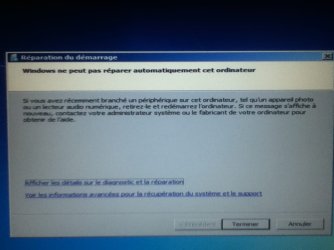
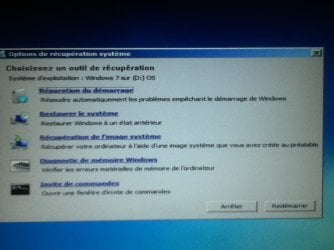
Here it is, sorry but my installation disc is in french. If you have any question just ask.

-The first picture is the menu I get after booting the disc in UEFI.
-The second is what I get when I click on repair my computer.
-The third one is what I get after clicking next and the automatic repair is executed. Amessage saying that my computer could not be automaticly repaired.
-Finally, the last one is the menu I have access when I click on advanced options from the previous.

Thanks a lot for the help!
 

Attachments

  • IMG_0009.JPG
    IMG_0009.JPG
    39.6 KB · Views: 0
  • IMG_0011.JPG
    IMG_0011.JPG
    58.3 KB · Views: 0
  • IMG_0013.JPG
    IMG_0013.JPG
    52.5 KB · Views: 1
  • IMG_0014.JPG
    IMG_0014.JPG
    58.8 KB · Views: 1

My Computer My Computer

At a glance

Windows 7 Home Premium 64bit
Computer type
Laptop
Computer Manufacturer/Model Number
Asus
OS
Windows 7 Home Premium 64bit
Hi and welcome to SevenForums,
The last experience I had with a dual boot with mate mint 17.1 I had to install along side win-7 because the install couldn't be done on a separate partition with 1 system reserved partition and the 7 os on another
Your dealing with another install altogether with uefi and as I understand several partitions or was there just 1 system reserved 100mg or 3... ?

Needless to say installing along side was interesting and a bit too cozy for my comfort so I reinstalled 7 clean to get out of that arrangement ;)

Now the two are on totally separate sdd's and have their own boot systems.
 

My Computer My Computer

At a glance

Win-7-Pro64bit 7-H-Prem-64biti7-5930K 2nd i9-9940x both water blocked VRM'...Trident-z 3200C14 2nd Trident-z 3600C16EVGA 1080ti ftw3 2nd Titan Xp both water blocked
Computer type
PC/Desktop
Computer Manufacturer/Model Number
Custom assembled by me :}
OS
Win-7-Pro64bit 7-H-Prem-64bit
CPU
i7-5930K 2nd i9-9940x both water blocked VRM's too
Motherboard
ASUS SABERTOOTH X99 2nd ASUS x299 Apex
Memory
Trident-z 3200C14 2nd Trident-z 3600C16
Graphics Card(s)
EVGA 1080ti ftw3 2nd Titan Xp both water blocked
Sound Card
Built-in Realtek
Monitor(s) Displays
1-AOC G2460PG 24"G-Sync 144Hz/ 2nd 1-ASUS VG248QE 24" 144Hz
Screen Resolution
1920 x 1080 144Hz
Hard Drives
2-Samsung M.2 Evo & Evo Plus
2-Samsung 850 EVO 500GB SSD's/ 3-2.5 W.D. Black 1tb-&3-1tb/3-3.5 WD Black 1tb hdd's
PSU
EVGA SuperNOVA 1000-P2 2nd 1200-P2
Case
2-Corsair Obsidian Series 450D Black ATX Mid Tower
Cooling
Custom water loops
Keyboard
Logitech G710+/ 2nd Logitech G910
Mouse
2-RedDragon M901 Perdition 16400 dpi Gaming mouse = wired
Internet Speed
Comcast Ping 19ms 89.31mbps download speed 6.12mbps upload
Antivirus
Malwarebytes Pro/ Superantispyware Pro
Browser
FireFox & Pale moon
Other Info
2nd ASUS X299 Apex/Intel i9-9940x with Custom water loop/7H-Prem-x64/Corsair 450D case/Ram Trident-z 3600C16 4x8gb / Samsung970Evo plus 500gb SSD/Dual ssd EZ swap evo/PSU EVGA SuperNova 1200w-P2 80+Platinum/GPU Titan Xp /8-ML-140 on push-pull on 2-280GTX rads
Please boot into the System Recovery Options
Command Line and run:

DISKPART
LIST DISK
SEL DIS 0 (first confirm that is the number of Win7 disk)
LIST PART
Take a camera snap then for each partition listed
SEL PART #
DETAIL PART
Take another picture of each partition's details.
If any partitions are not shown, try LIST VOL instead.
 

My Computer My Computer

At a glance

Vista, Windows7, Mint Mate, Zorin, Windows 8from 1.6GHz Duo to i7
Computer Manufacturer/Model Number
HP, Dell, Gateway, Toshiba - 4 laptops and 2 desktops
OS
Vista, Windows7, Mint Mate, Zorin, Windows 8
CPU
from 1.6GHz Duo to i7
Monitor(s) Displays
2x HP w2207
Hard Drives
5x HDD, 7x SSD, 12x Externals
Keyboard
with trackball - no mices
Mouse
Trackball mice
Internet Speed
DSL 6000
I think this is the easiest procedure to fix it:

Fixing a Corrupted UEFI Partition in Windows 8 or 8.1

But you may lose the Grub in the process. Then reinstall Ubuntu with the Windows disk disconnected and select the OS via the BIOS boot order.

Whs, i don't think that the guy who wrote that guide even know how UEFI booting works. The commands Fixboot and Fixmbr has no effect in a UEFI booting environment as UEFI doesn't read the MBR at all. The first sector of a GPT disk will only contain a dummy MBR and it's sole purpose is to prevent legacy partitioning tools from modifying the GPT structure. Without that dummy MBR, a legacy partition tool like "Win XP" "Disk Management" will think that the disk has no partitions, MBR and disk signature and hence will prompt to "initialize" the disk. That may cause data loss so GPT uses this dummy MBR to trick the legacy tools to think that the disk has been initialized and partitioned under MBR scheme. Also there is no command named Rebuildmbr in my knowledge. I think what he meant is Bootrec /rebuildbcd.


Btw, GRUB2 which supports UEFI is still in beta stage and has lots of unresolved bugs. As of now, it's better stick with legacy/MBR installations if you plan to dual boot - especially with Linux.
 

My Computer My Computer

At a glance

Windows 7 Ultimate x64
Computer type
PC/Desktop
OS
Windows 7 Ultimate x64
  • Like
Reactions: whs
Thanks Anshad for casting more light on UEFI repair, but do we have any other strategies to follow than Startup Repair? Are the other commands suggested in Fixing a Corrupted UEFI Partition in Windows 8 or 8.1 helpful at all?

It bothers me that while we are getting ahead of installation failures on UEFI finally after several years time, we have not gotten any new strategies for repairing UEFI.

Come to think of it, the demand isn't that great like it was when we were developing many workarounds for repairing MBR boot here. But it would be nice to have more tricks up our sleeve.It may be partly that many of us are still hosting Win7 on BIOS. Only one of the dozen machines at my homes is UEFI.

I'm going to try to message the author to ask him to comment, also ask Mahmoud at EasyBCD to work with us more on developing workarounds like we did for MBR. Does anyone have a link to the thread where we recently helped move the EFI System partition to same disk via Startup Repair?
 
I think this is the easiest procedure to fix it:

Fixing a Corrupted UEFI Partition in Windows 8 or 8.1

But you may lose the Grub in the process. Then reinstall Ubuntu with the Windows disk disconnected and select the OS via the BIOS boot order.

Whs, i don't think that the guy who wrote that guide even know how UEFI booting works. The commands Fixboot and Fixmbr has no effect in a UEFI booting environment as UEFI doesn't read the MBR at all. The first sector of a GPT disk will only contain a dummy MBR and it's sole purpose is to prevent legacy partitioning tools from modifying the GPT structure. Without that dummy MBR, a legacy partition tool like "Win XP" "Disk Management" will think that the disk has no partitions, MBR and disk signature and hence will prompt to "initialize" the disk. That may cause data loss so GPT uses this dummy MBR to trick the legacy tools to think that the disk has been initialized and partitioned under MBR scheme. Also there is no command named Rebuildmbr in my knowledge. I think what he meant is Bootrec /rebuildbcd.


Btw, GRUB2 which supports UEFI is still in beta stage and has lots of unresolved bugs. As of now, it's better stick with legacy/MBR installations if you plan to dual boot - especially with Linux.
Thanks, that's good to know. I was not aware of that since I never had this situation myself.
 

My Computer My Computer

At a glance

Vista, Windows7, Mint Mate, Zorin, Windows 8from 1.6GHz Duo to i7
Computer Manufacturer/Model Number
HP, Dell, Gateway, Toshiba - 4 laptops and 2 desktops
OS
Vista, Windows7, Mint Mate, Zorin, Windows 8
CPU
from 1.6GHz Duo to i7
Monitor(s) Displays
2x HP w2207
Hard Drives
5x HDD, 7x SSD, 12x Externals
Keyboard
with trackball - no mices
Mouse
Trackball mice
Internet Speed
DSL 6000
Hi

To repair a corrupted UEFI boot-loader, the easiest way i know is to use the Bcdboot command line tool. For example when we need to completely remove GRUB2 EFI and restore Windows boot manager ( Win 7/8 ), the following steps will do the trick.

1. Boot from a Windows installation disk under UEFI mode. You can't repair a UEFI installation if you boot from DVD/USB in MBR mode.

2 Open a command prompt at boot by pressing Shift + F10 together.

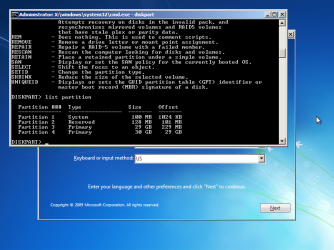
3. Use DISKPART to identify the EFI System Partition or ESP and assign a letter to it. List Partition command will identify the ESP as type System.

List partitions.png

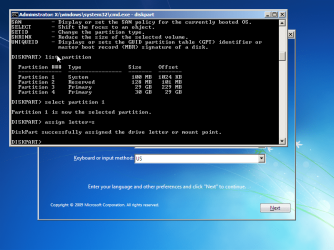
4. Select the ESP and assign a letter to it.

assign letter.png

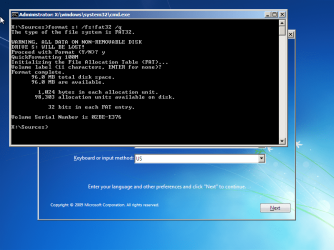
5. Exit DISKPART and format the ESP under FAT32 file system. This will completely wipe whatever boot loader is currently on the ESP - whether it is Windows or GRUB2 boot loader.

Format.png

6. Now initialize the ESP with Bcdboot command. this will create new BCD store and Windows boot manger on the ESP from scratch.

Bcdboot C:\Windows

This will remove GRUB EFI and install Windows boot manager.

( Assuming C: is the Windows drive's letter assigned by WinPE. Usually Windows partition will be the first "Data" type partition (Microsoft basic data partition - Wikipedia, the free encyclopedia) on a GPT disk and usually it will receive letter C:. However this may change if you install Windows to a second or third "Data" partition. Check the contents of partitions with DIR command when in doubt.)

Bcdboot.png

Btw, i don't think this will help resolving OP's situation. It seems more like a critical system files corruption than a boot loader issue/Windows partition severely damaged.
 

My Computer My Computer

At a glance

Windows 7 Ultimate x64
Computer type
PC/Desktop
OS
Windows 7 Ultimate x64
Thanks Anshad. I'm going to bookmark both those posts of yours.

You introduce the CMD repair saying it is for GRUB removal. Will it not also work to manually rebuild the BCD on sole Windows UEFI installs, if Startup Repair somehow cannot do that?

Does the REbuild BCD normally on EasyBCD work the same on the beta as your commands? Where do they differ or can you tell?

I've asked the author of EasyBCD Mahmoud to share his wisdom here too.

I tried to rep you again but as per usual I need to wait.
 
Does the REbuild BCD normally on EasyBCD work the same on the beta as your commands? Where do they differ or can you tell?

EasyBCD requires a working Windows. If grub gone rogue on a UEFI install, you may not be able to boot in to Windows and hence won't be able to use EasyBCD. Mahmoud has "Easy Recovery Eassentials" boot disc for rescue but unfortunately it's paid. For manual repair via command line, you only need either Win 7/Win 8.x/Win 10 64 bit installation disc ( and a little bit of CMD Karate skills ).
 

My Computer My Computer

At a glance

Windows 7 Ultimate x64
Computer type
PC/Desktop
OS
Windows 7 Ultimate x64
Gotcha, same as for MBR.

Need to check if EasyRE supports UEFI yet.

Mahmoud should be around soon.
 
As weird as that may sound, it works. I haven't done anything new, but before I tried your solution I thought I would try another time to boot into windows7 and it worked. The startup repair I runned yesterday for the pictures must have repaired what was broken because it wasn't booting before. Anyway, thanks a lot to all for your help!
 

My Computer My Computer

At a glance

Windows 7 Home Premium 64bit
Computer type
Laptop
Computer Manufacturer/Model Number
Asus
OS
Windows 7 Home Premium 64bit
Thanks for the update,
Only dual boot Linux on it's own hdd or sdd it's more simplified :)
 

My Computer My Computer

At a glance

Win-7-Pro64bit 7-H-Prem-64biti7-5930K 2nd i9-9940x both water blocked VRM'...Trident-z 3200C14 2nd Trident-z 3600C16EVGA 1080ti ftw3 2nd Titan Xp both water blocked
Computer type
PC/Desktop
Computer Manufacturer/Model Number
Custom assembled by me :}
OS
Win-7-Pro64bit 7-H-Prem-64bit
CPU
i7-5930K 2nd i9-9940x both water blocked VRM's too
Motherboard
ASUS SABERTOOTH X99 2nd ASUS x299 Apex
Memory
Trident-z 3200C14 2nd Trident-z 3600C16
Graphics Card(s)
EVGA 1080ti ftw3 2nd Titan Xp both water blocked
Sound Card
Built-in Realtek
Monitor(s) Displays
1-AOC G2460PG 24"G-Sync 144Hz/ 2nd 1-ASUS VG248QE 24" 144Hz
Screen Resolution
1920 x 1080 144Hz
Hard Drives
2-Samsung M.2 Evo & Evo Plus
2-Samsung 850 EVO 500GB SSD's/ 3-2.5 W.D. Black 1tb-&3-1tb/3-3.5 WD Black 1tb hdd's
PSU
EVGA SuperNOVA 1000-P2 2nd 1200-P2
Case
2-Corsair Obsidian Series 450D Black ATX Mid Tower
Cooling
Custom water loops
Keyboard
Logitech G710+/ 2nd Logitech G910
Mouse
2-RedDragon M901 Perdition 16400 dpi Gaming mouse = wired
Internet Speed
Comcast Ping 19ms 89.31mbps download speed 6.12mbps upload
Antivirus
Malwarebytes Pro/ Superantispyware Pro
Browser
FireFox & Pale moon
Other Info
2nd ASUS X299 Apex/Intel i9-9940x with Custom water loop/7H-Prem-x64/Corsair 450D case/Ram Trident-z 3600C16 4x8gb / Samsung970Evo plus 500gb SSD/Dual ssd EZ swap evo/PSU EVGA SuperNova 1200w-P2 80+Platinum/GPU Titan Xp /8-ML-140 on push-pull on 2-280GTX rads
Back
Top