Dual booting the same Windows 7 installation

zero50

New member
Local time
4:43 AM
Messages
14
~Background~

There were some power failures last week which caused some errors on my hdd and I spent 3 days reading this forum, trying to fix my windows 7 boot.

I finally fixed it after running chkdisk through a Windows repair disk after trying various other solutions to no avail. Thankfully, no files were lost (Besides the most important stuff was backed up)

I have an anxiety disorder and I work solely on the PC.
This incident was very hard on my health so I want to make sure that whatever happens I can get to work.

So I had an idea.

~Idea~

A while back I was reading about dual booting and it seemed quite interesting.
So, I've had this idea.

I have a 1 TB HDD.

It has two partitions, "System Reserved" and "C".

I create a new partition called G of let's say 100GB.

I then transfer my music, videos, photos to an external drive.

I uninstall all unnecessary programms/games from C.

I make sure C has about 50-60 GB of used space.

Afterwards, I make a system image using either the Windows 7 built-in tool
or Macrium Reflect/Acronis and transfer all my media back to C.

Could I then restore that system image on the new partition?

The end result I want to achieve is to have a "backup windows 7 installation"
If something happens to my Main installation, I can get to work on the second one.
Of course I backup my work to an external drive everyday.
I don't want to lose any more working days...

A friend of mine suggested a virtual machine but I want to be able to play games
on the second installation and I heard that you can't play 3d intensive games on
a virtual machine (without at least the neccessary hardware).

I know my idea seems a bit weird, but it would really help me if this were possible.
I would buy a new internal drive and make 1:1 clone of the current one but I'm low
on money currently...

Anyway, I hope someone can help me either with this or with another solution.
Thanks!
 

My Computer My Computer

At a glance

Windows 7 Professional SP1Intel I5 2500KCORSAIR 8GBNVIDIA GTX 650 Ti
Computer type
PC/Desktop
Computer Manufacturer/Model Number
Custom Build
OS
Windows 7 Professional SP1
CPU
Intel I5 2500K
Motherboard
Gigabyte Z68P-DS3
Memory
CORSAIR 8GB
Graphics Card(s)
NVIDIA GTX 650 Ti
Hard Drives
Western Digital Black WD1002FAEX 1TB 7200 RPM 64MB Cache SATA 6.0Gb/s
Antivirus
Avast
Browser
Google Chrome
If you do a dual boot or install Windows in a VM you would need a second license for that install.
You can create system backup images or have a clone drive without needing a second license.
Either of these could recover your system, i only use imaging.

Post a screen print of Disk Management so we can see what you have now.
http://www.sevenforums.com/tutorials/274797-disk-management-post-screen-capture-image.html

I install all my programs on the partition, and store all user data on a different partition. I'm not a gamer, and from what i know they can use a lot of space.
 

My Computer My Computer

At a glance

Multi-Boot W7_Pro_x64 W8.1_Pro_x64 W10_Pro_x6...AMD Athlon II x4 6206GB GSkill DDR2 800AMD 4670 GPU + AMD 4200 IGP
Computer type
PC/Desktop
Computer Manufacturer/Model Number
home built
OS
Multi-Boot W7_Pro_x64 W8.1_Pro_x64 W10_Pro_x64 +Linux_VMs +Chromium_VM
CPU
AMD Athlon II x4 620
Motherboard
Gigabyte GA-MA785G-UD3H
Memory
6GB GSkill DDR2 800
Graphics Card(s)
AMD 4670 GPU + AMD 4200 IGP
Sound Card
on board Realtek ALC889A
Monitor(s) Displays
RCA 40" LCD TV, Insignia 32" LCD TV, HP 15" LCD monitor
Screen Resolution
1680 x 1050
Hard Drives
OCZ Vertex 3 120GB,
Samsung F3 1TB (3),
Several others - WD, Seagate, Hitachi, ...
PSU
Corsair 500 W
Case
Rosewill mid tower
Cooling
CM 90mm rifle
Keyboard
Gyration wireless, Logitech wireless, Dell USB wired
Mouse
Gyration wireless, Logitech wireless, V7 USB wired
Internet Speed
Spectrum - 100Mbps D / 10Mbps U
Antivirus
Avast, MBAM3, EMET, WinPatrol
Browser
Pale Moon, Firefox, IE
Other Info
2 multi-boot PC's
Mainly HTPC/Office/Gen purpose (no gaming).
Trendnet USB KVM.
LG DVD burner/Blue Ray Player.
Tray system for removable SATA backup drives.

Not currently OCd, under-volted.
I use Hybrid sleep, rarely re-boot or shutdown.

Hauppauge HD-PVR, Avermedia PCIe TV Tuner, Hauppauge PCI TV Tuner.

My Computer My Computer

At a glance

Vista, Windows7, Mint Mate, Zorin, Windows 8from 1.6GHz Duo to i7
Computer Manufacturer/Model Number
HP, Dell, Gateway, Toshiba - 4 laptops and 2 desktops
OS
Vista, Windows7, Mint Mate, Zorin, Windows 8
CPU
from 1.6GHz Duo to i7
Monitor(s) Displays
2x HP w2207
Hard Drives
5x HDD, 7x SSD, 12x Externals
Keyboard
with trackball - no mices
Mouse
Trackball mice
Internet Speed
DSL 6000
If you do a dual boot or install Windows in a VM you would need a second license for that install.
You can create system backup images or have a clone drive without needing a second license.
Either of these could recover your system, i only use imaging.

Post a screen print of Disk Management so we can see what you have now.
http://www.sevenforums.com/tutorials/274797-disk-management-post-screen-capture-image.html

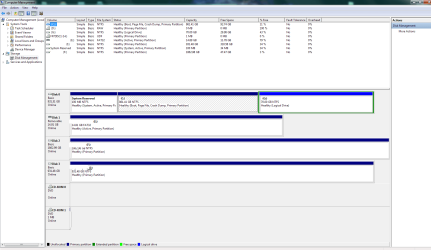
I install all my programs on the partition, and store all user data on a different partition. I'm not a gamer, and from what i know they can use a lot of space.[/QUOTE] Here is my current setup. (I have obscured the names of my external drives as they are named after family members) I have made a new partition, seen as :G here. My plan is to free most of the space on :C (make my used space about 30-50GB), make a system image of it, and then boot up my Windows 7 installation disk, and restore the image on the second partition (Seen as :G). What do you think? Would that work? I downloaded Acronis and Macrium Reflect too in case they are better suited to the task.
 

Attachments

  • disk management.png
    disk management.png
    45.1 KB · Views: 6

My Computer My Computer

At a glance

Windows 7 Professional SP1Intel I5 2500KCORSAIR 8GBNVIDIA GTX 650 Ti
Computer type
PC/Desktop
Computer Manufacturer/Model Number
Custom Build
OS
Windows 7 Professional SP1
CPU
Intel I5 2500K
Motherboard
Gigabyte Z68P-DS3
Memory
CORSAIR 8GB
Graphics Card(s)
NVIDIA GTX 650 Ti
Hard Drives
Western Digital Black WD1002FAEX 1TB 7200 RPM 64MB Cache SATA 6.0Gb/s
Antivirus
Avast
Browser
Google Chrome
Are you willing to buy a second license - because else you will be in trouble.
 

My Computer My Computer

At a glance

Vista, Windows7, Mint Mate, Zorin, Windows 8from 1.6GHz Duo to i7
Computer Manufacturer/Model Number
HP, Dell, Gateway, Toshiba - 4 laptops and 2 desktops
OS
Vista, Windows7, Mint Mate, Zorin, Windows 8
CPU
from 1.6GHz Duo to i7
Monitor(s) Displays
2x HP w2207
Hard Drives
5x HDD, 7x SSD, 12x Externals
Keyboard
with trackball - no mices
Mouse
Trackball mice
Internet Speed
DSL 6000

My Computer My Computer

At a glance

Windows 7 Professional SP1Intel I5 2500KCORSAIR 8GBNVIDIA GTX 650 Ti
Computer type
PC/Desktop
Computer Manufacturer/Model Number
Custom Build
OS
Windows 7 Professional SP1
CPU
Intel I5 2500K
Motherboard
Gigabyte Z68P-DS3
Memory
CORSAIR 8GB
Graphics Card(s)
NVIDIA GTX 650 Ti
Hard Drives
Western Digital Black WD1002FAEX 1TB 7200 RPM 64MB Cache SATA 6.0Gb/s
Antivirus
Avast
Browser
Google Chrome
Are you willing to buy a second license - because else you will be in trouble.

But, essentially it's the same installation...
Would a new license be needed?
It's the same hardware, the same software, just "cloned".
I'm not trying to evade buying a new license, I want to understand
how this stuff works. :)
 

My Computer My Computer

At a glance

Windows 7 Professional SP1Intel I5 2500KCORSAIR 8GBNVIDIA GTX 650 Ti
Computer type
PC/Desktop
Computer Manufacturer/Model Number
Custom Build
OS
Windows 7 Professional SP1
CPU
Intel I5 2500K
Motherboard
Gigabyte Z68P-DS3
Memory
CORSAIR 8GB
Graphics Card(s)
NVIDIA GTX 650 Ti
Hard Drives
Western Digital Black WD1002FAEX 1TB 7200 RPM 64MB Cache SATA 6.0Gb/s
Antivirus
Avast
Browser
Google Chrome
I wouldn't go down the dual boot approach.
Your best approach longer term IMO given you want a quick return to operation in the event of a major problem would be simply to use Macrium system imaging to an external HDD and make a couple of images and have a spare (internal) 1TB HDD.

However at the moment you have a large amount of data on your OS partition (~700+GB). So in this situation I would recommend you buy a new internal HDD and use Macrium to clone all of your current 1TB HDD to the new one. Note this will take some time. Disconnect the original HDD and make sure the new HDD boots by itself. If it does then disconnect it and go back to the original. If the original HDD fails then just disconnect it and reconnect your cloned standby drive.

In the longer term move your (large) data from the OS partition to a separate data partition. This will then make regular (faster!) system imaging more of an option. BTW I don't know why your smallish third partition is logical. I would be expanding it into C: as you move data off it onto a temporary data backup.
 

My Computer My Computer

At a glance

Windows 7x64 Home Premium SP1Intel i7 2600kG.Skill Ripjaws (DDR3-1600) 2x4GBNvidia GeForce GTS 450; Intel HD Graphics 300...
Computer type
PC/Desktop
Computer Manufacturer/Model Number
Own build
OS
Windows 7x64 Home Premium SP1
CPU
Intel i7 2600k
Motherboard
ASUS P8Z68 Deluxe
Memory
G.Skill Ripjaws (DDR3-1600) 2x4GB
Graphics Card(s)
Nvidia GeForce GTS 450; Intel HD Graphics 3000(GT2+)
Monitor(s) Displays
Dell Ultrasharp IPS panel U2311H, Samsung SyncMaster P2350
Screen Resolution
1920x1080
Hard Drives
Samsung 850 Pro SSD 256GB, Samsung SSD 840 120GB, Seagates 1TB Barracuda ST31000528AS x2
PSU
Seasonic M12II 520W
Case
Lian Li Lancool PC-K60
Cooling
Case: 1x120mm, 3x140mm CPU: Hyper 212+
Keyboard
Logitech MK520 (wireless)
Mouse
Logitech MK520
Internet Speed
6-7 Mbps
Antivirus
Norton Security Premium, Malwarebytes on 2 (MSE on 3rd PC)
Browser
FireFox
Other Info
Audio: Logitech Z523 2.1
I wouldn't go down the dual boot approach.
Your best approach longer term IMO given you want a quick return to operation in the event of a major problem would be simply to use Macrium system imaging to an external HDD and make a couple of images and have a spare (internal) 1TB HDD.

However at the moment you have a large amount of data on your OS partition (~700+GB). So in this situation I would recommend you buy a new internal HDD and use Macrium to clone all of your current 1TB HDD to the new one. Note this will take some time. Disconnect the original HDD and make sure the new HDD boots by itself. If it does then disconnect it and go back to the original. If the original HDD fails then just disconnect it and reconnect your cloned standby drive.

In the longer term move your (large) data from the OS partition to a separate data partition. This will then make regular (faster!) system imaging more of an option. BTW I don't know why your smallish third partition is logical. I would be expanding it into C: as you move data off it onto a temporary data backup.

I see. I was thinking of buying an internal 3TB Toshiba drive that costs about 100$
and a Samsung Pro 500 GB SSD. I'd transfer the windows files over to the SSD for faster booting.
But unfortunately I can't afford this at the moment.

So you 're saying I should move my larger files to another partition?
 

My Computer My Computer

At a glance

Windows 7 Professional SP1Intel I5 2500KCORSAIR 8GBNVIDIA GTX 650 Ti
Computer type
PC/Desktop
Computer Manufacturer/Model Number
Custom Build
OS
Windows 7 Professional SP1
CPU
Intel I5 2500K
Motherboard
Gigabyte Z68P-DS3
Memory
CORSAIR 8GB
Graphics Card(s)
NVIDIA GTX 650 Ti
Hard Drives
Western Digital Black WD1002FAEX 1TB 7200 RPM 64MB Cache SATA 6.0Gb/s
Antivirus
Avast
Browser
Google Chrome
Are you willing to buy a second license - because else you will be in trouble.

But, essentially it's the same installation...
Would a new license be needed?
It's the same hardware, the same software, just "cloned".
I'm not trying to evade buying a new license, I want to understand
how this stuff works. :)
Yes, if you have 2 systems installed you need 2 licenses. There is no escape. But you can avoid that with the imaging approach that Michael suggested.

PS - and don't finagle anything. You may lose the license you currently have in the process.
 

My Computer My Computer

At a glance

Vista, Windows7, Mint Mate, Zorin, Windows 8from 1.6GHz Duo to i7
Computer Manufacturer/Model Number
HP, Dell, Gateway, Toshiba - 4 laptops and 2 desktops
OS
Vista, Windows7, Mint Mate, Zorin, Windows 8
CPU
from 1.6GHz Duo to i7
Monitor(s) Displays
2x HP w2207
Hard Drives
5x HDD, 7x SSD, 12x Externals
Keyboard
with trackball - no mices
Mouse
Trackball mice
Internet Speed
DSL 6000
Are you willing to buy a second license - because else you will be in trouble.

But, essentially it's the same installation...
Would a new license be needed?
It's the same hardware, the same software, just "cloned".
I'm not trying to evade buying a new license, I want to understand
how this stuff works. :)
Yes, if you have 2 systems installed you need 2 licenses. There is no escape. But you can avoid that with the imaging approach that Michael suggested.

PS - and don't finagle anything. You may lose the license you currently have in the process.

I see.
You guys seem more experienced so I'll take your advice.
I may dual boot Ubuntu and figure out how Wine works to use my programms somewhere down the line.

By the way, I just saw that support for Windows 7 will cease in 4 years... Didn't know that!
And it's my favourite OS...:(
 

My Computer My Computer

At a glance

Windows 7 Professional SP1Intel I5 2500KCORSAIR 8GBNVIDIA GTX 650 Ti
Computer type
PC/Desktop
Computer Manufacturer/Model Number
Custom Build
OS
Windows 7 Professional SP1
CPU
Intel I5 2500K
Motherboard
Gigabyte Z68P-DS3
Memory
CORSAIR 8GB
Graphics Card(s)
NVIDIA GTX 650 Ti
Hard Drives
Western Digital Black WD1002FAEX 1TB 7200 RPM 64MB Cache SATA 6.0Gb/s
Antivirus
Avast
Browser
Google Chrome
I see. I was thinking of buying an internal 3TB Toshiba drive that costs about 100$
and a Samsung Pro 500 GB SSD. I'd transfer the windows files over to the SSD for faster booting.
But unfortunately I can't afford this at the moment.

So you 're saying I should move my larger files to another partition?
I think you are MBR booting which is fine (I do) so I would choose a HDD no greater than 2TB otherwise you need to change your booting to UEFI/GPT - I wouldn't be doing this at this stage. Also you want a performance 7200 rpm drive.
Here are a couple of links to making your copy. The first is for Macrium 5 but is much the same as Macrium 6 and provides some guidance if you have booting problems. The second is a Macrium KB for V6.
How to Upgrade Your Existing Hard Drive in Under an Hour
It's going to take more than an hour.
Cloning a disk - KnowledgeBase - Macrium Reflect Knowledgebase

Yes I am suggesting you move your larger files to another partition. I actually store my large data on separate internal HDDs since my OS drive is an SSD.
 

My Computer My Computer

At a glance

Windows 7x64 Home Premium SP1Intel i7 2600kG.Skill Ripjaws (DDR3-1600) 2x4GBNvidia GeForce GTS 450; Intel HD Graphics 300...
Computer type
PC/Desktop
Computer Manufacturer/Model Number
Own build
OS
Windows 7x64 Home Premium SP1
CPU
Intel i7 2600k
Motherboard
ASUS P8Z68 Deluxe
Memory
G.Skill Ripjaws (DDR3-1600) 2x4GB
Graphics Card(s)
Nvidia GeForce GTS 450; Intel HD Graphics 3000(GT2+)
Monitor(s) Displays
Dell Ultrasharp IPS panel U2311H, Samsung SyncMaster P2350
Screen Resolution
1920x1080
Hard Drives
Samsung 850 Pro SSD 256GB, Samsung SSD 840 120GB, Seagates 1TB Barracuda ST31000528AS x2
PSU
Seasonic M12II 520W
Case
Lian Li Lancool PC-K60
Cooling
Case: 1x120mm, 3x140mm CPU: Hyper 212+
Keyboard
Logitech MK520 (wireless)
Mouse
Logitech MK520
Internet Speed
6-7 Mbps
Antivirus
Norton Security Premium, Malwarebytes on 2 (MSE on 3rd PC)
Browser
FireFox
Other Info
Audio: Logitech Z523 2.1
I see. I was thinking of buying an internal 3TB Toshiba drive that costs about 100$
and a Samsung Pro 500 GB SSD. I'd transfer the windows files over to the SSD for faster booting.
But unfortunately I can't afford this at the moment.

So you 're saying I should move my larger files to another partition?
I think you are MBR booting which is fine (I do) so I would choose a HDD no greater than 2TB otherwise you need to change your booting to UEFI/GPT - I wouldn't be doing this at this stage. Also you want a performance 7200 rpm drive.
Here are a couple of links to making your copy. The first is for Macrium 5 but is much the same as Macrium 6 and provides some guidance if you have booting problems. The second is a Macrium KB for V6.
How to Upgrade Your Existing Hard Drive in Under an Hour
It's going to take more than an hour.
Cloning a disk - KnowledgeBase - Macrium Reflect Knowledgebase

So, to use an SSD for booting I would need to change settings? :confused:
Is that difficult? I was planning on getting the SSD soon.
 

My Computer My Computer

At a glance

Windows 7 Professional SP1Intel I5 2500KCORSAIR 8GBNVIDIA GTX 650 Ti
Computer type
PC/Desktop
Computer Manufacturer/Model Number
Custom Build
OS
Windows 7 Professional SP1
CPU
Intel I5 2500K
Motherboard
Gigabyte Z68P-DS3
Memory
CORSAIR 8GB
Graphics Card(s)
NVIDIA GTX 650 Ti
Hard Drives
Western Digital Black WD1002FAEX 1TB 7200 RPM 64MB Cache SATA 6.0Gb/s
Antivirus
Avast
Browser
Google Chrome

My Computer My Computer

At a glance

Vista, Windows7, Mint Mate, Zorin, Windows 8from 1.6GHz Duo to i7
Computer Manufacturer/Model Number
HP, Dell, Gateway, Toshiba - 4 laptops and 2 desktops
OS
Vista, Windows7, Mint Mate, Zorin, Windows 8
CPU
from 1.6GHz Duo to i7
Monitor(s) Displays
2x HP w2207
Hard Drives
5x HDD, 7x SSD, 12x Externals
Keyboard
with trackball - no mices
Mouse
Trackball mice
Internet Speed
DSL 6000
Nah, moving to an SSD is a piece of cake. We'll help you - for starters have a look at this:

http://www.sevenforums.com/tutorials/149969-ssd-install-transfer-operating-system.html

I see so the problem is just with drives bigger than 2TB.
Didn't know that!
Is there anything I can read about MBR/UEFI/GPT?
How do I change from one to another?
I just want to know the proccess to see if I can do it or not and plan which drive to get accordingly.
That Toshiba drive seems like a bargain!
 

My Computer My Computer

At a glance

Windows 7 Professional SP1Intel I5 2500KCORSAIR 8GBNVIDIA GTX 650 Ti
Computer type
PC/Desktop
Computer Manufacturer/Model Number
Custom Build
OS
Windows 7 Professional SP1
CPU
Intel I5 2500K
Motherboard
Gigabyte Z68P-DS3
Memory
CORSAIR 8GB
Graphics Card(s)
NVIDIA GTX 650 Ti
Hard Drives
Western Digital Black WD1002FAEX 1TB 7200 RPM 64MB Cache SATA 6.0Gb/s
Antivirus
Avast
Browser
Google Chrome

My Computer My Computer

At a glance

Vista, Windows7, Mint Mate, Zorin, Windows 8from 1.6GHz Duo to i7
Computer Manufacturer/Model Number
HP, Dell, Gateway, Toshiba - 4 laptops and 2 desktops
OS
Vista, Windows7, Mint Mate, Zorin, Windows 8
CPU
from 1.6GHz Duo to i7
Monitor(s) Displays
2x HP w2207
Hard Drives
5x HDD, 7x SSD, 12x Externals
Keyboard
with trackball - no mices
Mouse
Trackball mice
Internet Speed
DSL 6000

Nice! Thanks for the links! You guys saved me from buying the 3TB and losing my mind over not being able to use it. I'll study the material you gave me.

I see now that changing Bios to Uefi risks losing data and making the Os unbootable.
Would a system image help in this case?
 

My Computer My Computer

At a glance

Windows 7 Professional SP1Intel I5 2500KCORSAIR 8GBNVIDIA GTX 650 Ti
Computer type
PC/Desktop
Computer Manufacturer/Model Number
Custom Build
OS
Windows 7 Professional SP1
CPU
Intel I5 2500K
Motherboard
Gigabyte Z68P-DS3
Memory
CORSAIR 8GB
Graphics Card(s)
NVIDIA GTX 650 Ti
Hard Drives
Western Digital Black WD1002FAEX 1TB 7200 RPM 64MB Cache SATA 6.0Gb/s
Antivirus
Avast
Browser
Google Chrome
Is there anything I can read about MBR/UEFI/GPT?
How do I change from one to another?
Your motherboard is getting older now and it appears some people may have had problems upgrading their BIOS. You need to do your own google research. Given your motherboard and CPU in your specs I see no significant advantage in moving from MBR/legacy boot while you stick with Windows 7 only potential headaches. I'd focus on your original concern.
 

My Computer My Computer

At a glance

Windows 7x64 Home Premium SP1Intel i7 2600kG.Skill Ripjaws (DDR3-1600) 2x4GBNvidia GeForce GTS 450; Intel HD Graphics 300...
Computer type
PC/Desktop
Computer Manufacturer/Model Number
Own build
OS
Windows 7x64 Home Premium SP1
CPU
Intel i7 2600k
Motherboard
ASUS P8Z68 Deluxe
Memory
G.Skill Ripjaws (DDR3-1600) 2x4GB
Graphics Card(s)
Nvidia GeForce GTS 450; Intel HD Graphics 3000(GT2+)
Monitor(s) Displays
Dell Ultrasharp IPS panel U2311H, Samsung SyncMaster P2350
Screen Resolution
1920x1080
Hard Drives
Samsung 850 Pro SSD 256GB, Samsung SSD 840 120GB, Seagates 1TB Barracuda ST31000528AS x2
PSU
Seasonic M12II 520W
Case
Lian Li Lancool PC-K60
Cooling
Case: 1x120mm, 3x140mm CPU: Hyper 212+
Keyboard
Logitech MK520 (wireless)
Mouse
Logitech MK520
Internet Speed
6-7 Mbps
Antivirus
Norton Security Premium, Malwarebytes on 2 (MSE on 3rd PC)
Browser
FireFox
Other Info
Audio: Logitech Z523 2.1
Frequent system images are recommended because it allows you to always backpaddle. And why frequent - because if you have to go back to an image of last year because that is the only one you have, then you lose a lot of the work you have done in the meantime.
 

My Computer My Computer

At a glance

Vista, Windows7, Mint Mate, Zorin, Windows 8from 1.6GHz Duo to i7
Computer Manufacturer/Model Number
HP, Dell, Gateway, Toshiba - 4 laptops and 2 desktops
OS
Vista, Windows7, Mint Mate, Zorin, Windows 8
CPU
from 1.6GHz Duo to i7
Monitor(s) Displays
2x HP w2207
Hard Drives
5x HDD, 7x SSD, 12x Externals
Keyboard
with trackball - no mices
Mouse
Trackball mice
Internet Speed
DSL 6000
Is there anything I can read about MBR/UEFI/GPT?
How do I change from one to another?
Your motherboard is getting older now and it appears some people may have had problems upgrading their BIOS. You need to do your own google research. Given your motherboard and CPU in your specs I see no significant advantage in moving from MBR/legacy boot while you stick with Windows 7 only potential headaches. I'd focus on your original concern.

I see. I guess I have to get a new computer sooner than I expected.
For now I'll look for a 1-2TB internal drive, maybe a 2TB one so I can use half of it as storage for system images and another half as data storage.

My current hard drive seems to be the weakest link in my system (Every component get a Windows score of 7.5 except the drive which gets 5.9) so I really want to get an SSD too.

When it's time to let go of this PC, I'll sell the old mobo,cpu and gpu and keep the same drives.
Anyway, I'm cleaning up a bit to reduce the used size on :C. I'll try making a system image using Macrium and see how it goes.
 

My Computer My Computer

At a glance

Windows 7 Professional SP1Intel I5 2500KCORSAIR 8GBNVIDIA GTX 650 Ti
Computer type
PC/Desktop
Computer Manufacturer/Model Number
Custom Build
OS
Windows 7 Professional SP1
CPU
Intel I5 2500K
Motherboard
Gigabyte Z68P-DS3
Memory
CORSAIR 8GB
Graphics Card(s)
NVIDIA GTX 650 Ti
Hard Drives
Western Digital Black WD1002FAEX 1TB 7200 RPM 64MB Cache SATA 6.0Gb/s
Antivirus
Avast
Browser
Google Chrome
Back
Top