
After moving some of my User folders from C:\Users\Steve to a location on my secondary HDD (D:\Steve), Windows 7 has spontaneously created folders in C:\Users\Steve that I cannot delete.
I moved the folders by going to Properties, Location tab, and clicking Move, and I clicked YES when asked if I wanted to move any files contained in the folders to the new location.
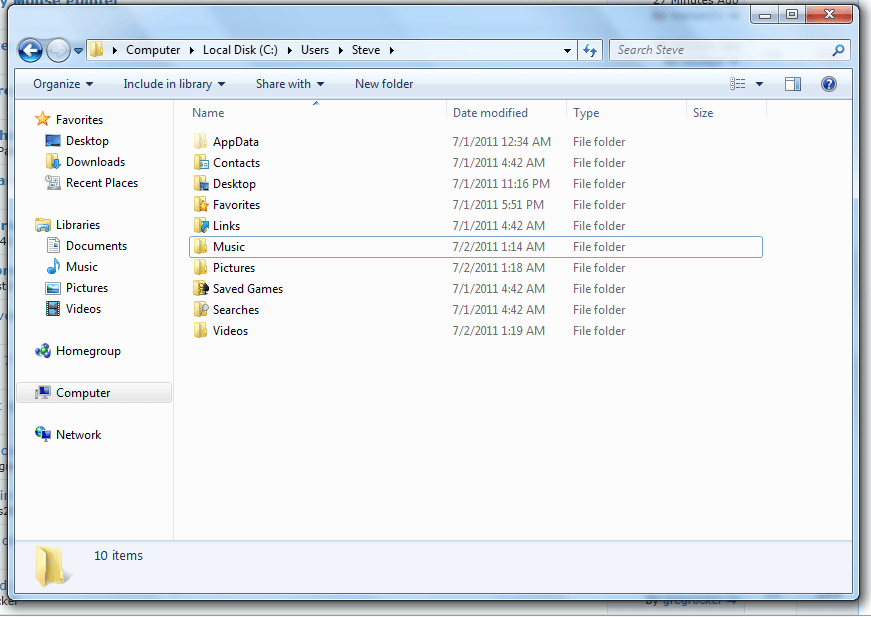
When I moved My Music, it created a folder named "Music" in C:\Users\Steve
When I moved My Pictures, it created a folder named "Pictures" in C:\Users\Steve
When I moved My Videos, it created a folder named "Videos" inC:\Users\Steve
Weirdly, it didn't create duplicate folders for My Documents or Downloads, which I also moved.
The folders it created are not linked to the user profile folders, as you can see in this image (they just have normal folder icons). It looks like they're just regular folders, marked as read only, containing 0 bytes, but when I try to delete them it tells me I need permission to perform this action. And if I uncheck read only, it tells me access denied.
I recently installed an SSD and a HDD in my laptop, installing the OS on the SSD and reserving the HDD for my data. I really wish Windows made it easier to just move the whole goshdarn User profile to another location, but I guess that's too much to ask.
I think this guy had the same problem that I'm having but it doesn't look like he ever got to the bottom of the issue: http://www.sevenforums.com/music-pictures-video/23467-default-user-locations-duplicate-folders.html
Any help would be much appreciated. How do I delete these folders?
I moved the folders by going to Properties, Location tab, and clicking Move, and I clicked YES when asked if I wanted to move any files contained in the folders to the new location.
When I moved My Music, it created a folder named "Music" in C:\Users\Steve
When I moved My Pictures, it created a folder named "Pictures" in C:\Users\Steve
When I moved My Videos, it created a folder named "Videos" inC:\Users\Steve
Weirdly, it didn't create duplicate folders for My Documents or Downloads, which I also moved.
The folders it created are not linked to the user profile folders, as you can see in this image (they just have normal folder icons). It looks like they're just regular folders, marked as read only, containing 0 bytes, but when I try to delete them it tells me I need permission to perform this action. And if I uncheck read only, it tells me access denied.
I recently installed an SSD and a HDD in my laptop, installing the OS on the SSD and reserving the HDD for my data. I really wish Windows made it easier to just move the whole goshdarn User profile to another location, but I guess that's too much to ask.
I think this guy had the same problem that I'm having but it doesn't look like he ever got to the bottom of the issue: http://www.sevenforums.com/music-pictures-video/23467-default-user-locations-duplicate-folders.html
Any help would be much appreciated. How do I delete these folders?
My Computer
- Computer Manufacturer/Model Number
- Toshiba Portege R835-P56x
- OS
- Windows 7 Home Premium x64
- Hard Drives
- Crucial M4 128GB
Hitachi 640GB HDD


