Solved DVDFlick Burn DVD with Chapters

Carver

New member
Member
Local time
12:40 AM
Messages
44
I have seven (7) .wmv files that I want to burn to DVD and have a link to each one of those files appear on the home page. I have burned several DVDs using DVDFlick and the links to the individual files do not appear and the files seem to appear in random order rather than in their numbered sequence.

I have no idea what I am doing wrong so it seems that I need basic instructions on how to burn a DVD with Chapters using DVDFlick. I would especially like the links to the chapters to be static That is, an icon to click on rather than constantly changing scenes if that is possible. Where can I find those instructions?
 

My Computer My Computer

Computer Manufacturer/Model Number
HPE h8-1010 PC
OS
Windows 7 Home Premium 64bit
Memory
8 GB
Graphics Card(s)
Radeon HD 6450
Correct my impression if I am wrong. Do you want a menu with an icon that you click on to play the content of the .wmv file? If so the only way to get there with DVD Flick is to convert eaxh .wmv as a Title. This uses up space as DVD Flick will convert each .wmv file to a DVD Video title.

If you have a DVD Player that can play .wmv the alternative is to use Imgburn to burn a Data DVD with the 7 .wmv files as data files. Most DVD Players that can play .wmv will show a menu with the names of the videos.

The Official ImgBurn Website

I haven't used DVD Flick Menu wizard very often. But I believe it just uses text buttons on an image background. In any case I don't know of any software that does menus for .wmv. Converting .wmv to DVD Video is a last resort as the .wmv format can even have HD resolution where the DVD Video format is limited to 720x576 for PAL and 720x480 for NTSC.

Are the .wmv files SD or HD?
What make and model DVD Player do you have?
 

My Computer My Computer

Computer Manufacturer/Model Number
HP Media Center
OS
Windows 7 32 bit
CPU
AMD 5200+ dual core
Memory
2 GB
Graphics Card(s)
NVidia GeForce 6150SE 128 MB
Monitor(s) Displays
CRT
Screen Resolution
1280x1024
Hard Drives
500 GB Sata internal :

SIIG USB 3.0 docking stations w/WD Caviar Black 6 Gb/s drives
Keyboard
PS/2
Mouse
PS/2 Wheel Mouse
Other Info
SIIG USB 3.0 PCIexpress card.
MilesAhead,

Thank you for replying. My modem/router was acting up and I was not able to get back online until now. Sorry about that.

I am just trying to burn a DVD with chapters for the first time, and do it the easiest way possible. The few discs that people have sent me that have changing "scenes" for chapters often seem confusing. So I want to avoid that if I can, but at this point I will happily take anything I can get. But the DVD is to be a "Scrapbook" for my wife to share with others. It would be too boring for anyone to have to view the entire disc. The goal is to be able to select and play any one segment (file/chapter) at a tme.

If I did not need chapters, I assume I would be able to use DVDFlick with no problem. Creating chapters is the problem.

The .wmv files are SD. I use .wmv only because that is what Windows Movie Maker produced. I would gladly convert them if that would make things easier.

I hope to be able to play the DVD in any DVD player, or as many different ones as possible. Our own DVD player was a VCR/DVD combo that just went bad and has yet to be replaced (this weelkend). But we want different family members to be able to play this DVD with whatever DVD player they have.

I am not familiar with ImgBurn, but I will download and try it. Thank you for recommending it and sending the link. I will let you knw how I make out.
 

My Computer My Computer

Computer Manufacturer/Model Number
HPE h8-1010 PC
OS
Windows 7 Home Premium 64bit
Memory
8 GB
Graphics Card(s)
Radeon HD 6450
Hi Roderunner,

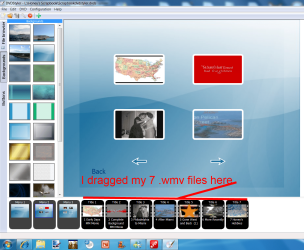
Thank you for that information and the link. I am still a bit lost. I opened DVD Styler and dragged my 7 .wmv files to the bottom of the wndow to the right of "Menu 1 and 2." A screenshot is attached. What do I do next?
 

Attachments

  • Screenshot DVDStyler Step 1..png
    Screenshot DVDStyler Step 1..png
    285 KB · Views: 20

My Computer My Computer

Computer Manufacturer/Model Number
HPE h8-1010 PC
OS
Windows 7 Home Premium 64bit
Memory
8 GB
Graphics Card(s)
Radeon HD 6450
Click the orange thing next to the green cross, then follow my guide.
 

My Computer My Computer

Computer Manufacturer/Model Number
Look in my Signature.
OS
Win7 H.Prem. 32bit+SP1
What is the total play time of the .wmv files? DVD 5 after 2 hours the quality starts to degrade. That's why many people get DVD players that can play divx avi and wmv files. You don't have to do any conversion. If for example the .wmv files are one hour each you may need to convert to 3 DVDs and burn.

It's better to avoid conversion if possible. DVD Players that can play avi divx and wmv are about $60 new.
 

My Computer My Computer

Computer Manufacturer/Model Number
HP Media Center
OS
Windows 7 32 bit
CPU
AMD 5200+ dual core
Memory
2 GB
Graphics Card(s)
NVidia GeForce 6150SE 128 MB
Monitor(s) Displays
CRT
Screen Resolution
1280x1024
Hard Drives
500 GB Sata internal :

SIIG USB 3.0 docking stations w/WD Caviar Black 6 Gb/s drives
Keyboard
PS/2
Mouse
PS/2 Wheel Mouse
Other Info
SIIG USB 3.0 PCIexpress card.
MilesAhead,

The total playing time for all seven .wmv files is 127 minutes. I purposelhy made seven different movies so that each segment would, hopefully, be overwhelming (at least to family mebers).

Roderunner,
I began by opening the project made earlier where all seven .wmv files had been dragged into plce but I was unable to add buttons to them that worked. When I "Click the orange thing next to the green cross,"t opens a "Burn window." Does that mean tghat I need tio start fresh?
 

My Computer My Computer

Computer Manufacturer/Model Number
HPE h8-1010 PC
OS
Windows 7 Home Premium 64bit
Memory
8 GB
Graphics Card(s)
Radeon HD 6450
Sounds like they will all fit on one disc. Here's a guide for flick that shows how to add a menu:

DVD Flick Guide
 

My Computer My Computer

Computer Manufacturer/Model Number
HP Media Center
OS
Windows 7 32 bit
CPU
AMD 5200+ dual core
Memory
2 GB
Graphics Card(s)
NVidia GeForce 6150SE 128 MB
Monitor(s) Displays
CRT
Screen Resolution
1280x1024
Hard Drives
500 GB Sata internal :

SIIG USB 3.0 docking stations w/WD Caviar Black 6 Gb/s drives
Keyboard
PS/2
Mouse
PS/2 Wheel Mouse
Other Info
SIIG USB 3.0 PCIexpress card.
MikesAhead,

Thank you for that link. I think the Guide you attached shows the reason for my problem, It looks like I should have been doing some editing when I first imported the seven .wmv files. I will read that guide again. I am glad to have it.
 

My Computer My Computer

Computer Manufacturer/Model Number
HPE h8-1010 PC
OS
Windows 7 Home Premium 64bit
Memory
8 GB
Graphics Card(s)
Radeon HD 6450
DVD Flick is a nice app. Even though it's no longer updated it's still worth a place in the video tools folder. :)
 

My Computer My Computer

Computer Manufacturer/Model Number
HP Media Center
OS
Windows 7 32 bit
CPU
AMD 5200+ dual core
Memory
2 GB
Graphics Card(s)
NVidia GeForce 6150SE 128 MB
Monitor(s) Displays
CRT
Screen Resolution
1280x1024
Hard Drives
500 GB Sata internal :

SIIG USB 3.0 docking stations w/WD Caviar Black 6 Gb/s drives
Keyboard
PS/2
Mouse
PS/2 Wheel Mouse
Other Info
SIIG USB 3.0 PCIexpress card.
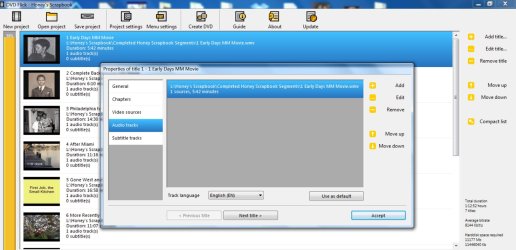
I added the seven .wmv files one-at-a-time and clicked on "Edit" each time. I did not really see anything to edit or any place to "make chapters." So I ended up back at Square One -- I burned another DVD with all of the files but no chapters.

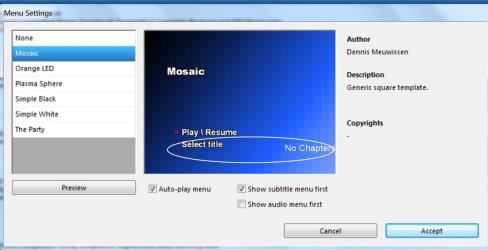
I attached two Screenshots with the hope that they might show something that I need to change.
 

Attachments

  • Screenshot - DVDFlicks Audio Tracks.jpg
    Screenshot - DVDFlicks Audio Tracks.jpg
    149.5 KB · Views: 42
  • Screenshot - DVDFlick Menu Settings.jpg
    Screenshot - DVDFlick Menu Settings.jpg
    49.7 KB · Views: 38

My Computer My Computer

Computer Manufacturer/Model Number
HPE h8-1010 PC
OS
Windows 7 Home Premium 64bit
Memory
8 GB
Graphics Card(s)
Radeon HD 6450
Roderunner,
I began by opening the project made earlier where all seven .wmv files had been dragged into plce but I was unable to add buttons to them that worked. When I "Click the orange thing next to the green cross,"t opens a "Burn window." Does that mean tghat I need tio start fresh?
Once the files are loaded, click 'Orange' icon. Set to 'Create ISO' select save to desktop. Press 'Start' Make coffee, it will take about 1 hour. When complete, close DVDStyler. Burn to DVD with ImgBurn. When you put DVD in your player, click 'Select Title' mission complete.
 

My Computer My Computer

Computer Manufacturer/Model Number
Look in my Signature.
OS
Win7 H.Prem. 32bit+SP1
I added the seven .wmv files one-at-a-time and clicked on "Edit" each time. I did not really see anything to edit or any place to "make chapters." So I ended up back at Square One -- I burned another DVD with all of the files but no chapters.

I attached two Screenshots with the hope that they might show something that I need to change.

Chapters are points to skip to in each title. You don't have one long movie with 7 chapters. You have 7 distinct titles. Therefor you don't need chapters. Just a menu with an entry for each title. You're making it much harder than it is.
 

My Computer My Computer

Computer Manufacturer/Model Number
HP Media Center
OS
Windows 7 32 bit
CPU
AMD 5200+ dual core
Memory
2 GB
Graphics Card(s)
NVidia GeForce 6150SE 128 MB
Monitor(s) Displays
CRT
Screen Resolution
1280x1024
Hard Drives
500 GB Sata internal :

SIIG USB 3.0 docking stations w/WD Caviar Black 6 Gb/s drives
Keyboard
PS/2
Mouse
PS/2 Wheel Mouse
Other Info
SIIG USB 3.0 PCIexpress card.

My Computer My Computer

Computer Manufacturer/Model Number
HP Media Center
OS
Windows 7 32 bit
CPU
AMD 5200+ dual core
Memory
2 GB
Graphics Card(s)
NVidia GeForce 6150SE 128 MB
Monitor(s) Displays
CRT
Screen Resolution
1280x1024
Hard Drives
500 GB Sata internal :

SIIG USB 3.0 docking stations w/WD Caviar Black 6 Gb/s drives
Keyboard
PS/2
Mouse
PS/2 Wheel Mouse
Other Info
SIIG USB 3.0 PCIexpress card.
This tool has a nice menu wizard. You may find it easier to use. Most times you just add chapters as times. When you hit the Next Button on the DVD remote it goes to the next chapter. I used to do image buttons for chapters back in the old SVCD days. I don't know if free authoring programs have buttons for chapters now. You could look at AvsToDVD. Also there's a support thread on that site where the author answers questions instead of getting the info second hand.

http://www.videohelp.com/tools/AVStoDVD

http://forum.videohelp.com/threads/277852-AVStoDVD-Support-Thread
 

My Computer My Computer

Computer Manufacturer/Model Number
HP Media Center
OS
Windows 7 32 bit
CPU
AMD 5200+ dual core
Memory
2 GB
Graphics Card(s)
NVidia GeForce 6150SE 128 MB
Monitor(s) Displays
CRT
Screen Resolution
1280x1024
Hard Drives
500 GB Sata internal :

SIIG USB 3.0 docking stations w/WD Caviar Black 6 Gb/s drives
Keyboard
PS/2
Mouse
PS/2 Wheel Mouse
Other Info
SIIG USB 3.0 PCIexpress card.
MilesAhead and Roderunner,

I appreciate the help you have been giving me but things are just not clicking right for me. I just tried to burn my latest DVDFlick attempt. It stoped during the process and gave this error message."An error occured during the encoding process 53 File Not Found." I got that same message last night so I uninstalled and reinstalled DVDFlick, but that apparently did not help.

As much as I appreciate your help, it is time to give this up for awhile. It is spoiling my holiday spirit. Thank you very much for all of your efforts.

Roderunner, earlier you said about DVDStyler, "Once the files are loaded, click 'Orange' icon. Set to 'Create ISO' select save to desktop. Press 'Start' Make coffee, it will take about 1 hour. When complete, close DVDStyler. Burn to DVD with ImgBurn."

After I decided to give DVDFlick a rest, I created an ISO. It is saved as "scrapbookdvdstyler.dvds." When I try to burn it to DVD using ImgBurn, ImgBurn does not recognize that file. Do I need to to convert the .dvds" file?
 

My Computer My Computer

Computer Manufacturer/Model Number
HPE h8-1010 PC
OS
Windows 7 Home Premium 64bit
Memory
8 GB
Graphics Card(s)
Radeon HD 6450
I do all DVD burning using Imgburn

With Flick or any other converter or encoder you should only output to files on the HD. In this case a VIDEO_TS folder. That way you can check for errors before burning. You are likely better off asking on a video specific site such as:

http://www.videohelp.com/

or

http://forum.digital-digest.com/

Trying to burn directly from DVD Flick is asking for problems. Most people who recommend Flick also recommend outputting to VIDEO_TS. See if you can get a VIDEO_TS folder that plays correctly in VLC. It's also a good idea to have erasable DVDR to try a test burn first. Flick is known for having issues when you try to encode and burn in one operation. In fact most do. Any paid converter that makes me put a disc in the burner to encode, I take off my system even if I get it on a Giveaway promotion for free. It's just a waste of time. 2 step process. Produce and test the video files. If test ok then burn.
 

My Computer My Computer

Computer Manufacturer/Model Number
HP Media Center
OS
Windows 7 32 bit
CPU
AMD 5200+ dual core
Memory
2 GB
Graphics Card(s)
NVidia GeForce 6150SE 128 MB
Monitor(s) Displays
CRT
Screen Resolution
1280x1024
Hard Drives
500 GB Sata internal :

SIIG USB 3.0 docking stations w/WD Caviar Black 6 Gb/s drives
Keyboard
PS/2
Mouse
PS/2 Wheel Mouse
Other Info
SIIG USB 3.0 PCIexpress card.
MilesAhead,

That is very helpful information. It was very thoughtful of you to take the time to explain all of that. I appreciate all of your advice and help.

I hope that it is okay to wish you a Very Merry Christmas and a Healthy and Happy New Year!
 

My Computer My Computer

Computer Manufacturer/Model Number
HPE h8-1010 PC
OS
Windows 7 Home Premium 64bit
Memory
8 GB
Graphics Card(s)
Radeon HD 6450
Carver, the file your looking for is an ISO. The one you tried to use was the project file.
 

My Computer My Computer

Computer Manufacturer/Model Number
Look in my Signature.
OS
Win7 H.Prem. 32bit+SP1
Back
Top