Solved DVDFlick Burn DVD with Chapters

Roderunner,

What is the best way to end up with the ISO?

Topic Jumpimg -- I just learned why I was not getting Chapters in WindowsDVD Maker. Under its "Options"
there is a place to tell it you want Chapters. I did not know about that until now. Could it be that there is such a place in WindowsFlick too?

The problem is that the Chapters windows on the Home Page of the DVDFlick movie are all constantly changing scenes with no titles. If I could change those scenes to static pictures or the first scene (only) of each Chapter, I would be happy to go with that.
 

My Computer My Computer

At a glance

Windows 7 Home Premium 64bit8 GBRadeon HD 6450
Computer Manufacturer/Model Number
HPE h8-1010 PC
OS
Windows 7 Home Premium 64bit
Memory
8 GB
Graphics Card(s)
Radeon HD 6450
Roderunner,

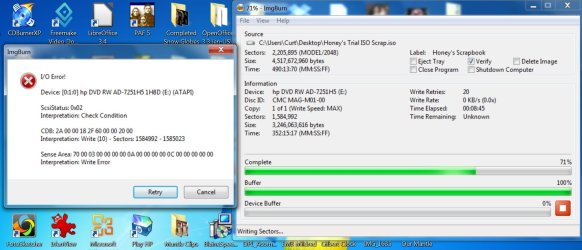
I went back and did save an ISO to desktop. Then I used ImgBurn to burn it to a DVD. It got more than half done before stopping and giving the following error. Do you have any idea what this error message means?
 

Attachments

  • Screenshot -ImgBurn Error.jpg
    Screenshot -ImgBurn Error.jpg
    143.6 KB · Views: 69

My Computer My Computer

At a glance

Windows 7 Home Premium 64bit8 GBRadeon HD 6450
Computer Manufacturer/Model Number
HPE h8-1010 PC
OS
Windows 7 Home Premium 64bit
Memory
8 GB
Graphics Card(s)
Radeon HD 6450
Roderunner,

I went back and did save an ISO to desktop. Then I used ImgBurn to burn it to a DVD. It got more than half done before stopping and giving the following error. Do you have any idea what this error message means?
I usually use DVD-RW, if I get any errors I try a new disc. If you have RW discs try doing them one at a time to ascertain if your files are faulty.
 

My Computer My Computer

At a glance

Win7 H.Prem. 32bit+SP1
Computer Manufacturer/Model Number
Look in my Signature.
OS
Win7 H.Prem. 32bit+SP1
Hi Roderunner,

Success! Your hunch was correct. I tried a new DVD and it burned fine and ther chapers work well too. I do not have any DVD-RW. All of mine are DVD+R, but I was using a LiteScribe the first time when it produced an error. The two that worked were plain DVD+R.

I am really pleased to finally have a good, working copy of this movie. Thank you very much for all of your help. I really appreciate it. I hope you have something fun to do for the holiday. I will enjpoy mine showing my wife how to use her new electronic scrapbook, thanks to you!
 

My Computer My Computer

At a glance

Windows 7 Home Premium 64bit8 GBRadeon HD 6450
Computer Manufacturer/Model Number
HPE h8-1010 PC
OS
Windows 7 Home Premium 64bit
Memory
8 GB
Graphics Card(s)
Radeon HD 6450
Hi Carver,
Glad to have been able to help. One more piece of advice. When DVDStyler completes it's task, the CPU keeps running at 100% till you end the program.
 

My Computer My Computer

At a glance

Win7 H.Prem. 32bit+SP1
Computer Manufacturer/Model Number
Look in my Signature.
OS
Win7 H.Prem. 32bit+SP1
Hi Roderunner,

Thank you. That is good to know.
 

My Computer My Computer

At a glance

Windows 7 Home Premium 64bit8 GBRadeon HD 6450
Computer Manufacturer/Model Number
HPE h8-1010 PC
OS
Windows 7 Home Premium 64bit
Memory
8 GB
Graphics Card(s)
Radeon HD 6450
Back
Top