Edit windows explorer details pane?

redeater

New member
Local time
3:42 PM
Messages
2
Does anyone know how to edit the details that appear at the bottom of the screen when you select a file? I'm not talking about the details that you can change when you select view but the one at the very bottom of the screen.
Thank you
 

My Computer

OS
windows 7

My Computer

Computer Manufacturer/Model Number
DIY
OS
W7x64 Pro, SuSe 12.1/** W7 x64 Pro, XP MCE
CPU
Phenom II 1090T w/Noctua NH-D14 /**4400+ X2 w/CM Hyper TX 3
Motherboard
ASRock 890FX Deluxe 4/**A8N-SLI
Memory
2 x 2GB Patriot PGS34g1600LLKA/**4x1GB Corsair VS
Graphics Card(s)
EVGA GTX460 SC/**EVGA 8800GTS
Sound Card
Asus Xonar D2X/**Xonar D1
Monitor(s) Displays
Acer X233H, Dell E152FPc /**LG M237-WD
Screen Resolution
1920x1080 & 1024x768/**1980x1080
Hard Drives
WDC 2TB, 1.5TB, 1TB, 500GB,Seagate 500GB , Maxtor 80GB /**500GB Seagate & WDC 1TB Black
PSU
CM RS600 w/ APC BX1000G/**Antec 500 TP w/ APC BX1000
Case
HAF922/**Antec 1040IIB
Cooling
3x200mm, 1x140 and 1x120mm/**5x80mm fans
Keyboard
Logitech Media USB/**Saitek Eclipse
Mouse
Cordless Trackman Wheel/**Ditto
Internet Speed
3.3Mbps
Other Info
SB 560 5.1 w/ Sennheiser RS140/**Creative T20 speakers, Dvico FusionHDTV7 Gold RT, Cisco E3000, HP 5510V AIO, Linksys E3000, Belkin F5U237 hub and **F5D8055 adapter
(** = 2nd rig)
Edit Detail Pane

Hey I had asked this before in another thread but maybe you guys can help me.

I was wondering if you can change what is displayed in the details pane.

i.e. if you go to a folder with a mp3 in it and click once on that mp3, you will get a bunch of info on the bottom of windows explorer.

I'm not talking about editing the info for the mp3 that is already done. What i want to be able to do is change what is being shown on the details panel.

For example I don't need to see the bitrate or contributing artists.....I would just prefer to see artist, track number, title and album.

Keep in mind I don't want to edit the actual track, just what is showing up in the details panel.

thank you and I hope this is clear. :D
 
Last edited by a moderator:

My Computer

OS
windows 7
Cannot edit an MP3 "Artist" field in Win 7

Try this:

http://www.muvenum.com/downloads/freeware/muvenummediatags-setup.exe

Once installed, go to the details tab of a files properties, and you can edit them as you wish, which will also appear at the bottom of Windows Explorer.

Although I already have to use third party software to properly edit my tags, I would rather not deal with third party software. In the Edit bar at the bottom of the screen, the "Album Artist" field shows up, but the "Artist" field does NOT! there is a major difference. Is there any way I can edit that field? I went into properties, and the "Artist" field was not even an option. Most media players look for the "Artist" tag to display proper info for that track. "Album artist" is meaningless when playing a track on an album with multiple artists. I love being able to edit tags outside a player; but without the ability to edit the "Artist" tag, it's almost usless to me. It's a major field! Album, ARTIST, Title, Track (and Length/Size/Bitrate although these are almost never edited). There are more, but those are the ones most people look at. Please help!
 

My Computer

Computer Manufacturer/Model Number
HP Touchsmart
OS
XP Media Edition / Vista /Win 7 Home Premium
CPU
Win 7 Machine: Intel Core 2 Duo T5850 @ 2.16GHz Merom 65nm
Motherboard
Pegatron Corp. EVE Model
Memory
4GB Dual Channel DDR2 @ 333MHz 5-5-5-15
Graphics Card(s)
Nvidia Defaul 1920X1200 256MB GeForce 9300M
Sound Card
SoundMAX Integrated Digital HD Audio
Monitor(s) Displays
HP 25" Flat Panel Touch Screen
Screen Resolution
1900X1200
Hard Drives
500 GB Seagate ST3500620as (Sata) 1.5 TB Seagate External
Keyboard
HP Model RK713A
Internet Speed
3.0Gb
Does anyone know how to edit the details that appear at the bottom of the screen when you select a file? I'm not talking about the details that you can change when you select view but the one at the very bottom of the screen.
Thank you
I've been looking for a way to do this also. (See previous post) But unlike redeaters last post, I would also edit from this bar. (I know I can now edit from this bar. I like that!)
 

My Computer

Computer Manufacturer/Model Number
HP Touchsmart
OS
XP Media Edition / Vista /Win 7 Home Premium
CPU
Win 7 Machine: Intel Core 2 Duo T5850 @ 2.16GHz Merom 65nm
Motherboard
Pegatron Corp. EVE Model
Memory
4GB Dual Channel DDR2 @ 333MHz 5-5-5-15
Graphics Card(s)
Nvidia Defaul 1920X1200 256MB GeForce 9300M
Sound Card
SoundMAX Integrated Digital HD Audio
Monitor(s) Displays
HP 25" Flat Panel Touch Screen
Screen Resolution
1900X1200
Hard Drives
500 GB Seagate ST3500620as (Sata) 1.5 TB Seagate External
Keyboard
HP Model RK713A
Internet Speed
3.0Gb
pls tell me how to change explorer lower detail pane with a custom picture.i successfully changed system properties left pane with a custom picture (edit shell32.dll) .but cant changed explorer lower detail pane with a custom picture cos i cant find where it belongs shell32 or aero.msstyles. pls help me. i m using windows 7 ultimate v6.1 build 7600.
 

My Computer

OS
windows 7
Keith Miller \(MVP\) Posts: n/a

Re: customize the details pane in windows explorer?
--------------------------------------------------------------------------------
It's a per-filetype registry edit. Here's the example for .doc. If you're
using Office 2007, you would also want to edit .docx.
Open the registry editor & navigate to:
[HKEY_LOCAL_MACHINE\SOFTWARE\Classes\SystemFileAsso ciations\.doc]
In the right-hand pane, you'll want to edit the value named 'Preview
Details'. The various details are separated by semi-colons. Insert the
string 'System.Document.Wordcount' wherever you want. In this export, it is
the first detail to appear. (This is an edited export, showing only the
PreviewDetails info)
Windows Registry Editor Version 5.00
[HKEY_LOCAL_MACHINE\SOFTWARE\Classes\SystemFileAsso ciations\.doc]
"PreviewDetails"="prop:System.Document.WordCount;* System.DateModified;System.Author;System.Keywords; *System.Size;System.Title;System.Comment;System.Ca tegory;*System.Document.PageCount;System.ContentSt atus;System.ContentType;*System.OfflineAvailabilit y;*System.OfflineStatus;System.Subject;*System.Dat eCreated;*System.SharedWith"

--
Good Luck,
Keith
Microsoft MVP [Windows Shell/User]

"ElCagle" <[email protected]> wrote in message
news:[email protected]...
> Is there a way to customize what appears in the details pane?
> Could I show, say, wordcounts in the details pane?
>
> Thank you

hope this will help, though it has been a long time
 

My Computer

Computer Manufacturer/Model Number
Microsoft
OS
Windows 7
CPU
Intel E8400
Motherboard
GIGABYTE GA-G31M-ES2L
Memory
3GB DDR2 800 Mhz
Graphics Card(s)
NVIDIA GeFORCE 9500 GT
Sound Card
on board
Cooling
EVEREST EPS-1450A
Hey I had asked this before in another thread but maybe you guys can help me.

I was wondering if you can change what is displayed in the details pane.

i.e. if you go to a folder with a mp3 in it and click once on that mp3, you will get a bunch of info on the bottom of windows explorer.

I'm not talking about editing the info for the mp3 that is already done. What i want to be able to do is change what is being shown on the details panel.

For example I don't need to see the bitrate or contributing artists.....I would just prefer to see artist, track number, title and album.

Keep in mind I don't want to edit the actual track, just what is showing up in the details panel.

thank you and I hope this is clear. :D

No promises... but have you tried clicking on the title bars at the top of the details view and selecting the colums you want displayed?
 

My Computer

Computer Manufacturer/Model Number
Homebrew
OS
XP Pro SP3 X86 / Win7 Pro X86
CPU
Amd 64 x2 4200 (2.4ghz)
Motherboard
Asus M2N-MX SE Plus
Memory
Kingston DDR2 800 2gb
Graphics Card(s)
Nvidia GF-8400
Sound Card
Realtek on Motherboard
Monitor(s) Displays
Acer x-193bw
Screen Resolution
1440 x 900
Hard Drives
Western Digital 500g
PSU
350watt In-Win
Case
In-Win
Cooling
Air
Keyboard
yes
Mouse
yes
Internet Speed
5mpbs
Other Info
Also ASRock ION 330 as HTPC (on XP).
Acer Aspire as GP netbook (on XP).
Looks like there is still no answer to adding "Artist" as a detail column. Unbelievable that MS would remove one of the most important data items when selecting music.
 

My Computer

Computer Manufacturer/Model Number
Acer Aspire 8940g
OS
Windows 7
CPU
Core I7
Looks like there is still no answer to adding "Artist" as a detail column. Unbelievable that MS would remove one of the most important data items when selecting music.

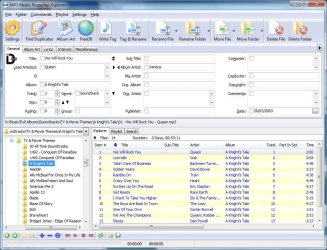
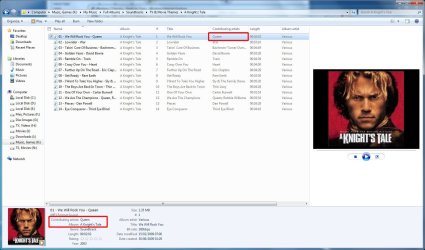
Actually, if you've been paying attention, you'll notice that in Windows Explorer, the "Contributing Artists" field is, in fact, the "Artist" field you have been looking for. This I know, because my own "MP3 Media Properties Explorer" that I use to manage the tags in my music collection calls the tag "Lead Artist", and whatever I enter into that field shows up in Windows Explorer as "Contributing Artist".

mp3_file_tags2.jpg
MP3 Media Properties Explorer

mp3_file_tags.jpg
Windows Explorer​


The name is not important, as long as the various programs out there (including Windows Explorer) show the correct information.
 

My Computer

Computer type
PC/Desktop
Computer Manufacturer/Model Number
Virtual Machine
OS
Windows 7 Professional 32-bit SP1
CPU
AMD A4/A6
Motherboard
Intel Corporation 440BX Desktop Reference Platform
Memory
3.00GB EDO
Graphics Card(s)
VMware SVGA 3D
Sound Card
High Definition Audio Device
Monitor(s) Displays
Generic Non-PnP Monitor on VMware SVGA 3D
Screen Resolution
1440x900
Hard Drives
1 x 60GB VMware Virtual SATA Hard Drive ATA Device
Antivirus
Kaspersky Total Security
I was told in another thread to edit the Contributing artist field in stead too. Anybody else ever work with data bases? Wrong field. Contributing Artist field is NOT the Artist field. I need to SEE the field I'm editing. If the OS does update a related field automaticaly (Bad form), I would like a way to verify. Don't mean to throw rocks, but thats a bad answer in my book. Sorry. The name IS important. The Edit pane needs to be customizable.
(X-base Programming 7 yrs)
 
Last edited:

My Computer

Computer Manufacturer/Model Number
HP Touchsmart
OS
XP Media Edition / Vista /Win 7 Home Premium
CPU
Win 7 Machine: Intel Core 2 Duo T5850 @ 2.16GHz Merom 65nm
Motherboard
Pegatron Corp. EVE Model
Memory
4GB Dual Channel DDR2 @ 333MHz 5-5-5-15
Graphics Card(s)
Nvidia Defaul 1920X1200 256MB GeForce 9300M
Sound Card
SoundMAX Integrated Digital HD Audio
Monitor(s) Displays
HP 25" Flat Panel Touch Screen
Screen Resolution
1900X1200
Hard Drives
500 GB Seagate ST3500620as (Sata) 1.5 TB Seagate External
Keyboard
HP Model RK713A
Internet Speed
3.0Gb
I was told in another thread to edit the Contributing artist field in stead too. Anybody else ever work with data bases? Wrong field. Contributing Artist field is NOT the Artist field. I need to SEE the field I'm editing. If the OS does update a related field automaticaly (Bad form), I would like a way to verify. Don't mean to throw rocks, but thats a bad answer in my book. Sorry. The name IS important. The Edit pane needs to be customizable.
(X-base Programming 7 yrs)

Ok, now we're arguing semantics here. As a Pascal/Delphi programmer of nearly 20 years, I can say this with the following code extracts):

Code:
    { TPE1 } fiLeadArtist, { Lead performer(s)/Soloist(s) }
    { TPE2 } fiBand, { Band/orchestra/accompaniment }
    { TPE3 } fiConductor, { Conductor/performer refinement }
    { TPE4 } fiMixArtist, { Interpreted, remixed, or otherwise modified by }

The above is only a small part of the ID3v2 standard (which defines over 90 "frames" of metadata). The "TPEx" frames is used to represent "human data", and usually contains names of people.

The out-moded "ID3v1" specification, however, defines only 7 items : "ID", "Songname", "Artist", "Album", "Year", "Comments" and "Genre".

Basically, all I'm trying to highlight to you is this: In the V2 metadata standard for MP3 files, the field is "TPE1". So how does the database field name make my previous answer incorrect, when (in the context of this thread), the terms "Artist", "Contributing Artist" or "Lead Artist" are simply used for display purposes only, and the data itself is embedded into an MP3 file using the "TPE1" field?

Would you rather have MS display it as "TPE1" (the actual field name) and yet another target of complaint setup against them?? The name of the field IS important, but the user "Display Name" for that field takes preference. The user does not care what the database field name is.

This is what I tried to highlight to exmeaguy, that some programs display TPE1 as "Artist" and others show it as "Contributing Artist", but the data it holds remains the same.

Cbleman, while I do not agree with your post as a whole, I do agree with you that the "Details Pane" (you incorrectly call it the Edit Pane. See how easy it is to get a name wrong?) must be customizable with more than just changing it's size. I'd like to see a facility where the user can decide which fields are displayed, and in which order. It should also be made more clear that some of the information it displays is editable.

 

My Computer

Computer type
PC/Desktop
Computer Manufacturer/Model Number
Virtual Machine
OS
Windows 7 Professional 32-bit SP1
CPU
AMD A4/A6
Motherboard
Intel Corporation 440BX Desktop Reference Platform
Memory
3.00GB EDO
Graphics Card(s)
VMware SVGA 3D
Sound Card
High Definition Audio Device
Monitor(s) Displays
Generic Non-PnP Monitor on VMware SVGA 3D
Screen Resolution
1440x900
Hard Drives
1 x 60GB VMware Virtual SATA Hard Drive ATA Device
Antivirus
Kaspersky Total Security
Ok, now we're arguing semantics here. As a Pascal/Delphi programmer of nearly 20 years, I can say this with the following code extracts):

Code:
    { TPE1 } fiLeadArtist, { Lead performer(s)/Soloist(s) }
    { TPE2 } fiBand, { Band/orchestra/accompaniment }
    { TPE3 } fiConductor, { Conductor/performer refinement }
    { TPE4 } fiMixArtist, { Interpreted, remixed, or otherwise modified by }

The above is only a small part of the ID3v2 standard (which defines over 90 "frames" of metadata). The "TPEx" frames is used to represent "human data", and usually contains names of people.

The out-moded "ID3v1" specification, however, defines only 7 items : "ID", "Songname", "Artist", "Album", "Year", "Comments" and "Genre".

Basically, all I'm trying to highlight to you is this: In the V2 metadata standard for MP3 files, the field is "TPE1". So how does the database field name make my previous answer incorrect, when (in the context of this thread), the terms "Artist", "Contributing Artist" or "Lead Artist" are simply used for display purposes only, and the data itself is embedded into an MP3 file using the "TPE1" field?

Would you rather have MS display it as "TPE1" (the actual field name) and yet another target of complaint setup against them?? The name of the field IS important, but the user "Display Name" for that field takes preference. The user does not care what the database field name is.

This is what I tried to highlight to exmeaguy, that some programs display TPE1 as "Artist" and others show it as "Contributing Artist", but the data it holds remains the same.

Cbleman, while I do not agree with your post as a whole, I do agree with you that the "Details Pane" (you incorrectly call it the Edit Pane. See how easy it is to get a name wrong?) must be customizable with more than just changing it's size. I'd like to see a facility where the user can decide which fields are displayed, and in which order. It should also be made more clear that some of the information it displays is editable.
:DYou make a good point. Thank you for for the correct name to the Details Pane. Your programming experience trumps mine too.

After working with large data bases for so many years, I'm extremely cognizant of field names, and leary of saving data into the wrong field. Before I looked at your example, I was looking at the lables like fields in a flat data base. I can see your point though. Someone using my program would see a field labeled "First Name" when the actual field name could be called "tfrstnm1". Meaningfull to the Database manager (to Identify which database the field belongs to, and other usefull info.) but to nobody else.

"Artist" has been a main field in every MP3 editing program I have ever used. Since I reside in the U.S, this may be an ethnocentric point of view. I have no Idea what the rest of the world sees this field name as, and the US may well be a minority. I do however question the current name of the label in the pane. If I changed the "First Name" label on an input screen to "Christian Given Name", it would confuse the heck out of the people inputing the data, and cause the Database Manager to question my sanity. Just as I question the sanity of the person who decided to change name of a very widely used label in the US. I will put several MP3s back on the Win 7 machine, Edit the contributing artist field, and pull them back into Media Monkey to see if the "Artist" field updates correctly.

I had a problem with bunch truncated .MP3 files in my library. I blamed Win 7 and pulled my mp3 hard drive off the Win 7 machine. I never tested what you said, I just jumped in with both feet.... in my mouth. Sorry. :mad:
 

My Computer

Computer Manufacturer/Model Number
HP Touchsmart
OS
XP Media Edition / Vista /Win 7 Home Premium
CPU
Win 7 Machine: Intel Core 2 Duo T5850 @ 2.16GHz Merom 65nm
Motherboard
Pegatron Corp. EVE Model
Memory
4GB Dual Channel DDR2 @ 333MHz 5-5-5-15
Graphics Card(s)
Nvidia Defaul 1920X1200 256MB GeForce 9300M
Sound Card
SoundMAX Integrated Digital HD Audio
Monitor(s) Displays
HP 25" Flat Panel Touch Screen
Screen Resolution
1900X1200
Hard Drives
500 GB Seagate ST3500620as (Sata) 1.5 TB Seagate External
Keyboard
HP Model RK713A
Internet Speed
3.0Gb
I had a problem with bunch truncated .MP3 files in my library. I blamed Win 7 and pulled my mp3 hard drive off the Win 7 machine. I never tested what you said, I just jumped in with both feet.... in my mouth. Sorry. :mad:

That happened a lot with the BETA - untill MS released a patch...
 

My Computer

Computer type
PC/Desktop
Computer Manufacturer/Model Number
Virtual Machine
OS
Windows 7 Professional 32-bit SP1
CPU
AMD A4/A6
Motherboard
Intel Corporation 440BX Desktop Reference Platform
Memory
3.00GB EDO
Graphics Card(s)
VMware SVGA 3D
Sound Card
High Definition Audio Device
Monitor(s) Displays
Generic Non-PnP Monitor on VMware SVGA 3D
Screen Resolution
1440x900
Hard Drives
1 x 60GB VMware Virtual SATA Hard Drive ATA Device
Antivirus
Kaspersky Total Security
Hello,

For shortcut files, (.lnk) I want to see the Comment property in the details pane. It shows up in the balloon when you hover over it, but not in the details pane. I went to...

[HKEY_LOCAL_MACHINE\SOFTWARE\Classes\SystemFileAssociations\.lnk]

...and found FileOperationPrompt and FullDetails, but not PreviewDetails. So I added it, but it doesn't seem to change anything.

Any ideas?
 

My Computer

Computer Manufacturer/Model Number
Dell Latitude E6410
OS
Windows 7 Professional 64-bit
CPU
Intel Core i5 2.67 GHz
Memory
8 GB
The new "Contents" view also

I would also like to gain control over the "Details Pane" and "Contents" view.
 

My Computer

Computer type
PC/Desktop
Computer Manufacturer/Model Number
n/a
OS
W7 Ultimate SP1, LM19.2 MATE, W10 Home 1703, W10 Pro 1703 VM, #All 64 bit
CPU
AMD Phenom II x6 1100T, 3.3 GHz
Motherboard
ASUS M4A88T-M/USB3 (AM3)
Memory
12GB DDR3 1333 G-Skill (4GB x 2), G-Skill (2GB x 2)
Graphics Card(s)
NVIDIA GeForce GTX 660
Sound Card
Realtek?
Monitor(s) Displays
Samsung S23B350
Screen Resolution
1920x1080
Hard Drives
WD Green 2TB (SATA), WD Green 3TB (SATA), WD Blue 4TB (SATA), WD Blue 6TB (SATA)
PSU
Cooler Master
Case
Antec GX300 Tower
Cooling
3x Antec TRICOOL 120mm Fans
Mouse
Wired Optical
Internet Speed
DSL
Antivirus
Avast
Browser
Pale Moon (64 bit)
Other Info
2018-12-27 Upgraded HDDs
2015-12-10 Upgraded case, graphics card, storage
2015-08-15 Upgraded motherboard & RAM
2015-07-15 Upgraded LM17.1 to LM17.2
I would also like to gain control over the "Details Pane" and "Contents" view.

Yeah, it would be OK with me if I could get the comment field in the "Contents" view, but I'd rather have it either in the "Details Pane" or right back where it was before, in the "Status Bar."

Over many years I have been making great use of the comment field of the shortcut properties, making notes like who sent me a particular attachment, or where I downloaded it from, or which zip archive I archived it to. So, for example, if someone sent me an attachment, I would save it, then immediately make a shortcut to it in the same folder, then update the comment field. Or, if I need to archive a file, I would note the name of the archive where I saved the file, then I would delete the file and leave just the shortcut behind. Works really well for me.

At least I can still see it in the bubble, or I can add it to the details (View/Choose Details...), but it was very convenient to have it right there in the "Status Bar" before. The problem for me with the bubble is that it is very mouse-dependent, and I'm much more keyboard-oriented. So I'd rather arrow down to a file with the keyboard, rather than move my hand over, grab the mouse and point to it, just to get the information I need.

I'm thinking of grabbing my old machine and seeing if I can find anything in the registry that may give me a clue as to what shows up in the "Status Bar" from XP Pro. I know the "Details Pane" was not in XP Pro, but maybe it will give me a clue.

Beyond that, I'm open to ideas!
 

My Computer

Computer Manufacturer/Model Number
Dell Latitude E6410
OS
Windows 7 Professional 64-bit
CPU
Intel Core i5 2.67 GHz
Memory
8 GB

My Computer

OS
Windows 7 Pro x64
CPU
Q6600 3.2 Ghz
Memory
4 GB DDR2
Graphics Card(s)
GTX 275
Monitor(s) Displays
SyncMaster 2443
Screen Resolution
1920x1200
Hard Drives
500 GB 7200 RPM Seagate Barracuda
2 TB WD Green
2 TB WD Green
Internet Speed
50 Mbps down/3 Mbps up
Back
Top