Eject disk

TexTwil

New member
Member
Local time
5:24 AM
Messages
64
Hi,
this is driving me a bit crazy. I booted my Windows 7 RC, with my FireWire disk attached. I want simply to unplug the disk just after the boot by "safely removing" the device but Windows keeps saying the the disk is being used !!

Just after the boot. How can I force to eject it ? How can I know which program is accessing the disk ?

Tex
 

My Computer

OS
Windows 7
CPU
i7 2.8 Ghz
Memory
Corsaire 8GB
Graphics Card(s)
ATI 5850
If I understood you correctly, you have installed Windows 7 on your Firewire disk and you have booted from it. Now you want to eject the Firewire disk. Right? If that's the case, then you wont be able to eject it because its used by Windows.
 

My Computer

Computer Manufacturer/Model Number
Samsung NP530U4B-S02IN
OS
Windows® 8 Pro (64-bit)
CPU
Intel® Core™ i5 Processor 2467M (1.60GHz, 3MB L3 Cache)
Motherboard
Samsung Electronics
Memory
6GB DDR3 System Memory at 1,333MHz (on BD 4GB + 2GB x 1)
Graphics Card(s)
AMD Radeon™ HD7550M 1GB DDR3 (Ext. Graphic)
Sound Card
Realtek High Definition Audio
Monitor(s) Displays
35.56cm (14.0) SuperBright 300nit HD LED Display
Screen Resolution
1366x768
Hard Drives
1TB S-ATA II Hard Drive (5400RPM) with ExpressCache 16GB SSD
Internet Speed
sucks
Antivirus
Microsoft Security Essentials
Browser
Google Chrome (Sync enabled)
No.

I just have an external data disk I want to eject.
 

My Computer

OS
Windows 7
CPU
i7 2.8 Ghz
Memory
Corsaire 8GB
Graphics Card(s)
ATI 5850
Whats the make? Is it Western digital or seagate? Look in taskmgr is the hard drive software is using the disk.
 

My Computer

Computer Manufacturer/Model Number
Samsung NP530U4B-S02IN
OS
Windows® 8 Pro (64-bit)
CPU
Intel® Core™ i5 Processor 2467M (1.60GHz, 3MB L3 Cache)
Motherboard
Samsung Electronics
Memory
6GB DDR3 System Memory at 1,333MHz (on BD 4GB + 2GB x 1)
Graphics Card(s)
AMD Radeon™ HD7550M 1GB DDR3 (Ext. Graphic)
Sound Card
Realtek High Definition Audio
Monitor(s) Displays
35.56cm (14.0) SuperBright 300nit HD LED Display
Screen Resolution
1366x768
Hard Drives
1TB S-ATA II Hard Drive (5400RPM) with ExpressCache 16GB SSD
Internet Speed
sucks
Antivirus
Microsoft Security Essentials
Browser
Google Chrome (Sync enabled)
As long as the drive appears in explorer, just right click on it and choose eject...
 

My Computer

Computer type
PC/Desktop
Computer Manufacturer/Model Number
LENOVO K450 @3.0GHZ
OS
64-bit Windows 8.1 Pro
CPU
Core(TM) i5 CPU 4330 Haswell @ 3.20GHz
Motherboard
LENOVO
Memory
12.00 GB
Graphics Card(s)
Intel(R) HD Graphics
Sound Card
Intel HD integtrated
Monitor(s) Displays
HP 25' ISP Monitor
Screen Resolution
1900/1020
Hard Drives
(1) ST1000DM003-1CH162 (2) Generic STORAGE DEVICE USB Device (3) Generic STORAGE DEVICE USB Device
Internet Speed
100mb down/10mb up
Whats the make? Is it Western digital or seagate? Look in taskmgr is the hard drive software is using the disk.
It's a WD but I don't have any WD software installed.


As long as the drive appears in explorer, just right click on it and choose eject...

Well that's the point of this thread. This doesn't work. It says that it is being used.
 

My Computer

OS
Windows 7
CPU
i7 2.8 Ghz
Memory
Corsaire 8GB
Graphics Card(s)
ATI 5850
I rebooted again and now it seems I can eject it fine.

But isn't there a way to force the ejection or to show the processes that might be using the disk ?

In OSX, one can see which process uses the disk when it's being ejected.

Tex
 

My Computer

OS
Windows 7
CPU
i7 2.8 Ghz
Memory
Corsaire 8GB
Graphics Card(s)
ATI 5850
Im sure there is, I just cant recall it atm... Glad you got it sorted out though!;)
 

My Computer

Computer type
PC/Desktop
Computer Manufacturer/Model Number
LENOVO K450 @3.0GHZ
OS
64-bit Windows 8.1 Pro
CPU
Core(TM) i5 CPU 4330 Haswell @ 3.20GHz
Motherboard
LENOVO
Memory
12.00 GB
Graphics Card(s)
Intel(R) HD Graphics
Sound Card
Intel HD integtrated
Monitor(s) Displays
HP 25' ISP Monitor
Screen Resolution
1900/1020
Hard Drives
(1) ST1000DM003-1CH162 (2) Generic STORAGE DEVICE USB Device (3) Generic STORAGE DEVICE USB Device
Internet Speed
100mb down/10mb up
Sometimes Windows won't eject my external WD disk when it appears nothing is accessing it. The only way to do it safely is to reboot.
 

My Computer

Computer Manufacturer/Model Number
Dell Inspiron 1520 (Laptop)/ Home (Desktop)
OS
Windows 7 x64 / Same
CPU
Intel Core 2 Duo T7250 / Intel Core i7 930
Motherboard
Intel 945 / Asus P6X58D-E
Memory
4GB / 6GB
Graphics Card(s)
NVIDIA GeForce 8400M GS / ASUS 1GB
Sound Card
Whatever Dell gave me :-( / Onboard
Monitor(s) Displays
15.4" LCD / Crappy CRT
Hard Drives
Seagate 500GB SATA; 7200 RPM / Seagate 1TB SATA; 7200 RPM
PSU
N/A / OCZ Fatal1ty 550W Modular
Case
N/A / Antec 900
Cooling
Air
Mouse
Microsoft Presenter (Bluetooth)
I just keep my cool and detach the disk when this happens, and I've never had any problems because of it.
 

My Computer

Computer Manufacturer/Model Number
Asus N73SV
OS
Windows 7 x64 Ultimate SP1
CPU
Core i7-2630QM
Motherboard
Intel HM 65
Memory
6 GB DDR3
Graphics Card(s)
Nvidia GT 540M / Intel HD 3000 - Optimus switching
Sound Card
HD Audio (Intel Azalia/Realtek) ALC269
Monitor(s) Displays
LED flat panel
Screen Resolution
1920 x 1080
Hard Drives
2x Seagate Momentus 640 GB - 1,28 TB in total
Internet Speed
4 MB/256 kbps
Other Info
External HDs

WD Elements 1,5 TB
WD MyBook 500 GB
I just keep my cool and detach the disk when this happens, and I've never had any problems because of it.

Some devices are supposed to have the ability to disconnect/power off without ejecting, but I think it is most safe to reboot given that situation. Comes down to preference.
 

My Computer

Computer Manufacturer/Model Number
Dell Inspiron 1520 (Laptop)/ Home (Desktop)
OS
Windows 7 x64 / Same
CPU
Intel Core 2 Duo T7250 / Intel Core i7 930
Motherboard
Intel 945 / Asus P6X58D-E
Memory
4GB / 6GB
Graphics Card(s)
NVIDIA GeForce 8400M GS / ASUS 1GB
Sound Card
Whatever Dell gave me :-( / Onboard
Monitor(s) Displays
15.4" LCD / Crappy CRT
Hard Drives
Seagate 500GB SATA; 7200 RPM / Seagate 1TB SATA; 7200 RPM
PSU
N/A / OCZ Fatal1ty 550W Modular
Case
N/A / Antec 900
Cooling
Air
Mouse
Microsoft Presenter (Bluetooth)
What happened is that some process had a handle on your disk. Usually the easiest is to wait until you shutdown the system and remove the device then. At shutdown, all handles are released.
 

My Computer

Computer Manufacturer/Model Number
HP, Dell, Gateway, Toshiba - 4 laptops and 2 desktops
OS
Vista, Windows7, Mint Mate, Zorin, Windows 8
CPU
from 1.6GHz Duo to i7
Monitor(s) Displays
2x HP w2207
Hard Drives
5x HDD, 7x SSD, 12x Externals
Keyboard
with trackball - no mices
Mouse
Trackball mice
Internet Speed
DSL 6000
Here we go again. This time I have a clean install of Win7 Home Edition. I just plug the disk via firewire, copy a file, then want to eject it but it says a process is still accessing it :( How annoying.

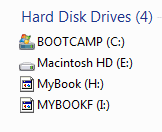
I also realized that in the disk list in Explorer, my WD disk is missing icons (see screenshot) .. do I need some special drivers for it ?
 

Attachments

  • Capture7.PNG
    Capture7.PNG
    3.6 KB · Views: 3
  • Capture8.PNG
    Capture8.PNG
    2.3 KB · Views: 673

My Computer

OS
Windows 7
CPU
i7 2.8 Ghz
Memory
Corsaire 8GB
Graphics Card(s)
ATI 5850
Back
Top