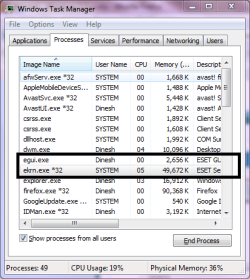
ekrn.exe

cashng

New member
Local time
10:34 PM
Messages
49
Location
Taipei
this .exe file is taking up a lot of my cpu resources, and even up to 100% sometimes....any idea to kill this application?
 

Attachments

  • sysres.jpg
    sysres.jpg
    46.6 KB · Views: 15

My Computer

Computer Manufacturer/Model Number
Acer Aspire 4730Z
OS
Windows 7 Ultimate 32-bit
CPU
Intel Pentium @2.00GHz Merom 65nm Technology
Motherboard
Acer Aspire 4730Z (uPGA-478)
Memory
4.0 Dual-Channel DDR2 @ 332MHz 5-5-5-15
Graphics Card(s)
Mobile Intel(R) 4 Series Express Chipset Family
Monitor(s) Displays
Generic PnP Monitor
Screen Resolution
1280x800
Hard Drives
160GB Hitachi
this .exe file is taking up a lot of my cpu resources, and even up to 100% sometimes....any idea to kill this application?

Welcome

Normally that process is part of your antivirus. Turn if off and see if process remains.

Somtimes it can be a virus, disguised as that particular process.. Run antivirus and malwarebytes.
http://www.malwarebytes.org/mbam.php

If it is part of your antivirus, uninstall and use Microsoft Security Essentials.
 

My Computer

Computer type
PC/Desktop
Computer Manufacturer/Model Number
Dell XPS 420
OS
Windows 10, Home Clean Install
CPU
Intel Core2 processsor Q8200(2.33Ghz 1333FSB) Quad Core Tech
Motherboard
Dell
Memory
6 gb
Graphics Card(s)
ATI Radeon 256MB HD3650
Sound Card
Intergrated 7.1 Channel Audio
Monitor(s) Displays
Dell SP2009W 20"
Hard Drives
640 GB Serial ATA Hard drive
Cooling
Fan
Keyboard
Dell USB Keyboard
Mouse
Dell Premium Optical USB
Internet Speed
DSL 2.85
for what i've known, this process is came from esst nod 32. i tried killing this process, it keep telling me, unable to.. anyone any idea on how to do this?
 

My Computer

Computer Manufacturer/Model Number
Acer Aspire 4730Z
OS
Windows 7 Ultimate 32-bit
CPU
Intel Pentium @2.00GHz Merom 65nm Technology
Motherboard
Acer Aspire 4730Z (uPGA-478)
Memory
4.0 Dual-Channel DDR2 @ 332MHz 5-5-5-15
Graphics Card(s)
Mobile Intel(R) 4 Series Express Chipset Family
Monitor(s) Displays
Generic PnP Monitor
Screen Resolution
1280x800
Hard Drives
160GB Hitachi
ekrn.exe is the main process of ESET anti virus. It may spike up the CPU when its scanning.

Capture.PNG
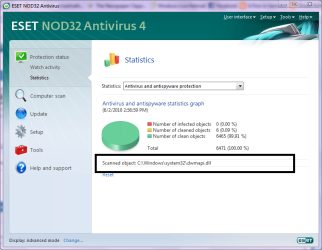
Even if you are not running any scan, eset still keeps scanning your computer files silently in the background for active malware.

1.PNG
 

My Computer

Computer Manufacturer/Model Number
Samsung NP530U4B-S02IN
OS
Windows® 8 Pro (64-bit)
CPU
Intel® Core™ i5 Processor 2467M (1.60GHz, 3MB L3 Cache)
Motherboard
Samsung Electronics
Memory
6GB DDR3 System Memory at 1,333MHz (on BD 4GB + 2GB x 1)
Graphics Card(s)
AMD Radeon™ HD7550M 1GB DDR3 (Ext. Graphic)
Sound Card
Realtek High Definition Audio
Monitor(s) Displays
35.56cm (14.0) SuperBright 300nit HD LED Display
Screen Resolution
1366x768
Hard Drives
1TB S-ATA II Hard Drive (5400RPM) with ExpressCache 16GB SSD
Internet Speed
sucks
Antivirus
Microsoft Security Essentials
Browser
Google Chrome (Sync enabled)
so is there any way to stop it from scanning?
 

My Computer

Computer Manufacturer/Model Number
Acer Aspire 4730Z
OS
Windows 7 Ultimate 32-bit
CPU
Intel Pentium @2.00GHz Merom 65nm Technology
Motherboard
Acer Aspire 4730Z (uPGA-478)
Memory
4.0 Dual-Channel DDR2 @ 332MHz 5-5-5-15
Graphics Card(s)
Mobile Intel(R) 4 Series Express Chipset Family
Monitor(s) Displays
Generic PnP Monitor
Screen Resolution
1280x800
Hard Drives
160GB Hitachi
so is there any way to stop it from scanning?
I guess we need not stop it. I have been running eset and it does scan in the background. I never had any problem with it. The cpu spikes are temporary.
 

My Computer

Computer Manufacturer/Model Number
Samsung NP530U4B-S02IN
OS
Windows® 8 Pro (64-bit)
CPU
Intel® Core™ i5 Processor 2467M (1.60GHz, 3MB L3 Cache)
Motherboard
Samsung Electronics
Memory
6GB DDR3 System Memory at 1,333MHz (on BD 4GB + 2GB x 1)
Graphics Card(s)
AMD Radeon™ HD7550M 1GB DDR3 (Ext. Graphic)
Sound Card
Realtek High Definition Audio
Monitor(s) Displays
35.56cm (14.0) SuperBright 300nit HD LED Display
Screen Resolution
1366x768
Hard Drives
1TB S-ATA II Hard Drive (5400RPM) with ExpressCache 16GB SSD
Internet Speed
sucks
Antivirus
Microsoft Security Essentials
Browser
Google Chrome (Sync enabled)
Yes, uninstall and use MSE, Microsoft Security Essentials. It is free, made just for windows and gets high praise from members of this Forum. It has a small footprint, also
 

My Computer

Computer type
PC/Desktop
Computer Manufacturer/Model Number
Dell XPS 420
OS
Windows 10, Home Clean Install
CPU
Intel Core2 processsor Q8200(2.33Ghz 1333FSB) Quad Core Tech
Motherboard
Dell
Memory
6 gb
Graphics Card(s)
ATI Radeon 256MB HD3650
Sound Card
Intergrated 7.1 Channel Audio
Monitor(s) Displays
Dell SP2009W 20"
Hard Drives
640 GB Serial ATA Hard drive
Cooling
Fan
Keyboard
Dell USB Keyboard
Mouse
Dell Premium Optical USB
Internet Speed
DSL 2.85
Hello

I received an email from Eset Technical Support concerning this issue.

The issue with ekrn.exe taking up processor time is a known issue and is being worked on, hopefully for the next build of Nod32.

In the meantime I was advised to disable the System Startup Scan under the Scheduler of Nod32.

Hopefully this will be fixed soon.

Hope this helps.

Bye for now

Kevin
 

My Computer

Computer Manufacturer/Model Number
Custom Build
OS
Windows 7 Ultimate x64
CPU
Intel Core 2 Quad 3.0Ghz OC @ 3.6Ghz
Motherboard
Gigabyte GA-EP45-DS3P
Memory
8GB Crucial Ballistix Tracer
Graphics Card(s)
2 x ATI HD 5770 CrossFireX
Sound Card
Onboard
Monitor(s) Displays
Dell SP2309W
Screen Resolution
2048x1152 32 Bit
Hard Drives
2 x 1TB WD Caviar Black
PSU
CORSAIR CMPSU-850HXUK
Keyboard
Microsoft Wireless Laser 7000
Mouse
Microsoft Wireless Laser 7000
Internet Speed
8Mbit
The issue with ekrn.exe taking up processor time is a known issue and is being worked on for the last several years. They still have not fixed it?

NOD32 is a good antivirus when it works, it does it's job very well,, the problem has come from quality over recent years and the crippling of certain features of the OS when the license lapses.

These are the main reasons I no longer recommend NOD32. Save some money and get MSE.
 

My Computer

Computer Manufacturer/Model Number
Self Built
OS
Win 7 Ultimate 32bit
CPU
C2D E6600 2.4Ghz
Motherboard
Intel D965WH
Memory
4G Kingston KHX5400D2
Graphics Card(s)
EVGA GTX 570 HD SC (012-P3-1573-KR)
Sound Card
On-Board
Monitor(s) Displays
Samsung 226BW
Screen Resolution
1680 x 1050
Hard Drives
2 x 250 Seagate Barracuda
2 x 500 Seagate Barracuda (Raid1)
PSU
Corsair TX750W
Case
In-Win C589
Cooling
Stock Intel Cooling
Yes, uninstall and use MSE, Microsoft Security Essentials. It is free, made just for windows and gets high praise from members of this Forum. It has a small footprint, also

I agree Tepid, I even
said that a while back.
 

My Computer

Computer type
PC/Desktop
Computer Manufacturer/Model Number
Dell XPS 420
OS
Windows 10, Home Clean Install
CPU
Intel Core2 processsor Q8200(2.33Ghz 1333FSB) Quad Core Tech
Motherboard
Dell
Memory
6 gb
Graphics Card(s)
ATI Radeon 256MB HD3650
Sound Card
Intergrated 7.1 Channel Audio
Monitor(s) Displays
Dell SP2009W 20"
Hard Drives
640 GB Serial ATA Hard drive
Cooling
Fan
Keyboard
Dell USB Keyboard
Mouse
Dell Premium Optical USB
Internet Speed
DSL 2.85
I disagree with changing from NOD32 to MSE. NOD32 is a far superior product. The CPU spikes cause no performance degradation. Turning off start up scans may help. Eset will fix this. Switching to MSE would be downgrading.
 

My Computer

Computer Manufacturer/Model Number
tw33k
OS
Windows 7 Ultimate (x64) SP1
CPU
Intel 3770k 4.6GHz
Motherboard
ASUS Maximus V Formula
Memory
8GB (2x 4GB) Crucial Ballistix
Graphics Card(s)
Sapphire 7950 (1060/1600)
Sound Card
On Board Realtek HD Audio
Monitor(s) Displays
27" Acer B273HU (via HDMI)
Screen Resolution
2048 x 1152
Hard Drives
Crucial M4 128GB
2TB WD Black
1TB Samsung F3 SATA
1TB WD Elite External
2TB WD USB 3.0
PSU
Corsair AX750 Gold
Case
Corsair Obsidian 800DW
Cooling
Corsair H100 (2x AP-121/2x UK-3000 push/pull)
Keyboard
Microsoft Wireless 5000
Mouse
Microsoft Wireless 5000
Internet Speed
5mb/s
Other Info
Logitech z-2300 2.1 speakers
Lamptron FC-5 v2
Sorry Tweek, but I categorically disagree. NOD32 has had this problem for a very long time (several years) and they have not yet fixed it.

Yes, it does degrade system functionality.

how do I know this?

Because when a place I worked for, we stopped selling Norton due to many reason, main one was they wantesd to charge us about 80$ to help them fix their definition files to clean a system that Norton would not clean. We looked for alterntives and at the time, NOD32 was the best offer we got, and it was very stable and didn't have these problems. Then they did a full upgrade and changed the GUI and this very problem began. This was at least 2 or 3 years ago. We worked with ESET quite a bit on this and on their Server Solutions with other issues. The support was ok, they did try to help as much as possible, but started blaming Windows for the issue. We did continue to sell it as it was not an issue on every system. But still, more often than we liked. We began looking for alternatives and Live OneCare came along, we immediately started testing it heavily and switched to it exclusively after that. At the time, Live OneCare did a pretty darn good job of keeping systems clean, not so good at cleaning an infected system. We kept tabs on this in many ways, through fairly decent testing of our own. I had a system once with over 5000 infections, literally, and no, they were not cookies. I saved them to a CD ROM and used it for testing, Not sure if I still have it though.
Incidentally, nothing could clean this system completely, So we did have to reload it, But, it also had AVG installed on it, and running the full scan, found very few of them, and refused to clean any of it. A main reason AVG is garbage.

Suffice to say, Eset is a good product when it works, but, it is flakey and has been, they refuse to fix the issue.

MSE may not be the absolute best product on the market, but it is quite adequate for those who surf safely.

 

My Computer

Computer Manufacturer/Model Number
Self Built
OS
Win 7 Ultimate 32bit
CPU
C2D E6600 2.4Ghz
Motherboard
Intel D965WH
Memory
4G Kingston KHX5400D2
Graphics Card(s)
EVGA GTX 570 HD SC (012-P3-1573-KR)
Sound Card
On-Board
Monitor(s) Displays
Samsung 226BW
Screen Resolution
1680 x 1050
Hard Drives
2 x 250 Seagate Barracuda
2 x 500 Seagate Barracuda (Raid1)
PSU
Corsair TX750W
Case
In-Win C589
Cooling
Stock Intel Cooling
Sorry Tweek, but I categorically disagree. NOD32 has had this problem for a very long time (several years) and they have not yet fixed it.

Yes, it does degrade system functionality.

how do I know this?

Because when a place I worked for, we stopped selling Norton due to many reason, main one was they wantesd to charge us about 80$ to help them fix their definition files to clean a system that Norton would not clean. We looked for alterntives and at the time, NOD32 was the best offer we got, and it was very stable and didn't have these problems. Then they did a full upgrade and changed the GUI and this very problem began. This was at least 2 or 3 years ago. We worked with ESET quite a bit on this and on their Server Solutions with other issues. The support was ok, they did try to help as much as possible, but started blaming Windows for the issue. We did continue to sell it as it was not an issue on every system. But still, more often than we liked. We began looking for alternatives and Live OneCare came along, we immediately started testing it heavily and switched to it exclusively after that. At the time, Live OneCare did a pretty darn good job of keeping systems clean, not so good at cleaning an infected system. We kept tabs on this in many ways, through fairly decent testing of our own. I had a system once with over 5000 infections, literally, and no, they were not cookies. I saved them to a CD ROM and used it for testing, Not sure if I still have it though.
Incidentally, nothing could clean this system completely, So we did have to reload it, But, it also had AVG installed on it, and running the full scan, found very few of them, and refused to clean any of it. A main reason AVG is garbage.

Suffice to say, Eset is a good product when it works, but, it is flakey and has been, they refuse to fix the issue.

MSE may not be the absolute best product on the market, but it is quite adequate for those who surf safely.

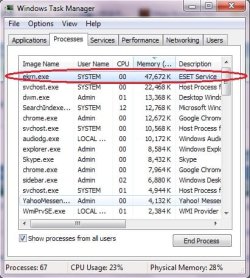
I've used NOD32 for nearly 10 years and have never suffered any loss of performance. The CPU spikes that the OP was referring are infrequent and with the amount of RAM he has, would not affect performance what-so-ever. Switching to MSE, which is an inferior product is, IMO, a bad bad particularly considering that Eset are aware of the issue and a fix is immanent.
 

My Computer

Computer Manufacturer/Model Number
tw33k
OS
Windows 7 Ultimate (x64) SP1
CPU
Intel 3770k 4.6GHz
Motherboard
ASUS Maximus V Formula
Memory
8GB (2x 4GB) Crucial Ballistix
Graphics Card(s)
Sapphire 7950 (1060/1600)
Sound Card
On Board Realtek HD Audio
Monitor(s) Displays
27" Acer B273HU (via HDMI)
Screen Resolution
2048 x 1152
Hard Drives
Crucial M4 128GB
2TB WD Black
1TB Samsung F3 SATA
1TB WD Elite External
2TB WD USB 3.0
PSU
Corsair AX750 Gold
Case
Corsair Obsidian 800DW
Cooling
Corsair H100 (2x AP-121/2x UK-3000 push/pull)
Keyboard
Microsoft Wireless 5000
Mouse
Microsoft Wireless 5000
Internet Speed
5mb/s
Other Info
Logitech z-2300 2.1 speakers
Lamptron FC-5 v2
Eset are aware of the issue and a fix is immanent

and have been doing so for some years now.

You can put yourself in the "I'm a lucky one" column.
 

My Computer

Computer Manufacturer/Model Number
Self Built
OS
Win 7 Ultimate 32bit
CPU
C2D E6600 2.4Ghz
Motherboard
Intel D965WH
Memory
4G Kingston KHX5400D2
Graphics Card(s)
EVGA GTX 570 HD SC (012-P3-1573-KR)
Sound Card
On-Board
Monitor(s) Displays
Samsung 226BW
Screen Resolution
1680 x 1050
Hard Drives
2 x 250 Seagate Barracuda
2 x 500 Seagate Barracuda (Raid1)
PSU
Corsair TX750W
Case
In-Win C589
Cooling
Stock Intel Cooling
Back
Top