Email defaults

Megalomando

New member
Local time
3:57 PM
Messages
31
I can't figure out how to assign the default mailto: to my email progam. I use Pegasus for my emails, have since 1994 & now using the current version. I've always been able to use the commands in Pegasus to allow me to use pegasus as the default email program but Windows 7 does not recgonize Pegasus when it comes to trying to send from a software via the email to link or when in Firefox & IE when clicking on an email to link.

Nothing about Pegasus shows in the default programs in Control Panel VIA Control panel>Programs>Default Programs>Set default programs.

Nothing showed in the default programs options either so I installed Windows Live to try and change it to go to Pegasus when Windows live was called but when I modified those commands, nothing happened either.

So how does one get 7 to use the email program of choice?

I'm using build 7232

Thanks
 

My Computer My Computer

At a glance

windows 7
OS
windows 7
pegasus

I can't figure out how to assign the default mailto: to my email progam. I use Pegasus for my emails, have since 1994 & now using the current version. I've always been able to use the commands in Pegasus to allow me to use pegasus as the default email program but Windows 7 does not recgonize Pegasus when it comes to trying to send from a software via the email to link or when in Firefox & IE when clicking on an email to link.

Nothing about Pegasus shows in the default programs in Control Panel VIA Control panel>Programs>Default Programs>Set default programs.

Nothing showed in the default programs options either so I installed Windows Live to try and change it to go to Pegasus when Windows live was called but when I modified those commands, nothing happened either.

So how does one get 7 to use the email program of choice?

I'm using build 7232

Thanks
Hi although pegasus is "vista capable" you might find it dificult to get win 7 to recognize it by default. I noticed you went to cpanel/via/defaults to try and make it default. Is there a reason yo didn't go to win 7 cpanel for it?

Ken
 

My Computer My Computer

At a glance

Win 8 Release candidate 8400[email protected]4 gigsNvidia 9600M
Computer Manufacturer/Model Number
HP Pavillion dv-7 1005 Tx
OS
Win 8 Release candidate 8400
CPU
[email protected]
Memory
4 gigs
Graphics Card(s)
Nvidia 9600M
Sound Card
HD built-in
Monitor(s) Displays
17" Wxga
Screen Resolution
1440x900
Cooling
none
Internet Speed
45Mb down 5Mb up
Hi although pegasus is "vista capable" you might find it dificult to get win 7 to recognize it by default. I noticed you went to cpanel/via/defaults to try and make it default. Is there a reason yo didn't go to win 7 cpanel for it?

Ken

I went there because I clicked on the mailto in a program and a window came up saying there is no email program associated to perform the requested action and to install an email program or if one is installed to create an association in the default programs control panel.

Since it appears Microsoft is making it harder and harder for the user to use legacy commands to personalize windows, I could not go to the options seen in 95, 98,2000 & XP to add the association under "folder options" (it no longer exists there), I typed :default programs in the search bar and "set default programs" is what opened up for me.

back tracking to the "default programs was useless as nothing I found there was of help.

Did that answer your question?

Thanks for the reply, I'd like to find Win 7 worth staying with,
 

My Computer My Computer

At a glance

windows 7
OS
windows 7
right-click on the icon for your mail client and "Run as administrator" and then apply the settings you normally do to make it the default client. Then close the mail client and reopen it as your normal user. Maybe that will work.
 

My Computer My Computer

At a glance

XP, Seven, 2008R2AMD, Intel, VIACorsair, Kingston, etc.ATI, NVIDIA
Computer Manufacturer/Model Number
Too many to list.
OS
XP, Seven, 2008R2
CPU
AMD, Intel, VIA
Motherboard
Various
Memory
Corsair, Kingston, etc.
Graphics Card(s)
ATI, NVIDIA
Monitor(s) Displays
Samsung
Hard Drives
Maxtor, Western Digital
Keyboard
qwerty
Internet Speed
22 Mb/s @ home, 1 Gb/s @ server
Other Info
All of my systems still run fastest on XP 32-bit for the most part. Win7 is fun to play with, but I still prefer XP for raw speed, security, and functionality.
sorry but I only use Firefox and never had a problem with it... good luck though!
 

My Computer My Computer

At a glance

Win7, XP, Vista x64, Ubuntu 9.04Desktops: E6600, E2140, XP3000+; Laptop: Cele...Desktops: 4GB, 3GB, 1GB; Laptop: 2GBDesktops: 320MB 8800GTS, 128MB 7300GTS, 128MB...
Computer Manufacturer/Model Number
Custom built desktops and a Compaq CQ60-211DX laptop
OS
Win7, XP, Vista x64, Ubuntu 9.04
CPU
Desktops: E6600, E2140, XP3000+; Laptop: Celeron 585
Motherboard
Desktops: GA-EP35-DS3P, GA-P965-DS3, A7N8X
Memory
Desktops: 4GB, 3GB, 1GB; Laptop: 2GB
Graphics Card(s)
Desktops: 320MB 8800GTS, 128MB 7300GTS, 128MB 9600XT
Sound Card
Creative or onboard
Monitor(s) Displays
19" widescreen, 17" CRT, 19" CRT, and 15.6" LCD on laptop.
Screen Resolution
1440x900, 1280x1024.... 1366x768
Hard Drives
Desktop 1: 320GB Seagate main, 500GB WD backup, 120GB WD testing
Desktop 2: 80GB server
Desktop 3: 160GB main, 250GB backup
Laptop: 160GB
PSU
varies, 350W to 550W
Internet Speed
8Mb+ cable
sorry but I only use Firefox and never had a problem with it... good luck though!

You mean Thunderbird right?

Besides web based email such as hotmail and gmail, Firefox isn't a mail client is it?
 

My Computer My Computer

At a glance

XP, Seven, 2008R2AMD, Intel, VIACorsair, Kingston, etc.ATI, NVIDIA
Computer Manufacturer/Model Number
Too many to list.
OS
XP, Seven, 2008R2
CPU
AMD, Intel, VIA
Motherboard
Various
Memory
Corsair, Kingston, etc.
Graphics Card(s)
ATI, NVIDIA
Monitor(s) Displays
Samsung
Hard Drives
Maxtor, Western Digital
Keyboard
qwerty
Internet Speed
22 Mb/s @ home, 1 Gb/s @ server
Other Info
All of my systems still run fastest on XP 32-bit for the most part. Win7 is fun to play with, but I still prefer XP for raw speed, security, and functionality.
Hi Sunspirit,

If you're asking me, no, I do use gmail which offers a pop account so I can get it on both web based email and with Pegasus. You could use outlook, Eudora, any of the pop3 programs. But I'm having my issues with Pegasus which is found at pmail.com

Thanks!

MM
 

My Computer My Computer

At a glance

windows 7
OS
windows 7
Did you try my earlier suggestion?

I was not really asking you about Firefox or Thunderbird. I quoted screwballl
 

My Computer My Computer

At a glance

XP, Seven, 2008R2AMD, Intel, VIACorsair, Kingston, etc.ATI, NVIDIA
Computer Manufacturer/Model Number
Too many to list.
OS
XP, Seven, 2008R2
CPU
AMD, Intel, VIA
Motherboard
Various
Memory
Corsair, Kingston, etc.
Graphics Card(s)
ATI, NVIDIA
Monitor(s) Displays
Samsung
Hard Drives
Maxtor, Western Digital
Keyboard
qwerty
Internet Speed
22 Mb/s @ home, 1 Gb/s @ server
Other Info
All of my systems still run fastest on XP 32-bit for the most part. Win7 is fun to play with, but I still prefer XP for raw speed, security, and functionality.
Ah,

Yes I tried that, didn't make a difference.
 

My Computer My Computer

At a glance

windows 7
OS
windows 7
Did you try to change the MAILTO protocol under :

Control Panel\All Control Panel Items\Default Programs\Set Associations ?
 

My Computer My Computer

At a glance

7264x64/7260x86
OS
7264x64/7260x86
Did you try to change the MAILTO protocol under :

Control Panel\All Control Panel Items\Default Programs\Set Associations ?

Hi,

I don't know where you're finding this. If I go to start & click on control panel, I don't get an option to select "all control panel items".

If I type that in the search window, it doesn't show.

if I type in "default programs" I get the option to "set default programs" but that only lists some programs that are installed & Pegasus does not show up.

If I click on that link and open the "set default programs and then click on the "default programs" in the directory path, I get to select four links and one is "set computer access and computer defaults"where I think you're talking about (These MS engineers are definitely trying to make windows unfriendly to anyone who needs to customize it) Vista was only slightly less ugly than 7 seems to be.

So anyway, assuming this is where you're talking about, there's three options: Microsoft, non-mictrosoft and custom. Nowhere does mailto show up.

If I go to one of the other 4 links, one is "associate a file type or protocol with a program"

This seems to be closer as it is where you assign a program to be a default for an extension. Unfortunately, mailto is not one of those files. mapimail is the closest option and nowhere is there the ability to add mailto and assign a program to go with it.

XP was much more accessible. If I'm going to stick with 7, it's going to need to be more user friendly. Ubuntu Linux is more direct than I'm finding this to be.

Thanks for the reply

Idears?
 

My Computer My Computer

At a glance

windows 7
OS
windows 7
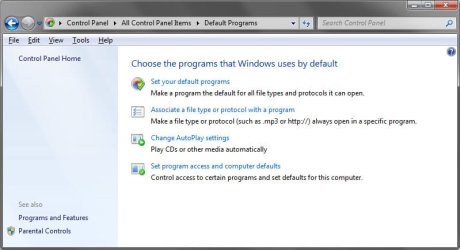
You should see this when you hit default programs:
protocol.jpg

Second option is the one I'm talking about.

What build are you using?

As far as seeing the entire control panel contents, you would want to use either small icons or large icons to see the individual sections.

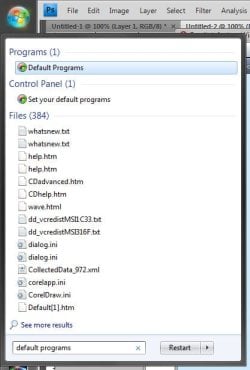
If you type "default programs" into the start menu you should see two options First one sends you to the window I posted above. Second one sends you to the first option in the window above.

cp2.jpg
 

My Computer My Computer

At a glance

7264x64/7260x86
OS
7264x64/7260x86
Thanks for the interest in helping me out.

My build is 7232 x64

When I click on option 2, Pegasus does not show up. Firefox, winamp & winrar are the only non MS programs that appear here. There is no way I can see to add another program to this. In Pegasus there is an option which has always worked with windows till now & that is "Default system Mail Program" It says: "Click here to enable Pegasus Mail as the default handler for mailto: URLs on this system"

However 7 has no interest in this being enacted. When I click on the button, nothing happens & there's no warning shown.

Of course there is an answer but darned if I can find it as straightforward...

Thanks!
 

My Computer My Computer

At a glance

windows 7
OS
windows 7
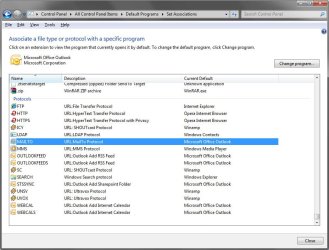
Scroll down to the bottom section, what do you see? Mine currently says outlook.
mailto.jpg

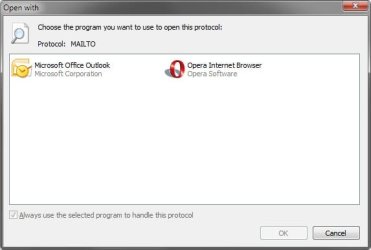
Highlight the mailto protocol and click change program up to. You should then see an option to change what program to use.
diag.jpg
 

My Computer My Computer

At a glance

7264x64/7260x86
OS
7264x64/7260x86
Hi,

Here's where it's not making sense. I still don't have a mailto option.

FTP
HTTP
HTTPS
ICY
SC
UNSV
UVOX
LDAP
MMS
SEARCH

Those are the only items listed under protocols.

Idears?
 

My Computer My Computer

At a glance

windows 7
OS
windows 7
Registry change kinda works

I'm using Build 7264 of Windows 7 32bit.

I was able to set the "default" value of
HKEY_CLASSES_ROOT\mailto\Shell\open\command
to C:\PMAIL\Programs\wsendto.exe %1

It seems to work fine in limited testing
 

My Computer My Computer

At a glance

Windows 7 32bit Build 7264E86004GBMSI Nvidia GeForce 9600GT
Computer Manufacturer/Model Number
Clone
OS
Windows 7 32bit Build 7264
CPU
E8600
Motherboard
Intel
Memory
4GB
Graphics Card(s)
MSI Nvidia GeForce 9600GT
Sound Card
Internal
Monitor(s) Displays
Planar 22"
Hard Drives
WD VelociRaptor as primary
Dunno what mail app you're using.. I'm using thunderbird and the key was set to "thunderbird url"?!

Thing is that I don't want ANYTHING to happen when I plugin my WinMo so I changed the reg key to "ping localhost" and voila, nothing. ;)

Thanks for the key, that was a great tip.

I'm using Build 7264 of Windows 7 32bit.

I was able to set the "default" value of
HKEY_CLASSES_ROOT\mailto\Shell\open\command
to C:\PMAIL\Programs\wsendto.exe %1

It seems to work fine in limited testing
 

My Computer My Computer

At a glance

Win7
Computer Manufacturer/Model Number
LexyComp
OS
Win7
And then after about 2 mins.. there it is!??!?!?!?!?!!?

...no default program assigned.. FUUUUUUUUUUUUUUUUUUUUUUUUUUUUUUUU! :cry:
 

My Computer My Computer

At a glance

Win7
Computer Manufacturer/Model Number
LexyComp
OS
Win7
Isn't there some free mail program from MS for Win7 ? I recall there was something for Vista but damn did I ever ignore Vista like the plague.. ;)
 

My Computer My Computer

At a glance

Win7
Computer Manufacturer/Model Number
LexyComp
OS
Win7
Megalomando, I don't know if you ever solved your problem, but Pegasus has now brought out a new version, 4.52, which works correctly with Windows 7. Give it a try.
 

My Computer My Computer

At a glance

Windows 7 Home Premium 64 bitAMD Core Duo4G
Computer Manufacturer/Model Number
Gateway NV5212u
OS
Windows 7 Home Premium 64 bit
CPU
AMD Core Duo
Memory
4G
Hard Drives
320G
Case
Laptop
Back
Top