- Local time
- 6:48 AM
- Messages
- 131
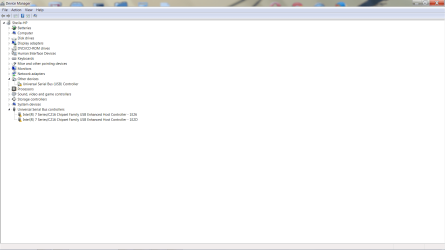
My HP notebook computer suddenly lost function in all 4 usb ports (3 are usb3 and the usb2 disappeared entirely out of device manager). After trying to fix it myself and working for 2 hours with HP tech support, they still don't work. It's out of warranty so took to local repair shop. They say files are corrupted and it needs a clean install of Windows 7. I am an old, crabby woman living in the winter in Florida. All my software is in Michigan so I really don't want to do a clean install right now and lose all my software until I drive back up north in May. (No, my house in MI is locked up tight and there is no one who can get into my house with the snow they have been getting.) Tech guy said maybe a workaround would be to press F8 and enable test mode so the USB drivers would work. He said he would try it and call back. He hasn't called back, so who knows if it will work. Will it? If not, anyone have a better idea short of reinstalling windows? Would upgrading to windows 8 get my computer to recognize the drivers?
My Computer
At a glance
Windows 7 Home Premium 64 bit3rd generation Intel Core i7-3610QM Processor8GB DDR3 1600MHz RAM (2 DIMM); 750GB 7200RPM ...2GB (2048MB) NVIDIA GeForce GT 650M GDDR5 Gra...
- Computer type
- PC/Desktop
- Computer Manufacturer/Model Number
- HP Pavilian DV7-7012 notebook
- OS
- Windows 7 Home Premium 64 bit
- CPU
- 3rd generation Intel Core i7-3610QM Processor
- Motherboard
- 2.30GHz
- Memory
- 8GB DDR3 1600MHz RAM (2 DIMM); 750GB 7200RPM hard drive
- Graphics Card(s)
- 2GB (2048MB) NVIDIA GeForce GT 650M GDDR5 Graphics
- Hard Drives
- 750GB 7200RPM hard drive with HP ProtectSmart Hard Drive Protection
- Antivirus
- Microsoft
- Browser
- Firefox, Chrome, Microsoft