Enable test mode to solve USB problems?

Thanks. I hope this does not require that I get into the bios because this computer will only let you change the boot order. That's as far as you can get. Someone else was complaining about this in another forum.
Gator, do you live in Ft. Myers? I'm in Cape Coral.
Well I am not that intuitive as most but I have to say not having the BIOS available is very odd if not downright suspicious.
Have you updated at any time??
 

My Computer

Computer type
PC/Desktop
Computer Manufacturer/Model Number
Own build (new) Desk1 / Asus ROG Win 7 / Desk2 1st build
OS
Desk1 7 Home Prem / Desk2 10 Pro / Main lap Asus ROG 10 Pro 2 laptop Toshiba 7 Pro Asus P2520 7 & 10
CPU
Desk1 i5 3750K / Laptop i7 GTX 860M / Desk2 i5 2500
Motherboard
Desk1 Asus P877-V / Desk2 Gigabyte H67 UD3H / Laptop ?
Memory
Desk1 8GB (1866) / Desk2 16GB (1333) / Laptop 8Gb DDR3
Graphics Card(s)
Desk 1& 2NVidia GTX 650 & Laptops on board Intel
Sound Card
Desk 1 & 2 -XONAR DG Realtek High Def audio Laptop
Monitor(s) Displays
Desk 1 Benq HD 2450 / Desk2 Philips 24" / Laptop 17.5"
Screen Resolution
1920x1080 D1 & D2 & Laptop 1
Hard Drives
Desk1 Samsung 120GB 830 SSD
Asus ROG 256GB 850 Pro SSD
Desk2 Samsung 840 256 SSD
Toshiba 120GB EVO
PSU
Desk 1 Corsair HX 1050/ Laptop ? / Desk 2 Corsair HX 650
Case
Desk 1 Cooler HAF XM ? Toshiba laptop / Desk2 Coolermaster
Cooling
Fans on all Desk1 -2 Desk2 - all Coolermasters 5 Laptop ?
Keyboard
Desk 1 MS Sidewinder X6 Desk 2 MS Sidewinder X 4
Mouse
Desk 1&2 - Gigabyte MS 900 gamer - laptop - Logitec wireless
Internet Speed
ADSL2+
Other Info
One other Desktop (tester) and spare Toshba laptop both with SSD's
Running Kaspersky 2016 ISS on all machines config'd identically
Logitec audio stereo systems on each machine (x3)
Canon MG5250MFC
Router/modem TP-Link running WPA2SK
The fix for the mapi32.dll error in the SFC report won't do anything for the USB issue.

Download DriverCleanup.zip
Extract all from the compressed folder - just select the default location provided in the extract window
A new explorer widow should open showing the extracted files
navigate to the x64 folder
Right click on DriveCleanup
select Run as administrator

Author's anchor to DriveCleanup
DriveCleanup removes all currently non present "Storage Volumes", "Disk", "CDROM", "Floppy" USB drives and their USB devices from the device tree. Furthermore it removes orphaned registry items related to these device types. Since V0.8 it removes WPD devices under Vista and Win7/8/10.

Started with parameter -T (like test) it shows which devices it would remove.
DriveCleanup -T

Started with admin privileges and without a parameter it does its job without further inquiry.

To remove certain types of devices there are the parameters -U -D -C -F -V -W and -R.

Sample to remove abandoned registry entries only:
drivecleanup -R

Under x64 editions of Windows only the included x64 version works.

Admin privileges are required for actual cleanup, without it switches into the test mode.

Scroll up to the top of the command prompt window and make sure it did not run in test mode. If it says test mode, then your did not Run as administrator. please try again. You can close the command prompt window.

Then please post a screenshot of Device Manager showing
any unknown devices
any devices with error icons

These should be easy to spot, the device category should already be expanded to any device that meets that criteria (unknown or problem)

See: http://www.sevenforums.com/tutorials/9733-screenshots-files-upload-post-seven-forums.html

I'll probably want to see another one showing the Universal Serial Bus Controllers, but I'm not sure which ones to look at - there are probably quite a few entries in that category.

Let me see what I can see and I'll try to figure out the best way to get more information.

Thanks

Bill
.
 

My Computer

Computer type
Laptop
Computer Manufacturer/Model Number
HP Pavilion dv6-6c10us
OS
x64 (6.3.9600) Win8.1 Pro & soon dual boot x64 (6.1.7601) Win7_SP1 HomePrem
CPU
AMD A6-3420M APU with Radeon(tm) HD Graphics
Motherboard
Hewlett-Packard 1805
Memory
6.00 GB
Graphics Card(s)
AMD Radeon(TM) HD 6520G
Sound Card
(1) AMD High Definition Audio Device (2) IDT High Definiti
Monitor(s) Displays
HP W2072a 20" LCD (1600 x 900) @ 60 Hz
Screen Resolution
1366 x 768 x 32 bits (4294967296 colors) @ 60 Hz
Hard Drives
ST640LM0 00 HM641JI SATA Disk Device
Keyboard
Logitech k520 wireless KB
Mouse
Logitech m320 wireless mouse (bundled with KB)
Internet Speed
15/5 | 54 MB Wireless 'n'
Antivirus
Realtime: Defender or Avast | On-demand: Malwarebytes, ESET
Browser
IE 11 on Win8, IE 10 on win 7
Other Info
Media: [Gimp, Audacity, VLC] || Comm: [WEmail 2012, Skype] || Productivity: [OpenOffice,| Textpad] || Utils: [Sysinternals, cCleaner, Speccy, Defraggler]
Well I am not that intuitive as most but I have to say not having the BIOS available is very odd if not downright suspicious.
Have you updated at any time??

John, it's an HP - they lock the user out of BIOS to protect them. The default settings work for the most part, but it gets frustrating when someone asks you to change a BIOS setting and you can't.

I spent quite a while trying to figure out if my machine was configured AHCI or IDE. The HP documentation did not help until I dug way down and learned that HP sets the default to AHCI - makes perfect sense, but they should really tell us up front what the settings are.

You make a good point about the BIOS version - it might be something to look into and a BIOS update might force the USB ports to be recognized.

I'll gather some information and try to work out the steps.


@CrabbyRightNow: Since John asked about the BIOS, it would be good to know about that and other aspects of your machine.
Please follow this tutorial to provide the current operating environment of your machine.
http://www.sevenforums.com/tutorials/311593-speccy-publish-snapshot-your-system-specs.html

Thanks
 

My Computer

Computer type
Laptop
Computer Manufacturer/Model Number
HP Pavilion dv6-6c10us
OS
x64 (6.3.9600) Win8.1 Pro & soon dual boot x64 (6.1.7601) Win7_SP1 HomePrem
CPU
AMD A6-3420M APU with Radeon(tm) HD Graphics
Motherboard
Hewlett-Packard 1805
Memory
6.00 GB
Graphics Card(s)
AMD Radeon(TM) HD 6520G
Sound Card
(1) AMD High Definition Audio Device (2) IDT High Definiti
Monitor(s) Displays
HP W2072a 20" LCD (1600 x 900) @ 60 Hz
Screen Resolution
1366 x 768 x 32 bits (4294967296 colors) @ 60 Hz
Hard Drives
ST640LM0 00 HM641JI SATA Disk Device
Keyboard
Logitech k520 wireless KB
Mouse
Logitech m320 wireless mouse (bundled with KB)
Internet Speed
15/5 | 54 MB Wireless 'n'
Antivirus
Realtime: Defender or Avast | On-demand: Malwarebytes, ESET
Browser
IE 11 on Win8, IE 10 on win 7
Other Info
Media: [Gimp, Audacity, VLC] || Comm: [WEmail 2012, Skype] || Productivity: [OpenOffice,| Textpad] || Utils: [Sysinternals, cCleaner, Speccy, Defraggler]
Ok Bill didn't know that about them (HP) - thought all BIOS's were accessible:o

I think your point re other aspects of the machine would be good too.
 

My Computer

Computer type
PC/Desktop
Computer Manufacturer/Model Number
Own build (new) Desk1 / Asus ROG Win 7 / Desk2 1st build
OS
Desk1 7 Home Prem / Desk2 10 Pro / Main lap Asus ROG 10 Pro 2 laptop Toshiba 7 Pro Asus P2520 7 & 10
CPU
Desk1 i5 3750K / Laptop i7 GTX 860M / Desk2 i5 2500
Motherboard
Desk1 Asus P877-V / Desk2 Gigabyte H67 UD3H / Laptop ?
Memory
Desk1 8GB (1866) / Desk2 16GB (1333) / Laptop 8Gb DDR3
Graphics Card(s)
Desk 1& 2NVidia GTX 650 & Laptops on board Intel
Sound Card
Desk 1 & 2 -XONAR DG Realtek High Def audio Laptop
Monitor(s) Displays
Desk 1 Benq HD 2450 / Desk2 Philips 24" / Laptop 17.5"
Screen Resolution
1920x1080 D1 & D2 & Laptop 1
Hard Drives
Desk1 Samsung 120GB 830 SSD
Asus ROG 256GB 850 Pro SSD
Desk2 Samsung 840 256 SSD
Toshiba 120GB EVO
PSU
Desk 1 Corsair HX 1050/ Laptop ? / Desk 2 Corsair HX 650
Case
Desk 1 Cooler HAF XM ? Toshiba laptop / Desk2 Coolermaster
Cooling
Fans on all Desk1 -2 Desk2 - all Coolermasters 5 Laptop ?
Keyboard
Desk 1 MS Sidewinder X6 Desk 2 MS Sidewinder X 4
Mouse
Desk 1&2 - Gigabyte MS 900 gamer - laptop - Logitec wireless
Internet Speed
ADSL2+
Other Info
One other Desktop (tester) and spare Toshba laptop both with SSD's
Running Kaspersky 2016 ISS on all machines config'd identically
Logitec audio stereo systems on each machine (x3)
Canon MG5250MFC
Router/modem TP-Link running WPA2SK
Bill just noticed in crabby's specs the machine is quoted a desktop yet the rest is notebook so Crabby what actually is it desk or lap - top please?

Ok looks like a bloat filled laptop and this is interesting as there loks to be two ways of accessing the BIOS
how to enter bios pavilion dv7 - HP Support Forum - 1009781
 

My Computer

Computer type
PC/Desktop
Computer Manufacturer/Model Number
Own build (new) Desk1 / Asus ROG Win 7 / Desk2 1st build
OS
Desk1 7 Home Prem / Desk2 10 Pro / Main lap Asus ROG 10 Pro 2 laptop Toshiba 7 Pro Asus P2520 7 & 10
CPU
Desk1 i5 3750K / Laptop i7 GTX 860M / Desk2 i5 2500
Motherboard
Desk1 Asus P877-V / Desk2 Gigabyte H67 UD3H / Laptop ?
Memory
Desk1 8GB (1866) / Desk2 16GB (1333) / Laptop 8Gb DDR3
Graphics Card(s)
Desk 1& 2NVidia GTX 650 & Laptops on board Intel
Sound Card
Desk 1 & 2 -XONAR DG Realtek High Def audio Laptop
Monitor(s) Displays
Desk 1 Benq HD 2450 / Desk2 Philips 24" / Laptop 17.5"
Screen Resolution
1920x1080 D1 & D2 & Laptop 1
Hard Drives
Desk1 Samsung 120GB 830 SSD
Asus ROG 256GB 850 Pro SSD
Desk2 Samsung 840 256 SSD
Toshiba 120GB EVO
PSU
Desk 1 Corsair HX 1050/ Laptop ? / Desk 2 Corsair HX 650
Case
Desk 1 Cooler HAF XM ? Toshiba laptop / Desk2 Coolermaster
Cooling
Fans on all Desk1 -2 Desk2 - all Coolermasters 5 Laptop ?
Keyboard
Desk 1 MS Sidewinder X6 Desk 2 MS Sidewinder X 4
Mouse
Desk 1&2 - Gigabyte MS 900 gamer - laptop - Logitec wireless
Internet Speed
ADSL2+
Other Info
One other Desktop (tester) and spare Toshba laptop both with SSD's
Running Kaspersky 2016 ISS on all machines config'd identically
Logitec audio stereo systems on each machine (x3)
Canon MG5250MFC
Router/modem TP-Link running WPA2SK
Bill just noticed in crabby's specs the machine is quoted a desktop yet the rest is notebook so Crabby what actually is it desk or lap - top please?

Crabby probably didn't notice the dropdown box for that field.
Specs entry error - look below PC/Desktop and you'll see: HP Pavilian DV7-7012 notebook

HP Pavilion dv7-7012nr Entertainment Notebook PC
 

My Computer

Computer type
Laptop
Computer Manufacturer/Model Number
HP Pavilion dv6-6c10us
OS
x64 (6.3.9600) Win8.1 Pro & soon dual boot x64 (6.1.7601) Win7_SP1 HomePrem
CPU
AMD A6-3420M APU with Radeon(tm) HD Graphics
Motherboard
Hewlett-Packard 1805
Memory
6.00 GB
Graphics Card(s)
AMD Radeon(TM) HD 6520G
Sound Card
(1) AMD High Definition Audio Device (2) IDT High Definiti
Monitor(s) Displays
HP W2072a 20" LCD (1600 x 900) @ 60 Hz
Screen Resolution
1366 x 768 x 32 bits (4294967296 colors) @ 60 Hz
Hard Drives
ST640LM0 00 HM641JI SATA Disk Device
Keyboard
Logitech k520 wireless KB
Mouse
Logitech m320 wireless mouse (bundled with KB)
Internet Speed
15/5 | 54 MB Wireless 'n'
Antivirus
Realtime: Defender or Avast | On-demand: Malwarebytes, ESET
Browser
IE 11 on Win8, IE 10 on win 7
Other Info
Media: [Gimp, Audacity, VLC] || Comm: [WEmail 2012, Skype] || Productivity: [OpenOffice,| Textpad] || Utils: [Sysinternals, cCleaner, Speccy, Defraggler]
Here's the condensed part ot the SFC log...
Code:
 Line 13025: 2015-01-10 22:43:59, Info                  CSI    0000031f [SR] Repairing 1 components
 Line 13026: 2015-01-10 22:43:59, Info                  CSI    00000320 [SR] Beginning Verify and Repair transaction
 Line 13029: 2015-01-10 22:43:59, Info                  CSI    00000322 [SR] Cannot repair member file [l:20{10}]"mapi32.dll" of Microsoft-Windows-Mapi, Version = 6.1.7601.17514, pA = PROCESSOR_ARCHITECTURE_INTEL (0), Culture neutral, VersionScope = 1 nonSxS, PublicKeyToken = {l:8 b:31bf3856ad364e35}, Type neutral, TypeName neutral, PublicKey neutral in the store, hash mismatch
 Line 13032: 2015-01-10 22:43:59, Info                  CSI    00000324 [SR] Cannot repair member file [l:20{10}]"mapi32.dll" of Microsoft-Windows-Mapi, Version = 6.1.7601.17514, pA = PROCESSOR_ARCHITECTURE_INTEL (0), Culture neutral, VersionScope = 1 nonSxS, PublicKeyToken = {l:8 b:31bf3856ad364e35}, Type neutral, TypeName neutral, PublicKey neutral in the store, hash mismatch
 Line 13033: 2015-01-10 22:43:59, Info                  CSI    00000325 [SR] This component was referenced by [l:202{101}]"Microsoft-Windows-Foundation-Package~31bf3856ad364e35~amd64~~6.1.7601.17514.WindowsFoundationDelivery"
 Line 13038: 2015-01-10 22:43:59, Info                  CSI    00000328 [SR] Could not reproject corrupted file [ml:48{24},l:46{23}]"\??\C:\Windows\SysWOW64"\[l:20{10}]"mapi32.dll"; source file in store is also corrupted
 Line 13043: 2015-01-10 22:43:59, Info                  CSI    0000032a [SR] Repair complete

As Gator says, this is hardly a critical system file - and I don't really see it causing your problems. I can see no other significant errors in the CBS background data.

I'll post a fix protocol for it a little later.
 

My Computer

Computer type
Laptop
Computer Manufacturer/Model Number
Asus K52F or Lenovo B51-80
OS
Win 7 x64 Home Premium (and x86 VirtualBox VM)/Win10
CPU
i3 370M/i7 6500U
Motherboard
Asus/Lenovo
Memory
8GB - finally :)/8GB
Graphics Card(s)
it's an i3, dude!/dual Intel&nVidia
Sound Card
onboard
Monitor(s) Displays
15.6" built-in
Screen Resolution
1366x768/1920x1080
Hard Drives
750GB Seagate internal
Sundry external drives attached to other computers on the local network
1TB SSD on the Lenovo
PSU
n/a
Internet Speed
as much as I can get - usually on a dongle/phone, so <1MB/s
Antivirus
MSE/Defender
Browser
IE11/12/Edge/Chrome/FF(if I must)
Thanks to everyone for the suggestions. Should I run the drivercleanup.exe now or wait for Noel's fix?
Yes, this is a bloat-filled HP notebook.
 

My Computer

Computer type
PC/Desktop
Computer Manufacturer/Model Number
HP Pavilian DV7-7012 notebook
OS
Windows 7 Home Premium 64 bit
CPU
3rd generation Intel Core i7-3610QM Processor
Motherboard
2.30GHz
Memory
8GB DDR3 1600MHz RAM (2 DIMM); 750GB 7200RPM hard drive
Graphics Card(s)
2GB (2048MB) NVIDIA GeForce GT 650M GDDR5 Graphics
Hard Drives
750GB 7200RPM hard drive with HP ProtectSmart Hard Drive Protection
Antivirus
Microsoft
Browser
Firefox, Chrome, Microsoft
I've uploaded a file - crnaa.zip - to my OneDrive at Noel's OneDrive
Please download and save it.

Right-click on the saved file and select Extract all...
Change the target to C:\ and click on Extract
Close all windows (it would be a good idea to print these instructions!)

Now reboot to the Repair Environment - as soon as the machine restarts, start tapping F8 - this should bring up the Advanced Boot Menu, at the top of which should be the option 'Repair my Computer'
Pick that
You'll have to log in with your username and password.

Pick the option to use a Command Prompt
At the prompt type
DIR C:\crnaa
hit the enter key - if you get a 'Not Found' error try
DIR D:\crnaa
or
DIR E:\crnaa


The drive letter in use when you find the folder will need to be substituted (for<drive>) into the following command...


XCOPY <drive>:\crnaa <drive>:\windows\winsxs /y /i /s /v /h


(e.g. XCOPY P:\wfire P:\windows\winsxs /y /i /s /v /h )


run the command (it should take almost no time) and when the prompt returns, type
EXIT
and hit the Enter key to exit Command Prompt - reboot to Normal Mode Windows.

Now run SFC /SCANNOW in an Elevated Command Prompt
then reboot and upload the new CBS.log file to your reply
 

My Computer

Computer type
Laptop
Computer Manufacturer/Model Number
Asus K52F or Lenovo B51-80
OS
Win 7 x64 Home Premium (and x86 VirtualBox VM)/Win10
CPU
i3 370M/i7 6500U
Motherboard
Asus/Lenovo
Memory
8GB - finally :)/8GB
Graphics Card(s)
it's an i3, dude!/dual Intel&nVidia
Sound Card
onboard
Monitor(s) Displays
15.6" built-in
Screen Resolution
1366x768/1920x1080
Hard Drives
750GB Seagate internal
Sundry external drives attached to other computers on the local network
1TB SSD on the Lenovo
PSU
n/a
Internet Speed
as much as I can get - usually on a dongle/phone, so <1MB/s
Antivirus
MSE/Defender
Browser
IE11/12/Edge/Chrome/FF(if I must)
Do Noel's patch first, then DriverCleanup and the other things I requested.

I do want to verify the model number though. I posted links to the NR model, I'll double check HP to see if there is more than one model for your machine, but there's usually a link in your start menu or bookmarks that take you directly to the support page.

The HP assistant might also give you that information or link - it's HP bloat, but it has at least one good virtue.

edit: searching HP for DV7-7012 only turned up the NR model so I probably have the right links.
 

My Computer

Computer type
Laptop
Computer Manufacturer/Model Number
HP Pavilion dv6-6c10us
OS
x64 (6.3.9600) Win8.1 Pro & soon dual boot x64 (6.1.7601) Win7_SP1 HomePrem
CPU
AMD A6-3420M APU with Radeon(tm) HD Graphics
Motherboard
Hewlett-Packard 1805
Memory
6.00 GB
Graphics Card(s)
AMD Radeon(TM) HD 6520G
Sound Card
(1) AMD High Definition Audio Device (2) IDT High Definiti
Monitor(s) Displays
HP W2072a 20" LCD (1600 x 900) @ 60 Hz
Screen Resolution
1366 x 768 x 32 bits (4294967296 colors) @ 60 Hz
Hard Drives
ST640LM0 00 HM641JI SATA Disk Device
Keyboard
Logitech k520 wireless KB
Mouse
Logitech m320 wireless mouse (bundled with KB)
Internet Speed
15/5 | 54 MB Wireless 'n'
Antivirus
Realtime: Defender or Avast | On-demand: Malwarebytes, ESET
Browser
IE 11 on Win8, IE 10 on win 7
Other Info
Media: [Gimp, Audacity, VLC] || Comm: [WEmail 2012, Skype] || Productivity: [OpenOffice,| Textpad] || Utils: [Sysinternals, cCleaner, Speccy, Defraggler]
Noel, I followed your instructions and am running sfc /scannow. Will post log file when it's done. I hope I did this right.
 

My Computer

Computer type
PC/Desktop
Computer Manufacturer/Model Number
HP Pavilian DV7-7012 notebook
OS
Windows 7 Home Premium 64 bit
CPU
3rd generation Intel Core i7-3610QM Processor
Motherboard
2.30GHz
Memory
8GB DDR3 1600MHz RAM (2 DIMM); 750GB 7200RPM hard drive
Graphics Card(s)
2GB (2048MB) NVIDIA GeForce GT 650M GDDR5 Graphics
Hard Drives
750GB 7200RPM hard drive with HP ProtectSmart Hard Drive Protection
Antivirus
Microsoft
Browser
Firefox, Chrome, Microsoft
New log file

Here is the log file.
 

My Computer

Computer type
PC/Desktop
Computer Manufacturer/Model Number
HP Pavilian DV7-7012 notebook
OS
Windows 7 Home Premium 64 bit
CPU
3rd generation Intel Core i7-3610QM Processor
Motherboard
2.30GHz
Memory
8GB DDR3 1600MHz RAM (2 DIMM); 750GB 7200RPM hard drive
Graphics Card(s)
2GB (2048MB) NVIDIA GeForce GT 650M GDDR5 Graphics
Hard Drives
750GB 7200RPM hard drive with HP ProtectSmart Hard Drive Protection
Antivirus
Microsoft
Browser
Firefox, Chrome, Microsoft
SFC is happy now ;)

Back to your other helpers!
 

My Computer

Computer type
Laptop
Computer Manufacturer/Model Number
Asus K52F or Lenovo B51-80
OS
Win 7 x64 Home Premium (and x86 VirtualBox VM)/Win10
CPU
i3 370M/i7 6500U
Motherboard
Asus/Lenovo
Memory
8GB - finally :)/8GB
Graphics Card(s)
it's an i3, dude!/dual Intel&nVidia
Sound Card
onboard
Monitor(s) Displays
15.6" built-in
Screen Resolution
1366x768/1920x1080
Hard Drives
750GB Seagate internal
Sundry external drives attached to other computers on the local network
1TB SSD on the Lenovo
PSU
n/a
Internet Speed
as much as I can get - usually on a dongle/phone, so <1MB/s
Antivirus
MSE/Defender
Browser
IE11/12/Edge/Chrome/FF(if I must)
Screenshot after running drivecleanup

Here is the screenshot after running drivecleanup. Should I have rebooted before taking the screenshot of device manager? It looks the same as before.
 

Attachments

  • screenshot after drivecleanup.png
    screenshot after drivecleanup.png
    1.6 MB · Views: 10

My Computer

Computer type
PC/Desktop
Computer Manufacturer/Model Number
HP Pavilian DV7-7012 notebook
OS
Windows 7 Home Premium 64 bit
CPU
3rd generation Intel Core i7-3610QM Processor
Motherboard
2.30GHz
Memory
8GB DDR3 1600MHz RAM (2 DIMM); 750GB 7200RPM hard drive
Graphics Card(s)
2GB (2048MB) NVIDIA GeForce GT 650M GDDR5 Graphics
Hard Drives
750GB 7200RPM hard drive with HP ProtectSmart Hard Drive Protection
Antivirus
Microsoft
Browser
Firefox, Chrome, Microsoft
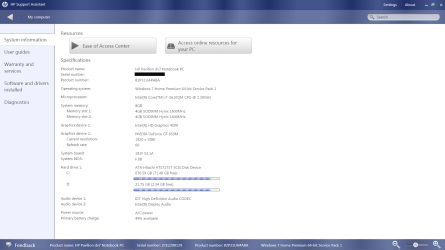
Screen shot of computer specs

Here is a screen shot of my computer specs in case you need these.

screen%20shot%20of%20computer%20specs.png
 
Last edited by a moderator:

My Computer

Computer type
PC/Desktop
Computer Manufacturer/Model Number
HP Pavilian DV7-7012 notebook
OS
Windows 7 Home Premium 64 bit
CPU
3rd generation Intel Core i7-3610QM Processor
Motherboard
2.30GHz
Memory
8GB DDR3 1600MHz RAM (2 DIMM); 750GB 7200RPM hard drive
Graphics Card(s)
2GB (2048MB) NVIDIA GeForce GT 650M GDDR5 Graphics
Hard Drives
750GB 7200RPM hard drive with HP ProtectSmart Hard Drive Protection
Antivirus
Microsoft
Browser
Firefox, Chrome, Microsoft
Thanks Crabby,

First a few things that will help communicate information on the forum
1) screenshots: Alt+PrtScn grabs just a window, not the full screen.
You still have to paste it into Paint and save it though. It makes it easier to read, that's all.

2) System information: I prefer Speccy reports - just my preference.
But ... keep in mind any time you post anything to review it before posting.
Many reports or screenshots contain information you wouldn't want on a public forum (such as your eMail address)
Paint has an eraser that makes it easy to remove anything from an image that you think should be kept private.
Just a heads up for your own privacy.

See if re-installing the USB chipset drivers solves the problem
 

My Computer

Computer type
Laptop
Computer Manufacturer/Model Number
HP Pavilion dv6-6c10us
OS
x64 (6.3.9600) Win8.1 Pro & soon dual boot x64 (6.1.7601) Win7_SP1 HomePrem
CPU
AMD A6-3420M APU with Radeon(tm) HD Graphics
Motherboard
Hewlett-Packard 1805
Memory
6.00 GB
Graphics Card(s)
AMD Radeon(TM) HD 6520G
Sound Card
(1) AMD High Definition Audio Device (2) IDT High Definiti
Monitor(s) Displays
HP W2072a 20" LCD (1600 x 900) @ 60 Hz
Screen Resolution
1366 x 768 x 32 bits (4294967296 colors) @ 60 Hz
Hard Drives
ST640LM0 00 HM641JI SATA Disk Device
Keyboard
Logitech k520 wireless KB
Mouse
Logitech m320 wireless mouse (bundled with KB)
Internet Speed
15/5 | 54 MB Wireless 'n'
Antivirus
Realtime: Defender or Avast | On-demand: Malwarebytes, ESET
Browser
IE 11 on Win8, IE 10 on win 7
Other Info
Media: [Gimp, Audacity, VLC] || Comm: [WEmail 2012, Skype] || Productivity: [OpenOffice,| Textpad] || Utils: [Sysinternals, cCleaner, Speccy, Defraggler]
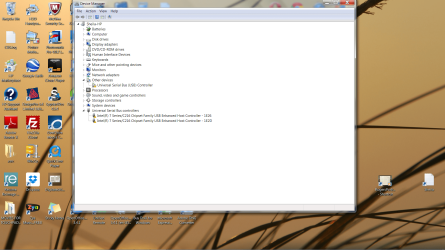
I reinstalled the USB chipset drivers earlier in the week and it didn't work... I tried it again just now and the USB ports still don't work. I have attached a screen shot of device manager. Hope I did the screen shot right this time.
 

Attachments

  • screen shot after usb driver install.png
    screen shot after usb driver install.png
    154.2 KB · Views: 5

My Computer

Computer type
PC/Desktop
Computer Manufacturer/Model Number
HP Pavilian DV7-7012 notebook
OS
Windows 7 Home Premium 64 bit
CPU
3rd generation Intel Core i7-3610QM Processor
Motherboard
2.30GHz
Memory
8GB DDR3 1600MHz RAM (2 DIMM); 750GB 7200RPM hard drive
Graphics Card(s)
2GB (2048MB) NVIDIA GeForce GT 650M GDDR5 Graphics
Hard Drives
750GB 7200RPM hard drive with HP ProtectSmart Hard Drive Protection
Antivirus
Microsoft
Browser
Firefox, Chrome, Microsoft
The install fixed the unknown device - most likely the USB eXtrensible host controller.
It is now known, but it still has an error.

I'll have to dig a little deeper.

This Chipset update seems as though it only changes the name shown in Device manager.

While I dig around some more, please do two things
1) install the above driver Chipset update - even if it only cosmetic.
2) Manually run Windows update and look in the optional updates section.
Select all that are offered that are related to the issue. There might be some that are touchpad, monitor, or network adapter related - don't select those at this time, you can and should come back to select those updates later.

I'm trying to limit the changes specifically to the issue at hand - the USB controllers

If you're not sure, post a screen shot of the optional Windows Updates and I will review and advise.
You seem fairly capable though.

Bill
.
 

My Computer

Computer type
Laptop
Computer Manufacturer/Model Number
HP Pavilion dv6-6c10us
OS
x64 (6.3.9600) Win8.1 Pro & soon dual boot x64 (6.1.7601) Win7_SP1 HomePrem
CPU
AMD A6-3420M APU with Radeon(tm) HD Graphics
Motherboard
Hewlett-Packard 1805
Memory
6.00 GB
Graphics Card(s)
AMD Radeon(TM) HD 6520G
Sound Card
(1) AMD High Definition Audio Device (2) IDT High Definiti
Monitor(s) Displays
HP W2072a 20" LCD (1600 x 900) @ 60 Hz
Screen Resolution
1366 x 768 x 32 bits (4294967296 colors) @ 60 Hz
Hard Drives
ST640LM0 00 HM641JI SATA Disk Device
Keyboard
Logitech k520 wireless KB
Mouse
Logitech m320 wireless mouse (bundled with KB)
Internet Speed
15/5 | 54 MB Wireless 'n'
Antivirus
Realtime: Defender or Avast | On-demand: Malwarebytes, ESET
Browser
IE 11 on Win8, IE 10 on win 7
Other Info
Media: [Gimp, Audacity, VLC] || Comm: [WEmail 2012, Skype] || Productivity: [OpenOffice,| Textpad] || Utils: [Sysinternals, cCleaner, Speccy, Defraggler]
Please also double click on each of the problem devices in Device Manager and post a screen shot of the general property tab.

This should show the error.

Thanks again.

Bill
 

My Computer

Computer type
Laptop
Computer Manufacturer/Model Number
HP Pavilion dv6-6c10us
OS
x64 (6.3.9600) Win8.1 Pro & soon dual boot x64 (6.1.7601) Win7_SP1 HomePrem
CPU
AMD A6-3420M APU with Radeon(tm) HD Graphics
Motherboard
Hewlett-Packard 1805
Memory
6.00 GB
Graphics Card(s)
AMD Radeon(TM) HD 6520G
Sound Card
(1) AMD High Definition Audio Device (2) IDT High Definiti
Monitor(s) Displays
HP W2072a 20" LCD (1600 x 900) @ 60 Hz
Screen Resolution
1366 x 768 x 32 bits (4294967296 colors) @ 60 Hz
Hard Drives
ST640LM0 00 HM641JI SATA Disk Device
Keyboard
Logitech k520 wireless KB
Mouse
Logitech m320 wireless mouse (bundled with KB)
Internet Speed
15/5 | 54 MB Wireless 'n'
Antivirus
Realtime: Defender or Avast | On-demand: Malwarebytes, ESET
Browser
IE 11 on Win8, IE 10 on win 7
Other Info
Media: [Gimp, Audacity, VLC] || Comm: [WEmail 2012, Skype] || Productivity: [OpenOffice,| Textpad] || Utils: [Sysinternals, cCleaner, Speccy, Defraggler]
Don't do anything with this yet, I'm posting it for later reference.
Your BIOS is version F.0B (from the HP assistant image), but the HP support site only show BIOS F.0A

BIOS F.0A

Don't go any further with this post until I get back to you.

There's either a typo on the HP support page, the HP assistant is wrong, or you have the wrong BIOS.

I'll try to figure out what BIOS F.0B is on the HP site and how it might have been put on your machine. It's too much detective work to really figure out what happened, so I just have to verify what HP has (is it a typo?? or is F.0A the version you need).

It's interesting from a technical standpoint, that F.0B didn't brick your machine. PCs are commodities and the difference between one model and another from the same vendor might be minor and you skated by with only the USBs being affected.

So again, hold off on doing anything in this post.

Thanks,

Bill
.
 

My Computer

Computer type
Laptop
Computer Manufacturer/Model Number
HP Pavilion dv6-6c10us
OS
x64 (6.3.9600) Win8.1 Pro & soon dual boot x64 (6.1.7601) Win7_SP1 HomePrem
CPU
AMD A6-3420M APU with Radeon(tm) HD Graphics
Motherboard
Hewlett-Packard 1805
Memory
6.00 GB
Graphics Card(s)
AMD Radeon(TM) HD 6520G
Sound Card
(1) AMD High Definition Audio Device (2) IDT High Definiti
Monitor(s) Displays
HP W2072a 20" LCD (1600 x 900) @ 60 Hz
Screen Resolution
1366 x 768 x 32 bits (4294967296 colors) @ 60 Hz
Hard Drives
ST640LM0 00 HM641JI SATA Disk Device
Keyboard
Logitech k520 wireless KB
Mouse
Logitech m320 wireless mouse (bundled with KB)
Internet Speed
15/5 | 54 MB Wireless 'n'
Antivirus
Realtime: Defender or Avast | On-demand: Malwarebytes, ESET
Browser
IE 11 on Win8, IE 10 on win 7
Other Info
Media: [Gimp, Audacity, VLC] || Comm: [WEmail 2012, Skype] || Productivity: [OpenOffice,| Textpad] || Utils: [Sysinternals, cCleaner, Speccy, Defraggler]
Back
Top