Solved Error (0x80300024)

driecken

New member
Local time
1:00 PM
Messages
72
Tried formatting, deleting, and installing and I get error (0x80300024) "unable to install"...

I know its not the disc as i just used it successfully format a week or so ago.

I thought it may be the HD so I used a toolkit to manually format, no go. :cry:
 

My Computer

OS
Windows 7 Ultimate x64
error 0x80300024

Tried formatting, deleting, and installing and I get error (0x80300024) "unable to install"...

I know its not the disc as i just used it successfully format a week or so ago.

I thought it may be the HD so I used a toolkit to manually format, no go. :cry:

Hey driecken

That error relate to the disk partitions so How did you format the disk and with what utility. Its 64 bit and is it a clean install? might as well tellus about where you got the image and how you burned it.

thanks

Ken
 

My Computer

Computer Manufacturer/Model Number
HP Pavillion dv-7 1005 Tx
OS
Win 8 Release candidate 8400
CPU
[email protected]
Memory
4 gigs
Graphics Card(s)
Nvidia 9600M
Sound Card
HD built-in
Monitor(s) Displays
17" Wxga
Screen Resolution
1440x900
Cooling
none
Internet Speed
45Mb down 5Mb up
Tried formatting, deleting, and installing and I get error (0x80300024) "unable to install"...

I know its not the disc as i just used it successfully format a week or so ago.

I thought it may be the HD so I used a toolkit to manually format, no go. :cry:


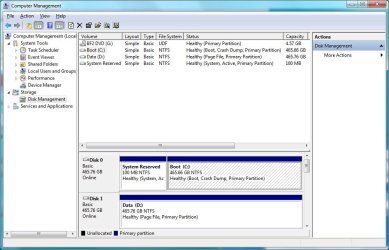
Try removing all partitions from the disk. Mine did this, and after deleting all partitions it made a 100mb "system reserved" partition and the rest to the primary "C" partition.
 

Attachments

  • win7part.jpg
    win7part.jpg
    78.3 KB · Views: 4,089
Last edited:

My Computer

Computer Manufacturer/Model Number
Self-built
OS
Win7 x64 RTM
CPU
AMD Penom II X2 550 @ 3.575 GHz
Motherboard
Asus M3N72D
Memory
4GB Kingston PC8500
Graphics Card(s)
PNY Nvidia 9800GT 1GB
Monitor(s) Displays
24" Acer X233H LCD
Screen Resolution
1920x1080
Hard Drives
3 Western Digital Caviar WD5000AACS in RAID5
PSU
Antec Earthwatts 500W
Hey driecken

That error relate to the disk partitions so How did you format the disk and with what utility. Its 64 bit and is it a clean install? might as well tellus about where you got the image and how you burned it.

thanks

Ken

Yep, downloaded from microsoft, its 64 bit and 7100 build.
Burned with microsoft software, whatever their default burner app is on 7000 build, using sony dvdburner via usb.

The disc is solid, I even tested install on another box with no problems a few minutes ago.

I am thinking it has to be something with the hard drive, and windows setup not being able to actually format the drive correctly.

Clean install, I completely wiped the drive prior to install, and I am attempting dual boot with mac os x on another HD (200 GB).

This install is going on a 500 GB WD HD (SATA), completely clean and the drive was working fine just prior to attempted setup.

Setup starts fine, but when I get to the drive options under custom install, I select the 500 GB drive (disk 0 partition1) I beleive and click delete, format, new...install...and the error begins.

I even attempted changing partition size without any success.

I used a WD disk utility from my collection of utilities, and formatted ntfs.

 

My Computer

OS
Windows 7 Ultimate x64
Try removing all partitions from the disk. Mine did this, and after deleting all partitions it made a 100mb "system reserved" partition and the rest to the primary "C" partition.


Indeed, I wiped all partitions, deleted, and formatted, with no avail.

I just attempted install again, I even lowered the partition space to see if that would help but no dice.

I am still getting the same error code and "windows could not install to the selected location/device"
 

My Computer

OS
Windows 7 Ultimate x64
Indeed, I wiped all partitions, deleted, and formatted, with no avail.

I just attempted install again, I even lowered the partition space to see if that would help but no dice.

I am still getting the same error code and "windows could not install to the selected location/device"

You need to have space for the system reserved partition on disk 0.
 

My Computer

Computer Manufacturer/Model Number
Self-built
OS
Win7 x64 RTM
CPU
AMD Penom II X2 550 @ 3.575 GHz
Motherboard
Asus M3N72D
Memory
4GB Kingston PC8500
Graphics Card(s)
PNY Nvidia 9800GT 1GB
Monitor(s) Displays
24" Acer X233H LCD
Screen Resolution
1920x1080
Hard Drives
3 Western Digital Caviar WD5000AACS in RAID5
PSU
Antec Earthwatts 500W
You need to have space for the system reserved partition on disk 0.

There is space, thats not the issue.

Besides, it automatically creates a partition for that on install.
 

My Computer

OS
Windows 7 Ultimate x64
There is space, thats not the issue.

Besides, it automatically creates a partition for that on install.

Driecken

You are trying to install to an internal, eide, or sata drive from a dvd right?

What does the rest of the unable to install message say?

It might be unable to install because the OS isn't compatible. Just a thought.

Ken
 

My Computer

Computer Manufacturer/Model Number
HP Pavillion dv-7 1005 Tx
OS
Win 8 Release candidate 8400
CPU
[email protected]
Memory
4 gigs
Graphics Card(s)
Nvidia 9600M
Sound Card
HD built-in
Monitor(s) Displays
17" Wxga
Screen Resolution
1440x900
Cooling
none
Internet Speed
45Mb down 5Mb up
Driecken

You are trying to install to an internal, eide, or sata drive from a dvd right?

What does the rest of the unable to install message say?

It might be unable to install because the OS isn't compatible. Just a thought.

Ken

Yes, it is in internally connected SATA Hard Drive Western Digital 500 GB.

The drive has been used for windows before, and it is clean as far as data, it is wiped.

I don't think windows setup is actually formatting it properly though, it could be also another drive problem, but it was working properly earlier in the day so I doubt it.

The entire message stated simply "unable to install windows to desired location" or something to that general message. I am done messing with it for today, I am running mac os x leopard with no problem on another internal sata drive, so I can mess more with windows install tommorow, and get you the full message error.
 

My Computer

OS
Windows 7 Ultimate x64
I disconnected my macintosh os hd, and installed windows 7 fine, dunno why perhaps the eif formatted drive was freaking out windows install.

Anyways, installed fine and working.
 

My Computer

OS
Windows 7 Ultimate x64
Disk 0 was my SSD raid 0
Disk 1 was a 1 terrabyte disk NTFS

Unplugging the Disk 1 fixed the problem.

Thanks!!

:geek:
 

My Computer

Computer Manufacturer/Model Number
ZEOPC
OS
Windows 7 Ultimate 64bit
CPU
Intel iCore7 920 @ 4.2ghz
Motherboard
Asus P6T-SE
Memory
12GB DDRe 1333mhz
Graphics Card(s)
nVidia GTX 580
Sound Card
Sound Blaster X-Fi Titanium PCI-E
Monitor(s) Displays
BenQ W1000+
Screen Resolution
1080p
Hard Drives
1x Corsair x64 50GB SATA2
PSU
OCZ 1000W Elite X Stream
Case
Thermaltake Spedo
Cooling
Thermaltake spinQ
Keyboard
Logitech G15 1st Edition
Mouse
Razer Imperator
Internet Speed
Cable 10 Mbps
Disk 0 was my SSD raid 0
Disk 1 was a 1 terrabyte disk NTFS

Unplugging the Disk 1 fixed the problem.

Thanks!!

:geek:

Glad this thread could be of some use for you as well.
 

My Computer

OS
Windows 7 Ultimate x64
I only just joined this forum to say thanks for the help with the 00024 problem. I disconnected all drives except the one I wanted to install on (obviously) and problem solved. Cheers chaps.
 

My Computer

OS
7 64 bit
Fix error 0×80300024

This error messages may appear because the Windows 7 RC system has problems with Grub (Linux) boot loader present or previously present on the system. And to fix this error you should run the Windows 7 setup do a FixMBR so Windows 7 can write a fresh bootloader.

a link that can help you
 

My Computer

OS
XP
Just to FYI anyone. I've been using OEM Windows 7 64bit Home Premium just fine. Until today everything was working fine. Today I installed 2 2tb hard drives while removing my other 3 drives from the machine and in doing so it's given me nothing but trouble for over 12 hours. I've been trying to dual boot Windows 7 and Kubuntu 10.10 on one drive and ended up giving up. I've decided to do a straight W7 install but I noticed that the drive that I was trying to make my W7 C: was showing as Disk 1 not 0. I moved the cables around and got that to show correctly, but when I tried to install W7 I then got this error. After moving this back to Disk 1 I could Install even with my second 2TB drive connected. For some reason W7 does not like to be installed on Disk 0 on SATA at least.
 

My Computer

Computer Manufacturer/Model Number
Home Built
OS
Windows 7 Home Premium 64bit
CPU
Intel Celeron E3300 Wolfdale 2.5GHz 1MB L2 Cache LGA 775 65W
Motherboard
MSI G31TM-P21 LGA 775 Intel G31 Micro ATX Intel Motherboard
Memory
4 Gb 2 x 2GB Crucial DDR2 UNBUFF. PC2 - 6400
Graphics Card(s)
MSI nVidia GeForce 8400GS 256 MB DVI/HDTV PCI-Express Video
Sound Card
Realtek ALC888S
Monitor(s) Displays
Envision Professional H191W - LCD display - TFT - 19" - wide
Hard Drives
2 x Western Digital 2 TB Caviar Green SATA Intellipower 64 MB Cache Bulk/OEM Desktop Hard Drive WD20EARS
PSU
LOGISYS Computer PS550ABK 550Watts ATX12V Power Supply With
Case
Unknown
Cooling
fans 4 x 80mm chassis, 1 x 80mm cpu, 1 x 45mm gpu
Hello cscott0108, welcome to Seven Forums!


If you want help it would be a good idea to start your own thread instead of tagging onto this 1 year old thread that may not get seen.


Click Here
 

My Computer

Computer Manufacturer/Model Number
* BFK Customs *
OS
W 7 64-bit Ultimate
CPU
Intel Q9550 Yorkfield
Motherboard
ASUS P5Q Pro
Memory
8GB Dominator 8500C5D
Graphics Card(s)
ATI : XFX 5870
Sound Card
Realtek HD Audio 7-1
Monitor(s) Displays
1x 47" LCD HDMI & 3x 26" LCD HDMI
Screen Resolution
1920x1080P & 1920x1200
Hard Drives
1x 80GB Intel X25-M G2 SSD : 1x 500GB & 1x 640GB WD Caviar Black(s)
PSU
Corsair 620HX
Case
Cooler Master RC-690
Cooling
Tuniq Tower 120, 2x 140mm and 3x 120mm case fans
Keyboard
Microsoft 500
Mouse
Razer Diamondback 3G
Internet Speed
14 Mb/s
Other Info
1x Koutech 3Gb/s SATA HDD Hot Swap Rack
SATA slot 1 solved my problem

had the same problem as OP.

thanks for the solution given 2 posts up.
 

My Computer

OS
win 7 64bit ultimate
MAC drive on hackentosh was the problem

Hey, thanks for the info, this was driving me nuts.

Windows 7 does not like MAC/LINUX
 

My Computer

OS
windows 7 64bit
windows 7 64 bit installation

hi all had the error 0x80300024 on my macpro on attempting to install win7 64 bit i followed the message posted and disconnected all the harddrives except the install drive and alls well:D
 

My Computer

OS
WIN7 64BIT
did a google search on this error, this thread was first result, and the posts here resolved the issue (remove other hdds)... Just wanted to reply quickly and say thx for website, thread, and posts!
 

My Computer

OS
windows 7 ultimate x64
Back
Top