Error 1335

Kemocer

New member
Local time
11:44 PM
Messages
2
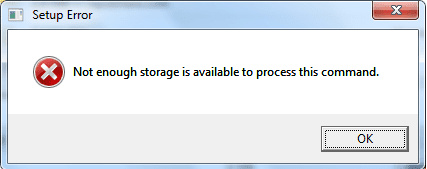
Hi everyone, i tried to install UT3 but during the installation Error 1335 was appearing, on forums people told me to install Microsoft Installer 3.5 Redistributable but during the installation storage error appears, I tried many solutions of those problems but none has worked.

40e523f54c03.png
 

My Computer

OS
Windows 7
CPU
E7200
Motherboard
EP45-UD3R
Memory
OCZ Reaper PC 9200 2GB
Graphics Card(s)
MSI GTX 260 sp192
Monitor(s) Displays
Samsung SyncMaster 740t
Hard Drives
Samsung 320gb
PSU
OCZ Stealth 600W
Case
CM 690
Hi everyone, i tried to install UT3 but during the installation Error 1335 was appearing, on forums people told me to install Microsoft Installer 3.5 Redistributable but during the installation storage error appears, I tried many solutions of those problems but none has worked.

40e523f54c03.png
Are you sure you have enough Hard Disk space?
 

My Computer

Computer Manufacturer/Model Number
Compal JFT02 (Custom Build Laptop)
OS
Windows 7 Home Premium x64 - Mac OS X 10.6.4 x64
CPU
Intel Core 2 Duo T9300 2.5 GHz
Motherboard
JFT02
Memory
4GB Kingston DDR2-800
Graphics Card(s)
NVIDIA Geforce 8600M GT (512MB Model)
Sound Card
Realtek HD Audio
Monitor(s) Displays
WUXGA Standard Laptop Display
Screen Resolution
1680*1050
Hard Drives
Toshiba 320GB 5400RPM Laptop HD
PSU
Standard Laptop Power Supply
Case
Standard Laptop Case
Cooling
Standard Laptop Cooling
Keyboard
Standard Laptop 105 Key-Keyboard
Mouse
Synaptics Touchpad
Internet Speed
Verizion Online DSL 3360/864 kbs (dl/up)
Task Manager, performance tab...

What do the "paged" and "nonpaged" kernel memory counters report just before/after you experience this error?
 

My Computer

Computer Manufacturer/Model Number
Multiple machines in various stages of decomposition.
OS
Win7x64
Task Manager, performance tab...

What do the "paged" and "nonpaged" kernel memory counters report just before/after you experience this error?
lmao...having reread their statement and yours...

I see/should have seen where this is going...
 

My Computer

Computer Manufacturer/Model Number
Compal JFT02 (Custom Build Laptop)
OS
Windows 7 Home Premium x64 - Mac OS X 10.6.4 x64
CPU
Intel Core 2 Duo T9300 2.5 GHz
Motherboard
JFT02
Memory
4GB Kingston DDR2-800
Graphics Card(s)
NVIDIA Geforce 8600M GT (512MB Model)
Sound Card
Realtek HD Audio
Monitor(s) Displays
WUXGA Standard Laptop Display
Screen Resolution
1680*1050
Hard Drives
Toshiba 320GB 5400RPM Laptop HD
PSU
Standard Laptop Power Supply
Case
Standard Laptop Case
Cooling
Standard Laptop Cooling
Keyboard
Standard Laptop 105 Key-Keyboard
Mouse
Synaptics Touchpad
Internet Speed
Verizion Online DSL 3360/864 kbs (dl/up)
I have lots of Hard disk space. What about Error 1335?
f85db84854ff.jpg

763f5efc4115.jpg
 

My Computer

OS
Windows 7
CPU
E7200
Motherboard
EP45-UD3R
Memory
OCZ Reaper PC 9200 2GB
Graphics Card(s)
MSI GTX 260 sp192
Monitor(s) Displays
Samsung SyncMaster 740t
Hard Drives
Samsung 320gb
PSU
OCZ Stealth 600W
Case
CM 690

My Computer

Computer Manufacturer/Model Number
Custom
OS
Windows 7 Ultimate RTM (Technet)
CPU
3.00 gigahertz Intel Core2 Duo E8400
Motherboard
ASUSTeK Computer INC. P5K/EPU Rev 1.xx
Memory
4GB
Graphics Card(s)
ATI Radeon X1950 Pro
Sound Card
Built in HD Audio
Monitor(s) Displays
22" Gateway LCD
Screen Resolution
1920 x 1200
Hard Drives
ST3160023A [Hard drive] (160.04 GB) -- drive 0, rev 8.01, ST3500630AS [Hard drive] (500.11 GB) -- drive 2, rev 3.AAK
ST3500630AS [Hard drive] (500.11 GB) -- drive 1, rev 3.AAK
Keyboard
Logitech G11
Mouse
Microsoft Wireless Laser Mouse 5000
Internet Speed
13.44 Mbps
I have lots of Hard disk space. What about Error 1335?

The "storage" error you get during your attempt to update the installer is almost certainly completely unrelated to your disk. The actual error is Win32 status code 8:

Q:\>net helpmsg 8
Not enough storage is available to process this command.
The list of potential causes is many and varied, and running out of paged/non-paged pool is one of them. However with your numbers hovering around 100MB for paged pool and 32MB for NPP, that may not be the problem.

Try uninstalling your anti-virus first and then running the installer update. It's possible that the AV is interfering with memory allocation routines.

As far as the UT3 "1335" error is concerned, that's possibly going to be UT3-specific and not a Win32 status code. If you've been advised to update the installer, presumably there's an incompatibility between the older version and UT3. Hence, fixing the installer issue becomes the focal point.
 

My Computer

Computer Manufacturer/Model Number
Multiple machines in various stages of decomposition.
OS
Win7x64
Which one Windows Installer did you try install?
This one CLICK or older this means 3.x.If you tried install any 3.x it's no strange it returned you "not enough storage" because this version is not for your system and it is normal - if any application is uncompatible with system during installation it can return error "not enough storage" as well :p

There never been Windows Installer 3.5

read there:
Released Versions of Windows Installer (Windows)

Besides in Windows 7 is buildin Windows Installer 5.0 (not even 4.5)What's New in Windows Installer 5.0 (Windows) and untill now if anybody have issue with this service can only fix it manually because there is no 5.0 to download...but I doubt is really issue with Windows Installer in this content

Relate to error 1335

Copy includes from DVD to hard disk to any location and from there try install
 

My Computer

Computer Manufacturer/Model Number
Custom made
OS
Windows 7 Professional x64 PL
CPU
AMD Athlon 4450e
Motherboard
Giga-Byte GA-MA69G-S3H
Memory
GoodRam DDR2 2x2048MB (FSB 800MHz)
Graphics Card(s)
nVidia GeForce 9600GT (G94-300) 1024 MB
Monitor(s) Displays
SAMSUNG SyncMaster HS2P301688
Hard Drives
Seagate ST3750330AS 750GB
PSU
Corsair 550W
Cooling
AeroCool ExtremeEngine 3T
Did anyone read the link I posted? It's not a hard drive space issue.
 

My Computer

Computer Manufacturer/Model Number
Custom
OS
Windows 7 Ultimate RTM (Technet)
CPU
3.00 gigahertz Intel Core2 Duo E8400
Motherboard
ASUSTeK Computer INC. P5K/EPU Rev 1.xx
Memory
4GB
Graphics Card(s)
ATI Radeon X1950 Pro
Sound Card
Built in HD Audio
Monitor(s) Displays
22" Gateway LCD
Screen Resolution
1920 x 1200
Hard Drives
ST3160023A [Hard drive] (160.04 GB) -- drive 0, rev 8.01, ST3500630AS [Hard drive] (500.11 GB) -- drive 2, rev 3.AAK
ST3500630AS [Hard drive] (500.11 GB) -- drive 1, rev 3.AAK
Keyboard
Logitech G11
Mouse
Microsoft Wireless Laser Mouse 5000
Internet Speed
13.44 Mbps
... if any application is uncompatible with system during installation it can return error "not enough storage" as well :p

It's a minor point, but no application should bail out of its setup routine with Win32 status 0x8 as a means of telling the user that "it's the wrong version".

You're the Update Master though, and the OP would do well to follow your advice :)
 

My Computer

Computer Manufacturer/Model Number
Multiple machines in various stages of decomposition.
OS
Win7x64
Did anyone read the link I posted? It's not a hard drive space issue.

I think everyone is aware of that, thanks.

0x80070008 = ERROR_NOT_ENOUGH_MEMORY = "Not enough storage is available to process this command."

I liked the way the guy (you linked to) starts off his troubleshooting by suggesting a good CD polishing though ;)
 

My Computer

Computer Manufacturer/Model Number
Multiple machines in various stages of decomposition.
OS
Win7x64
... if any application is uncompatible with system during installation it can return error "not enough storage" as well :p

It's a minor point, but no application should bail out of its setup routine with Win32 status 0x8 as a means of telling the user that "it's the wrong version".

I can sure you it is possible :p

NES.png

Everybody get this message when try install Windows Installer 3.x on Vista or Windows 7 - If you don't believe me check yourself :p.When I tried install 4.5 on Windows 7 the message was different "The update is not applicable for your system" - I can instal 4.5 on Vista without any problem.

The same error you will get when you try install Windows Script on Vista (probably on Windows 7 as well I don't have time test all) - Windows Script installer is only for XP and older system.Probably the same error you get when try another things which are not applicable for your system.It's instalator of program issue not system issue.I'm not programmer to explain exacltly why it is. I only know from my experience.

So follow to your thoughts you can everybody prove to have "not enough storage issue" including yourself as well
 

My Computer

Computer Manufacturer/Model Number
Custom made
OS
Windows 7 Professional x64 PL
CPU
AMD Athlon 4450e
Motherboard
Giga-Byte GA-MA69G-S3H
Memory
GoodRam DDR2 2x2048MB (FSB 800MHz)
Graphics Card(s)
nVidia GeForce 9600GT (G94-300) 1024 MB
Monitor(s) Displays
SAMSUNG SyncMaster HS2P301688
Hard Drives
Seagate ST3750330AS 750GB
PSU
Corsair 550W
Cooling
AeroCool ExtremeEngine 3T
... if any application is uncompatible with system during installation it can return error "not enough storage" as well :p

It's a minor point, but no application should bail out of its setup routine with Win32 status 0x8 as a means of telling the user that "it's the wrong version".

I can sure you it is possible :p

View attachment 33278

Everybody get this message when try install Windows Installer 3.x on Vista or Windows 7 - If you don't believe me check yourself :p.When I tried install 4.5 on Windows 7 the message was different "The update is not applicable for your system" - I can instal 4.5 on Vista without any problem.

Oh, don't get me wrong Flavius, I believe you entirely when you talk about the probable cause and the fact that it's "possible" to see this error message when attempting to install an inapplicable update.

My point is that it shouldn't happen, from a programming standpoint. The installer executable ought to be checking the target version and flagging any discrepancies with a meaningful bailout message ("Your OS doesn't need this particular update"), as opposed to dying in the a##e with a cryptic error status that nobody without a lot of experience and knowledge - such as yourself - would possibly associate with an incompatibility between the update and the OS in question :)
 

My Computer

Computer Manufacturer/Model Number
Multiple machines in various stages of decomposition.
OS
Win7x64
Back
Top