Error after installing Win XP on partition

yeah, you need the proper version of the .net framework 2.0 or higher.

I have installed on my computer versions 2.0 SP2, 3.0 SP2, and 3.5 SP1

I also have the latest EasyBCD 2.0 beta 64 that was released today.

I did have all those versions installed but still got the error.. On one forum someone suggested it being due to drivers not being installed? That coudl be a possibility as after installing XP I only bothered installing the motherboard chipset drivers, do you know what else I could need to make this work?

Thank you
 

My Computer My Computer

At a glance

Windows 7
OS
Windows 7
try the latest beta version?

can you run any .net apps? Like Paint.net for example?

http://www.getpaint.net/

another thing you could try is VistaBootPro but that is also a .net application

or you could just use the command line utilities, but I was trying to make this easy on you.
 

My Computer My Computer

At a glance

XP, Seven, 2008R2AMD, Intel, VIACorsair, Kingston, etc.ATI, NVIDIA
Computer Manufacturer/Model Number
Too many to list.
OS
XP, Seven, 2008R2
CPU
AMD, Intel, VIA
Motherboard
Various
Memory
Corsair, Kingston, etc.
Graphics Card(s)
ATI, NVIDIA
Monitor(s) Displays
Samsung
Hard Drives
Maxtor, Western Digital
Keyboard
qwerty
Internet Speed
22 Mb/s @ home, 1 Gb/s @ server
Other Info
All of my systems still run fastest on XP 32-bit for the most part. Win7 is fun to play with, but I still prefer XP for raw speed, security, and functionality.
Okay got XP installed but one problem... I can't get the dual boot option up..

Any ideas to get Windows 7 on boot options?
I assume you mean you: Don't see the W7 Boot Manager B/W screen at all, and boot directly to XP:
If this is not the case, Ignore this post.

The solution should be to boot from your w7 install DVD.
Now you need to get to a "command prompt", which in Win7, is to hit "Shift F10" which brings up an 'Admin Cmd prompt'.
---------------------------------------------
( Now you have to find out the 'letter' of your DVD, and HDD: )
type: diskpart
then: list volume -- Note the letters of DVD (D:?) and boot HDD (C:?)
type: EXIT to get out of 'diskpart' and back to the cmd prompt.

type: D: (? for your DVD letter)

type: CD boot
type: bootsect /nt60 C: /mbr (? for your boot HDD)...
--- He should say "Success" ---

type: EXIT to get out of 'Command Prompt' and back to Win7 Setup.

That ought to do it. Cancel out of Setup, reboot.
 
Last edited:

My Computer My Computer

At a glance

XP_Pro, W7_7201, W7RC.vhd, SciLinux5.3, Fedor...AMD 64x21 gigDunno
Computer Manufacturer/Model Number
Gateway GT5056
OS
XP_Pro, W7_7201, W7RC.vhd, SciLinux5.3, Fedora12, Fedora9_2x, OpenSolaris_09-06
CPU
AMD 64x2
Motherboard
Yes
Memory
1 gig
Graphics Card(s)
Dunno
Sound Card
Realtek something
Monitor(s) Displays
Samsung SyncMaster 940MW w/TV
Screen Resolution
1280x1024
Hard Drives
250 GB WD, USB Seagate Freedesk 1.5 T
Internet Speed
Cable modem
Other Info
1 + 1 = 10b,
7 + 7 = 16o,
a + b = 15h.
diskpart
list volume
EXIT

bootsect /nt60 C: /mbr

That ought to do it. Cancel out of Setup, reboot.

Those are the command line tools I'm talking about

Then you need to add an entry for Windows XP using bcdedit.
 

My Computer My Computer

At a glance

XP, Seven, 2008R2AMD, Intel, VIACorsair, Kingston, etc.ATI, NVIDIA
Computer Manufacturer/Model Number
Too many to list.
OS
XP, Seven, 2008R2
CPU
AMD, Intel, VIA
Motherboard
Various
Memory
Corsair, Kingston, etc.
Graphics Card(s)
ATI, NVIDIA
Monitor(s) Displays
Samsung
Hard Drives
Maxtor, Western Digital
Keyboard
qwerty
Internet Speed
22 Mb/s @ home, 1 Gb/s @ server
Other Info
All of my systems still run fastest on XP 32-bit for the most part. Win7 is fun to play with, but I still prefer XP for raw speed, security, and functionality.
yeah, you need the proper version of the .net framework 2.0 or higher.

I have installed on my computer versions 2.0 SP2, 3.0 SP2, and 3.5 SP1

I also have the latest EasyBCD 2.0 beta 64 that was released today.

I did have all those versions installed but still got the error.. On one forum someone suggested it being due to drivers not being installed? That coudl be a possibility as after installing XP I only bothered installing the motherboard chipset drivers, do you know what else I could need to make this work?

Thank you

shy

could you go into event viewer (type event viewer in search) goto the windows log>applications and see if there are errors (errors have red x in left column). if there are errors and there are see if any relate to this problem.

Take a screenshot of the error and upload it to us

Ken
 

My Computer My Computer

At a glance

Win 8 Release candidate 8400[email protected]4 gigsNvidia 9600M
Computer Manufacturer/Model Number
HP Pavillion dv-7 1005 Tx
OS
Win 8 Release candidate 8400
CPU
[email protected]
Memory
4 gigs
Graphics Card(s)
Nvidia 9600M
Sound Card
HD built-in
Monitor(s) Displays
17" Wxga
Screen Resolution
1440x900
Cooling
none
Internet Speed
45Mb down 5Mb up
Okay got XP installed but one problem... I can't get the dual boot option up..

Any ideas to get Windows 7 on boot options?
I assume you mean you: Don't see the W7 Boot screen at all, and boot directly to XP:
If this is not the case, Ignore this post.

The solution should be to boot from your w7 install DVD.
Now you need to get to a "command prompt", which in Win7, is to hit "Shift F10" which brings up an 'Admin Cmd prompt'.
---------------------------------------------
( Now you have to find out the 'letter' of your DVD, and HDD: )
type: diskpart
then: list volume -- Note the letters of DVD (D:?) and boot HDD (C:?)
type: EXIT to get out of 'diskpart' and back to the cmd prompt.

type: D: (? for your DVD letter)

type: CD boot
type: bootsect /nt60 C: /mbr (? for your boot HDD)...
--- He should say "Success" ---

type: EXIT to get out of 'Command Prompt' and back to Win7 Setup.

That ought to do it. Cancel out of Setup, reboot.

Thanks - so to get the command prompt I go to boot the Windows 7 DVD right? And then go to repair, command prompt.. And F10 for admin command prompt (is this after opening the normal one?)?

I'll try this first, and if it fails the other solutions - thanks everyone for your help!
 

My Computer My Computer

At a glance

Windows 7
OS
Windows 7
as soon as the blue screen comes up hit Shift+F10

although you don't really need to boot from the DVD as all of the tools you need were installed with EasyBCD folder

and it is not the entire solution. You are going around in circles. You will be left with Windows 7 boot entry but nothing for XP..

you also need:

bcdedit /create {ntldr} –d "Windows XP"
bcdedit /set {ntldr} device partition=x:
bcdedit /set {ntldr} path \ntldr
bcdedit /displayorder {ntldr} /addlast

where x: is the partition letter where XP boot files are installed.
 

My Computer My Computer

At a glance

XP, Seven, 2008R2AMD, Intel, VIACorsair, Kingston, etc.ATI, NVIDIA
Computer Manufacturer/Model Number
Too many to list.
OS
XP, Seven, 2008R2
CPU
AMD, Intel, VIA
Motherboard
Various
Memory
Corsair, Kingston, etc.
Graphics Card(s)
ATI, NVIDIA
Monitor(s) Displays
Samsung
Hard Drives
Maxtor, Western Digital
Keyboard
qwerty
Internet Speed
22 Mb/s @ home, 1 Gb/s @ server
Other Info
All of my systems still run fastest on XP 32-bit for the most part. Win7 is fun to play with, but I still prefer XP for raw speed, security, and functionality.
as soon as the blue screen comes up hit Shift+F10

although you don't really need to boot from the DVD as all of the tools you need were installed with EasyBCD folder

and it is not the entire solution. You are going around in circles. You will be left with Windows 7 boot entry but nothing for XP..

you also need:

bcdedit /create {ntldr} –d "Windows XP"
bcdedit /set {ntldr} device partition=x:
bcdedit /set {ntldr} path \ntldr
bcdedit /displayorder {ntldr} /addlast

where x: is the partition letter where XP is installed.

Right so I get into the command prompt using Windows 7 disk (does it have to be administrators command prompt, and if so, I press F10 to get onto it right), then do exactly what chuckr said, and then add the 4 lines you said.. right?

Thank yuo
 

My Computer My Computer

At a glance

Windows 7
OS
Windows 7
Shift + F10

Yes you will need the bcdedit lines if you have installed XP after Windows 7. If you installed 7 after XP it would be a different story.
 

My Computer My Computer

At a glance

XP, Seven, 2008R2AMD, Intel, VIACorsair, Kingston, etc.ATI, NVIDIA
Computer Manufacturer/Model Number
Too many to list.
OS
XP, Seven, 2008R2
CPU
AMD, Intel, VIA
Motherboard
Various
Memory
Corsair, Kingston, etc.
Graphics Card(s)
ATI, NVIDIA
Monitor(s) Displays
Samsung
Hard Drives
Maxtor, Western Digital
Keyboard
qwerty
Internet Speed
22 Mb/s @ home, 1 Gb/s @ server
Other Info
All of my systems still run fastest on XP 32-bit for the most part. Win7 is fun to play with, but I still prefer XP for raw speed, security, and functionality.
I assume you mean you: boot directly to XP, and Don't see the Windows 7 Boot Manager screen, which is the B/W one with the "Windows Memory Test" at the bottom.
If this is not the case, Ignore this post.

To clarify:

1. Boot from w7 DVD.

2. Accept "English language and keyboard" by clicking "Next".

3. Press 'Shift' and punch 'F10'.

4. Keep going from there.
 

My Computer My Computer

At a glance

XP_Pro, W7_7201, W7RC.vhd, SciLinux5.3, Fedor...AMD 64x21 gigDunno
Computer Manufacturer/Model Number
Gateway GT5056
OS
XP_Pro, W7_7201, W7RC.vhd, SciLinux5.3, Fedora12, Fedora9_2x, OpenSolaris_09-06
CPU
AMD 64x2
Motherboard
Yes
Memory
1 gig
Graphics Card(s)
Dunno
Sound Card
Realtek something
Monitor(s) Displays
Samsung SyncMaster 940MW w/TV
Screen Resolution
1280x1024
Hard Drives
250 GB WD, USB Seagate Freedesk 1.5 T
Internet Speed
Cable modem
Other Info
1 + 1 = 10b,
7 + 7 = 16o,
a + b = 15h.
Shift + F10

Yes you will need the bcdedit lines if you have installed XP after Windows 7. If you installed 7 after XP it would be a different story.

Hi -

Okay I reformatted and reinstalled XP once more, and am now following the steps.

I did the bootsect command with no problem, then moved onto the ones you gave.

after typing the first command you gave the bcdedit /create one I got this error: 'An error occurred while attempting the specified create operation. The specificied entry already exists. Cannot create a file when that file already exists.'

I did the next 3 anyway and they were all successful.

Rebooted, but it went straight to XP.

Any further ideas..?

Edit: I installed EasyBCD again and it ran fine, and followed the instructions but both Windows XP and Windows 7 already appeared on the entries list, and I didn't need to add a new one (although Windows 7 was under recovered?). I still reinstalled the bootloader, restarted, but no boot options again.
 

My Computer My Computer

At a glance

Windows 7
OS
Windows 7
(although Windows 7 was under recovered?).

That's what happens when you use the automated recovery tools on the DVD.

If you would like me to help you over Teamviewer, I can.
 

My Computer My Computer

At a glance

XP, Seven, 2008R2AMD, Intel, VIACorsair, Kingston, etc.ATI, NVIDIA
Computer Manufacturer/Model Number
Too many to list.
OS
XP, Seven, 2008R2
CPU
AMD, Intel, VIA
Motherboard
Various
Memory
Corsair, Kingston, etc.
Graphics Card(s)
ATI, NVIDIA
Monitor(s) Displays
Samsung
Hard Drives
Maxtor, Western Digital
Keyboard
qwerty
Internet Speed
22 Mb/s @ home, 1 Gb/s @ server
Other Info
All of my systems still run fastest on XP 32-bit for the most part. Win7 is fun to play with, but I still prefer XP for raw speed, security, and functionality.
pmed.
 

My Computer My Computer

At a glance

Windows 7
OS
Windows 7
For some reason the file bootmgr is missing from the C: drive. I cannot run the command-line tools from within XP because the programs are 64-bit Windows 7. So you will need to use the Windows DVD to do some more repair.

Consider using the tools bcdboot and bootrec

It seems the BCD somehow got hosed. Probably the automated recovery messed it up.
 

My Computer My Computer

At a glance

XP, Seven, 2008R2AMD, Intel, VIACorsair, Kingston, etc.ATI, NVIDIA
Computer Manufacturer/Model Number
Too many to list.
OS
XP, Seven, 2008R2
CPU
AMD, Intel, VIA
Motherboard
Various
Memory
Corsair, Kingston, etc.
Graphics Card(s)
ATI, NVIDIA
Monitor(s) Displays
Samsung
Hard Drives
Maxtor, Western Digital
Keyboard
qwerty
Internet Speed
22 Mb/s @ home, 1 Gb/s @ server
Other Info
All of my systems still run fastest on XP 32-bit for the most part. Win7 is fun to play with, but I still prefer XP for raw speed, security, and functionality.
I reproduced that behavior by deleting the \boot folder and bootmgr file on my computer. When this file is missing, the system automatically boots into Windows XP (even when the Windows 7 boot sector is installed).

To repair it, I booted from the Win 7 DVD and did:

bcdboot c:\windows /s c:

bootrec /rebuildbcd

Now all is left is to recreate the BCD entries for XP, which we've already discussed previously.

bcdedit /create {ntldr}
bcdedit /set {ntldr} description "Windows XP"
bcdedit /set {ntldr} device partition=c:
bcdedit /set {ntldr} path \ntldr
bcdedit /displayorder {ntldr} /addlast
 

My Computer My Computer

At a glance

XP, Seven, 2008R2AMD, Intel, VIACorsair, Kingston, etc.ATI, NVIDIA
Computer Manufacturer/Model Number
Too many to list.
OS
XP, Seven, 2008R2
CPU
AMD, Intel, VIA
Motherboard
Various
Memory
Corsair, Kingston, etc.
Graphics Card(s)
ATI, NVIDIA
Monitor(s) Displays
Samsung
Hard Drives
Maxtor, Western Digital
Keyboard
qwerty
Internet Speed
22 Mb/s @ home, 1 Gb/s @ server
Other Info
All of my systems still run fastest on XP 32-bit for the most part. Win7 is fun to play with, but I still prefer XP for raw speed, security, and functionality.
Yes , Vista /7 bootsector code is capable of handing control to ntldr.

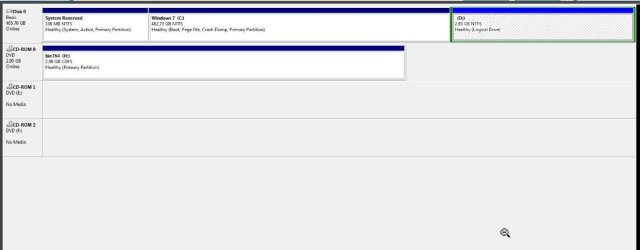
Is ntldr on The 7 Boot partition - or is it on the System Reserved partition?
 

My Computers My Computers

  • At a glance

    7 X64i5 84002x8gb 3200mhz
    Computer type
    PC/Desktop
    OS
    7 X64
    CPU
    i5 8400
    Motherboard
    gigabyte b365m ds3h
    Memory
    2x8gb 3200mhz
    Hard Drives
    various
    PSU
    pure power 11 400w cm
    Case
    Coolermaster
    Cooling
    cryorig m9i
  • At a glance

    7x64g54008gb ddr4 2400
    Computer type
    PC/Desktop
    OS
    7x64
    CPU
    g5400
    Motherboard
    ga b365m ds3h
    Memory
    8gb ddr4 2400
    PSU
    xfx pro 450w
ntldr and boot.ini are on the Windows 7 partition, C:, which is why I have accounted for that in the commands. I took a quick glance at Disk Management and I don't remember seeing a system reserved partition.

Only bootmgr was missing from C: (\boot\bcd was there) and I think that is the source of the problem. The bcdboot command will put back the bootmgr file. And the BCD was hosed, so that needs rebuilding as well.
 

My Computer My Computer

At a glance

XP, Seven, 2008R2AMD, Intel, VIACorsair, Kingston, etc.ATI, NVIDIA
Computer Manufacturer/Model Number
Too many to list.
OS
XP, Seven, 2008R2
CPU
AMD, Intel, VIA
Motherboard
Various
Memory
Corsair, Kingston, etc.
Graphics Card(s)
ATI, NVIDIA
Monitor(s) Displays
Samsung
Hard Drives
Maxtor, Western Digital
Keyboard
qwerty
Internet Speed
22 Mb/s @ home, 1 Gb/s @ server
Other Info
All of my systems still run fastest on XP 32-bit for the most part. Win7 is fun to play with, but I still prefer XP for raw speed, security, and functionality.
Thanks for the quick reply.

I only ask , because this was in post 9

POST-9-2009-09-19_010819.jpg
 

My Computers My Computers

  • At a glance

    7 X64i5 84002x8gb 3200mhz
    Computer type
    PC/Desktop
    OS
    7 X64
    CPU
    i5 8400
    Motherboard
    gigabyte b365m ds3h
    Memory
    2x8gb 3200mhz
    Hard Drives
    various
    PSU
    pure power 11 400w cm
    Case
    Coolermaster
    Cooling
    cryorig m9i
  • At a glance

    7x64g54008gb ddr4 2400
    Computer type
    PC/Desktop
    OS
    7x64
    CPU
    g5400
    Motherboard
    ga b365m ds3h
    Memory
    8gb ddr4 2400
    PSU
    xfx pro 450w
Apparently he had changed some things around, because I remember seeing a couple of black chunks at the beginning and end of disk which means that space was unallocated.

Another thing he did is convert XP to a primary partition, which is something I recommended earlier because I thought it was necessary at the time. It turns out it wasn't. If the boot files are all on the Windows 7 partition (and working properly), XP can indeed be booted from a logical partition.
 

My Computer My Computer

At a glance

XP, Seven, 2008R2AMD, Intel, VIACorsair, Kingston, etc.ATI, NVIDIA
Computer Manufacturer/Model Number
Too many to list.
OS
XP, Seven, 2008R2
CPU
AMD, Intel, VIA
Motherboard
Various
Memory
Corsair, Kingston, etc.
Graphics Card(s)
ATI, NVIDIA
Monitor(s) Displays
Samsung
Hard Drives
Maxtor, Western Digital
Keyboard
qwerty
Internet Speed
22 Mb/s @ home, 1 Gb/s @ server
Other Info
All of my systems still run fastest on XP 32-bit for the most part. Win7 is fun to play with, but I still prefer XP for raw speed, security, and functionality.
Back
Top