Error booting Windows 7 from External HDD

Yufukuai

New member
Local time
8:21 PM
Messages
3
Hey guys, I'm completely new in this world of Windows 7 on UEFI mode. And the thing is, I'm trying to get Windows 7 working on my External HDD with WinToUSB, and after the installation of WinToUSB, Windows gets stuck at Windows is Starting and nothing happens. There are not drivers installed for the USB 3.0 or the drivers for the new MBs.

Thing is, how I can get it working? I have a Ryzen 5 2400G, 8GB of RAM and a GTX 1050Ti. Now I'm downloading a brand new ISO, because somehow Rufus doesn't let me put the USB in GPT and for UEFI.

The ISO that I'm using is normal Win 7, no SP1, nothing there. So maybe that's the problem, what do you think about this guys?
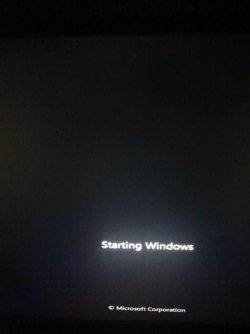
IMG_20191024_201634.jpg
 

My Computer

Computer type
PC/Desktop
OS
none yet
Hi Yufukuai,

Welcome to SevenForums,

Hey guys, I'm completely new in this world of Windows 7 on UEFI mode. And the thing is, I'm trying to get Windows 7 working on my External HDD with WinToUSB, and after the installation of WinToUSB, Windows gets stuck at Windows is Starting and nothing happens. There are not drivers installed for the USB 3.0 or the drivers for the new MBs.

Thing is, how I can get it working? I have a Ryzen 5 2400G, 8GB of RAM and a GTX 1050Ti. Now I'm downloading a brand new ISO, because somehow Rufus doesn't let me put the USB in GPT and for UEFI.

The ISO that I'm using is normal Win 7, no SP1, nothing there. So maybe that's the problem, what do you think about this guys?

This will help with integrating the drivers into the ISO => Update your Win 7 installation media..

I hope this helps!
 

My Computer

Computer type
Laptop
Computer Manufacturer/Model Number
Fujitsu LIFEBOOK
OS
Win 7 HP SP1 64-bit Vista HB SP2 32-bit Linux Mint 18.3
CPU
Intel(R) Pentium(R) CPU P6200 @ 2.13GHz
Motherboard
FUJITSU FJNBB06
Memory
4.00 GB
Graphics Card(s)
Intel(R) Graphics Media Accelerator HD
Sound Card
[1] Realtek High Definition Audio [2] Intel(R) Display Audio
Screen Resolution
1366 x 768 x 32 bits (4294967296 colors) @ 59 Hz
Hard Drives
TOSHIBA MK5076GSX
Antivirus
AVG FREE
I don't know how to get Ryzen series cpu with built in vega graphics working with windows 7. ( they call it apu - the G series)


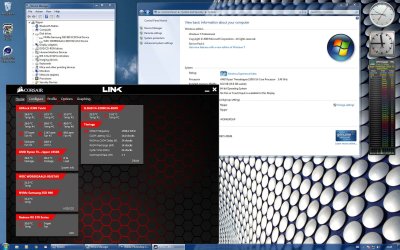
Ryzen 7 3700X cpu without built in graphics with windows 7:

ryzen3700x.png


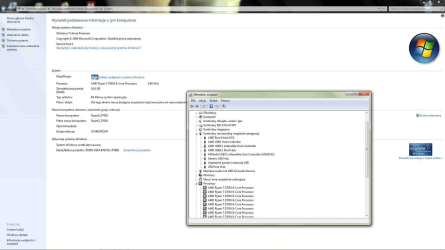
Ryzen threadripper 1950X without built in graphics with windows 7:

ryzen-x399taichi.jpg
 

My Computers

System One System Two

  • Computer type
    PC/Desktop
    OS
    7 X64
    CPU
    i5 8400
    Motherboard
    gigabyte b365m ds3h
    Memory
    2x8gb 3200mhz
    Hard Drives
    various
    PSU
    pure power 11 400w cm
    Case
    Coolermaster
    Cooling
    cryorig m9i
  • Computer type
    PC/Desktop
    OS
    7x64
    CPU
    g5400
    Motherboard
    ga b365m ds3h
    Memory
    8gb ddr4 2400
    PSU
    xfx pro 450w
I don't know how to get Ryzen series cpu with built in vega graphics working with windows 7. ( they call it apu - the G series)


Ryzen 7 3700X cpu without built in graphics with windows 7:

View attachment 409845


Ryzen threadripper 1950X without built in graphics with windows 7:

View attachment 409846

I'm using a GTX 1050Ti, so I'm fine with it :D
 

My Computer

Computer type
PC/Desktop
OS
none yet
You have a G series cpu. That is the issue, it causes problem with acpi. Separate graphics card doesn't help with that.

When you upgrade to 5 3600 ( not G) or 7 3700 ( not G ) you should be able to run win7.
Or you could use 5 2600 ( not G). Anything that does not have built in vega should be fine.

AMD Ryzen 5 3600 3.6GHz 6x Core Processor with Wraith Stealth Cooler - Aria PC


For Intel users, the cpus with built graphics don't have that issue.

You can check win raid forum, but I don't think anybody has found a way of using win7 if there is a G series cpu installed. If you have non G ryzen, it is also possible to get the onboard usb3 working.

Forum - [Solution] Win7 drivers for USB 3.0/3.1 Controllers of new AMD X570 mainboard.

[Guide] 'Fixing' Windows 7 USB support on Matisse / Ryzen 3000 / Zen 2 on X370/X470 - Overclock.net - An Overclocking Community
 
Last edited:

My Computers

System One System Two

  • Computer type
    PC/Desktop
    OS
    7 X64
    CPU
    i5 8400
    Motherboard
    gigabyte b365m ds3h
    Memory
    2x8gb 3200mhz
    Hard Drives
    various
    PSU
    pure power 11 400w cm
    Case
    Coolermaster
    Cooling
    cryorig m9i
  • Computer type
    PC/Desktop
    OS
    7x64
    CPU
    g5400
    Motherboard
    ga b365m ds3h
    Memory
    8gb ddr4 2400
    PSU
    xfx pro 450w
Atak has made something which creates giant win7 installation media with tons of drivers. He has now included the Biostar modded intel graphics driver I pointed him to.

Atak's giant installation media works for most Intel and Ryzen systems - but it does not work for systems with Ryzen G series cpu.

Windows 7 Image Updater - SkyLake\KabyLake\CoffeLake\Ryzen Threadripper - VideoHelp Forum

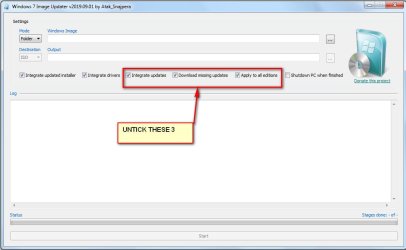
For anyone wanting to use use Atak's tool , I suggest it is best to use my updater first:
Update your Win 7 installation media.

Then when using Atak's tool, uncheck the update boxes ( because you have already updated the media using Simplix with my updater - it is much better for the updates)

atak1.jpg
 

My Computers

System One System Two

  • Computer type
    PC/Desktop
    OS
    7 X64
    CPU
    i5 8400
    Motherboard
    gigabyte b365m ds3h
    Memory
    2x8gb 3200mhz
    Hard Drives
    various
    PSU
    pure power 11 400w cm
    Case
    Coolermaster
    Cooling
    cryorig m9i
  • Computer type
    PC/Desktop
    OS
    7x64
    CPU
    g5400
    Motherboard
    ga b365m ds3h
    Memory
    8gb ddr4 2400
    PSU
    xfx pro 450w
Atak has made something which creates giant win7 installation media with tons of drivers. He has now included the Biostar modded intel graphics driver I pointed him to.

Atak's giant installation media works for most Intel and Ryzen systems - but it does not work for systems with Ryzen G series cpu.

Windows 7 Image Updater - SkyLake\KabyLake\CoffeLake\Ryzen Threadripper - VideoHelp Forum

For anyone wanting to use use Atak's tool , I suggest it is best to use my updater first:
Update your Win 7 installation media.

Then when using Atak's tool, uncheck the update boxes ( because you have already updated the media using Simplix with my updater - it is much better for the updates)

View attachment 409850

Sadly I'm trying to boot with my NVIDIA graphics as the main display, but after the first part of it, it crashes at Setting up registry Settings, or just don't get past in the final installation thing (BSOD, BAD_POOL_CALLER)

But really there's nothing I can do with it? I mean for disabling the integrated graphics or something, I don't have any money for buying another CPU
 

My Computer

Computer type
PC/Desktop
OS
none yet
But really there's nothing I can do with it? I mean for disabling the integrated graphics or something

I don't know any way of doing that. :(

You can check win raid forum. Maybe somebody there has a way.
 

My Computers

System One System Two

  • Computer type
    PC/Desktop
    OS
    7 X64
    CPU
    i5 8400
    Motherboard
    gigabyte b365m ds3h
    Memory
    2x8gb 3200mhz
    Hard Drives
    various
    PSU
    pure power 11 400w cm
    Case
    Coolermaster
    Cooling
    cryorig m9i
  • Computer type
    PC/Desktop
    OS
    7x64
    CPU
    g5400
    Motherboard
    ga b365m ds3h
    Memory
    8gb ddr4 2400
    PSU
    xfx pro 450w
Back
Top