error box on startup

CF40INPA

New member
Local time
9:35 AM
Messages
13
Hi everyone. when starting windows a error box pops up that says RDVD folder not exist! and I am unable to proceed into windows 7 screen. has anyone ever seen this have any idea what the problem is?
 

My Computer My Computer

At a glance

windows 7
Computer type
PC/Desktop
OS
windows 7
also should have mentioned I am on another computer trying to research a solution to the problem. I am unable to get windows 7 to load because of that error box. is it possible to download a fix to another computer and transfer over to the one affected? thanks for any help or suggestions
 

My Computer My Computer

At a glance

windows 7
Computer type
PC/Desktop
OS
windows 7
Can you tell me what you did before the error started to pop up? Do you tried something like System Restore, removing virus, etc.?
 
I actually had done nothing. this happened about 3 years ago. I went to bed one night and woke up to find the computer was off. I had just figured it had done an upgrade overnight and then signed off. so it has been several years since I have seen the windows screen. and everything I have tried hasn't worked. it will start to load windows and just as its done loading the error box comes up. thanks for the reply MS. I am clueless at this point
 

My Computer My Computer

At a glance

windows 7
Computer type
PC/Desktop
OS
windows 7
Well, a clean install of Windows with CD should fix this error. Thanks for getting back.
 
Ok thank you. how would I go about doing the clean install? do I have to buy and reinstall windows 7 software ?
thanks again for helping
 

My Computer My Computer

At a glance

windows 7
Computer type
PC/Desktop
OS
windows 7

My Computer My Computer

At a glance

W7 home premium 32bit/W7HP 64bit/w10 tp insid...E5300 dual core3gbNvidia Geforce 7100 Nforce 630i
Computer type
PC/Desktop
Computer Manufacturer/Model Number
medionl/Aspire 6930G/acer x55a
OS
W7 home premium 32bit/W7HP 64bit/w10 tp insider ring
CPU
E5300 dual core
Motherboard
medion MS7366
Memory
3gb
Graphics Card(s)
Nvidia Geforce 7100 Nforce 630i
Monitor(s) Displays
avixc
Internet Speed
n (isp resticted to 72)
Antivirus
mse/pands
Browser
palemoon
Other Info
Belkin Fd7050 n USB using Railink RT2870 drivers, more upto date
Hi Torch. yes this is an ASUS machine. the problem occured about 3 years ago. I will look into the info you sent. thanks
 

My Computer My Computer

At a glance

windows 7
Computer type
PC/Desktop
OS
windows 7
Hi CF40INPA,

Are you by any chance running an Asus machine.
They had a problem whereby when system recovery was either set-up or used caused this error.

Have a look at this solution if so.
My Tech, My Life: Asus AI Recovery-Recovery Partition Does Not Exist (Solved)

can be accessed via safe mode

Roy

Sorry Torch, this was not for me I am not able to get to those screens since windows is unable to load. I did try using a repair OS system fixer ( a boot cd ) and that will not run either.
 

My Computer My Computer

At a glance

windows 7
Computer type
PC/Desktop
OS
windows 7
Hi,
Not sure what is the deal with the issue possibly post a picture of the screen popup message with a camera/ cell phone.

Have you removed the battery or unplugged the machine and held down the power button for about 45 seconds to drain any remaining energy from the system ?

After enter your bios usually tapping the Delete key directly after using the power button.
If you can get into your bios see if restoring defaults will help
Make sure you actually see your hard drive or ssd that windows is on if you don't it may have died.
This update caused a little issue booting but is all I've read about,
Why does the “Secure Boot Violation” appear when I enter my WINDOWS 7 OS? | Official Support | ASUS Global

 

My Computer My Computer

At a glance

Win-7-Pro64bit 7-H-Prem-64biti7-5930K 2nd i9-9940x both water blocked VRM'...Trident-z 3200C14 2nd Trident-z 3600C16EVGA 1080ti ftw3 2nd Titan Xp both water blocked
Computer type
PC/Desktop
Computer Manufacturer/Model Number
Custom assembled by me :}
OS
Win-7-Pro64bit 7-H-Prem-64bit
CPU
i7-5930K 2nd i9-9940x both water blocked VRM's too
Motherboard
ASUS SABERTOOTH X99 2nd ASUS x299 Apex
Memory
Trident-z 3200C14 2nd Trident-z 3600C16
Graphics Card(s)
EVGA 1080ti ftw3 2nd Titan Xp both water blocked
Sound Card
Built-in Realtek
Monitor(s) Displays
1-AOC G2460PG 24"G-Sync 144Hz/ 2nd 1-ASUS VG248QE 24" 144Hz
Screen Resolution
1920 x 1080 144Hz
Hard Drives
2-Samsung M.2 Evo & Evo Plus
2-Samsung 850 EVO 500GB SSD's/ 3-2.5 W.D. Black 1tb-&3-1tb/3-3.5 WD Black 1tb hdd's
PSU
EVGA SuperNOVA 1000-P2 2nd 1200-P2
Case
2-Corsair Obsidian Series 450D Black ATX Mid Tower
Cooling
Custom water loops
Keyboard
Logitech G710+/ 2nd Logitech G910
Mouse
2-RedDragon M901 Perdition 16400 dpi Gaming mouse = wired
Internet Speed
Comcast Ping 19ms 89.31mbps download speed 6.12mbps upload
Antivirus
Malwarebytes Pro/ Superantispyware Pro
Browser
FireFox & Pale moon
Other Info
2nd ASUS X299 Apex/Intel i9-9940x with Custom water loop/7H-Prem-x64/Corsair 450D case/Ram Trident-z 3600C16 4x8gb / Samsung970Evo plus 500gb SSD/Dual ssd EZ swap evo/PSU EVGA SuperNova 1200w-P2 80+Platinum/GPU Titan Xp /8-ML-140 on push-pull on 2-280GTX rads
Hi,
Not sure what is the deal with the issue possibly post a picture of the screen popup message with a camera/ cell phone.

Have you removed the battery or unplugged the machine and held down the power button for about 45 seconds to drain any remaining energy from the system ?

After enter your bios usually tapping the Delete key directly after using the power button.
If you can get into your bios see if restoring defaults will help
Make sure you actually see your hard drive or ssd that windows is on if you don't it may have died.
This update caused a little issue booting but is all I've read about,
Why does the “Secure Boot Violation” appear when I enter my WINDOWS 7 OS? | Official Support | ASUS Global

Hi I am able to get to the BIOS screen but that is where I am stumped as far as the ssd or hard drive. thanks. wasnt able to find restoring defaults either. thanks for reply
 

My Computer My Computer

At a glance

windows 7
Computer type
PC/Desktop
OS
windows 7
Default Settings should be in your BIOS "main menu" e.g. on your main BIOS screen. Can you boot CD on your machine?
 
Hi,
Restore defaults or actually should be Optimize defaults is what it is and F5 I believe is the keyboard key to use and F10 to save and exit.
You can also after that try F8 and see what is listed on the boot menu cd/dvd burner and your hard drive should be listed too.
 

My Computer My Computer

At a glance

Win-7-Pro64bit 7-H-Prem-64biti7-5930K 2nd i9-9940x both water blocked VRM'...Trident-z 3200C14 2nd Trident-z 3600C16EVGA 1080ti ftw3 2nd Titan Xp both water blocked
Computer type
PC/Desktop
Computer Manufacturer/Model Number
Custom assembled by me :}
OS
Win-7-Pro64bit 7-H-Prem-64bit
CPU
i7-5930K 2nd i9-9940x both water blocked VRM's too
Motherboard
ASUS SABERTOOTH X99 2nd ASUS x299 Apex
Memory
Trident-z 3200C14 2nd Trident-z 3600C16
Graphics Card(s)
EVGA 1080ti ftw3 2nd Titan Xp both water blocked
Sound Card
Built-in Realtek
Monitor(s) Displays
1-AOC G2460PG 24"G-Sync 144Hz/ 2nd 1-ASUS VG248QE 24" 144Hz
Screen Resolution
1920 x 1080 144Hz
Hard Drives
2-Samsung M.2 Evo & Evo Plus
2-Samsung 850 EVO 500GB SSD's/ 3-2.5 W.D. Black 1tb-&3-1tb/3-3.5 WD Black 1tb hdd's
PSU
EVGA SuperNOVA 1000-P2 2nd 1200-P2
Case
2-Corsair Obsidian Series 450D Black ATX Mid Tower
Cooling
Custom water loops
Keyboard
Logitech G710+/ 2nd Logitech G910
Mouse
2-RedDragon M901 Perdition 16400 dpi Gaming mouse = wired
Internet Speed
Comcast Ping 19ms 89.31mbps download speed 6.12mbps upload
Antivirus
Malwarebytes Pro/ Superantispyware Pro
Browser
FireFox & Pale moon
Other Info
2nd ASUS X299 Apex/Intel i9-9940x with Custom water loop/7H-Prem-x64/Corsair 450D case/Ram Trident-z 3600C16 4x8gb / Samsung970Evo plus 500gb SSD/Dual ssd EZ swap evo/PSU EVGA SuperNova 1200w-P2 80+Platinum/GPU Titan Xp /8-ML-140 on push-pull on 2-280GTX rads
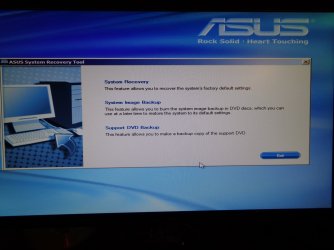
Hi everyone. sorry to bring this issue back up but I was having camera issues for a while and had to get a new one so I finally snapped a pic of the screen that I am able to get to and this is the end of the road for me as far as getting back to my windows 7 screen. Im still unsure of what to do but maybe this will help anyone else that was willing to help me solve this issue. thanks
 

Attachments

  • DSC00005.JPG
    DSC00005.JPG
    529 KB · Views: 0

My Computer My Computer

At a glance

windows 7
Computer type
PC/Desktop
OS
windows 7
Also I wanted to say I have tried the above suggestions like using the F5 and F10 keys to try to do a restore and it keeps going back to the screen shot I posted above. has anyone seen this before?
 

My Computer My Computer

At a glance

windows 7
Computer type
PC/Desktop
OS
windows 7
I can also get to this screen I posted but then after reading it said I would lose all data if I try to do a recover system restore after clicking on the system recover at the top. I hope somebody on here has an idea of what I can do to get back to my windows 7 because every time I try something I come to a roadblock.
 

Attachments

  • DSC00006.JPG
    DSC00006.JPG
    437 KB · Views: 0

My Computer My Computer

At a glance

windows 7
Computer type
PC/Desktop
OS
windows 7
Hi. bumping this back up in case anyone here has a solution to this, thanks.
 

My Computer My Computer

At a glance

windows 7
Computer type
PC/Desktop
OS
windows 7
Hi is there a reason why nobody is no longer responding to this? I felt like I was gaining ground as far as finding a solution to this so without your help and contribution I would be completely lost. thanks.
 

My Computer My Computer

At a glance

windows 7
Computer type
PC/Desktop
OS
windows 7
Hi is there a reason why nobody is no longer responding to this? I felt like I was gaining ground as far as finding a solution to this so without your help and contribution I would be completely lost. thanks.

Somewhere I remember you saying that you've had this problem for three years. ??
Your first post was in July and this is now October 24th and you still have not fixed the problem???
Or got someone else to fix it for you?

You say that you live in the USA, but that's one heck of a big place. :confused:
If you lived close to central FL, I'd say bring that beast over here and I'd fix it for you. It's what I do.

At the very least, you should connect your HD to another computer and copy off all your data files.
And then reinstall Win-7 to that HD. There are many versions of it on the internet for download.
I have at least a half dozen versions of it myself.

Good Luck to you, Wherever you are,

:cool:
 

My Computer My Computer

At a glance

Win 7 Pro, SP1, x86, Win-11/Pro/64AMD8GB CrucialVarious
Computer type
PC/Desktop
Computer Manufacturer/Model Number
Various
OS
Win 7 Pro, SP1, x86, Win-11/Pro/64
CPU
AMD
Motherboard
Various
Memory
8GB Crucial
Graphics Card(s)
Various
Sound Card
OnBoard
Monitor(s) Displays
Acer 21.5"
Hard Drives
Crucial SSD, 500 GB
PSU
OEM
Case
SFF Slim Line Case
Cooling
OEM
Keyboard
eMachines
Mouse
Logitech Wireless
Internet Speed
varies
Antivirus
Windows Defender/Super Anti-Spyware
Browser
Firefox
I have googled and fond a similar problem. In that case the user had a virus. Restored my computer now it says RDVD folder does not exist? | Yahoo Answers

Do you have some personal data that you want to save?
- If you do have data that you want to save, boot with a Linux USB Flash drive and copy your data to an external disk then do a recover system restore.
- If you don't, do a recover system restore.

Let us know what you want to do.
 

My Computers My Computers

  • At a glance

    Windows 7 HP 64i5 6600K - 800MHz to 4200MHz4+4G GSkill DDR4 3000IG - Intel 530
    Computer type
    PC/Desktop
    Computer Manufacturer/Model Number
    custom build
    OS
    Windows 7 HP 64
    CPU
    i5 6600K - 800MHz to 4200MHz
    Motherboard
    GA-Z170-HD3P
    Memory
    4+4G GSkill DDR4 3000
    Graphics Card(s)
    IG - Intel 530
    Monitor(s) Displays
    Samsung 226BW
    Screen Resolution
    1680x1050
    Hard Drives
    (1) -1 SM951 – 128GB M.2 AHCI PCIe SSD drive for Windows 7 and Lubuntu
    (2) -1 WD SATA 3 - 1T for Data
    (3) -1 WD SATA 3 - 1T for backup
    PSU
    Thermaltake 450W TR2 gold
    Keyboard
    Old and good Chicony mechanical keyboard
    Mouse
    Logitech mX performance - 9 buttons (had to disable some)
    Internet Speed
    500Mb/s
    Browser
    Firefox 64
    Other Info
    TinyWall firewall
  • At a glance

    Windows 7 Proi7-4500U 800MHz to 3.0GHz(4+4)G DDR3 1600IG intel 4400 + NVIDIA GeForce GT 745M
    Computer type
    Laptop
    System Manufacturer/Model Number
    Asus Q550LF
    OS
    Windows 7 Pro
    CPU
    i7-4500U 800MHz to 3.0GHz
    Motherboard
    Asus Q550LF
    Memory
    (4+4)G DDR3 1600
    Graphics Card(s)
    IG intel 4400 + NVIDIA GeForce GT 745M
    Sound Card
    Realtek
    Monitor(s) Displays
    LG Display LP156WF4-SPH1
    Screen Resolution
    1920 x 1080
    Hard Drives
    BX500 120G SSD for Windows and programs +
    1T HDD for data
    Internet Speed
    500 Mb/s
    Browser
    Firefox
    Other Info
    TinyWall firewall
Back
Top