
error c0000022 ?

studentnursey

New member
Local time
12:17 AM
Messages
6
Hello, I am really sorry if there is already loads of information on this error code but I am a little thick at understanding all of the jargon.

In a nutshell I have a 3 week old desktop PC that keeps telling me windows 7 may not be genuine and will not allow me to update ? It's not able to search for updates and hasnt done so since 28/3/10 ?

I have done a system restore as thats about it for my knowledge ?

Please help ?

:-)
 

My Computer

Computer Manufacturer/Model Number
Packard Bell iMedia I4521uk
OS
Windows 7 Home Premium
Memory
3 Gb
Hi and welcome to the forums :party:. Please make sure Windows 7 is activated; you can do this by going to the start menu and searching for 'Activate Windows' and hitting enter.
A new Window should open, if at the top it says 'Activation was Successful', then windows is activated, if it doesn't follow what it says on screen to activate it.

It may also be worth running a scan for viruses using AntiMalware Bytes (Malwarebytes Anti-Malware - Free software downloads and software reviews - CNET Download.com) just to see if you its a virus thats causing this, it most likely isn't but won't do any harm just to check.

Please post back with any results.

Please could you also fill in your System Specs in User CP, it just makes life easier for everyone in the long run.

Oli
 

My Computer

Computer Manufacturer/Model Number
Apple MacBook 5,1
OS
Windows 7 Profesional x86, Mac OS X 10.6 Snow Leopard
CPU
Intel Core 2 Duo 2.4Ghz
Memory
4GB DDR3
Graphics Card(s)
Nvidia 9400m
Monitor(s) Displays
13.3" Internal + 22" DVI + 21.5" USB
Screen Resolution
1280x800 + 1920x1080 + 1920x1080
Hard Drives
Internal SATA 2.5" 500GB (395GB Mac HFS+, 105GB Windows NTFS)
2.48TB RAID consisting of 5 disks (HFS+)
Case
Aluminium Unibody
Keyboard
Apple Late 2009 Wireless Keyboard (US)
Mouse
Apple Magic Mouse
Internet Speed
6.33Mb/s up. 0.36Mb/s down.
Other Info
Harman Kardon Soundsticks II Speakers
Hi and welcome to the forums :party:. Please make sure Windows 7 is activated; you can do this by going to the start menu and searching for 'Activate Windows' and hitting enter.

A new Window should open, if at the top it says 'Activation was Successful', then windows is activated, if it doesn't follow what it says on screen to activate it.

It may also be worth running a scan for viruses using AntiMalware Bytes (Malwarebytes Anti-Malware - Free software downloads and software reviews - CNET Download.com) just to see if you its a virus thats causing this, it most likely isn't but won't do any harm just to check.

Please post back with any results.

Please could you also fill in your System Specs in User CP, it just makes life easier for everyone in the long run.

Oli

Thanks for the reply Oli, I tried to activate windows but it says an error has occured and that I should contact Packard bell ! ?

I am now running a quick scan .....
 

My Computer

Computer Manufacturer/Model Number
Packard Bell iMedia I4521uk
OS
Windows 7 Home Premium
Memory
3 Gb
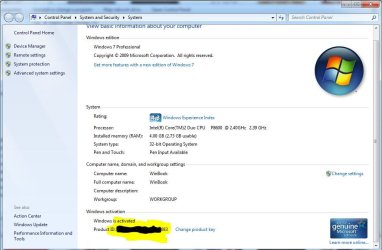
If you go to Computer and right click in the empty space and click properties a window should come up looking something like the attachment. In the corresponding part of your window to the yellow highlighted bit in my attachment you should see a product ID, if you do not please post a screenshot using the snipping tool of what you see. If you do see a product Id code, make sure it corresponds to the code printed on your machine (underneath on the blue Microsoft sticker usually).

Oli
 

Attachments

  • Capture.JPG
    Capture.JPG
    71.9 KB · Views: 873

My Computer

Computer Manufacturer/Model Number
Apple MacBook 5,1
OS
Windows 7 Profesional x86, Mac OS X 10.6 Snow Leopard
CPU
Intel Core 2 Duo 2.4Ghz
Memory
4GB DDR3
Graphics Card(s)
Nvidia 9400m
Monitor(s) Displays
13.3" Internal + 22" DVI + 21.5" USB
Screen Resolution
1280x800 + 1920x1080 + 1920x1080
Hard Drives
Internal SATA 2.5" 500GB (395GB Mac HFS+, 105GB Windows NTFS)
2.48TB RAID consisting of 5 disks (HFS+)
Case
Aluminium Unibody
Keyboard
Apple Late 2009 Wireless Keyboard (US)
Mouse
Apple Magic Mouse
Internet Speed
6.33Mb/s up. 0.36Mb/s down.
Other Info
Harman Kardon Soundsticks II Speakers
Hi Oli, Just asked my kids how to do a print screen LOL

Not sure if it has been attatched ??

As you can see it says not available ?
 

Attachments

My Computer

Computer Manufacturer/Model Number
Packard Bell iMedia I4521uk
OS
Windows 7 Home Premium
Memory
3 Gb
This is odd. I did some research and it seams this is mostly associated with people trying to illegally activate Windows 7.

Follow this guide and hopefully it should sort itself out after a restart.

Click on the start menu and type 'services'.

Press enter.

In the big list that appears in a new window scroll down to Software Protection and double click on it.

Make sure in the drop down menu after the words 'Startup Type' that 'Automatic (Delayed Start)' is selected.

Click 'OK'.

Restart.

Report back.

Oli
 

My Computer

Computer Manufacturer/Model Number
Apple MacBook 5,1
OS
Windows 7 Profesional x86, Mac OS X 10.6 Snow Leopard
CPU
Intel Core 2 Duo 2.4Ghz
Memory
4GB DDR3
Graphics Card(s)
Nvidia 9400m
Monitor(s) Displays
13.3" Internal + 22" DVI + 21.5" USB
Screen Resolution
1280x800 + 1920x1080 + 1920x1080
Hard Drives
Internal SATA 2.5" 500GB (395GB Mac HFS+, 105GB Windows NTFS)
2.48TB RAID consisting of 5 disks (HFS+)
Case
Aluminium Unibody
Keyboard
Apple Late 2009 Wireless Keyboard (US)
Mouse
Apple Magic Mouse
Internet Speed
6.33Mb/s up. 0.36Mb/s down.
Other Info
Harman Kardon Soundsticks II Speakers
I tried to activate windows but it says an error has occured and that I should contact Packard bell ! ?
Uninstall all 3p security software and try again,you can also try use this tool Genuine Microsoft Software
If really nothing help to constact with manufacturer support is good idea.
 

My Computer

Computer Manufacturer/Model Number
Custom made
OS
Windows 7 Professional x64 PL
CPU
AMD Athlon 4450e
Motherboard
Giga-Byte GA-MA69G-S3H
Memory
GoodRam DDR2 2x2048MB (FSB 800MHz)
Graphics Card(s)
nVidia GeForce 9600GT (G94-300) 1024 MB
Monitor(s) Displays
SAMSUNG SyncMaster HS2P301688
Hard Drives
Seagate ST3750330AS 750GB
PSU
Corsair 550W
Cooling
AeroCool ExtremeEngine 3T
This is odd. I did some research and it seams this is mostly associated with people trying to illegally activate Windows 7.

Follow this guide and hopefully it should sort itself out after a restart.

Click on the start menu and type 'services'.

Press enter.

In the big list that appears in a new window scroll down to Software Protection and double click on it.

Make sure in the drop down menu after the words 'Startup Type' that 'Automatic (Delayed Start)' is selected.

Click 'OK'.

Restart.

Report back.

Oli

Ok Oli, I did all that and nothing has changed ?
 

My Computer

Computer Manufacturer/Model Number
Packard Bell iMedia I4521uk
OS
Windows 7 Home Premium
Memory
3 Gb
I tried to activate windows but it says an error has occured and that I should contact Packard bell ! ?
Uninstall all 3p security software and try again,you can also try use this tool Genuine Microsoft Software
If really nothing help to constact with manufacturer support is good idea.

I tried to uninstall AVG and it wont let me ?

I ran the microsoft tool and it said I am running a counterfeit edition of windows !?

Any other suggestions ?
 

My Computer

Computer Manufacturer/Model Number
Packard Bell iMedia I4521uk
OS
Windows 7 Home Premium
Memory
3 Gb
I would go with what Flavius said about contacting Packard Bell.

Packard Bell's contact page is here

The only other thing you could try is a repair install but the chances are Packard Bell haven't given you a full Windows 7 install disk, just some recovery disks which aren't of much use in this situation.

Sorry that we couldn't be of more help.

Oli
 

My Computer

Computer Manufacturer/Model Number
Apple MacBook 5,1
OS
Windows 7 Profesional x86, Mac OS X 10.6 Snow Leopard
CPU
Intel Core 2 Duo 2.4Ghz
Memory
4GB DDR3
Graphics Card(s)
Nvidia 9400m
Monitor(s) Displays
13.3" Internal + 22" DVI + 21.5" USB
Screen Resolution
1280x800 + 1920x1080 + 1920x1080
Hard Drives
Internal SATA 2.5" 500GB (395GB Mac HFS+, 105GB Windows NTFS)
2.48TB RAID consisting of 5 disks (HFS+)
Case
Aluminium Unibody
Keyboard
Apple Late 2009 Wireless Keyboard (US)
Mouse
Apple Magic Mouse
Internet Speed
6.33Mb/s up. 0.36Mb/s down.
Other Info
Harman Kardon Soundsticks II Speakers
I would go with what Flavius said about contacting Packard Bell.

Packard Bell's contact page is here

The only other thing you could try is a repair install but the chances are Packard Bell haven't given you a full Windows 7 install disk, just some recovery disks which aren't of much use in this situation.

Sorry that we couldn't be of more help.

Oli


Ok thanks I am trying to do a restore to factory settings ( a friend reccommended it? ) so will see what happens.

And you are right I had no disks supplied with the computer but I did create back up disks. ( not sure what went on them tbh ? )

At the moment it appears to be re activated and running ok ?? ( she says with her fingers crossed ! )

Many thanks for your help .

X
 

My Computer

Computer Manufacturer/Model Number
Packard Bell iMedia I4521uk
OS
Windows 7 Home Premium
Memory
3 Gb
I would go with what Flavius said about contacting Packard Bell.

Packard Bell's contact page is here

The only other thing you could try is a repair install but the chances are Packard Bell haven't given you a full Windows 7 install disk, just some recovery disks which aren't of much use in this situation.

Sorry that we couldn't be of more help.

Oli


Ok thanks I am trying to do a restore to factory settings ( a friend reccommended it? ) so will see what happens.

And you are right I had no disks supplied with the computer but I did create back up disks. ( not sure what went on them tbh ? )

At the moment it appears to be re activated and running ok ?? ( she says with her fingers crossed ! )

Many thanks for your help .

X

I'm glad it's working. The stuff that ends up on recovery disks are generally just copies of all the system files and depending on the manufacturer possibly some programs.

As you are new to the forum I thought you might like to know how to mark threads as solved as well as the uses of some of the other buttons.

To the top right of this post you will see 3 icons. An orange (+), a set of scales and a red and white warning triangle.

The orange (+) or blue (-) denotes whether a user is on or offline (orange = on, blue = off).

The scales are used to give rep points; click this button if someone has helped you significantly or solved your queries (only give this to posts that you think really deserve it).

The red and white warning triangle is used to denote either an abusive post OR to mark a thread as solved (just put solved in the box that comes up and the admins or moderators will mark it solved).

Be sure to mark this thread solved when you know for sure that Windows is back to normal.

Oli
 

My Computer

Computer Manufacturer/Model Number
Apple MacBook 5,1
OS
Windows 7 Profesional x86, Mac OS X 10.6 Snow Leopard
CPU
Intel Core 2 Duo 2.4Ghz
Memory
4GB DDR3
Graphics Card(s)
Nvidia 9400m
Monitor(s) Displays
13.3" Internal + 22" DVI + 21.5" USB
Screen Resolution
1280x800 + 1920x1080 + 1920x1080
Hard Drives
Internal SATA 2.5" 500GB (395GB Mac HFS+, 105GB Windows NTFS)
2.48TB RAID consisting of 5 disks (HFS+)
Case
Aluminium Unibody
Keyboard
Apple Late 2009 Wireless Keyboard (US)
Mouse
Apple Magic Mouse
Internet Speed
6.33Mb/s up. 0.36Mb/s down.
Other Info
Harman Kardon Soundsticks II Speakers
Back
Top