
Error code 80070005 trying to install KB3033890 (WMP patch)

i forgot to do sfc /scannow before i went to bed last night, should i get on that first or try to restore permissions?

EDIT: gonna link post 48 here for easier access.

EDIT: tried those commands again, with pretty much the same result as last time. gonna go do the sfc /scannow thing.

Code:
Microsoft Windows [Version 6.1.7601]
Copyright (c) 2009 Microsoft Corporation.  All rights reserved.

C:\Windows\system32>TAKEOWN /F "C:\Program Files (x86)\Windows Media Player\wmps
hare.exe" /A
ERROR: Access is denied.

C:\Windows\system32>ICACLS "C:\Program Files (x86)\Windows Media Player\wmpshare
.exe"
C:\Program Files (x86)\Windows Media Player\wmpshare.exe: Access is denied.
Successfully processed 0 files; Failed processing 1 files

C:\Windows\system32>ICACLS "C:\Program Files (x86)\Windows Media Player\wmpshare
.exe" /remove:d Everyone
C:\Program Files (x86)\Windows Media Player\wmpshare.exe: Access is denied.
Successfully processed 0 files; Failed processing 1 files

C:\Windows\system32>ICACLS "C:\Program Files (x86)\Windows Media Player\wmpshare
.exe" /grant:r "NT Service\TrustedInstaller":(F)
C:\Program Files (x86)\Windows Media Player\wmpshare.exe: Access is denied.
Successfully processed 0 files; Failed processing 1 files

C:\Windows\system32>ICACLS "C:\Program Files (x86)\Windows Media Player\wmpshare
.exe" /grant:r "Administrators":(RX)
C:\Program Files (x86)\Windows Media Player\wmpshare.exe: Access is denied.
Successfully processed 0 files; Failed processing 1 files

C:\Windows\system32>ICACLS "C:\Program Files (x86)\Windows Media Player\wmpshare
.exe" /grant:r "Users":(RX)
 
Last edited:

My Computer

Computer type
Laptop
Computer Manufacturer/Model Number
HP Pavilion dv6
OS
Windows 7 Home Premium 64-bit
CPU
AMD A8-3500M APU with Radeon(tm) HD Graphics 1.50GHz 4 core
Memory
6 GB
Antivirus
COMODO Internet Security
Browser
Avant Browser (Firefox)
any output from the gpresults options scan

Roy
 

My Computer

Computer type
PC/Desktop
Computer Manufacturer/Model Number
medionl/Aspire 6930G/acer x55a
OS
W7 home premium 32bit/W7HP 64bit/w10 tp insider ring
CPU
E5300 dual core
Motherboard
medion MS7366
Memory
3gb
Graphics Card(s)
Nvidia Geforce 7100 Nforce 630i
Monitor(s) Displays
avixc
Internet Speed
n (isp resticted to 72)
Antivirus
mse/pands
Browser
palemoon
Other Info
Belkin Fd7050 n USB using Railink RT2870 drivers, more upto date
gpresults pulls up, well... a lot of stuff. i can't select all and copy because it only copies what's currently in view, which isn't all of it, and i can't scroll up. is there any way i can output this to a text file somehow?

while i'm here, sfc /scannow said it found and repaired corrupted files, and here's the CBS.log file i got from it.
 

My Computer

Computer type
Laptop
Computer Manufacturer/Model Number
HP Pavilion dv6
OS
Windows 7 Home Premium 64-bit
CPU
AMD A8-3500M APU with Radeon(tm) HD Graphics 1.50GHz 4 core
Memory
6 GB
Antivirus
COMODO Internet Security
Browser
Avant Browser (Firefox)

My Computer

Computer type
PC/Desktop
Computer Manufacturer/Model Number
medionl/Aspire 6930G/acer x55a
OS
W7 home premium 32bit/W7HP 64bit/w10 tp insider ring
CPU
E5300 dual core
Motherboard
medion MS7366
Memory
3gb
Graphics Card(s)
Nvidia Geforce 7100 Nforce 630i
Monitor(s) Displays
avixc
Internet Speed
n (isp resticted to 72)
Antivirus
mse/pands
Browser
palemoon
Other Info
Belkin Fd7050 n USB using Railink RT2870 drivers, more upto date
I must admit to not knowing a lot about Group policy, never used it

looking on the web there are ways to remove them
>> BUT there based on a >>standard install<< not a hack <<
As we dont know what else has been changed, its possible were fighting a losing battle

Time to consider other options
Do you want to go to W10,
Use the factory reset option if its available
Get a set of >>Dell HomePremium << recovery discs from dell/friend
carry on pluggin away

Roy
 

My Computer

Computer type
PC/Desktop
Computer Manufacturer/Model Number
medionl/Aspire 6930G/acer x55a
OS
W7 home premium 32bit/W7HP 64bit/w10 tp insider ring
CPU
E5300 dual core
Motherboard
medion MS7366
Memory
3gb
Graphics Card(s)
Nvidia Geforce 7100 Nforce 630i
Monitor(s) Displays
avixc
Internet Speed
n (isp resticted to 72)
Antivirus
mse/pands
Browser
palemoon
Other Info
Belkin Fd7050 n USB using Railink RT2870 drivers, more upto date
i figured out how to output gpresult to text files, so i have those attached.

i don't use IE for browsing purposes. the last time i actually used it was years ago, for a web design class, and that was only to check if my site was working on IE for compatibility purposes. and according to Microsoft, IE10 is the latest version available for Windows 7, so i probably wouldn't have had the latest version anyway even if i was on top of updates.

the updates that fail are usually WMP-related, which i really only use to watch videos i downloaded off of YouTube for the most part. i use WinAmp for music, and i'm pretty sure YouTube wouldn't have malware-ridden "specially crafted media" (as Microsoft puts it) on their site, otherwise Google would have a lot of explaining to do :p i'll just keep going as is if i can help it.
i'm pretty paranoid when it comes to malware, if i happen to download anything that uses WMP to dump its payload, COMODO would probably catch it first before i even get a chance to consider playing it.

speaking of COMODO, i'll try asking around on their forums if their blocked files list is capable of denying all permissions (don't know why i haven't thought of this sooner). never got any malware that affected WMP, and it's just wmpshare.exe specifically that's broken, so that's all i can really think of at the moment.
 

Attachments

My Computer

Computer type
Laptop
Computer Manufacturer/Model Number
HP Pavilion dv6
OS
Windows 7 Home Premium 64-bit
CPU
AMD A8-3500M APU with Radeon(tm) HD Graphics 1.50GHz 4 core
Memory
6 GB
Antivirus
COMODO Internet Security
Browser
Avant Browser (Firefox)
Now thats an interesting comment re IE, I and Noelp would have assumed you were >>totally<< upto date

Can you d/l and install it please, there will be further related updates

https://www.google.co.uk/url?sa=t&rct=j&q=&esrc=s&source=web&cd=1&cad=rja&uact=8&ved=0ahUKEwiQhIGBgs7LAhWIBZoKHTknAp4QFggdMAA&url=https%3A%2F%2Fsupport.microsoft.com%2Fen-us%2Fkb%2F2841134&usg=AFQjCNGz4v7o9WIT2daysWgdVB4CCUviKw


we can turn it off afterwards but there are certain ActiveX components it updates, in the background.
Roy
 

My Computer

Computer type
PC/Desktop
Computer Manufacturer/Model Number
medionl/Aspire 6930G/acer x55a
OS
W7 home premium 32bit/W7HP 64bit/w10 tp insider ring
CPU
E5300 dual core
Motherboard
medion MS7366
Memory
3gb
Graphics Card(s)
Nvidia Geforce 7100 Nforce 630i
Monitor(s) Displays
avixc
Internet Speed
n (isp resticted to 72)
Antivirus
mse/pands
Browser
palemoon
Other Info
Belkin Fd7050 n USB using Railink RT2870 drivers, more upto date
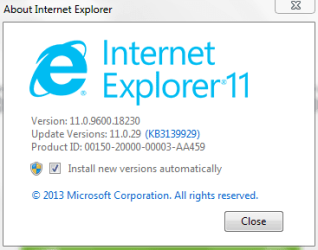
it says Internet Explorer 11 already in the window for "Turn Windows features on and off", so maybe i'm more up to date than i thought i was. i tend to just download everything Windows Update throws at me anyway (except all those Windows 10 updates Microsoft insists on shoving down my throat as of late).

i'll enable it and double check the version just to make sure.

EDIT: well, i guess this explains a lot.
 

Attachments

  • IE11.PNG
    IE11.PNG
    24.1 KB · Views: 11

My Computer

Computer type
Laptop
Computer Manufacturer/Model Number
HP Pavilion dv6
OS
Windows 7 Home Premium 64-bit
CPU
AMD A8-3500M APU with Radeon(tm) HD Graphics 1.50GHz 4 core
Memory
6 GB
Antivirus
COMODO Internet Security
Browser
Avant Browser (Firefox)
A reboot is required between uninstall and re-install.

Roy
 

My Computer

Computer type
PC/Desktop
Computer Manufacturer/Model Number
medionl/Aspire 6930G/acer x55a
OS
W7 home premium 32bit/W7HP 64bit/w10 tp insider ring
CPU
E5300 dual core
Motherboard
medion MS7366
Memory
3gb
Graphics Card(s)
Nvidia Geforce 7100 Nforce 630i
Monitor(s) Displays
avixc
Internet Speed
n (isp resticted to 72)
Antivirus
mse/pands
Browser
palemoon
Other Info
Belkin Fd7050 n USB using Railink RT2870 drivers, more upto date
yeah, i did reboot. and i'm still getting the same dialog box - probably because i actually do have the latest (or close-to-latest) version of IE. there also aren't any IE related updates in Windows Update when i go to check. so i don't really know what sfc /scannow is doing repairing IE9 files.

this is what my About window looks like in IE11.
 

Attachments

  • ie11_about.PNG
    ie11_about.PNG
    20.8 KB · Views: 7

My Computer

Computer type
Laptop
Computer Manufacturer/Model Number
HP Pavilion dv6
OS
Windows 7 Home Premium 64-bit
CPU
AMD A8-3500M APU with Radeon(tm) HD Graphics 1.50GHz 4 core
Memory
6 GB
Antivirus
COMODO Internet Security
Browser
Avant Browser (Firefox)

My Computer

Computer type
PC/Desktop
Computer Manufacturer/Model Number
medionl/Aspire 6930G/acer x55a
OS
W7 home premium 32bit/W7HP 64bit/w10 tp insider ring
CPU
E5300 dual core
Motherboard
medion MS7366
Memory
3gb
Graphics Card(s)
Nvidia Geforce 7100 Nforce 630i
Monitor(s) Displays
avixc
Internet Speed
n (isp resticted to 72)
Antivirus
mse/pands
Browser
palemoon
Other Info
Belkin Fd7050 n USB using Railink RT2870 drivers, more upto date
did that, everything went as that link said (even the 80070005 errors for the first 3 lines, which it says is normal)

Code:
Microsoft Windows [Version 6.1.7601]
Copyright (c) 2009 Microsoft Corporation.  All rights reserved.

C:\Windows\system32>FORFILES /P %WINDIR%\servicing\Packages /M Microsoft-Windows
-InternetExplorer-*11.*.mum /c "cmd /c echo Uninstalling package @fname && start
 /w pkgmgr /up:@fname /norestart"

Uninstalling package "Microsoft-Windows-InternetExplorer-Optional-Package~31bf38
56ad364e35~amd64~en-US~11.2.9600.16428"
Uninstalling package "Microsoft-Windows-InternetExplorer-Optional-Package~31bf38
56ad364e35~amd64~~11.2.9600.16428"
Uninstalling package "Microsoft-Windows-InternetExplorer-Package-MiniLP~31bf3856
ad364e35~amd64~en-US~11.2.9600.16428"
Uninstalling package "Microsoft-Windows-InternetExplorer-Package-TopLevel~31bf38
56ad364e35~amd64~~11.2.9600.16428"
Uninstalling package "Microsoft-Windows-InternetExplorer-Package~31bf3856ad364e3
5~amd64~en-US~11.2.9600.16428"
Uninstalling package "Microsoft-Windows-InternetExplorer-Package~31bf3856ad364e3
5~amd64~~11.2.9600.16428"
Uninstalling package "Microsoft-Windows-InternetExplorer-VistaPlus-Update~31bf38
56ad364e35~amd64~~11.2.9600.16428"

C:\Windows\system32>

gonna restart my computer, will be back in about 15 minutes (i can check via mobile in the meantime). should i reinstall using the standalone or from Windows Update?

also, one of my friends told me the reason why IE9 might've showed up in the logs and been repaired in sfc /scannow is that i have old versions of IE installed on my computer somewhere. is that actually a thing? it sounds a lot like Java and how they have a tool to remove old versions for security reasons.
 

My Computer

Computer type
Laptop
Computer Manufacturer/Model Number
HP Pavilion dv6
OS
Windows 7 Home Premium 64-bit
CPU
AMD A8-3500M APU with Radeon(tm) HD Graphics 1.50GHz 4 core
Memory
6 GB
Antivirus
COMODO Internet Security
Browser
Avant Browser (Firefox)
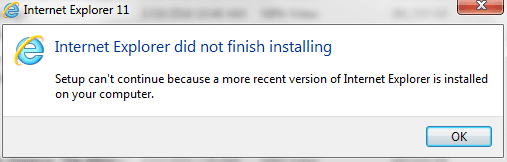
uninstalled IE11, rebooted, then tried to install using the installer i downloaded, only to get the window pictured below.

going through the troubleshooter link the window gave me, and one of the suggestions is to uninstall IE9, which i'm going to try first, considering how many times IE9's been brought up in this thread.

i still haven't heard anything about reverting COMODO Defense+ denying all permissions of its blocked files list (of which wmpshare.exe was the only one in that list, thankfully), so that's still up in the air.

EDIT: didn't find IE9, but found IE10 instead. that's weird... gonna uninstall it anyway.

also, the installer you linked me was for the 32 bit Windows 7, i think. the 64 bit installer i downloaded has a different file name. gonna run that after restarting to commit the IE10 installation.

EDIT: nope, still getting "Internet Explorer did not finish installing".

IE9 somehow showing up in Programs and Features despite not showing up in Windows Update's list of installed updates (IE10 instead taking it's place). disabling that, then gonna go restart my computer and try the IE11 install again.

EDIT: nope, that didn't work either.
 

Attachments

  • IE11_error.PNG
    IE11_error.PNG
    23.3 KB · Views: 15
Last edited:

My Computer

Computer type
Laptop
Computer Manufacturer/Model Number
HP Pavilion dv6
OS
Windows 7 Home Premium 64-bit
CPU
AMD A8-3500M APU with Radeon(tm) HD Graphics 1.50GHz 4 core
Memory
6 GB
Antivirus
COMODO Internet Security
Browser
Avant Browser (Firefox)
Hi Freecell,
Whichever version of IE your running can you open up the "tools/settings" and reset them to default, then

can you run this MS hotfix, (its for media player).

Roy
 

My Computer

Computer type
PC/Desktop
Computer Manufacturer/Model Number
medionl/Aspire 6930G/acer x55a
OS
W7 home premium 32bit/W7HP 64bit/w10 tp insider ring
CPU
E5300 dual core
Motherboard
medion MS7366
Memory
3gb
Graphics Card(s)
Nvidia Geforce 7100 Nforce 630i
Monitor(s) Displays
avixc
Internet Speed
n (isp resticted to 72)
Antivirus
mse/pands
Browser
palemoon
Other Info
Belkin Fd7050 n USB using Railink RT2870 drivers, more upto date
i think you forgot to link the hotfix in your last post.

i'll re-enable IE8 (because that's literally what i have now) and see if i can get the defaults back.
 

My Computer

Computer type
Laptop
Computer Manufacturer/Model Number
HP Pavilion dv6
OS
Windows 7 Home Premium 64-bit
CPU
AMD A8-3500M APU with Radeon(tm) HD Graphics 1.50GHz 4 core
Memory
6 GB
Antivirus
COMODO Internet Security
Browser
Avant Browser (Firefox)

My Computer

Computer type
PC/Desktop
Computer Manufacturer/Model Number
medionl/Aspire 6930G/acer x55a
OS
W7 home premium 32bit/W7HP 64bit/w10 tp insider ring
CPU
E5300 dual core
Motherboard
medion MS7366
Memory
3gb
Graphics Card(s)
Nvidia Geforce 7100 Nforce 630i
Monitor(s) Displays
avixc
Internet Speed
n (isp resticted to 72)
Antivirus
mse/pands
Browser
palemoon
Other Info
Belkin Fd7050 n USB using Railink RT2870 drivers, more upto date
reset IE8 settings to their defaults. what do i do now?

Fixit you linked didn't work - "The Microsoft Fix it does not apply to your operating system or application version." it says it's for Windows Vista on the link.

i sent a support ticket to COMODO regarding restoring the permissions of wmpshare.exe, hopefully they reply sometime soon. it's a little bit ridiculous how thoroughly it managed to deny literally every permission. imagine what would've happened if i blocked a more important system file...

EDIT: tried installing IE11 again, still not working.
 

My Computer

Computer type
Laptop
Computer Manufacturer/Model Number
HP Pavilion dv6
OS
Windows 7 Home Premium 64-bit
CPU
AMD A8-3500M APU with Radeon(tm) HD Graphics 1.50GHz 4 core
Memory
6 GB
Antivirus
COMODO Internet Security
Browser
Avant Browser (Firefox)
actually got a timely response on my support ticket at COMODO, surprisingly. they told me to uninstall COMODO Internet Security, which would stop blocking the service - i highly doubt that will do much of anything, considering unblocking wmpshare.exe didn't restore its file permissions. hopefully they don't just brush me off as another clueless user.
 

My Computer

Computer type
Laptop
Computer Manufacturer/Model Number
HP Pavilion dv6
OS
Windows 7 Home Premium 64-bit
CPU
AMD A8-3500M APU with Radeon(tm) HD Graphics 1.50GHz 4 core
Memory
6 GB
Antivirus
COMODO Internet Security
Browser
Avant Browser (Firefox)
just wanted to give you an update on IE11. i managed to reinstall it after following a suggestion on another forum, where i had to delete or rename C:\Windows\SoftwareDistribution (opted for the latter).

still no word from COMODO tech support on how to revert permissions.
 

My Computer

Computer type
Laptop
Computer Manufacturer/Model Number
HP Pavilion dv6
OS
Windows 7 Home Premium 64-bit
CPU
AMD A8-3500M APU with Radeon(tm) HD Graphics 1.50GHz 4 core
Memory
6 GB
Antivirus
COMODO Internet Security
Browser
Avant Browser (Firefox)
Back
Top