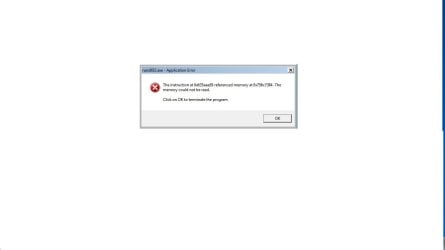
Error dll32.exe

yasmeen92

New member
Local time
10:47 AM
Messages
22
Please help me, sometimes when I open a video or some web pages this error comes up


dll32.exe error
the instruction at 0x6428aa59 referenced
memory at 0x75817384. the memory
could not be read.

click OK to terminate the program


I think its a virus or something, please help! :cry:
 

My Computer

OS
windows 7

My Computer

Computer Manufacturer/Model Number
Hewlett packard/p6512uk
OS
Microsoft Windows 7 Home Premium 64-bit 7600
CPU
IIx4 amd athelon 635 processor
Motherboard
FOXCONN 2AA9
Memory
2x2gb
Graphics Card(s)
ati radeon HD 5450
Sound Card
(1) Realtek High Definition Audio (2) AMD High Definition
Monitor(s) Displays
samsung lcd tv 32"
Screen Resolution
1360x 768
Hard Drives
(1) WDC WD10 01FAES-60Z2A0 SATA Disk Device (2) Maxtor OneTouch USB Device (3) ST310003 33AS USB Device (4) WD My Book 1111 USB Device
PSU
?
Cooling
air!
Keyboard
wireless hp
Mouse
wireless Hp,optical
Internet Speed
1.10mb/s
Antivirus
MSE
Browser
Firefox
Malwarebyes found a torjan, and the antispyware found only tracking cookies i removed them all, restarted the PC but still the error comes up!
 

My Computer

OS
windows 7
what security software do you use ,run a full scan of it.
 

My Computer

Computer Manufacturer/Model Number
Hewlett packard/p6512uk
OS
Microsoft Windows 7 Home Premium 64-bit 7600
CPU
IIx4 amd athelon 635 processor
Motherboard
FOXCONN 2AA9
Memory
2x2gb
Graphics Card(s)
ati radeon HD 5450
Sound Card
(1) Realtek High Definition Audio (2) AMD High Definition
Monitor(s) Displays
samsung lcd tv 32"
Screen Resolution
1360x 768
Hard Drives
(1) WDC WD10 01FAES-60Z2A0 SATA Disk Device (2) Maxtor OneTouch USB Device (3) ST310003 33AS USB Device (4) WD My Book 1111 USB Device
PSU
?
Cooling
air!
Keyboard
wireless hp
Mouse
wireless Hp,optical
Internet Speed
1.10mb/s
Antivirus
MSE
Browser
Firefox
i did and it deleted some infected file but the error is still thereerror.jpg
 

My Computer

OS
windows 7
Hi, yasmeen92.

Please launch Malarebytes and clicking the Logs tab in MBAM. Please post contents of that file in your next reply.

In addition, Please go here to run an on-line scan from ESET.

  • Note: It is easiest if you use Internet explorer for this scan. (If you use an alternate browser, it will be necessary to download the ESET Smart Installer)
  • Turn off the real time scanner of any existing antivirus program while performing the online scan
  • Tick the box next to YES, I accept the Terms of Use.
  • Click Start
  • When asked, allow the ActiveX control to install
  • Click Start
  • Make sure that the option Remove found threats is unticked and the Scan Archives option is ticked.
  • Click on Advanced Settings, ensure the options Scan for potentially unwanted applications, Scan for potentially unsafe applications, and Enable Anti-Stealth Technology are ticked.
  • Click Scan
  • Wait for the scan to finish
  • Use notepad to open the logfile located at C:\Program Files\Eset\Eset Online Scanner\log.txt
  • Copy and paste that log as a reply to this topic and also let me know how things are now.
 

My Computer

OS
Windows 7 & Windows Vista Ultimate
hey Corrine,

first of all the log

Malwarebytes' Anti-Malware 1.51.2.1300
www.malwarebytes.org

Database version: 7907

Windows 6.1.7600
Internet Explorer 8.0.7600.16385

10/9/2011 5:22:16 PM
mbam-log-2011-10-09 (17-22-16).txt

Scan type: Quick scan
Objects scanned: 200044
Time elapsed: 9 minute(s), 10 second(s)

Memory Processes Infected: 0
Memory Modules Infected: 0
Registry Keys Infected: 0
Registry Values Infected: 0
Registry Data Items Infected: 0
Folders Infected: 0
Files Infected: 1

Memory Processes Infected:
(No malicious items detected)

Memory Modules Infected:
(No malicious items detected)

Registry Keys Infected:
(No malicious items detected)

Registry Values Infected:
(No malicious items detected)

Registry Data Items Infected:
(No malicious items detected)

Folders Infected:
(No malicious items detected)

Files Infected:
c:\Users\yasmeen.lg-pc\Desktop\sweetimpack3405_closechromeprompt_apr11.exe (Trojan.Dropper.Pak) -> Quarantined and deleted successfully.

the scanner log


ESETSmartInstaller@High as downloader log:
all ok
ESETSmartInstaller@High as downloader log:
all ok
esets_scanner_update returned -1 esets_gle=53251
# version=7
# OnlineScannerApp.exe=1.0.0.1
# OnlineScanner.ocx=1.0.0.6528
# api_version=3.0.2
# EOSSerial=9a6464b378438d47b9f5d8f3d252bf3c
# end=finished
# remove_checked=false
# archives_checked=true
# unwanted_checked=true
# unsafe_checked=true
# antistealth_checked=true
# utc_time=2011-10-09 10:01:02
# local_time=2011-10-10 02:01:02 (+0400, Arabian Standard Time)
# country="United States"
# lang=1033
# osver=6.1.7600 NT
# compatibility_mode=5893 16776573 100 94 19781 69817817 0 0
# compatibility_mode=8192 67108863 100 0 4160 4160 0 0
# scanned=189906
# found=12
# cleaned=0
# scan_time=11035
C:\Program Files\Uniblue\RegistryBooster\Launcher.exe Win32/RegistryBooster application (unable to clean) 00000000000000000000000000000000 I
C:\Program Files\Uniblue\RegistryBooster\rbmonitor.exe Win32/RegistryBooster application (unable to clean) 00000000000000000000000000000000 I
C:\Program Files\Uniblue\RegistryBooster\rbnotifier.exe Win32/RegistryBooster application (unable to clean) 00000000000000000000000000000000 I
C:\Program Files\Uniblue\RegistryBooster\rb_move_serial.exe Win32/RegistryBooster application (unable to clean) 00000000000000000000000000000000 I
C:\Program Files\Uniblue\RegistryBooster\rb_ubm.exe Win32/RegistryBooster application (unable to clean) 00000000000000000000000000000000 I
C:\Program Files\Uniblue\RegistryBooster\registrybooster.exe Win32/RegistryBooster application (unable to clean) 00000000000000000000000000000000 I
C:\Users\yasmeen.lg-PC\AppData\Local\Microsoft\Windows\Temporary Internet Files\Content.IE5\5UBOHGPI\index-functions[1].js Win32/RegistryBooster application (unable to clean) 00000000000000000000000000000000 I
C:\Users\yasmeen.lg-PC\Downloads\cnet_wlsetup-web_exe.exe a variant of Win32/InstallCore.C application (unable to clean) 00000000000000000000000000000000 I
C:\Users\yasmeen.lg-PC\Downloads\registryboosterplc.exe Win32/RegistryBooster application (unable to clean) 00000000000000000000000000000000 I
C:\Users\yasmeen.lg-PC\Downloads\SoftonicDownloader_for_windows-movie-maker.exe a variant of Win32/SoftonicDownloader.A application (unable to clean) 00000000000000000000000000000000 I
C:\Users\yasmeen.lg-PC\Downloads\The Sims 2\Games\07_Glamour Life Stuff\The Sims 2 - Glamour Life Stuff.iso probably a variant of Win32/Agent.LNDZOZL trojan (unable to clean) 00000000000000000000000000000000 I
${Memory} Win32/RegistryBooster application 00000000000000000000000000000000 I

 

My Computer

OS
windows 7
Hi, yasmeen92.

In reviewing the findings in the ESET log, I note a couple of things. First, it appears that you have used a file-sharing site for downloading programs. P2P programs form a direct conduit on to your computer. They have always been a target of malware writers and are increasingly so of late. P2P security measures are easily circumvented and if your P2P program is not configured correctly, you may be sharing more files than you realize. There have been cases where people's passwords, address books and other personal, private, and financial details have been exposed to the file sharing network by a badly configured program.

With P2P file sharing, what means do you have of identifying or authenticating the source of the download? In addition, a file can be distributed among many hosts, and peers will provide for download the sections that they have already downloaded. This results in the distinct possibility of a distribution method in which malicious bits are mixed with with good files.

In addition, Windows is a closed source system. Developers of registry cleaners do not have the core code of Windows 7 and are not working on definitive information, but rather they are going on past knowledge and experience. Automatic cleaners will usually have to do some guesswork.

Modifying registry keys incorrectly can cause Windows instability, or make Windows unbootable. No registry cleaner is completely safe and the potential is ever present to cause more problems than they claim to fix.

Registry cleaners cannot distinguish between good and bad. If you run a registry cleaner, it will delete all those keys which are obsolete and sitting idle; but in reality, those keys may well be needed by some programs or windows at a later time.

Windows 7 is much more efficient at managing the registry than previous Windows versions. The few keys removed by a registry cleaner will not make 1 millisecond's difference in performance. If you run a registry cleaner and do not know precisely what you are doing, you will have problems down the road. There are no gains to be had from using a registry cleaner and the risk is great.

Forget all the "wisdom" you learned about XP. Windows 7 is not XP and does not manage the registry the same as XP. See, for example, Are registry cleaners necessary?.

~~~~~~~~~~~~~~~~~~~~

Note: As it appears your problem is malware, I will request the Moderators move your thread to the Security Forum.

Please download DDS and save it to your desktop from here.
Disable any script blocker, and then double-click dds.scr to run the tool.
  • When done, DDS will open two (2) logs:
    • DDS.txt
    • Attach.txt
  • Save both reports to your desktop.

-----------------------------------------------------

Please include the following logs in your thread:

  • Contents of the DDS.txt posted as text in your reply
  • Post a copy of the Attach.txt to your post as well. It may be necessary to create a second reply if the Attach.txt is lengthy.
 

My Computer

OS
Windows 7 & Windows Vista Ultimate
Hey Corrine,

I did as you mentioned two .txt files opened:

* DDS.txt

.
DDS (Ver_2011-08-26.01) - NTFSx86
Internet Explorer: 8.0.7600.16385 BrowserJavaVersion: 1.6.0_22
Run by yasmeen at 20:28:27 on 2011-10-11
Microsoft Windows 7 Starter 6.1.7600.0.1256.971.1033.18.1791.626 [GMT 4:00]
.
AV: avast! Antivirus *Enabled/Updated* {2B2D1395-420B-D5C9-657E-930FE358FC3C}
SP: avast! Antivirus *Enabled/Updated* {904CF271-6431-DA47-5FCE-A87D98DFB681}
SP: Windows Defender *Enabled/Updated* {D68DDC3A-831F-4fae-9E44-DA132C1ACF46}
.
============== Running Processes ===============
.
C:\Windows.starter.original\system32\wininit.exe
C:\Windows.starter.original\system32\lsm.exe
C:\Windows.starter.original\system32\svchost.exe -k DcomLaunch
C:\Windows.starter.original\system32\svchost.exe -k RPCSS
C:\Windows.starter.original\System32\svchost.exe -k LocalServiceNetworkRestricted
C:\Windows.starter.original\System32\svchost.exe -k LocalSystemNetworkRestricted
C:\Windows.starter.original\system32\svchost.exe -k netsvcs
C:\Windows.starter.original\system32\svchost.exe -k LocalService
C:\Windows.starter.original\system32\svchost.exe -k NetworkService
C:\Program Files\AVAST Software\Avast\AvastSvc.exe
C:\Windows.starter.original\System32\spoolsv.exe
C:\Windows.starter.original\system32\svchost.exe -k LocalServiceNoNetwork
C:\Windows.starter.original\system32\svchost.exe -k imgsvc
C:\Program Files\Yahoo!\SoftwareUpdate\YahooAUService.exe
C:\Windows.starter.original\system32\svchost.exe -k bthsvcs
C:\Windows.starter.original\system32\Dwm.exe
C:\Windows.starter.original\system32\taskhost.exe
C:\Windows.starter.original\Explorer.EXE
C:\Windows.starter.original\system32\taskeng.exe
C:\Program Files\Uniblue\RegistryBooster\rbmonitor.exe
C:\Program Files\real\realplayer\Update\realsched.exe
C:\Program Files\AVAST Software\Avast\AvastUI.exe
C:\Program Files\Malwarebytes' Anti-Malware\mbamgui.exe
C:\Program Files\uTorrent\uTorrent.exe
C:\Program Files\Windows Sidebar\sidebar.exe
C:\Users\yasmeen.lg-PC\AppData\Local\Google\Update\1.3.21.69\GoogleCrashHandler.exe
C:\Program Files\MagicDisc\MagicDisc.exe
C:\Program Files\Uniblue\RegistryBooster\registrybooster.exe
C:\Windows.starter.original\system32\svchost.exe -k LocalServiceAndNoImpersonation
C:\Windows.starter.original\system32\SearchIndexer.exe
C:\Program Files\Windows Media Player\wmpnetwk.exe
C:\Program Files\Yahoo!\Messenger\ymsgr_tray.exe
C:\Users\yasmeen.lg-PC\AppData\Local\Google\Chrome\Application\chrome.exe
C:\Program Files\Malwarebytes' Anti-Malware\mbamservice.exe
C:\Windows.starter.original\System32\svchost.exe -k secsvcs
C:\Windows.starter.original\system32\wuauclt.exe
C:\Users\yasmeen.lg-PC\AppData\Local\Google\Chrome\Application\chrome.exe
C:\Program Files\Mozilla Firefox\firefox.exe
C:\Program Files\Mozilla Firefox\plugin-container.exe
C:\Users\yasmeen.lg-PC\AppData\Local\Google\Chrome\Application\chrome.exe
C:\Windows.starter.original\system32\SearchProtocolHost.exe
C:\Windows.starter.original\system32\SearchFilterHost.exe
C:\Windows.starter.original\system32\conhost.exe
C:\Windows.starter.original\system32\wbem\wmiprvse.exe
.
============== Pseudo HJT Report ===============
.
uStart Page = hxxp://search.conduit.com?SearchSource=10&ctid=CT2475029
mLocal Page = c:\windows\system32\blank.htm
mSearchAssistant = hxxp://search.babylon.com/?babsrc=SP_ss&q={searchTerms}&mntrId=a2b3b4890000000000001c4bd6672890&tlver=1.4.23.10&affID=19637
uURLSearchHooks: H - No File
uURLSearchHooks: MyAshampoo Toolbar: {a1e75a0e-4397-4ba8-bb50-e19fb66890f4} - c:\program files\myashampoo\prxtbMyAs.dll
uURLSearchHooks: YTNavAssist.YTNavAssistPlugin Class: {81017ea9-9aa8-4a6a-9734-7af40e7d593f} - c:\progra~1\yahoo!\companion\installs\cpn0\YTNavAssist.dll
mURLSearchHooks: MyAshampoo Toolbar: {a1e75a0e-4397-4ba8-bb50-e19fb66890f4} - c:\program files\myashampoo\prxtbMyAs.dll
mWinlogon: Userinit=c:\windows\system32\userinit.exe,
BHO: &Yahoo! Toolbar Helper: {02478d38-c3f9-4efb-9b51-7695eca05670} - c:\progra~1\yahoo!\companion\installs\cpn0\yt.dll
BHO: Adobe PDF Link Helper: {18df081c-e8ad-4283-a596-fa578c2ebdc3} - c:\program files\common files\adobe\acrobat\activex\AcroIEHelperShim.dll
BHO: RealPlayer Download and Record Plugin for Internet Explorer: {3049c3e9-b461-4bc5-8870-4c09146192ca} - c:\programdata\real\realplayer\browserrecordplugin\ie\rpbrowserrecordplugin.dll
BHO: Conduit Engine: {30f9b915-b755-4826-820b-08fba6bd249d} - c:\program files\conduitengine\ConduitEngine.dll
BHO: {5C255C8A-E604-49b4-9D64-90988571CECB} - No File
BHO: avast! WebRep: {8e5e2654-ad2d-48bf-ac2d-d17f00898d06} - c:\program files\avast software\avast\aswWebRepIE.dll
BHO: Windows Live Sign-in Helper: {9030d464-4c02-4abf-8ecc-5164760863c6} - c:\program files\common files\microsoft shared\windows live\WindowsLiveLogin.dll
BHO: MyAshampoo Toolbar: {a1e75a0e-4397-4ba8-bb50-e19fb66890f4} - c:\program files\myashampoo\prxtbMyAs.dll
BHO: SingleInstance Class: {fdad4da1-61a2-4fd8-9c17-86f7ac245081} - c:\progra~1\yahoo!\companion\installs\cpn0\YTSingleInstance.dll
TB: Conduit Engine: {30f9b915-b755-4826-820b-08fba6bd249d} - c:\program files\conduitengine\ConduitEngine.dll
TB: avast! WebRep: {8e5e2654-ad2d-48bf-ac2d-d17f00898d06} - c:\program files\avast software\avast\aswWebRepIE.dll
TB: MyAshampoo Toolbar: {a1e75a0e-4397-4ba8-bb50-e19fb66890f4} - c:\program files\myashampoo\prxtbMyAs.dll
TB: Yahoo! Toolbar: {ef99bd32-c1fb-11d2-892f-0090271d4f88} - c:\progra~1\yahoo!\companion\installs\cpn0\yt.dll
TB: {BF7380FA-E3B4-4DB2-AF3E-9D8783A45BFC} - No File
uRun: [uTorrent] "c:\program files\utorrent\uTorrent.exe"
uRun: [Skype] "c:\program files\skype\phone\Skype.exe" /nosplash /minimized
uRun: [Sidebar] c:\program files\windows sidebar\sidebar.exe /autoRun
uRun: [Messenger (Yahoo!)] "c:\program files\yahoo!\messenger\YahooMessenger.exe" -quiet
uRun: [Google Update] "c:\users\yasmeen.lg-pc\appdata\local\google\update\GoogleUpdate.exe" /c
uRun: [EA Core] "c:\program files\electronic arts\eadm\Core.exe" -silent
uRun: [RegistryBooster] "c:\program files\uniblue\registrybooster\launcher.exe" delay 20000
mRun: [zOSD] c:\program files\lg software\lg osd\HotKey.exe
mRun: [UCam_Menu] "c:\program files\cyberlink\youcam\muitransfer\muistartmenu.exe" "c:\program files\cyberlink\youcam" updatewithcreateonce "software\cyberlink\youcam\2.0"
mRun: [TkBellExe] "c:\program files\real\realplayer\update\realsched.exe" -osboot
mRun: [SunJavaUpdateSched] "c:\program files\common files\java\java update\jusched.exe"
mRun: [SiSTray] %ProgramFiles%\SiS VGA Utilities\SiSTray.exe
mRun: [KeybdUtility] c:\program files\lg software\lg osd\HotKey.exe
mRun: [fspuip] %ProgramFiles%\FSP\fspuip.exe
mRun: [avast] "c:\program files\avast software\avast\avastUI.exe" /nogui
mRun: [Adobe Reader Speed Launcher] "c:\program files\adobe\reader 9.0\reader\Reader_sl.exe"
mRun: [Adobe ARM] "c:\program files\common files\adobe\arm\1.0\AdobeARM.exe"
mRun: [Malwarebytes' Anti-Malware] "c:\program files\malwarebytes' anti-malware\mbamgui.exe" /starttray
StartupFolder: c:\users\yasmee~1.lg-\appdata\roaming\micros~1\windows\startm~1\programs\startup\magicd~1.lnk - c:\program files\magicdisc\MagicDisc.exe
StartupFolder: c:\progra~2\micros~1\windows\startm~1\programs\startup\adobeg~1.lnk - c:\program files\common files\adobe\calibration\Adobe Gamma Loader.exe
mPolicies-system: ConsentPromptBehaviorAdmin = 0 (0x0)
mPolicies-system: ConsentPromptBehaviorUser = 3 (0x3)
mPolicies-system: EnableLUA = 0 (0x0)
mPolicies-system: EnableUIADesktopToggle = 0 (0x0)
mPolicies-system: PromptOnSecureDesktop = 0 (0x0)
IE: {08B0E5C0-4FCB-11CF-AAA5-00401C608501} - {CAFEEFAC-0016-0000-0022-ABCDEFFEDCBC} - c:\program files\java\jre6\bin\jp2iexp.dll
IE: {92780B25-18CC-41C8-B9BE-3C9C571A8263} - {FF059E31-CC5A-4E2E-BF3B-96E929D65503} - c:\progra~1\mif5ba~1\office12\REFIEBAR.DLL
DPF: {8AD9C840-044E-11D1-B3E9-00805F499D93} - hxxp://java.sun.com/update/1.6.0/jinstall-1_6_0_22-windows-i586.cab
DPF: {CAFEEFAC-0016-0000-0022-ABCDEFFEDCBA} - hxxp://java.sun.com/update/1.6.0/jinstall-1_6_0_22-windows-i586.cab
DPF: {CAFEEFAC-FFFF-FFFF-FFFF-ABCDEFFEDCBA} - hxxp://java.sun.com/update/1.6.0/jinstall-1_6_0_22-windows-i586.cab
DPF: {E2883E8F-472F-4FB0-9522-AC9BF37916A7} - hxxp://platformdl.adobe.com/NOS/getPlusPlus/1.6/gp.cab
TCP: DhcpNameServer = 192.168.254.254 192.168.254.254
TCP: Interfaces\{0C4C002B-A035-495D-9CB2-B636B6BB5DDE} : DhcpNameServer = 192.168.254.254 192.168.254.254
TCP: Interfaces\{0C4C002B-A035-495D-9CB2-B636B6BB5DDE}\05C4557494E43502D4D4 : DhcpNameServer = 192.168.2.1
TCP: Interfaces\{701033BD-F1BC-4E0F-9B42-3E4E56B168E0} : DhcpNameServer = 192.168.12.13 192.168.12.12
mASetup: {89820200-ECBD-11cf-8B85-00AA005B4383} - c:\windows\system32\ie4uinit.exe -BaseSettings
mASetup: {89B4C1CD-B018-4511-B0A1-5476DBF70820} - c:\windows\system32\rundll32.exe c:\windows\system32\mscories.dll,Install
mASetup: >{26923b43-4d38-484f-9b9e-de460746276c} - c:\windows\system32\ie4uinit.exe -UserIconConfig
mASetup: >{60B49E34-C7CC-11D0-8953-00A0C90347FF} - "c:\windows\system32\rundll32.exe" "c:\windows\system32\iedkcs32.dll",BrandIEActiveSetup SIGNUP
.
================= FIREFOX ===================
.
FF - ProfilePath - c:\users\yasmeen.lg-pc\appdata\roaming\mozilla\firefox\profiles\3otr3isf.default\
FF - prefs.js: browser.search.defaulturl - hxxp://search.conduit.com/ResultsExt.aspx?ctid=CT2475029&SearchSource=3&q={searchTerms}
FF - prefs.js: browser.search.selectedEngine - MyAshampoo Customized Web Search
FF - prefs.js: browser.startup.homepage - hxxp://search.conduit.com/?ctid=CT2475029&SearchSource=13
FF - prefs.js: keyword.URL - hxxp://search.conduit.com/ResultsExt.aspx?ctid=CT2475029&q=
FF - plugin: c:\program files\mozilla firefox\plugins\npdnu.dll
FF - plugin: c:\program files\mozilla firefox\plugins\npdnupdater2.dll
FF - plugin: c:\programdata\real\realplayer\browserrecordplugin\mozillaplugins\nprpchromebrowserrecordext.dll
FF - plugin: c:\programdata\real\realplayer\browserrecordplugin\mozillaplugins\nprphtml5videoshim.dll
FF - plugin: c:\users\yasmeen.lg-pc\appdata\local\google\update\1.3.21.69\npGoogleUpdate3.dll
.
---- FIREFOX POLICIES ----
FF - user.js: yahoo.ytff.general.dontshowhpoffer - true);user_pref(network.protocol-handler.warn-external.dnupdate, false
============= SERVICES / DRIVERS ===============
.
R1 aswSnx;aswSnx;c:\windows.starter.original\system32\drivers\aswSnx.sys [2011-6-19 441176]
R1 aswSP;aswSP;c:\windows.starter.original\system32\drivers\aswSP.sys [2011-6-19 307928]
R1 SASDIFSV;SASDIFSV;c:\program files\superantispyware\sasdifsv.sys [2010-2-17 12872]
R1 SASKUTIL;SASKUTIL;c:\program files\superantispyware\SASKUTIL.SYS [2010-5-10 67656]
R1 vwififlt;Virtual WiFi Filter Driver;c:\windows.starter.original\system32\drivers\vwififlt.sys [2009-7-14 48128]
R2 aswFsBlk;aswFsBlk;c:\windows.starter.original\system32\drivers\aswFsBlk.sys [2011-6-19 19544]
R2 aswMonFlt;aswMonFlt;c:\windows.starter.original\system32\drivers\aswMonFlt.sys [2011-6-19 53592]
R2 avast! Antivirus;avast! Antivirus;c:\program files\avast software\avast\AvastSvc.exe [2011-6-20 42184]
R2 MBAMService;MBAMService;c:\program files\malwarebytes' anti-malware\mbamservice.exe [2011-10-9 366152]
R3 fspad_wlh32;Finger Sensing Pad Driver for Windows 2000/XP/Vista/Win7_wlh32;c:\windows.starter.original\system32\drivers\fspad_wlh32.sys [2010-7-21 43520]
R3 MBAMProtector;MBAMProtector;c:\windows.starter.original\system32\drivers\mbam.sys [2011-10-9 22216]
R3 MTsensor32;PU ACPI UTILITY;c:\windows.starter.original\system32\drivers\PuAcpi32.sys [2010-7-21 14344]
R3 rtl8192se;Realtek Wireless LAN 802.11n PCI-E NIC NT Driver;c:\windows.starter.original\system32\drivers\RTL8192SE.SYS [2010-7-21 862208]
R3 SiS6350;SiS6350;c:\windows.starter.original\system32\drivers\SISGRKMD.sys [2010-7-21 465920]
R3 SiSGbeLH;SiS191/SiS190 Ethernet Device NDIS 6.0 Driver;c:\windows.starter.original\system32\drivers\SiSGB6.sys [2009-6-11 48128]
R3 vwifimp;Microsoft Virtual WiFi Miniport Service;c:\windows.starter.original\system32\drivers\vwifimp.sys [2009-7-14 14336]
S3 b57nd60x;Broadcom NetXtreme Gigabit Ethernet - NDIS 6.0;c:\windows.starter.original\system32\drivers\b57nd60x.sys [2009-7-14 229888]
S3 McComponentHostService;McAfee Security Scan Component Host Service;"c:\program files\mcafee security scan\2.0.181\mcchsvc.exe" --> c:\program files\mcafee security scan\2.0.181\McCHSvc.exe [?]
S3 RSUSBSTOR;RtsUStor.Sys Realtek USB Card Reader;c:\windows.starter.original\system32\drivers\RtsUStor.sys [2010-7-21 167424]
.
=============== File Associations ===============
.
JSEFile=c:\windows\system32\WScript.exe "%1" %*
.
=============== Created Last 30 ================
.
2011-10-11 06:30:11 56200 ----a-w- c:\programdata\microsoft\windows defender\definition updates\{c4f71749-c37e-4506-b3fd-b2ff5645a925}\offreg.dll
2011-10-11 06:30:07 7269712 ----a-w- c:\programdata\microsoft\windows defender\definition updates\{c4f71749-c37e-4506-b3fd-b2ff5645a925}\mpengine.dll
2011-10-09 17:47:46 -------- d-----w- c:\program files\ESET
2011-10-09 13:12:01 -------- d-----w- c:\users\yasmeen.lg-pc\appdata\roaming\Malwarebytes
2011-10-09 13:11:55 -------- d-----w- c:\programdata\Malwarebytes
2011-10-09 13:11:51 22216 ----a-w- c:\windows.starter.original\system32\drivers\mbam.sys
2011-10-09 13:11:51 -------- d-----w- c:\program files\Malwarebytes' Anti-Malware
2011-10-09 13:07:37 -------- d-----w- c:\users\yasmeen.lg-pc\appdata\roaming\Uniblue
2011-10-09 13:07:34 -------- d-----w- c:\program files\Uniblue
2011-10-06 12:24:03 -------- d-----w- C:\rei
2011-10-06 12:23:57 -------- d-----w- c:\program files\Reimage
2011-09-21 11:33:21 -------- d-----w- c:\program files\VideoLAN
2011-09-14 10:33:09 692224 ----a-w- c:\program files\common files\installshield\professional\runtime\0701\intel32\iKernel.dll
2011-09-14 10:33:09 57344 ----a-w- c:\program files\common files\installshield\professional\runtime\0701\intel32\ctor.dll
2011-09-14 10:33:09 5632 ----a-w- c:\program files\common files\installshield\professional\runtime\0701\intel32\DotNetInstaller.exe
2011-09-14 10:33:09 237568 ----a-w- c:\program files\common files\installshield\professional\runtime\0701\intel32\iscript.dll
2011-09-14 10:33:09 155648 ----a-w- c:\program files\common files\installshield\professional\runtime\0701\intel32\iuser.dll
2011-09-14 10:33:06 163972 ----a-w- c:\program files\common files\installshield\professional\runtime\0701\intel32\iGdi.dll
2011-09-14 10:33:05 286720 ----a-w- c:\program files\common files\installshield\professional\runtime\0701\intel32\setup.dll
.
==================== Find3M ====================
.
2011-09-07 11:28:52 404640 ----a-w- c:\windows.starter.original\system32\FlashPlayerCPLApp.cpl
2011-07-22 04:56:17 1638912 ----a-w- c:\windows.starter.original\system32\mshtml.tlb
2011-07-16 04:37:32 169984 ----a-w- c:\windows.starter.original\system32\winsrv.dll
2011-07-16 04:34:28 290816 ----a-w- c:\windows.starter.original\system32\KernelBase.dll
2011-07-16 04:31:12 271360 ----a-w- c:\windows.starter.original\system32\conhost.exe
2011-07-16 02:21:47 6144 ---ha-w- c:\windows.starter.original\system32\api-ms-win-security-base-l1-1-0.dll
2011-07-16 02:21:47 4608 ---ha-w- c:\windows.starter.original\system32\api-ms-win-core-threadpool-l1-1-0.dll
2011-07-16 02:21:47 3584 ---ha-w- c:\windows.starter.original\system32\api-ms-win-core-xstate-l1-1-0.dll
2011-07-16 02:21:47 3072 ---ha-w- c:\windows.starter.original\system32\api-ms-win-core-util-l1-1-0.dll
.
============= FINISH: 20:32:09.93 ===============
 

My Computer

OS
windows 7
* Attach.txt


.
UNLESS SPECIFICALLY INSTRUCTED, DO NOT POST THIS LOG.
IF REQUESTED, ZIP IT UP & ATTACH IT
.
DDS (Ver_2011-08-26.01)
.
Microsoft Windows 7 Starter
Boot Device: \Device\HarddiskVolume1
Install Date: 9/25/2010 9:22:24 AM
System Uptime: 10/11/2011 5:15:01 PM (3 hours ago)
.
Motherboard: PEGATRON CORPORATION | | H24L
Processor: Pentium(R) Dual-Core CPU T4400 @ 2.20GHz | CPU 1 | 2200/200mhz
.
==== Disk Partitions =========================
.
C: is FIXED (NTFS) - 233 GiB total, 116.323 GiB free.
D: is CDROM ()
E: is CDROM ()
F: is CDROM ()
.
==== Disabled Device Manager Items =============
.
Class GUID: {6bdd1fc6-810f-11d0-bec7-08002be2092f}
Description: Lexmark X422
Device ID: ROOT\IMAGE\0000
Manufacturer: Lexmark
Name: Lexmark X422
PNP Device ID: ROOT\IMAGE\0000
Service: usbscan
.
==== System Restore Points ===================
.
RP290: 9/30/2011 3:00:12 AM - Windows Update
RP291: 9/30/2011 10:58:36 AM - Windows Update
RP292: 10/1/2011 1:46:52 PM - Windows Update
RP293: 10/2/2011 3:00:17 AM - Windows Update
RP294: 10/3/2011 3:00:15 AM - Windows Update
RP296: 10/4/2011 2:05:15 PM - Windows Update
RP297: 10/7/2011 3:00:18 AM - Windows Update
RP298: 10/7/2011 1:03:30 PM - Windows Update
RP299: 10/8/2011 3:00:13 AM - Windows Update
RP302: 10/11/2011 3:00:19 AM - Windows Update
RP303: 10/11/2011 10:29:30 AM - Windows Update
.
==== Installed Programs ======================
.
µTorrent
Adobe AIR
Adobe Flash Player 10 ActiveX
Adobe Flash Player 10 Plugin
Adobe Photoshop CS
Adobe Reader 9.4.0
Adobe Shockwave Player 11.5
Ashampoo Burning Studio 10 v.10.0.10
avast! Free Antivirus
AzureWave UVC Camera Device
Bing Bar
Cisco EAP-FAST Module
Cisco LEAP Module
Cisco PEAP Module
Conduit Engine
CyberLink YouCam
Download Updater (AOL LLC)
Driver Genius Professional Edition
EA Download Manager
ESET Online Scanner v3
Finger Sensing Pad Driver
Google Chrome
Java Auto Updater
Java(TM) 6 Update 22
Junk Mail filter update
LG OSD
MagicDisc 2.7.106
Malwarebytes' Anti-Malware version 1.51.2.1300
McAfee Security Scan Plus
Microsoft Application Error Reporting
Microsoft Choice Guard
Microsoft Office 2007 Service Pack 2 (SP2)
Microsoft Office Access MUI (English) 2007
Microsoft Office Access Setup Metadata MUI (English) 2007
Microsoft Office Excel MUI (English) 2007
Microsoft Office InfoPath MUI (English) 2007
Microsoft Office Outlook MUI (English) 2007
Microsoft Office PowerPoint MUI (English) 2007
Microsoft Office Professional Plus 2007
Microsoft Office Proof (English) 2007
Microsoft Office Proof (French) 2007
Microsoft Office Proof (Spanish) 2007
Microsoft Office Proofing (English) 2007
Microsoft Office Proofing Tools 2007 Service Pack 2 (SP2)
Microsoft Office Publisher MUI (English) 2007
Microsoft Office Shared MUI (English) 2007
Microsoft Office Shared Setup Metadata MUI (English) 2007
Microsoft Office Word MUI (English) 2007
Microsoft Silverlight
Microsoft SQL Server 2005 Compact Edition [ENU]
Microsoft Visual C++ 2005 ATL Update kb973923 - x86 8.0.50727.4053
Microsoft Visual C++ 2005 Redistributable
Mozilla Firefox 7.0.1 (x86 en-US)
MSVCRT
MyAshampoo Toolbar
Norton Security Scan
RealPlayer
Realtek USB 2.0 Card Reader
REALTEK Wireless LAN Driver
RealUpgrade 1.0
Reimage Repair
Security Update for 2007 Microsoft Office System (KB2288621)
Security Update for 2007 Microsoft Office System (KB2344875)
Security Update for 2007 Microsoft Office System (KB2345043)
Security Update for 2007 Microsoft Office System (KB969559)
Security Update for 2007 Microsoft Office System (KB976321)
Security Update for 2007 Microsoft Office System (KB982312)
Security Update for Microsoft Office Access 2007 (KB979440)
Security Update for Microsoft Office Excel 2007 (KB2345035)
Security Update for Microsoft Office InfoPath 2007 (KB979441)
Security Update for Microsoft Office Outlook 2007 (KB2288953)
Security Update for Microsoft Office PowerPoint 2007 (KB982158)
Security Update for Microsoft Office Publisher 2007 (KB982124)
Security Update for Microsoft Office system 2007 (972581)
Security Update for Microsoft Office system 2007 (KB974234)
Security Update for Microsoft Office Visio Viewer 2007 (KB973709)
Security Update for Microsoft Office Word 2007 (KB2344993)
SiS VGA Utilities
SUPERAntiSpyware
The Sims 2
The Sims 2 Family Fun Stuff
The Sims 2 Glamour Life Stuff
The Sims 2 Nightlife
The Sims 2 Open For Business
The Sims 2 Pets
The Sims 2 University
The Sims™ 2 Apartment Life
The Sims™ 2 Bon Voyage
The Sims™ 2 Celebration! Stuff
The Sims™ 2 FreeTime
The Sims™ 2 H&M® Fashion Stuff
The Sims™ 2 IKEA® Home Stuff
The Sims™ 2 Kitchen & Bath Interior Design Stuff
The Sims™ 2 Mansion and Garden Stuff
The Sims™ 2 Seasons
The Sims™ 2 Teen Style Stuff
The Sims™ 3
Uniblue RegistryBooster
Unlocker 1.9.1
Update for 2007 Microsoft Office System (KB967642)
Update for Microsoft Office 2007 Help for Common Features (KB963673)
Update for Microsoft Office Access 2007 Help (KB963663)
Update for Microsoft Office Excel 2007 Help (KB963678)
Update for Microsoft Office Infopath 2007 Help (KB963662)
Update for Microsoft Office Outlook 2007 Help (KB963677)
Update for Microsoft Office Powerpoint 2007 Help (KB963669)
Update for Microsoft Office Publisher 2007 Help (KB963667)
Update for Microsoft Office Script Editor Help (KB963671)
Update for Microsoft Office Word 2007 Help (KB963665)
Update for Outlook 2007 Junk Email Filter (kb2410711)
VLC media player 1.1.11
Windows Live Call
Windows Live Communications Platform
Windows Live Essentials
Windows Live Mail
Windows Live Messenger
Windows Live Movie Maker
Windows Live Photo Gallery
Windows Live Sign-in Assistant
Windows Live Sync
Windows Live Upload Tool
Windows Media Player Firefox Plugin
WinRAR 4.00 (32-bit)
Yahoo! Messenger
Yahoo! Software Update
Yahoo! Toolbar
.
==== Event Viewer Messages From Past Week ========
.
10/9/2011 9:42:01 PM, Error: EventLog [6008] - The previous system shutdown at 9:40:22 PM on ‎10/‎9/‎2011 was unexpected.
10/9/2011 9:40:22 PM, Error: Service Control Manager [7009] - A timeout was reached (30000 milliseconds) while waiting for the Windows Error Reporting Service service to connect.
10/9/2011 2:03:21 PM, Error: Service Control Manager [7001] - The Task Scheduler service depends on the Windows Event Log service which failed to start because of the following error: The service cannot be started, either because it is disabled or because it has no enabled devices associated with it.
10/9/2011 12:17:05 PM, Error: Microsoft-Windows-DistributedCOM [10005] - DCOM got error "1053" attempting to start the service swprv with arguments "" in order to run the server: {65EE1DBA-8FF4-4A58-AC1C-3470EE2F376A}
10/9/2011 12:17:02 PM, Error: Service Control Manager [7009] - A timeout was reached (30000 milliseconds) while waiting for the Microsoft Software Shadow Copy Provider service to connect.
10/9/2011 12:17:02 PM, Error: Service Control Manager [7000] - The Microsoft Software Shadow Copy Provider service failed to start due to the following error: The service did not respond to the start or control request in a timely fashion.
10/9/2011 10:46:36 PM, Error: EventLog [6008] - The previous system shutdown at 10:45:15 PM on ‎10/‎9/‎2011 was unexpected.
10/8/2011 5:31:53 PM, Error: Service Control Manager [7011] - A timeout (30000 milliseconds) was reached while waiting for a transaction response from the ShellHWDetection service.
10/7/2011 12:52:09 PM, Error: Tcpip [4199] - The system detected an address conflict for IP address 192.168.254.2 with the system having network hardware address 00-1B-9E-11-BC-A1. Network operations on this system may be disrupted as a result.
10/6/2011 7:49:31 PM, Error: EventLog [6008] - The previous system shutdown at 7:47:43 PM on ‎10/‎6/‎2011 was unexpected.
10/5/2011 6:43:22 PM, Error: EventLog [6008] - The previous system shutdown at 6:26:41 PM on ‎10/‎5/‎2011 was unexpected.
10/5/2011 4:31:37 AM, Error: EventLog [6008] - The previous system shutdown at 3:40:50 AM on ‎10/‎5/‎2011 was unexpected.
10/4/2011 9:34:26 PM, Error: NetBT [4321] - The name "WORKGROUP :1d" could not be registered on the interface with IP address 192.168.254.2. The computer with the IP address 192.168.254.1 did not allow the name to be claimed by this computer.
10/11/2011 4:32:41 AM, Error: Service Control Manager [7011] - A timeout (30000 milliseconds) was reached while waiting for a transaction response from the Wlansvc service.
10/11/2011 3:18:20 PM, Error: EventLog [6008] - The previous system shutdown at 3:15:15 PM on ‎10/‎11/‎2011 was unexpected.
10/11/2011 3:02:45 AM, Error: Microsoft-Windows-WindowsUpdateClient [20] - Installation Failure: Windows failed to install the following update with error 0x80070643: Security Update for Microsoft Silverlight (KB2512827).
10/11/2011 1:47:47 PM, Error: Service Control Manager [7011] - A timeout (30000 milliseconds) was reached while waiting for a transaction response from the Netman service.
10/10/2011 7:00:34 PM, Error: Microsoft-Windows-Time-Service [4] - The time provider 'NtpClient' failed to start due to the following error: The specified module could not be found. (0x8007007E)
10/10/2011 7:00:34 PM, Error: Microsoft-Windows-Time-Service [21] - The time service is configured to use one or more input providers, however, none of the input providers are available. The time service has no source of accurate time.
10/10/2011 6:57:21 PM, Error: EventLog [6008] - The previous system shutdown at 6:51:30 PM on ‎10/‎10/‎2011 was unexpected.
10/10/2011 11:17:35 PM, Error: Tcpip [4199] - The system detected an address conflict for IP address 192.168.254.1 with the system having network hardware address 00-19-7E-5E-E5-86. Network operations on this system may be disrupted as a result.
.
==== End Of File ===========================
 

My Computer

OS
windows 7
Hi, yasmeen92.

It appears that I was correct and you got some malicious bits with files downloaded via uTorrent. Please follow these instructions carefully.

Download ComboFix from one of the following locations:

Link 1
Link 2


!!! IMPORTANT !!! Save ComboFix.exe to your Desktop


  • Disable your antivirus and anti-malware security applications. If not disabled, these programs will likely interfere with cleanup process. This can usually be accomplished by a right-click on the icon in the System Tray.

    Note: If you are unsure how to disable your security software, see the instructions in this topic at Tech Support Forum: How to disable your security applications.
    [*] If infections are found, ComboFix will automatically reboot the machine to complete the removal process. Please ensure all opened windows are closed before proceeding.
    [*]Double-click ComboFix.exe on your desktop and follow the prompts.
    [*]As part of the process, ComboFix will check to see if the Microsoft Windows Recovery Console is installed. With malware infections being as they are today, it is strongly recommended to have this pre-installed on your machine before doing any malware removal. The Recovery Console will allow you to start up the computer in a special recovery/repair mode that will allow us to more easily help you should your computer have a problem after an attempted removal of malware.


Please note: If the Microsoft Windows Recovery Console is already installed on the computer, ComboFix will continue the malware removal procedures.


  • Follow the prompts to allow ComboFix to download and install the Microsoft Windows Recovery Console.
  • When prompted, agree to the End-User License Agreement to install the Microsoft Windows Recovery Console.

    CF_RC1.png
  • After the Microsoft Windows Recovery Console is installed using ComboFix, you should see the following message:

    CF_RC2.png
  • Click "Yes" to continue scanning for malware.
  • When finished, a log will be produced. Please include the C:\ComboFix.txt in your next reply.
 

My Computer

OS
Windows 7 & Windows Vista Ultimate
Thank you for going through so much trouble for me


heres the .txt


ComboFix 11-10-15.03 - yasmeen 10/15/2011 15:10:09.1.2 - x86
Microsoft Windows 7 Starter 6.1.7600.0.1256.971.1033.18.1791.995 [GMT 4:00]
Running from: c:\users\yasmeen.lg-PC\Desktop\ComboFix.exe
AV: avast! Antivirus *Disabled/Updated* {2B2D1395-420B-D5C9-657E-930FE358FC3C}
SP: avast! Antivirus *Disabled/Updated* {904CF271-6431-DA47-5FCE-A87D98DFB681}
SP: Windows Defender *Enabled/Updated* {D68DDC3A-831F-4fae-9E44-DA132C1ACF46}
.
.
((((((((((((((((((((((((((((((((((((((( Other Deletions )))))))))))))))))))))))))))))))))))))))))))))))))
.
.
Infected copy of c:\windows.starter.original\system32\userinit.exe was found and disinfected
Restored copy from - c:\windows.starter.original\SoftwareDistribution\Download\18e2c83e42cc8f0cc17b5dbfaf982690\x86_microsoft-windows-userinit_31bf3856ad364e35_6.1.7601.17514_none_de3024012ff21116\userinit.exe
.
.
((((((((((((((((((((((((( Files Created from 2011-09-15 to 2011-10-15 )))))))))))))))))))))))))))))))
.
.
2011-10-15 11:21 . 2011-10-15 11:21 -------- d-----w- c:\users\yasmeen\AppData\Local\temp
2011-10-15 11:21 . 2011-10-15 11:21 -------- d-----w- c:\users\YASMEE~1~LG-\AppData\Local\temp
2011-10-15 11:21 . 2011-10-15 11:21 -------- d-----w- c:\users\Default\AppData\Local\temp
2011-10-15 11:21 . 2011-10-15 11:21 -------- d-----w- c:\users\Administrator\AppData\Local\temp
2011-10-14 11:24 . 2011-10-14 11:24 56200 ----a-w- c:\programdata\Microsoft\Windows Defender\Definition Updates\{6F8CA085-4785-4C04-9A8F-8C78EA05742A}\offreg.dll
2011-10-14 11:24 . 2011-09-12 23:14 7269712 ----a-w- c:\programdata\Microsoft\Windows Defender\Definition Updates\{6F8CA085-4785-4C04-9A8F-8C78EA05742A}\mpengine.dll
2011-10-13 06:34 . 2011-08-20 04:35 44544 ----a-w- c:\windows.starter.original\system32\licmgr10.dll
2011-10-13 06:34 . 2011-08-20 04:35 163328 ----a-w- c:\program files\Internet Explorer\ieproxy.dll
2011-10-13 06:34 . 2011-08-20 03:26 386048 ----a-w- c:\windows.starter.original\system32\html.iec
2011-10-13 06:34 . 2011-10-01 02:59 1638912 ----a-w- c:\windows.starter.original\system32\mshtml.tlb
2011-10-09 17:47 . 2011-10-09 17:47 -------- d-----w- c:\program files\ESET
2011-10-09 13:12 . 2011-10-09 13:12 -------- d-----w- c:\users\yasmeen.lg-PC\AppData\Roaming\Malwarebytes
2011-10-09 13:11 . 2011-10-09 13:11 -------- d-----w- c:\programdata\Malwarebytes
2011-10-09 13:11 . 2011-10-09 13:11 -------- d-----w- c:\program files\Malwarebytes' Anti-Malware
2011-10-09 13:11 . 2011-08-31 13:00 22216 ----a-w- c:\windows.starter.original\system32\drivers\mbam.sys
2011-10-09 13:07 . 2011-10-09 13:07 -------- d-----w- c:\users\yasmeen.lg-PC\AppData\Roaming\Uniblue
2011-10-09 13:07 . 2011-10-09 13:07 -------- d-----w- c:\program files\Uniblue
2011-10-06 12:24 . 2011-10-06 12:24 -------- d-----w- C:\rei
2011-10-06 12:23 . 2011-10-06 12:23 -------- d-----w- c:\program files\Reimage
2011-09-21 11:34 . 2011-09-24 13:08 -------- d-----w- c:\users\yasmeen.lg-PC\AppData\Roaming\vlc
2011-09-21 11:33 . 2011-09-21 11:33 -------- d-----w- c:\program files\VideoLAN
.
.
.
(((((((((((((((((((((((((((((((((((((((( Find3M Report ))))))))))))))))))))))))))))))))))))))))))))))))))))
.
2011-10-13 12:15 . 2011-05-30 18:54 414368 ----a-w- c:\windows.starter.original\system32\FlashPlayerCPLApp.cpl
2011-10-03 17:23 . 2011-06-25 22:48 134104 ----a-w- c:\program files\mozilla firefox\components\browsercomps.dll
.
.
((((((((((((((((((((((((((((((((((((( Reg Loading Points ))))))))))))))))))))))))))))))))))))))))))))))))))
.
.
*Note* empty entries & legit default entries are not shown
REGEDIT4
.
[HKEY_CURRENT_USER\Software\Microsoft\Internet Explorer\URLSearchHooks]
"{a1e75a0e-4397-4ba8-bb50-e19fb66890f4}"= "c:\program files\MyAshampoo\prxtbMyAs.dll" [2011-01-17 175912]
"{81017EA9-9AA8-4A6A-9734-7AF40E7D593F}"= "c:\progra~1\Yahoo!\Companion\Installs\cpn0\YTNavAssist.dll" [2011-03-16 214840]
.
[HKEY_CLASSES_ROOT\clsid\{a1e75a0e-4397-4ba8-bb50-e19fb66890f4}]
.
[HKEY_CLASSES_ROOT\clsid\{81017ea9-9aa8-4a6a-9734-7af40e7d593f}]
[HKEY_CLASSES_ROOT\YTNavAssist.YTNavAssistPlugin.1]
[HKEY_CLASSES_ROOT\TypeLib\{A31F34A1-EBD2-45A2-BF6D-231C1B987CC8}]
[HKEY_CLASSES_ROOT\YTNavAssist.YTNavAssistPlugin]
.
[HKEY_LOCAL_MACHINE\~\Browser Helper Objects\{30F9B915-B755-4826-820B-08FBA6BD249D}]
2010-12-09 09:51 3911776 ----a-w- c:\program files\ConduitEngine\ConduitEngine.dll
.
[HKEY_LOCAL_MACHINE\~\Browser Helper Objects\{a1e75a0e-4397-4ba8-bb50-e19fb66890f4}]
2011-01-17 13:54 175912 ----a-w- c:\program files\MyAshampoo\prxtbMyAs.dll
.
[HKEY_LOCAL_MACHINE\SOFTWARE\Microsoft\Internet Explorer\Toolbar]
"{30F9B915-B755-4826-820B-08FBA6BD249D}"= "c:\program files\ConduitEngine\ConduitEngine.dll" [2010-12-09 3911776]
"{a1e75a0e-4397-4ba8-bb50-e19fb66890f4}"= "c:\program files\MyAshampoo\prxtbMyAs.dll" [2011-01-17 175912]
.
[HKEY_CLASSES_ROOT\clsid\{30f9b915-b755-4826-820b-08fba6bd249d}]
.
[HKEY_CLASSES_ROOT\clsid\{a1e75a0e-4397-4ba8-bb50-e19fb66890f4}]
.
[HKEY_CURRENT_USER\Software\Microsoft\Internet Explorer\Toolbar\Webbrowser]
"{A1E75A0E-4397-4BA8-BB50-E19FB66890F4}"= "c:\program files\MyAshampoo\prxtbMyAs.dll" [2011-01-17 175912]
.
[HKEY_CLASSES_ROOT\clsid\{a1e75a0e-4397-4ba8-bb50-e19fb66890f4}]
.
[HKEY_LOCAL_MACHINE\software\microsoft\windows\currentversion\explorer\shelliconoverlayidentifiers\00avast]
@="{472083B0-C522-11CF-8763-00608CC02F24}"
[HKEY_CLASSES_ROOT\CLSID\{472083B0-C522-11CF-8763-00608CC02F24}]
2011-05-10 12:10 122512 ----a-w- c:\program files\AVAST Software\Avast\ashShell.dll
.
[HKEY_CURRENT_USER\SOFTWARE\Microsoft\Windows\CurrentVersion\Run]
"uTorrent"="c:\program files\uTorrent\uTorrent.exe" [2011-05-31 399736]
"Sidebar"="c:\program files\Windows Sidebar\sidebar.exe" [2009-07-14 1173504]
"Messenger (Yahoo!)"="c:\program files\Yahoo!\Messenger\YahooMessenger.exe" [2009-05-26 4351216]
"RegistryBooster"="c:\program files\Uniblue\RegistryBooster\launcher.exe" [2011-08-18 67456]
.
[HKEY_LOCAL_MACHINE\SOFTWARE\Microsoft\Windows\CurrentVersion\Run]
"TkBellExe"="c:\program files\real\realplayer\update\realsched.exe" [2011-05-30 273544]
"avast"="c:\program files\AVAST Software\Avast\avastUI.exe" [2011-05-10 3459712]
"Malwarebytes' Anti-Malware"="c:\program files\Malwarebytes' Anti-Malware\mbamgui.exe" [2011-08-31 449608]
.
c:\users\yasmeen.lg-PC\AppData\Roaming\Microsoft\Windows\Start Menu\Programs\Startup\
MagicDisc.lnk - c:\program files\MagicDisc\MagicDisc.exe [2011-8-8 576000]
.
c:\programdata\Microsoft\Windows\Start Menu\Programs\Startup\
Adobe Gamma Loader.lnk - c:\program files\Common Files\Adobe\Calibration\Adobe Gamma Loader.exe [2011-9-14 113664]
.
[HKEY_LOCAL_MACHINE\software\microsoft\windows\currentversion\policies\system]
"ConsentPromptBehaviorAdmin"= 0 (0x0)
"ConsentPromptBehaviorUser"= 3 (0x3)
"EnableLUA"= 0 (0x0)
"EnableUIADesktopToggle"= 0 (0x0)
"PromptOnSecureDesktop"= 0 (0x0)
.
[HKEY_LOCAL_MACHINE\software\microsoft\windows nt\currentversion\drivers32]
"aux"=wdmaud.drv
.
R2 MBAMService;MBAMService;c:\program files\Malwarebytes' Anti-Malware\mbamservice.exe [2011-08-31 366152]
R3 cpuz134;cpuz134;c:\users\YASMEE~1.LG-\AppData\Local\Temp\cpuz134\cpuz134_x32.sys [x]
R3 McComponentHostService;McAfee Security Scan Component Host Service;c:\program files\McAfee Security Scan\2.0.181\McCHSvc.exe [x]
R3 RSUSBSTOR;RtsUStor.Sys Realtek USB Card Reader;c:\windows.starter.original\system32\Drivers\RtsUStor.sys [2009-06-24 167424]
R3 RtsUIR;Realtek IR Driver;c:\windows.starter.original\system32\DRIVERS\Rts516xIR.sys [x]
S1 aswSnx;aswSnx; [x]
S1 aswSP;aswSP; [x]
S1 SASDIFSV;SASDIFSV;c:\program files\SUPERAntiSpyware\SASDIFSV.SYS [2010-02-17 12872]
S1 SASKUTIL;SASKUTIL;c:\program files\SUPERAntiSpyware\SASKUTIL.SYS [2010-05-10 67656]
S1 vwififlt;Virtual WiFi Filter Driver;c:\windows.starter.original\system32\DRIVERS\vwififlt.sys [2009-07-13 48128]
S2 aswFsBlk;aswFsBlk; [x]
S2 aswMonFlt;aswMonFlt;c:\windows.starter.original\system32\drivers\aswMonFlt.sys [2011-05-10 53592]
S3 fspad_wlh32;Finger Sensing Pad Driver for Windows 2000/XP/Vista/Win7_wlh32;c:\windows.starter.original\system32\DRIVERS\fspad_wlh32.sys [2010-01-13 43520]
S3 MBAMProtector;MBAMProtector;c:\windows.starter.original\system32\drivers\mbam.sys [2011-08-31 22216]
S3 MTsensor32;PU ACPI UTILITY;c:\windows.starter.original\system32\DRIVERS\PuAcpi32.sys [2009-06-04 14344]
S3 rtl8192se;Realtek Wireless LAN 802.11n PCI-E NIC NT Driver;c:\windows.starter.original\system32\DRIVERS\rtl8192se.sys [2009-10-02 862208]
S3 SiS6350;SiS6350;c:\windows.starter.original\system32\DRIVERS\SISGRKMD.sys [2010-01-14 465920]
S3 SiSGbeLH;SiS191/SiS190 Ethernet Device NDIS 6.0 Driver;c:\windows.starter.original\system32\DRIVERS\SiSGB6.sys [2009-07-13 48128]
S3 vwifimp;Microsoft Virtual WiFi Miniport Service;c:\windows.starter.original\system32\DRIVERS\vwifimp.sys [2009-07-13 14336]
.
.
[HKEY_LOCAL_MACHINE\software\microsoft\windows nt\currentversion\svchost]
LocalServiceAndNoImpersonation REG_MULTI_SZ SSDPSRV upnphost SCardSvr TBS FontCache fdrespub AppIDSvc QWAVE wcncsvc
.
[HKEY_LOCAL_MACHINE\software\microsoft\active setup\installed components\{89820200-ECBD-11cf-8B85-00AA005B4383}]
2009-07-14 01:14 176128 ----a-w- c:\windows\System32\ie4uinit.exe
.
[HKEY_LOCAL_MACHINE\software\microsoft\active setup\installed components\{89B4C1CD-B018-4511-B0A1-5476DBF70820}]
2009-07-14 01:14 44544 ----a-w- c:\windows\System32\rundll32.exe
.
Contents of the 'Scheduled Tasks' folder
.
2011-10-15 c:\windows.starter.original\Tasks\GoogleUpdateTaskUserS-1-5-21-4164346892-3130373211-1317641167-1002Core.job
- c:\users\yasmeen.lg-PC\AppData\Local\Google\Update\GoogleUpdate.exe [2011-05-30 18:42]
.
2011-10-15 c:\windows.starter.original\Tasks\GoogleUpdateTaskUserS-1-5-21-4164346892-3130373211-1317641167-1002UA.job
- c:\users\yasmeen.lg-PC\AppData\Local\Google\Update\GoogleUpdate.exe [2011-05-30 18:42]
.
2011-10-15 c:\windows.starter.original\Tasks\RegistryBooster.job
- c:\program files\Uniblue\RegistryBooster\rbmonitor.exe [2011-10-09 09:48]
.
.
------- Supplementary Scan -------
.
uStart Page = hxxp://search.conduit.com?SearchSource=10&ctid=CT2475029
mLocal Page = c:\windows\System32\blank.htm
TCP: DhcpNameServer = 192.168.254.254 192.168.254.254
FF - ProfilePath - c:\users\yasmeen.lg-PC\AppData\Roaming\Mozilla\Firefox\Profiles\3otr3isf.default\
FF - prefs.js: browser.search.defaulturl - hxxp://search.conduit.com/ResultsExt.aspx?ctid=CT2475029&SearchSource=3&q={searchTerms}
FF - prefs.js: browser.search.selectedEngine - MyAshampoo Customized Web Search
FF - prefs.js: browser.startup.homepage - hxxp://search.conduit.com/?ctid=CT2475029&SearchSource=13
FF - prefs.js: keyword.URL - hxxp://search.conduit.com/ResultsExt.aspx?ctid=CT2475029&q=
FF - user.js: yahoo.ytff.general.dontshowhpoffer - true);user_pref(network.protocol-handler.warn-external.dnupdate, false
.
.
------- File Associations -------
.
JSEFile=c:\windows\System32\WScript.exe "%1" %*
.
- - - - ORPHANS REMOVED - - - -
.
URLSearchHooks-{bf7380fa-e3b4-4db2-af3e-9d8783a45bfc} - (no file)
WebBrowser-{BF7380FA-E3B4-4DB2-AF3E-9D8783A45BFC} - (no file)
HKCU-Run-Skype - c:\program files\Skype\Phone\Skype.exe
HKCU-Run-EA Core - c:\program files\Electronic Arts\EADM\Core.exe
HKLM-Run-zOSD - c:\program files\LG Software\LG OSD\HotKey.exe
HKLM-Run-UCam_Menu - c:\program files\CyberLink\YouCam\MUITransfer\MUIStartMenu.exe
HKLM-Run-SunJavaUpdateSched - c:\program files\Common Files\Java\Java Update\jusched.exe
HKLM-Run-SiSTray - c:\program files\SiS VGA Utilities\SiSTray.exe
HKLM-Run-KeybdUtility - c:\program files\LG Software\LG OSD\HotKey.exe
HKLM-Run-fspuip - c:\program files\FSP\fspuip.exe
HKLM-Run-Adobe Reader Speed Launcher - c:\program files\Adobe\Reader 9.0\Reader\Reader_sl.exe
HKLM-Run-Adobe ARM - c:\program files\Common Files\Adobe\ARM\1.0\AdobeARM.exe
AddRemove-Adobe AIR - c:\program files\Common Files\Adobe AIR\Versions\1.0\Resources\Adobe AIR Updater.exe
AddRemove-Adobe Shockwave Player - c:\windows\system32\Adobe\Shockwave 11\uninstaller.exe
AddRemove-Driver Genius Professional Edition_is1 - c:\program files\Driver-Soft\DriverGenius\unins000.exe
AddRemove-EADM - c:\program files\Electronic Arts\EADM\Uninstall.exe
AddRemove-InstallShield_{01FB4998-33C4-4431-85ED-079E3EEFE75D} - c:\program files\InstallShield Installation Information\{01FB4998-33C4-4431-85ED-079E3EEFE75D}\SETUP.EXE
AddRemove-McAfee Security Scan - c:\program files\McAfee Security Scan\uninstall.exe
AddRemove-NSS - c:\program files\NortonInstaller\{397E31AA-0D78-4649-A01C-339D73A2ED35}\NSS\LicenseType\2.7.3.34\InstStub.exe
AddRemove-PROPLUS - c:\program files\Common Files\Microsoft Shared\OFFICE12\Office Setup Controller\setup.exe
AddRemove-SiS VGA Utilities - c:\program files\SiS VGA Utilities\Setup.exe
AddRemove-{01FB4998-33C4-4431-85ED-079E3EEFE75D} - c:\program files\InstallShield Installation Information\{01FB4998-33C4-4431-85ED-079E3EEFE75D}\SETUP.EXE
AddRemove-{96AE7E41-E34E-47D0-AC07-1091A8127911} - c:\program files\InstallShield Installation Information\{96AE7E41-E34E-47D0-AC07-1091A8127911}\SETUP.EXE
AddRemove-{9D3D8C60-A55F-4fed-B2B9-173F09590E16} - c:\program files\InstallShield Installation Information\{9D3D8C60-A55F-4fed-B2B9-173F09590E16}\Install.exe
.
.
.
--------------------- LOCKED REGISTRY KEYS ---------------------
.
[HKEY_LOCAL_MACHINE\SYSTEM\ControlSet001\Control\PCW\Security]
@Denied: (Full) (Everyone)
.
------------------------ Other Running Processes ------------------------
.
c:\program files\AVAST Software\Avast\AvastSvc.exe
c:\program files\Yahoo!\SoftwareUpdate\YahooAUService.exe
c:\windows.starter.original\system32\taskhost.exe
c:\windows.starter.original\system32\conhost.exe
c:\program files\Uniblue\RegistryBooster\registrybooster.exe
c:\program files\Windows Media Player\wmpnetwk.exe
c:\windows.starter.original\Microsoft.NET\Framework\v2.0.50727\mscorsvw.exe
c:\windows.starter.original\system32\sppsvc.exe
c:\\?\c:\windows.starter.original\system32\wbem\WMIADAP.EXE
.
**************************************************************************
.
Completion time: 2011-10-15 15:30:56 - machine was rebooted
ComboFix-quarantined-files.txt 2011-10-15 11:30
.
Pre-Run: 124,497,047,552 bytes free
Post-Run: 124,209,733,632 bytes free
.
- - End Of File - - E9A26313364BFAD7F98B933A8A344D7C
 

My Computer

OS
windows 7
Hi, yasmeen92.

Please see my earlier post with regard to P2P programs and registry cleaners.

As you can see from my report at How Windows PCs Get Infected with Malware, out of date Java JRE and Adobe products have been identified as being used the most by malware.

Thus, please do the following in the order provided:

1. Install the latest version of Adobe Reader from PDF reader, protected mode | Adobe Reader X

2. Please download JavaRa and unzip it to your desktop.


  • Double-click on JavaRa.exe to start the program. (Windows Vista users Right-click JavaRa.exe > Select Run as Administrator)
  • Click on Remove Older Versions to remove older versions of Java.
  • A logfile will pop up. Please save it to a convenient location.

3. Then download and install Java SE Runtime Environment 6u27.

Note: UNCHECK any pre-checked toolbar and/or software options presented with the update. They are not part of the software update and are completely optional.

4. Custom CFScript

Note: The following instructions were created specifically for this user. If you are not this user, do NOT follow these directions as they could damage the workings of your system.


  • Please open Notepad (Click Start -> Run -> type notepad in the Open field -> OK). Copy/Paste all of the text present inside the code box below:
Code:
RegLock::
[HKEY_LOCAL_MACHINE\SYSTEM\ControlSet001\Control\PCW\Security]
  • Save this as CFScript.txt and place it on your desktop.
  • Close any open browsers.
  • Close/disable all antivirus and anti-malware programs so they do not interfere with the running of ComboFix.


    CF_CFScript.gif
  • Referring to the screenshot above, drag CFScript.txt into ComboFix.exe.
  • ComboFix will now run a scan on your system. It may reboot your system when it finishes. This is normal.
  • When finished, it will produce a log for you. Copy and paste the contents of the log in your next reply.

CAUTION: Do not mouse-click ComboFix's window while it is running. That may cause it to stall.
 

My Computer

OS
Windows 7 & Windows Vista Ultimate
Hey Corine,

sorry I havent been on for a while because I have been travailing, I downloaded the adobe reader but the Java doesnt see to work
 

My Computer

OS
windows 7
Hey Corine,

sorry I havent been on for a while because I have been travailing, I downloaded the adobe reader but the Java doesnt see to work

Hi,

Sorry to interrupt, but it would speed things up if you told Corrine whether or not you ran the CF custom script :) I'm just trying to save time here as I know Corrine is a very busy person.

Tom
 

My Computer

Computer type
PC/Desktop
Computer Manufacturer/Model Number
Build #1
OS
Windows 8.1 Pro x64
CPU
Intel i7 3770K @4.5GHz
Motherboard
ASUS P8Z77-V PRO
Memory
Corsair Vengeance 2x4GB DDR3 1600MHz Low Profile (White)
Graphics Card(s)
Gigabyte Radeon HD 7850 (2GB GDDR5)
Sound Card
Integrated on motherboard
Monitor(s) Displays
23" LG LCD/LED IPS
Screen Resolution
1920*1080
Hard Drives
Samsung EVO 128GB SSD
Seagate Barracuda 2GB 7200rpm
2x Seagate FreeAgent [500gb]
PSU
Corsair TX650W V2 (80+ Bronze)
Case
NZXT Phantom 410 White
Cooling
Corsair H100 Water Cooler
Keyboard
Microsoft Desktop 2000 Wireless Keyboard
Mouse
Microsoft Desktop 2000 Wireless Mouse
Internet Speed
95 Mb/s Download 70 Mb/s Upload
Antivirus
MSE + MBAM Pro
Browser
Firefox
Hey Corine,

sorry I havent been on for a while because I have been travailing, I downloaded the adobe reader but the Java doesnt see to work

Hi, yasmeen92.

It has been a while. There's been a couple updates of Java since I posted those instructions.

Did you run JavaRa? Did you download the offline install of Java? Was there an error message?
 

My Computer

OS
Windows 7 & Windows Vista Ultimate
If it's still not fixed, look at your error logs. dll32.exe sounds like a service is crashing and it's not telling you which one. But some of the other errors might just reveal your wayward service or driver.
 

My Computer

Computer Manufacturer/Model Number
Thinkpad T500 2081CTO
OS
Win7 32 bit
CPU
Processor Intel(R) Core(TM)2 Duo CPU P8600 @ 2.40GHz, 2
Memory
4 Gigs - Lenovo
Graphics Card(s)
ATI Mobility Radeon HD 3650
Sound Card
Conexant 20561 SmartAudio HD
Monitor(s) Displays
2 SyncMaster 2253 BW
Hard Drives
500 G ST95005620AS
Back
Top