error downloading troubleshooter

philag1

New member
Local time
3:29 PM
Messages
18
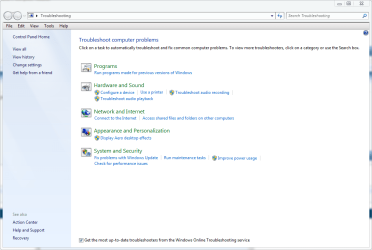
When I open the troubleshooter in windows 7 64 bit and click on "Check for performance issues" I get "An error occured while downloading the troubleshooter". The message / problem also occurs when I click and try to run "Fix problems with windows update". I do not have any problems relating to either of these troubleshooters as I am only trying to familiarize myself with the various tools as I repair my own and others computers. However Now I have a problem. The tools don't run. Can anyone help get them going. Thanks
 
Last edited:

My Computer

Computer Manufacturer/Model Number
custum
OS
7 64 bit
CPU
Sandy Bridge 2600k
Motherboard
ASUS DELUX P67
Memory
16 GB
Graphics Card(s)
5870 ati
Sound Card
on board
Monitor(s) Displays
Vizio lcd 47"
Screen Resolution
47" and 55" TV
Hard Drives
SSD OCZ VERTEX 3 240GB
750 GB western digital
PSU
750 watt
Case
generic
Cooling
Yes

My Computer

Computer type
PC/Desktop
Computer Manufacturer/Model Number
Self Built
OS
Win 10 Pro x64
CPU
Intel I5-2500K @3.3GHz
Motherboard
Asrock P67 Extreme4
Memory
16GB G.Skill Ripjaws X (4x4GB)
Graphics Card(s)
EVGA GeForce 750 Ti SC 2GB
Sound Card
ASUS Xonar DG 5.1 Channels 24-bit 96KHz PCI Interface Sound
Monitor(s) Displays
auria eq2367
Screen Resolution
1920 x 1080
Hard Drives
250GB Samsung 850 EVO SSD
1TB WD Blue
1TB Hitachi
PSU
SeaSonic X 650W 80 Plus Gold
Case
Corsair Obsidian 750D
Cooling
Corsair H60, Three 140mm case fans
Keyboard
Logitech Wireless Keyboard K520
Mouse
Logitech Wireless Mouse M310
Internet Speed
Wave Broadband ~ 100 dn 5 up
Antivirus
Windows Defender, Malwarebytes Premium
Browser
Edge, IE11, Chrome
Other Info
Laptop specs: HP g7-1365dx /
CPU: AMD A6-3420M APU with Radeon(tm) HD Graphics /
RAM: Crucial 8Gb (2x4Gb) /
SSD: Crucial M4-CT128M4SSD2 ATA Device/ FW 000F /
GFX: AMD Radeon HD 6520G /
OS: Windows 10 Pro x64
Microsoft security essentials I will start the sfc /scannow and reply my result
 

My Computer

Computer Manufacturer/Model Number
custum
OS
7 64 bit
CPU
Sandy Bridge 2600k
Motherboard
ASUS DELUX P67
Memory
16 GB
Graphics Card(s)
5870 ati
Sound Card
on board
Monitor(s) Displays
Vizio lcd 47"
Screen Resolution
47" and 55" TV
Hard Drives
SSD OCZ VERTEX 3 240GB
750 GB western digital
PSU
750 watt
Case
generic
Cooling
Yes
Microsoft security essentials I will start the sfc /scannow and reply my result

O.K. The A/V was just a guess, I thought maybe a firewall too, anyway let us know how that turns out.
 

My Computer

Computer type
PC/Desktop
Computer Manufacturer/Model Number
Self Built
OS
Win 10 Pro x64
CPU
Intel I5-2500K @3.3GHz
Motherboard
Asrock P67 Extreme4
Memory
16GB G.Skill Ripjaws X (4x4GB)
Graphics Card(s)
EVGA GeForce 750 Ti SC 2GB
Sound Card
ASUS Xonar DG 5.1 Channels 24-bit 96KHz PCI Interface Sound
Monitor(s) Displays
auria eq2367
Screen Resolution
1920 x 1080
Hard Drives
250GB Samsung 850 EVO SSD
1TB WD Blue
1TB Hitachi
PSU
SeaSonic X 650W 80 Plus Gold
Case
Corsair Obsidian 750D
Cooling
Corsair H60, Three 140mm case fans
Keyboard
Logitech Wireless Keyboard K520
Mouse
Logitech Wireless Mouse M310
Internet Speed
Wave Broadband ~ 100 dn 5 up
Antivirus
Windows Defender, Malwarebytes Premium
Browser
Edge, IE11, Chrome
Other Info
Laptop specs: HP g7-1365dx /
CPU: AMD A6-3420M APU with Radeon(tm) HD Graphics /
RAM: Crucial 8Gb (2x4Gb) /
SSD: Crucial M4-CT128M4SSD2 ATA Device/ FW 000F /
GFX: AMD Radeon HD 6520G /
OS: Windows 10 Pro x64
windows firewall . Also, I tried the remainder of the troubleshooters: Audio, internet connection, Display aero effects, etc... and the rest are functioning normal
.sfc /scannow is 78% complete and I will post results
 

My Computer

Computer Manufacturer/Model Number
custum
OS
7 64 bit
CPU
Sandy Bridge 2600k
Motherboard
ASUS DELUX P67
Memory
16 GB
Graphics Card(s)
5870 ati
Sound Card
on board
Monitor(s) Displays
Vizio lcd 47"
Screen Resolution
47" and 55" TV
Hard Drives
SSD OCZ VERTEX 3 240GB
750 GB western digital
PSU
750 watt
Case
generic
Cooling
Yes
no integrity violations in the sfc /scannow scan . "An error occured while downloading the troubleshooter". Downloading the troubleshooter is an interesting choice of words .
 

My Computer

Computer Manufacturer/Model Number
custum
OS
7 64 bit
CPU
Sandy Bridge 2600k
Motherboard
ASUS DELUX P67
Memory
16 GB
Graphics Card(s)
5870 ati
Sound Card
on board
Monitor(s) Displays
Vizio lcd 47"
Screen Resolution
47" and 55" TV
Hard Drives
SSD OCZ VERTEX 3 240GB
750 GB western digital
PSU
750 watt
Case
generic
Cooling
Yes
Turned off the firewall temporarily to test and recieved the same message.
 

My Computer

Computer Manufacturer/Model Number
custum
OS
7 64 bit
CPU
Sandy Bridge 2600k
Motherboard
ASUS DELUX P67
Memory
16 GB
Graphics Card(s)
5870 ati
Sound Card
on board
Monitor(s) Displays
Vizio lcd 47"
Screen Resolution
47" and 55" TV
Hard Drives
SSD OCZ VERTEX 3 240GB
750 GB western digital
PSU
750 watt
Case
generic
Cooling
Yes
Yeah, That is an interesting choice isn't it.
I don't know if this makes a difference but do you have the box checked at the bottom of the troubleshooting page, to download the latest troubleshooting tips.

Also is windows update working?
 

Attachments

  • troublesooter.PNG
    troublesooter.PNG
    38.6 KB · Views: 144

My Computer

Computer type
PC/Desktop
Computer Manufacturer/Model Number
Self Built
OS
Win 10 Pro x64
CPU
Intel I5-2500K @3.3GHz
Motherboard
Asrock P67 Extreme4
Memory
16GB G.Skill Ripjaws X (4x4GB)
Graphics Card(s)
EVGA GeForce 750 Ti SC 2GB
Sound Card
ASUS Xonar DG 5.1 Channels 24-bit 96KHz PCI Interface Sound
Monitor(s) Displays
auria eq2367
Screen Resolution
1920 x 1080
Hard Drives
250GB Samsung 850 EVO SSD
1TB WD Blue
1TB Hitachi
PSU
SeaSonic X 650W 80 Plus Gold
Case
Corsair Obsidian 750D
Cooling
Corsair H60, Three 140mm case fans
Keyboard
Logitech Wireless Keyboard K520
Mouse
Logitech Wireless Mouse M310
Internet Speed
Wave Broadband ~ 100 dn 5 up
Antivirus
Windows Defender, Malwarebytes Premium
Browser
Edge, IE11, Chrome
Other Info
Laptop specs: HP g7-1365dx /
CPU: AMD A6-3420M APU with Radeon(tm) HD Graphics /
RAM: Crucial 8Gb (2x4Gb) /
SSD: Crucial M4-CT128M4SSD2 ATA Device/ FW 000F /
GFX: AMD Radeon HD 6520G /
OS: Windows 10 Pro x64
view error details list is as follows:
Package ID: performance diagnostic
Path: non-local path
error code: 0x80091007
Source: Download
user: is my user name
Context: Elevated
 

My Computer

Computer Manufacturer/Model Number
custum
OS
7 64 bit
CPU
Sandy Bridge 2600k
Motherboard
ASUS DELUX P67
Memory
16 GB
Graphics Card(s)
5870 ati
Sound Card
on board
Monitor(s) Displays
Vizio lcd 47"
Screen Resolution
47" and 55" TV
Hard Drives
SSD OCZ VERTEX 3 240GB
750 GB western digital
PSU
750 watt
Case
generic
Cooling
Yes
yes
 

My Computer

Computer Manufacturer/Model Number
custum
OS
7 64 bit
CPU
Sandy Bridge 2600k
Motherboard
ASUS DELUX P67
Memory
16 GB
Graphics Card(s)
5870 ati
Sound Card
on board
Monitor(s) Displays
Vizio lcd 47"
Screen Resolution
47" and 55" TV
Hard Drives
SSD OCZ VERTEX 3 240GB
750 GB western digital
PSU
750 watt
Case
generic
Cooling
Yes
just tried windows update and it suceeded and yes I have ticked the get the most up-to-date troubleshooters etc.. I will do a search for windows online troubleshooting service
 

My Computer

Computer Manufacturer/Model Number
custum
OS
7 64 bit
CPU
Sandy Bridge 2600k
Motherboard
ASUS DELUX P67
Memory
16 GB
Graphics Card(s)
5870 ati
Sound Card
on board
Monitor(s) Displays
Vizio lcd 47"
Screen Resolution
47" and 55" TV
Hard Drives
SSD OCZ VERTEX 3 240GB
750 GB western digital
PSU
750 watt
Case
generic
Cooling
Yes

My Computer

Computer type
PC/Desktop
Computer Manufacturer/Model Number
Self Built
OS
Win 10 Pro x64
CPU
Intel I5-2500K @3.3GHz
Motherboard
Asrock P67 Extreme4
Memory
16GB G.Skill Ripjaws X (4x4GB)
Graphics Card(s)
EVGA GeForce 750 Ti SC 2GB
Sound Card
ASUS Xonar DG 5.1 Channels 24-bit 96KHz PCI Interface Sound
Monitor(s) Displays
auria eq2367
Screen Resolution
1920 x 1080
Hard Drives
250GB Samsung 850 EVO SSD
1TB WD Blue
1TB Hitachi
PSU
SeaSonic X 650W 80 Plus Gold
Case
Corsair Obsidian 750D
Cooling
Corsair H60, Three 140mm case fans
Keyboard
Logitech Wireless Keyboard K520
Mouse
Logitech Wireless Mouse M310
Internet Speed
Wave Broadband ~ 100 dn 5 up
Antivirus
Windows Defender, Malwarebytes Premium
Browser
Edge, IE11, Chrome
Other Info
Laptop specs: HP g7-1365dx /
CPU: AMD A6-3420M APU with Radeon(tm) HD Graphics /
RAM: Crucial 8Gb (2x4Gb) /
SSD: Crucial M4-CT128M4SSD2 ATA Device/ FW 000F /
GFX: AMD Radeon HD 6520G /
OS: Windows 10 Pro x64
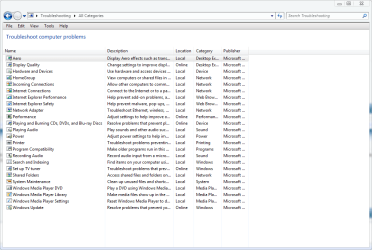
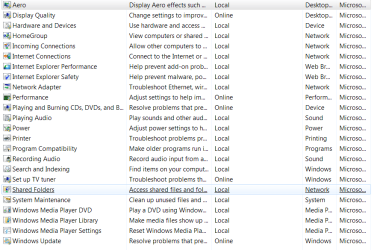
I have noted that on the left pain ( of the troubleshooter) there is a link for " view all" giving you a list view of all availiable troubleshooters and that my issues are listed as online . So far this little extra clue has not given my the sulution but should help to get me there eventualy.
 

My Computer

Computer Manufacturer/Model Number
custum
OS
7 64 bit
CPU
Sandy Bridge 2600k
Motherboard
ASUS DELUX P67
Memory
16 GB
Graphics Card(s)
5870 ati
Sound Card
on board
Monitor(s) Displays
Vizio lcd 47"
Screen Resolution
47" and 55" TV
Hard Drives
SSD OCZ VERTEX 3 240GB
750 GB western digital
PSU
750 watt
Case
generic
Cooling
Yes
opps we crossed paths
I will use you link
 

My Computer

Computer Manufacturer/Model Number
custum
OS
7 64 bit
CPU
Sandy Bridge 2600k
Motherboard
ASUS DELUX P67
Memory
16 GB
Graphics Card(s)
5870 ati
Sound Card
on board
Monitor(s) Displays
Vizio lcd 47"
Screen Resolution
47" and 55" TV
Hard Drives
SSD OCZ VERTEX 3 240GB
750 GB western digital
PSU
750 watt
Case
generic
Cooling
Yes
Here's what mine looks like,
 

Attachments

  • troubleshooter 2.PNG
    troubleshooter 2.PNG
    30.6 KB · Views: 40

My Computer

Computer type
PC/Desktop
Computer Manufacturer/Model Number
Self Built
OS
Win 10 Pro x64
CPU
Intel I5-2500K @3.3GHz
Motherboard
Asrock P67 Extreme4
Memory
16GB G.Skill Ripjaws X (4x4GB)
Graphics Card(s)
EVGA GeForce 750 Ti SC 2GB
Sound Card
ASUS Xonar DG 5.1 Channels 24-bit 96KHz PCI Interface Sound
Monitor(s) Displays
auria eq2367
Screen Resolution
1920 x 1080
Hard Drives
250GB Samsung 850 EVO SSD
1TB WD Blue
1TB Hitachi
PSU
SeaSonic X 650W 80 Plus Gold
Case
Corsair Obsidian 750D
Cooling
Corsair H60, Three 140mm case fans
Keyboard
Logitech Wireless Keyboard K520
Mouse
Logitech Wireless Mouse M310
Internet Speed
Wave Broadband ~ 100 dn 5 up
Antivirus
Windows Defender, Malwarebytes Premium
Browser
Edge, IE11, Chrome
Other Info
Laptop specs: HP g7-1365dx /
CPU: AMD A6-3420M APU with Radeon(tm) HD Graphics /
RAM: Crucial 8Gb (2x4Gb) /
SSD: Crucial M4-CT128M4SSD2 ATA Device/ FW 000F /
GFX: AMD Radeon HD 6520G /
OS: Windows 10 Pro x64
Interesting that error code Error 0x80091007 shows up more than once in a search. for example your link referrs to "Configuration Manager 2007" (wrong year for win 7 and is suspect) and refers to this path {System Center Configuration Manager / Site Database / Computer Management / Software Updates } now 7 has computer management and I have just been through it but I find no referance to "Software updates" or related. Also the path listed to computer management doesn't exist. System Center Configuration Manager does not exist.
 

My Computer

Computer Manufacturer/Model Number
custum
OS
7 64 bit
CPU
Sandy Bridge 2600k
Motherboard
ASUS DELUX P67
Memory
16 GB
Graphics Card(s)
5870 ati
Sound Card
on board
Monitor(s) Displays
Vizio lcd 47"
Screen Resolution
47" and 55" TV
Hard Drives
SSD OCZ VERTEX 3 240GB
750 GB western digital
PSU
750 watt
Case
generic
Cooling
Yes
heres mine. they are similar. performance troubleshooter is definately online and the error code is tied in, but the technet info doesn't ad up for me. I am not able to tie it to win 7 in any way. Course some times ya gatta smake me with it.
 

Attachments

  • Capture.PNG
    Capture.PNG
    27 KB · Views: 15

My Computer

Computer Manufacturer/Model Number
custum
OS
7 64 bit
CPU
Sandy Bridge 2600k
Motherboard
ASUS DELUX P67
Memory
16 GB
Graphics Card(s)
5870 ati
Sound Card
on board
Monitor(s) Displays
Vizio lcd 47"
Screen Resolution
47" and 55" TV
Hard Drives
SSD OCZ VERTEX 3 240GB
750 GB western digital
PSU
750 watt
Case
generic
Cooling
Yes
Interesting that error code Error 0x80091007 shows up more than once in a search. for example your link referrs to "Configuration Manager 2007" (wrong year for win 7 and is suspect) and refers to this path {System Center Configuration Manager / Site Database / Computer Management / Software Updates } now 7 has computer management and I have just been through it but I find no referance to "Software updates" or related. Also the path listed to computer management doesn't exist. System Center Configuration Manager does not exist.


Yeah but the guy in that link I gave you is using 7 home premium, that post is only 18 hours old. But that is also why I said IF it is a fix.

I would try the repair install. Unless you want to wait and see if someone else has got a better answer for you.
 

My Computer

Computer type
PC/Desktop
Computer Manufacturer/Model Number
Self Built
OS
Win 10 Pro x64
CPU
Intel I5-2500K @3.3GHz
Motherboard
Asrock P67 Extreme4
Memory
16GB G.Skill Ripjaws X (4x4GB)
Graphics Card(s)
EVGA GeForce 750 Ti SC 2GB
Sound Card
ASUS Xonar DG 5.1 Channels 24-bit 96KHz PCI Interface Sound
Monitor(s) Displays
auria eq2367
Screen Resolution
1920 x 1080
Hard Drives
250GB Samsung 850 EVO SSD
1TB WD Blue
1TB Hitachi
PSU
SeaSonic X 650W 80 Plus Gold
Case
Corsair Obsidian 750D
Cooling
Corsair H60, Three 140mm case fans
Keyboard
Logitech Wireless Keyboard K520
Mouse
Logitech Wireless Mouse M310
Internet Speed
Wave Broadband ~ 100 dn 5 up
Antivirus
Windows Defender, Malwarebytes Premium
Browser
Edge, IE11, Chrome
Other Info
Laptop specs: HP g7-1365dx /
CPU: AMD A6-3420M APU with Radeon(tm) HD Graphics /
RAM: Crucial 8Gb (2x4Gb) /
SSD: Crucial M4-CT128M4SSD2 ATA Device/ FW 000F /
GFX: AMD Radeon HD 6520G /
OS: Windows 10 Pro x64
thanks for your time. Sweat! I will check this tommorrow. I am sending in a support thingy to microsoft at this time. We get entertained by the strangest things, Yes? Later
 

My Computer

Computer Manufacturer/Model Number
custum
OS
7 64 bit
CPU
Sandy Bridge 2600k
Motherboard
ASUS DELUX P67
Memory
16 GB
Graphics Card(s)
5870 ati
Sound Card
on board
Monitor(s) Displays
Vizio lcd 47"
Screen Resolution
47" and 55" TV
Hard Drives
SSD OCZ VERTEX 3 240GB
750 GB western digital
PSU
750 watt
Case
generic
Cooling
Yes
thanks for your time. Sweat! I will check this tommorrow. I am sending in a support thingy to microsoft at this time. We get entertained by the strangest things, Yes? Later

Alright, Let us know how it goes.

We get entertained by the strangest things, Yes?

Yes.:)Later.
 

My Computer

Computer type
PC/Desktop
Computer Manufacturer/Model Number
Self Built
OS
Win 10 Pro x64
CPU
Intel I5-2500K @3.3GHz
Motherboard
Asrock P67 Extreme4
Memory
16GB G.Skill Ripjaws X (4x4GB)
Graphics Card(s)
EVGA GeForce 750 Ti SC 2GB
Sound Card
ASUS Xonar DG 5.1 Channels 24-bit 96KHz PCI Interface Sound
Monitor(s) Displays
auria eq2367
Screen Resolution
1920 x 1080
Hard Drives
250GB Samsung 850 EVO SSD
1TB WD Blue
1TB Hitachi
PSU
SeaSonic X 650W 80 Plus Gold
Case
Corsair Obsidian 750D
Cooling
Corsair H60, Three 140mm case fans
Keyboard
Logitech Wireless Keyboard K520
Mouse
Logitech Wireless Mouse M310
Internet Speed
Wave Broadband ~ 100 dn 5 up
Antivirus
Windows Defender, Malwarebytes Premium
Browser
Edge, IE11, Chrome
Other Info
Laptop specs: HP g7-1365dx /
CPU: AMD A6-3420M APU with Radeon(tm) HD Graphics /
RAM: Crucial 8Gb (2x4Gb) /
SSD: Crucial M4-CT128M4SSD2 ATA Device/ FW 000F /
GFX: AMD Radeon HD 6520G /
OS: Windows 10 Pro x64
Back
Top