
Solved Error message - "Internet not connected"

Debby

New member
Member
VIP
Local time
10:15 AM
Messages
164
Hi! On my Lenovo Thinkpad laptop computer (not this one) - I always get the error message, telling me that I am not connected to the internet, whenever I try to get online. So I always fix it by running the network troubleshooting program. But I wonder if there is a way how I can get it so I don't have to always go through this process every time, in order to get the internet turned on every time. I don't have this problem with my HP laptop computer. Our network provider is "Chain o' Lakes". We have a wireless internet connection, and use a router for that.

I recently restored the Lenovo Thinkpad laptop computer, so it is new and fresh. But this problem of internet connection difficulty is something that remained the same as before.
 
Last edited:

My Computer

Computer type
Laptop
Computer Manufacturer/Model Number
HP
OS
Windows 7
CPU
Intel(R) Core(TM)2 Duo CPU T5870 @ 2.00GHz
Motherboard
Intel(R) Core(TM)2 Duo CPU T5870 @ 2.00GHz
Memory
Intel(R) Core(TM)2 Duo CPU T5870 @ 2.00GHz
Graphics Card(s)
Intel(R) Core(TM)2 Duo CPU T5870 @ 2.00GHz
Sound Card
Intel(R) Core(TM)2 Duo CPU T5870 @ 2.00GHz
Monitor(s) Displays
Intel(R) Core(TM)2 Duo CPU T5870 @ 2.00GHz
Screen Resolution
Intel(R) Core(TM)2 Duo CPU T5870 @ 2.00GHz
Hard Drives
Intel(R) Core(TM)2 Duo CPU T5870 @ 2.00GHz
PSU
Intel(R) Core(TM)2 Duo CPU T5870 @ 2.00GHz
Case
Intel(R) Core(TM)2 Duo CPU T5870 @ 2.00GHz
Cooling
Intel(R) Core(TM)2 Duo CPU T5870 @ 2.00GHz
Keyboard
Intel(R) Core(TM)2 Duo CPU T5870 @ 2.00GHz
Mouse
Intel(R) Core(TM)2 Duo CPU T5870 @ 2.00GHz
Internet Speed
Intel(R) Core(TM)2 Duo CPU T5870 @ 2.00GHz
Antivirus
Windows Defender
Browser
Google Chrome
Other Info
Intel(R) Core(TM)2 Duo CPU T5870 @ 2.00GHz
If you can open a CMD prompt then type


Ipconfig /all


Do it working and not working to give us some info on the problem
 

My Computer

Computer type
PC/Desktop
OS
win 8 32 bit
Hi Debby,

Hi! On my Lenovo Thinkpad laptop computer (not this one) - I always get the error message, telling me that I am not connected to the internet, whenever I try to get online. So I always fix it by running the network troubleshooting program. But I wonder if there is a way how I can get it so I don't have to always go through this process every time, in order to get the internet turned on every time. I don't have this problem with my HP laptop computer. Our network provider is "Chain o' Lakes". We have a wireless internet connection, and use a router for that.

I recently restored the Lenovo Thinkpad laptop computer, so it is new and fresh. But this problem of internet connection difficulty is something that remained the same as before.

Please run MS_Info32_Find_Problem_Devices.bat, Option [2] from here => BATCH PROGRAMS [Standalone] and then upload the results using the tutorial at the bottom of the above link [Upload to SevenForums . . .] and someone will look at it for you.

There is further information in Post #1.

INFORMATION: I have written quite a few batch scripts in order to streamline processes, avoid possible typing errors, and save time hunting around for specific Windows and tabs etc. It is just quicker and easier for users to run the batch script and then upload the results for us to look at.

I hope this helps!
 

My Computer

Computer type
Laptop
Computer Manufacturer/Model Number
Fujitsu LIFEBOOK
OS
Win 7 HP SP1 64-bit Vista HB SP2 32-bit Linux Mint 18.3
CPU
Intel(R) Pentium(R) CPU P6200 @ 2.13GHz
Motherboard
FUJITSU FJNBB06
Memory
4.00 GB
Graphics Card(s)
Intel(R) Graphics Media Accelerator HD
Sound Card
[1] Realtek High Definition Audio [2] Intel(R) Display Audio
Screen Resolution
1366 x 768 x 32 bits (4294967296 colors) @ 59 Hz
Hard Drives
TOSHIBA MK5076GSX
Antivirus
AVG FREE
Hi Debby,

on the internet icon
Is it an orange blob or a red X

Roy
 

My Computer

Computer type
PC/Desktop
Computer Manufacturer/Model Number
medionl/Aspire 6930G/acer x55a
OS
W7 home premium 32bit/W7HP 64bit/w10 tp insider ring
CPU
E5300 dual core
Motherboard
medion MS7366
Memory
3gb
Graphics Card(s)
Nvidia Geforce 7100 Nforce 630i
Monitor(s) Displays
avixc
Internet Speed
n (isp resticted to 72)
Antivirus
mse/pands
Browser
palemoon
Other Info
Belkin Fd7050 n USB using Railink RT2870 drivers, more upto date
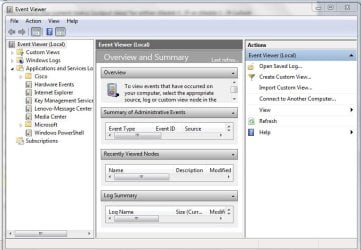
Hi! I did as you said: Please run MS_Info32_Find_Problem_Devices.bat, Option [2] from here => BATCH PROGRAMS [Standalone] and then upload the results using the tutorial at the bottom of the above link [Upload to SevenForums . . .] and someone will look at it for you. This is as far as I got on doing what you said: (1) I saw a mostly black screen when I clicked on"Batch programs." (2) Then, I did what you said for me to do next: [1] Click Start.
[2] In the search box type eventvwr.msc and press Enter.
[3] On the left-hand side under Event Viewer (Local) expand Windows Logs and click Application.
[4] On the right-hand side under the Actions pane click Filter current log.
[5] In the Event Sources: dropdown box list select Wininit and press Enter, then click OK. After I got to "application" and clicked on it, I saw no "actions pane" mentioned. So I didn't know what to do next. Can you tell me what to do about this? I'm sending you an attachment with the picture of what I saw after clicking on "Applications"-there in the Event viewer.
 

Attachments

  • event viewer.JPG
    event viewer.JPG
    85.7 KB · Views: 0

My Computer

Computer type
Laptop
Computer Manufacturer/Model Number
HP
OS
Windows 7
CPU
Intel(R) Core(TM)2 Duo CPU T5870 @ 2.00GHz
Motherboard
Intel(R) Core(TM)2 Duo CPU T5870 @ 2.00GHz
Memory
Intel(R) Core(TM)2 Duo CPU T5870 @ 2.00GHz
Graphics Card(s)
Intel(R) Core(TM)2 Duo CPU T5870 @ 2.00GHz
Sound Card
Intel(R) Core(TM)2 Duo CPU T5870 @ 2.00GHz
Monitor(s) Displays
Intel(R) Core(TM)2 Duo CPU T5870 @ 2.00GHz
Screen Resolution
Intel(R) Core(TM)2 Duo CPU T5870 @ 2.00GHz
Hard Drives
Intel(R) Core(TM)2 Duo CPU T5870 @ 2.00GHz
PSU
Intel(R) Core(TM)2 Duo CPU T5870 @ 2.00GHz
Case
Intel(R) Core(TM)2 Duo CPU T5870 @ 2.00GHz
Cooling
Intel(R) Core(TM)2 Duo CPU T5870 @ 2.00GHz
Keyboard
Intel(R) Core(TM)2 Duo CPU T5870 @ 2.00GHz
Mouse
Intel(R) Core(TM)2 Duo CPU T5870 @ 2.00GHz
Internet Speed
Intel(R) Core(TM)2 Duo CPU T5870 @ 2.00GHz
Antivirus
Windows Defender
Browser
Google Chrome
Other Info
Intel(R) Core(TM)2 Duo CPU T5870 @ 2.00GHz
Hi Debby,

I am not sure what you run but it certainly wasn't the file I asked you to run!

Anyway, to make it easier for you, here is what you need to run . . .

Click here [direct download] => MS_Info32_Find_Problem_Devices.bat.
Double-click the batch file, select Option 2, upload the results.

I hope this helps!
 

My Computer

Computer type
Laptop
Computer Manufacturer/Model Number
Fujitsu LIFEBOOK
OS
Win 7 HP SP1 64-bit Vista HB SP2 32-bit Linux Mint 18.3
CPU
Intel(R) Pentium(R) CPU P6200 @ 2.13GHz
Motherboard
FUJITSU FJNBB06
Memory
4.00 GB
Graphics Card(s)
Intel(R) Graphics Media Accelerator HD
Sound Card
[1] Realtek High Definition Audio [2] Intel(R) Display Audio
Screen Resolution
1366 x 768 x 32 bits (4294967296 colors) @ 59 Hz
Hard Drives
TOSHIBA MK5076GSX
Antivirus
AVG FREE
Hi,Paul! Ok I just now, clicked on the link you now provided, and I got that CMD black screen again. It said I must open it only as an administrator, and to do so - I need to right click on the batch file. But I couldn't see any batch file in there. I am already set up as administrator on this computer, which can be seen by opening up USers in the Control Panel.

I'll also mention that when I clicked on it in an earlier attempt to download it, my Malawarebytes program immediately blocked a program-which must have been that very one I tried to download. So then, I disabled temporarily - the Malawarebytes program, and so now it brings me to that CMD screen successfully - but as you see - I don't know what to do next. Thanks for your efforts!
 

My Computer

Computer type
Laptop
Computer Manufacturer/Model Number
HP
OS
Windows 7
CPU
Intel(R) Core(TM)2 Duo CPU T5870 @ 2.00GHz
Motherboard
Intel(R) Core(TM)2 Duo CPU T5870 @ 2.00GHz
Memory
Intel(R) Core(TM)2 Duo CPU T5870 @ 2.00GHz
Graphics Card(s)
Intel(R) Core(TM)2 Duo CPU T5870 @ 2.00GHz
Sound Card
Intel(R) Core(TM)2 Duo CPU T5870 @ 2.00GHz
Monitor(s) Displays
Intel(R) Core(TM)2 Duo CPU T5870 @ 2.00GHz
Screen Resolution
Intel(R) Core(TM)2 Duo CPU T5870 @ 2.00GHz
Hard Drives
Intel(R) Core(TM)2 Duo CPU T5870 @ 2.00GHz
PSU
Intel(R) Core(TM)2 Duo CPU T5870 @ 2.00GHz
Case
Intel(R) Core(TM)2 Duo CPU T5870 @ 2.00GHz
Cooling
Intel(R) Core(TM)2 Duo CPU T5870 @ 2.00GHz
Keyboard
Intel(R) Core(TM)2 Duo CPU T5870 @ 2.00GHz
Mouse
Intel(R) Core(TM)2 Duo CPU T5870 @ 2.00GHz
Internet Speed
Intel(R) Core(TM)2 Duo CPU T5870 @ 2.00GHz
Antivirus
Windows Defender
Browser
Google Chrome
Other Info
Intel(R) Core(TM)2 Duo CPU T5870 @ 2.00GHz
Hi Debby,

Ok I just now, clicked on the link you now provided, and I got that CMD black screen again. It said I must open it only as an administrator, and to do so - I need to right click on the batch file. But I couldn't see any batch file in there. I am already set up as administrator on this computer, which can be seen by opening up USers in the Control Panel.

[1] Close the batch file.
[2] Right-click the batch file and select Run as administrator.
[3] Select Option 2.
[4] Upload the Prob_Devices.txt file that gets created on the desktop.

If there are NO problem devices it will tell you so!

It is SAFE, trust me, I wrote it!

That's it!
 

My Computer

Computer type
Laptop
Computer Manufacturer/Model Number
Fujitsu LIFEBOOK
OS
Win 7 HP SP1 64-bit Vista HB SP2 32-bit Linux Mint 18.3
CPU
Intel(R) Pentium(R) CPU P6200 @ 2.13GHz
Motherboard
FUJITSU FJNBB06
Memory
4.00 GB
Graphics Card(s)
Intel(R) Graphics Media Accelerator HD
Sound Card
[1] Realtek High Definition Audio [2] Intel(R) Display Audio
Screen Resolution
1366 x 768 x 32 bits (4294967296 colors) @ 59 Hz
Hard Drives
TOSHIBA MK5076GSX
Antivirus
AVG FREE
Hi! I tried again,but still the same thing happened. So maybe this model of computer is somehow different than others you've worked with on that problem. I then tried looking online (with my other computer)for advice about a phrase I saw in the error message I saw: Err_SSL_PROTOCOL_ERROR. I saw a pageful of suggestions for fixing the problem. But whenever I opened up any of them - I lost my connection, and couldn't get back online unless I first closed all pages I had open with that phrase. On my other computer, sites said it was connected with a problem with Google chrome. But I have no trouble with Google chrome on my other computer. Also, I remember in times past - that whenever I had trouble with Google chrome not opening up - no other ISPs were able to get me online either. I looked in Network connections in the control panel - and clicked to see what I would see when I click on "Change adapter settings." To the left, it says "network cable unplugged." That's under the LAN button. And it shows a red x there. But the one for our router Netgear - is seen on the right, and has no error messages.
The same can be seen on my other computer,but it has no difficulty getting online - very rarely if ever.. If you can't think of how to fix this some other way - I guess I'll just have to live with the problem. I can count my blessings, as I can always fix the problem each time by running the network troubleshooter. Thanks for your efforts and I don't blame you if you give up on this one. In that case, just close the question then.
 

My Computer

Computer type
Laptop
Computer Manufacturer/Model Number
HP
OS
Windows 7
CPU
Intel(R) Core(TM)2 Duo CPU T5870 @ 2.00GHz
Motherboard
Intel(R) Core(TM)2 Duo CPU T5870 @ 2.00GHz
Memory
Intel(R) Core(TM)2 Duo CPU T5870 @ 2.00GHz
Graphics Card(s)
Intel(R) Core(TM)2 Duo CPU T5870 @ 2.00GHz
Sound Card
Intel(R) Core(TM)2 Duo CPU T5870 @ 2.00GHz
Monitor(s) Displays
Intel(R) Core(TM)2 Duo CPU T5870 @ 2.00GHz
Screen Resolution
Intel(R) Core(TM)2 Duo CPU T5870 @ 2.00GHz
Hard Drives
Intel(R) Core(TM)2 Duo CPU T5870 @ 2.00GHz
PSU
Intel(R) Core(TM)2 Duo CPU T5870 @ 2.00GHz
Case
Intel(R) Core(TM)2 Duo CPU T5870 @ 2.00GHz
Cooling
Intel(R) Core(TM)2 Duo CPU T5870 @ 2.00GHz
Keyboard
Intel(R) Core(TM)2 Duo CPU T5870 @ 2.00GHz
Mouse
Intel(R) Core(TM)2 Duo CPU T5870 @ 2.00GHz
Internet Speed
Intel(R) Core(TM)2 Duo CPU T5870 @ 2.00GHz
Antivirus
Windows Defender
Browser
Google Chrome
Other Info
Intel(R) Core(TM)2 Duo CPU T5870 @ 2.00GHz
Hi! Now I went to my other computer again and thought I should tell you I was able to put that Err_SSL_PROTOCOL_ERROR phrase in Google search and it caused no problem to this computer. Also, I saw this other tab I had open in which I typed the preceding error message I saw on that computer. It had this error message: "robvanderoude.com sent an invalid response." Ok that's all for now.
 

My Computer

Computer type
Laptop
Computer Manufacturer/Model Number
HP
OS
Windows 7
CPU
Intel(R) Core(TM)2 Duo CPU T5870 @ 2.00GHz
Motherboard
Intel(R) Core(TM)2 Duo CPU T5870 @ 2.00GHz
Memory
Intel(R) Core(TM)2 Duo CPU T5870 @ 2.00GHz
Graphics Card(s)
Intel(R) Core(TM)2 Duo CPU T5870 @ 2.00GHz
Sound Card
Intel(R) Core(TM)2 Duo CPU T5870 @ 2.00GHz
Monitor(s) Displays
Intel(R) Core(TM)2 Duo CPU T5870 @ 2.00GHz
Screen Resolution
Intel(R) Core(TM)2 Duo CPU T5870 @ 2.00GHz
Hard Drives
Intel(R) Core(TM)2 Duo CPU T5870 @ 2.00GHz
PSU
Intel(R) Core(TM)2 Duo CPU T5870 @ 2.00GHz
Case
Intel(R) Core(TM)2 Duo CPU T5870 @ 2.00GHz
Cooling
Intel(R) Core(TM)2 Duo CPU T5870 @ 2.00GHz
Keyboard
Intel(R) Core(TM)2 Duo CPU T5870 @ 2.00GHz
Mouse
Intel(R) Core(TM)2 Duo CPU T5870 @ 2.00GHz
Internet Speed
Intel(R) Core(TM)2 Duo CPU T5870 @ 2.00GHz
Antivirus
Windows Defender
Browser
Google Chrome
Other Info
Intel(R) Core(TM)2 Duo CPU T5870 @ 2.00GHz
Hi Debby,

I just clicked on the link that I posted in Post #6, downloaded it, run it, and got the required results. I have just done this on 3 computers with the same result. You are the only one that has had problems with this!

If this is the case, then I think you have got more wrong with your computer than you know at the moment!
 

My Computer

Computer type
Laptop
Computer Manufacturer/Model Number
Fujitsu LIFEBOOK
OS
Win 7 HP SP1 64-bit Vista HB SP2 32-bit Linux Mint 18.3
CPU
Intel(R) Pentium(R) CPU P6200 @ 2.13GHz
Motherboard
FUJITSU FJNBB06
Memory
4.00 GB
Graphics Card(s)
Intel(R) Graphics Media Accelerator HD
Sound Card
[1] Realtek High Definition Audio [2] Intel(R) Display Audio
Screen Resolution
1366 x 768 x 32 bits (4294967296 colors) @ 59 Hz
Hard Drives
TOSHIBA MK5076GSX
Antivirus
AVG FREE
Hi Debby,

Now I went to my other computer again and thought I should tell you I was able to put that Err_SSL_PROTOCOL_ERROR phrase in Google search and it caused no problem to this computer. Also, I saw this other tab I had open in which I typed the preceding error message I saw on that computer. It had this error message: "robvanderoude.com sent an invalid response." Ok that's all for now.

[1] I have no idea what you mean by the above!
[2] What has Err_SSL_PROTOCOL_ERROR got to do with my batch script?
[3] Do you also mean => Rob van der Woude's Scripting Pages. Why are you looking at batch script pages?
[4] Have you actually run my batch script or not?
 

My Computer

Computer type
Laptop
Computer Manufacturer/Model Number
Fujitsu LIFEBOOK
OS
Win 7 HP SP1 64-bit Vista HB SP2 32-bit Linux Mint 18.3
CPU
Intel(R) Pentium(R) CPU P6200 @ 2.13GHz
Motherboard
FUJITSU FJNBB06
Memory
4.00 GB
Graphics Card(s)
Intel(R) Graphics Media Accelerator HD
Sound Card
[1] Realtek High Definition Audio [2] Intel(R) Display Audio
Screen Resolution
1366 x 768 x 32 bits (4294967296 colors) @ 59 Hz
Hard Drives
TOSHIBA MK5076GSX
Antivirus
AVG FREE
Hi Debby,

You have been asked several times to update your system specifications by myself and other members, but you have still not done this. It is for YOUR benefit that you do this!

Please update your system specifications in your UserCP => Edit System Spec setup. It will help us to help you!

This SevenForums tutorial [Published by Brink and written by CyberZeus] uses an automated tool which makes this task very easy and quick to do. Click here => System Info - See Your System Specs.

Thanks.
 

My Computer

Computer type
Laptop
Computer Manufacturer/Model Number
Fujitsu LIFEBOOK
OS
Win 7 HP SP1 64-bit Vista HB SP2 32-bit Linux Mint 18.3
CPU
Intel(R) Pentium(R) CPU P6200 @ 2.13GHz
Motherboard
FUJITSU FJNBB06
Memory
4.00 GB
Graphics Card(s)
Intel(R) Graphics Media Accelerator HD
Sound Card
[1] Realtek High Definition Audio [2] Intel(R) Display Audio
Screen Resolution
1366 x 768 x 32 bits (4294967296 colors) @ 59 Hz
Hard Drives
TOSHIBA MK5076GSX
Antivirus
AVG FREE
Hi

If you cant run it sounds like something else is getting in the way

That SSL error only seems to be associated with Google
So lets go another route USE another browser, IE11, DELETE Google

now run Malwarebytes, and ESET on-line select all checks (dissable your current AV


Roy
 

My Computer

Computer type
PC/Desktop
Computer Manufacturer/Model Number
medionl/Aspire 6930G/acer x55a
OS
W7 home premium 32bit/W7HP 64bit/w10 tp insider ring
CPU
E5300 dual core
Motherboard
medion MS7366
Memory
3gb
Graphics Card(s)
Nvidia Geforce 7100 Nforce 630i
Monitor(s) Displays
avixc
Internet Speed
n (isp resticted to 72)
Antivirus
mse/pands
Browser
palemoon
Other Info
Belkin Fd7050 n USB using Railink RT2870 drivers, more upto date
If you cant run it sounds like something else is getting in the way.

That SSL error only seems to be associated with Google.

So lets go another route USE another browser, IE11, DELETE Google.

Now run Malwarebytes, and ESET on-line select all checks (dissable your current AV).
Good idea torchwood. :thumbsup:
 

My Computer

Computer type
Laptop
Computer Manufacturer/Model Number
Fujitsu LIFEBOOK
OS
Win 7 HP SP1 64-bit Vista HB SP2 32-bit Linux Mint 18.3
CPU
Intel(R) Pentium(R) CPU P6200 @ 2.13GHz
Motherboard
FUJITSU FJNBB06
Memory
4.00 GB
Graphics Card(s)
Intel(R) Graphics Media Accelerator HD
Sound Card
[1] Realtek High Definition Audio [2] Intel(R) Display Audio
Screen Resolution
1366 x 768 x 32 bits (4294967296 colors) @ 59 Hz
Hard Drives
TOSHIBA MK5076GSX
Antivirus
AVG FREE
Hi, Paul! I did what you said. I uninstalled Google chrome, and installed Mozilla instead. Then I ran Malawarebytes again. The problem is fixed now - I'm able to get online now with no difficulty! What relief! Thanks again for your help!
 

My Computer

Computer type
Laptop
Computer Manufacturer/Model Number
HP
OS
Windows 7
CPU
Intel(R) Core(TM)2 Duo CPU T5870 @ 2.00GHz
Motherboard
Intel(R) Core(TM)2 Duo CPU T5870 @ 2.00GHz
Memory
Intel(R) Core(TM)2 Duo CPU T5870 @ 2.00GHz
Graphics Card(s)
Intel(R) Core(TM)2 Duo CPU T5870 @ 2.00GHz
Sound Card
Intel(R) Core(TM)2 Duo CPU T5870 @ 2.00GHz
Monitor(s) Displays
Intel(R) Core(TM)2 Duo CPU T5870 @ 2.00GHz
Screen Resolution
Intel(R) Core(TM)2 Duo CPU T5870 @ 2.00GHz
Hard Drives
Intel(R) Core(TM)2 Duo CPU T5870 @ 2.00GHz
PSU
Intel(R) Core(TM)2 Duo CPU T5870 @ 2.00GHz
Case
Intel(R) Core(TM)2 Duo CPU T5870 @ 2.00GHz
Cooling
Intel(R) Core(TM)2 Duo CPU T5870 @ 2.00GHz
Keyboard
Intel(R) Core(TM)2 Duo CPU T5870 @ 2.00GHz
Mouse
Intel(R) Core(TM)2 Duo CPU T5870 @ 2.00GHz
Internet Speed
Intel(R) Core(TM)2 Duo CPU T5870 @ 2.00GHz
Antivirus
Windows Defender
Browser
Google Chrome
Other Info
Intel(R) Core(TM)2 Duo CPU T5870 @ 2.00GHz
I uninstalled Google chrome, and installed Mozilla instead. Then I ran Malawarebytes again. The problem is fixed now - I'm able to get online now with no difficulty! What relief! Thanks again for your help!
:thumbsup:
Please mark this thread as Solved!
 

My Computer

Computer type
Laptop
Computer Manufacturer/Model Number
Fujitsu LIFEBOOK
OS
Win 7 HP SP1 64-bit Vista HB SP2 32-bit Linux Mint 18.3
CPU
Intel(R) Pentium(R) CPU P6200 @ 2.13GHz
Motherboard
FUJITSU FJNBB06
Memory
4.00 GB
Graphics Card(s)
Intel(R) Graphics Media Accelerator HD
Sound Card
[1] Realtek High Definition Audio [2] Intel(R) Display Audio
Screen Resolution
1366 x 768 x 32 bits (4294967296 colors) @ 59 Hz
Hard Drives
TOSHIBA MK5076GSX
Antivirus
AVG FREE
Good thing i changed my name to Paul:zip:

Roy
 

My Computer

Computer type
PC/Desktop
Computer Manufacturer/Model Number
medionl/Aspire 6930G/acer x55a
OS
W7 home premium 32bit/W7HP 64bit/w10 tp insider ring
CPU
E5300 dual core
Motherboard
medion MS7366
Memory
3gb
Graphics Card(s)
Nvidia Geforce 7100 Nforce 630i
Monitor(s) Displays
avixc
Internet Speed
n (isp resticted to 72)
Antivirus
mse/pands
Browser
palemoon
Other Info
Belkin Fd7050 n USB using Railink RT2870 drivers, more upto date
Hi Debby,

Hi, Paul! I did what you said.

It was actually torchwood who recommended that course of action, not me!

Sorry torchwood, I wasn't taking the credit as that is something I don't do, but now you have pointed it out I can see what you mean!
 

My Computer

Computer type
Laptop
Computer Manufacturer/Model Number
Fujitsu LIFEBOOK
OS
Win 7 HP SP1 64-bit Vista HB SP2 32-bit Linux Mint 18.3
CPU
Intel(R) Pentium(R) CPU P6200 @ 2.13GHz
Motherboard
FUJITSU FJNBB06
Memory
4.00 GB
Graphics Card(s)
Intel(R) Graphics Media Accelerator HD
Sound Card
[1] Realtek High Definition Audio [2] Intel(R) Display Audio
Screen Resolution
1366 x 768 x 32 bits (4294967296 colors) @ 59 Hz
Hard Drives
TOSHIBA MK5076GSX
Antivirus
AVG FREE
Back
Top