
"Ethernet" Connection Drop

Na didnt seem to work either
 

My Computer

Computer Manufacturer/Model Number
Gigabyte Asus
OS
,Windows 7-64.7600.16385 Ultimate
CPU
AMD Athlon(tm) 64 X2 Dual Core Processor 4800+, 2500
Motherboard
GA-MA78G-DS3H
Memory
Geil 4 Gig DDR2 800 PC2-6400 (400 MHz)
Graphics Card(s)
ATI Onboard 3200
Sound Card
ATI High Definition Audio Device
Monitor(s) Displays
Acer 22"
Screen Resolution
1680x1050
Hard Drives
1 x120 Gig
1 X 80 Gig
PSU
550 watt
Case
Cooler Master
Keyboard
Wireless Microsoft
Mouse
Wireless Microsoft
Internet Speed
3 Meg down .5 up
Other Info
BIOS Version/Date Award Software International, Inc. F8, 12/08/2009
6 Steps to a Faster Broadband Connection

By Becky Waring, PC World

Six Steps to a Faster Broadband Connection - PC World
some good info plus other.
This might help, never hurts. I have not problems but my system is only 2yrs old... I also have it updated to the latest modem firmware.

My laptop which uses Marvel drivers has not problems and i have moved it to several sites. (different ISP still no problems.)[/QUOTE


Snuffy
I have installed Tweak 7 But nothing works on it unless you pay $50us
Its a lot to pay for something that may not work

I installed the Beta version but it doesnt work either

My Ipv6 doesnt work
& also DHCP is enabled everywhere but doesnt seem to work either

This maybe the root of all my problems
do You have any idea how to fix this
Cheers
Gaz:cry:
 

My Computer

Computer Manufacturer/Model Number
Gigabyte Asus
OS
,Windows 7-64.7600.16385 Ultimate
CPU
AMD Athlon(tm) 64 X2 Dual Core Processor 4800+, 2500
Motherboard
GA-MA78G-DS3H
Memory
Geil 4 Gig DDR2 800 PC2-6400 (400 MHz)
Graphics Card(s)
ATI Onboard 3200
Sound Card
ATI High Definition Audio Device
Monitor(s) Displays
Acer 22"
Screen Resolution
1680x1050
Hard Drives
1 x120 Gig
1 X 80 Gig
PSU
550 watt
Case
Cooler Master
Keyboard
Wireless Microsoft
Mouse
Wireless Microsoft
Internet Speed
3 Meg down .5 up
Other Info
BIOS Version/Date Award Software International, Inc. F8, 12/08/2009
OK, I do understand about TweakUI. what parts of Tweakui do you want to try? many times is simply is a reg tweak. and all you need to do is edit the registry to change that...
yes, many time it is "dangerous" to do if your not sure... but I also know that many "tweaks are available from trusted sites." Ask and you will rec how to from several sources..

I have several and I'm sure many other techy members also have.
As you know its easy to save the how to: then you always have a reference file.. mank sure you name them.
sample here is:
change UAC:
UAC, otherwise known as UAP (User Account Control/User Account Protection) is one of those features that just seem to get in the way of doing your work. This feature is designed with the average user in mind who needs this kind of protection to keep them out of trouble. If you are reading this, then chances are you know how to manage your own system. Here is how to disable UAP:
1. Press the Windows Key + R (winkey + R).
2. At the run prompt, type "msconfig" without the quotes.
3. Go to the Tools tab, scroll down and select "Disable UAP" and click the run button.
4. You should see a command prompt open and it will say "Command completed successfully".
5. Reboot and enjoy the freedom to control your system as you wish.

It’s the obnoxious, nagging popup window that will be your life for the next 3-5 years unless you switch back to XP in frustration, or to a better OS like… OS X, Suse, Ubuntu, or even XP.
Note: Disabling UAC will lead to a less secure system, so be warned.
Windows need your permission to annoy the crap out of you:
There’s a quick way you can enable or disable this annoying window from the command line:
Disable UAC
C:\Windows\System32\cmd.exe /k %windir%\System32\reg.exe ADD HKLM\SOFTWARE\Microsoft\Windows\CurrentVersion\Policies\System /v EnableLUA /t REG_DWORD /d 0 /f
Enable UAC
C:\Windows\System32\cmd.exe /k %windir%\System32\reg.exe ADD HKLM\SOFTWARE\Microsoft\Windows\CurrentVersion\Policies\System /v EnableLUA /t REG_DWORD /d 1 /f
After you enable or disable UAC, you will have to reboot your computer for the changes to take effect.
many people simply send you a (program) and say run this... well phooy. you can do it, it also had revert back to origina.
 
Tweak 2

Without an ability to control the Tcp Window Size all these utilities that swear they will increase your raw speed
and bandwith in Vista are nothing but smoke and mirrors. It can't be done because the Tcp Window Size in Vista is
based purely on AutoTuning being either on or off, and there is no 'magic' switch or registry entry to use. If you
disable AutoTuning your Tcp Window Size will be at the default, with AutoTuning enabled Vista will tune your
connection far more efficiently then any tweaker or registry entry adjustment could ever hope to do. If you want
to play around with TCP and AutoTuning you can do so from an admin command prompt using the below commands:
(these are not the only TCP commands, there are still a few that can be set in the registry but they do nothing
for raw speed and bandwidth as they only set vaious parameters of items in the TCP packet its self)
----------------------------------------------------
I see almost instant difference with this small legal tweak...
netsh int tcp set global autotuninglevel=normal add this -> start-> cmd -> run as admin (wait for popup) -> copy paste netsh int tcp set global autotuninglevel=disable {enter} wait for popup almost instant - close and start browsing. almost instantly you will see iy canopen many many pages of different sites, and it fast.... default setting is 10 and you will see a slow down when you have 6 open, and many crashes at 8 and total freezes at 9 ro 10). exit out.
netsh int tcp set global autotuninglevel=disable
netsh int tcp set global autotuninglevel=enable
netsh int tcp set global autotuninglevel=default

If you do not like this tweak ( revert back to default setting). all legal and info how to available from MS. by asking.
IMHO another 100% screw up on MS part. ( try it you might like it )
 
I just thought I may try to get these going to see if it helps

My Ipv6 doesnt work
& also DHCP is enabled everywhere but doesnt seem to work either
 

My Computer

Computer Manufacturer/Model Number
Gigabyte Asus
OS
,Windows 7-64.7600.16385 Ultimate
CPU
AMD Athlon(tm) 64 X2 Dual Core Processor 4800+, 2500
Motherboard
GA-MA78G-DS3H
Memory
Geil 4 Gig DDR2 800 PC2-6400 (400 MHz)
Graphics Card(s)
ATI Onboard 3200
Sound Card
ATI High Definition Audio Device
Monitor(s) Displays
Acer 22"
Screen Resolution
1680x1050
Hard Drives
1 x120 Gig
1 X 80 Gig
PSU
550 watt
Case
Cooler Master
Keyboard
Wireless Microsoft
Mouse
Wireless Microsoft
Internet Speed
3 Meg down .5 up
Other Info
BIOS Version/Date Award Software International, Inc. F8, 12/08/2009
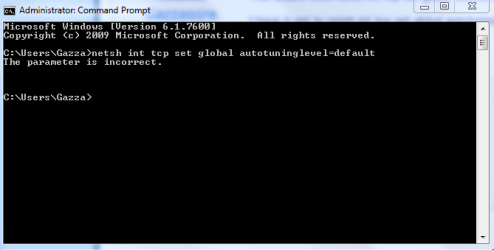
This doesnt work netsh int tcp set global autotuninglevel=default

I have it set to netsh int tcp set global autotuninglevel=disable

it is fast very fast
 

My Computer

Computer Manufacturer/Model Number
Gigabyte Asus
OS
,Windows 7-64.7600.16385 Ultimate
CPU
AMD Athlon(tm) 64 X2 Dual Core Processor 4800+, 2500
Motherboard
GA-MA78G-DS3H
Memory
Geil 4 Gig DDR2 800 PC2-6400 (400 MHz)
Graphics Card(s)
ATI Onboard 3200
Sound Card
ATI High Definition Audio Device
Monitor(s) Displays
Acer 22"
Screen Resolution
1680x1050
Hard Drives
1 x120 Gig
1 X 80 Gig
PSU
550 watt
Case
Cooler Master
Keyboard
Wireless Microsoft
Mouse
Wireless Microsoft
Internet Speed
3 Meg down .5 up
Other Info
BIOS Version/Date Award Software International, Inc. F8, 12/08/2009
This doesnt work netsh int tcp set global autotuninglevel=default

I have it set to netsh int tcp set global autotuninglevel=disable

it is fast very fast
disable is Default so apparently some program you tested or used did change the TCP settings, since it seems you DID SEE A DIFFERENCE.

autotuninglevel - One of the following values:
disabled: Fix the receive window at its default
value.
normal: Allow the receive window to grow to
accomodate almost all scenarios.

to see all the cmd what it does:
C:\Users\Snuffy>netsh int tcp set global /?
Usage: set global [[rss=]disabled|enabled|default]
[[chimney=]disabled|enabled|default]
[[autotuninglevel=]
disabled|highlyrestricted|restricted|normal|experimental]
[[congestionprovider=]none|ctcp|default]
[[netdma=]disabled|enabled|default]
[[dca=]disabled|enabled|default]
[[ecncapability=]disabled|enabled|default]
[[timestamps=]disabled|enabled|default]
Parameters:
Tag Value
rss - One of the following values:
disabled: Disable receive-side scaling.
enabled : Enable receive-side scaling.
default : Restore receive-side scaling state to
the system default.
chimney - One of the following values:
disabled: Disable Chimney offload.
enabled : Enable Chimney offload.
automatic: Enable Chimney offload with
performance heuristics.
default : Restore Chimney offload state to the
system default (automatic).
autotuninglevel - One of the following values:
disabled: Fix the receive window at its default
value.
highlyrestricted: Allow the receive window to
grow beyond its default value, but do so
very conservatively.
restricted: Allow the receive window to grow
beyond its default value, but limit such
growth in some scenarios.
normal: Allow the receive window to grow to
accomodate almost all scenarios.
experimental: Allow the receive window to grow
to accomodate extreme scenarios.
congestionprovider - One of the following values:
none: Use the built-in standard congestion
control algorithm.
ctcp: Use the add-on Compound TCP congestion
control algorithm.
default: Restore the selected provider to the
system default.
netdma - One of the following values:
disabled: Disable use of NetDMA by TCP/IP.
enabled : Enable use of NetDMA by TCP/IP.
default : Restore state to the system
default (enabled).
dca - One of the following values:
disabled: Disable Direct Cache Access when using
NetDMA.
enabled : Enable Direct Cache Access when using
NetDMA.
default : Restore state to the system
default (disabled).
ecncapability - One of the following values:
disabled: Disable ECN Capability.
enabled : Enable ECN Capability.
default : Restore state to the system default.
timestamps - One of the following values:
disabled: Disable RFC 1323 timestamps.
enabled: Enable RFC 1323 timestamps.
default: Restore state to the system default.
Remarks: Sets TCP parameters that affect all connections.
Example:
set global enabled enabled normal
set global rss=enabled chimney=enabled autotuninglevel=normal

C:\Users\Snuffy>

Seems this allows you to do exactly what the TCP Tune by DocTCP. only you control not what TweakUI or DocTCP thinks.
 
Something is wrong
 

Attachments

  • default.PNG
    default.PNG
    9.6 KB · Views: 105

My Computer

Computer Manufacturer/Model Number
Gigabyte Asus
OS
,Windows 7-64.7600.16385 Ultimate
CPU
AMD Athlon(tm) 64 X2 Dual Core Processor 4800+, 2500
Motherboard
GA-MA78G-DS3H
Memory
Geil 4 Gig DDR2 800 PC2-6400 (400 MHz)
Graphics Card(s)
ATI Onboard 3200
Sound Card
ATI High Definition Audio Device
Monitor(s) Displays
Acer 22"
Screen Resolution
1680x1050
Hard Drives
1 x120 Gig
1 X 80 Gig
PSU
550 watt
Case
Cooler Master
Keyboard
Wireless Microsoft
Mouse
Wireless Microsoft
Internet Speed
3 Meg down .5 up
Other Info
BIOS Version/Date Award Software International, Inc. F8, 12/08/2009
netsh int tcp set global autotuninglevel=disabled
(my bad) sorry did further checking an Windows 7 changed some commands:
it is auto set to disabled. so normal turns it on. you have 5 choices now.
see below.
netsh int tcp set global autotuninglevel=

replaced with [autotuninglevel=]
disabled
highlyrestricted
restricted
normal
experimental
---------------------------------
Microsoft said:
autotuninglevel - One of the following values:
disabled: Fix the receive window at its default
value. (Note default is Disabled or OFF.)
highlyrestricted: Allow the receive window to
grow beyond its default value, but do so
very conservatively.
restricted: Allow the receive window to grow
beyond its default value, but limit such
growth in some scenarios.
normal: Allow the receive window to grow to
accomodate almost all scenarios.
experimental: Allow the receive window to grow
to accomodate extreme scenarios.
WARNING: This can dramatically degrade
performance in common scenarios and should
only be used for research purposes.
 
Ok what about my DHCP its enabled but not showing it is

maybe I need to change some settings in my Router ?
 

My Computer

Computer Manufacturer/Model Number
Gigabyte Asus
OS
,Windows 7-64.7600.16385 Ultimate
CPU
AMD Athlon(tm) 64 X2 Dual Core Processor 4800+, 2500
Motherboard
GA-MA78G-DS3H
Memory
Geil 4 Gig DDR2 800 PC2-6400 (400 MHz)
Graphics Card(s)
ATI Onboard 3200
Sound Card
ATI High Definition Audio Device
Monitor(s) Displays
Acer 22"
Screen Resolution
1680x1050
Hard Drives
1 x120 Gig
1 X 80 Gig
PSU
550 watt
Case
Cooler Master
Keyboard
Wireless Microsoft
Mouse
Wireless Microsoft
Internet Speed
3 Meg down .5 up
Other Info
BIOS Version/Date Award Software International, Inc. F8, 12/08/2009
Now my set top box for satellite TV has lost connection
& is coming up with weird ip address when it tries to reconnect
 

My Computer

Computer Manufacturer/Model Number
Gigabyte Asus
OS
,Windows 7-64.7600.16385 Ultimate
CPU
AMD Athlon(tm) 64 X2 Dual Core Processor 4800+, 2500
Motherboard
GA-MA78G-DS3H
Memory
Geil 4 Gig DDR2 800 PC2-6400 (400 MHz)
Graphics Card(s)
ATI Onboard 3200
Sound Card
ATI High Definition Audio Device
Monitor(s) Displays
Acer 22"
Screen Resolution
1680x1050
Hard Drives
1 x120 Gig
1 X 80 Gig
PSU
550 watt
Case
Cooler Master
Keyboard
Wireless Microsoft
Mouse
Wireless Microsoft
Internet Speed
3 Meg down .5 up
Other Info
BIOS Version/Date Award Software International, Inc. F8, 12/08/2009
Restarted Router fixed it
 

My Computer

Computer Manufacturer/Model Number
Gigabyte Asus
OS
,Windows 7-64.7600.16385 Ultimate
CPU
AMD Athlon(tm) 64 X2 Dual Core Processor 4800+, 2500
Motherboard
GA-MA78G-DS3H
Memory
Geil 4 Gig DDR2 800 PC2-6400 (400 MHz)
Graphics Card(s)
ATI Onboard 3200
Sound Card
ATI High Definition Audio Device
Monitor(s) Displays
Acer 22"
Screen Resolution
1680x1050
Hard Drives
1 x120 Gig
1 X 80 Gig
PSU
550 watt
Case
Cooler Master
Keyboard
Wireless Microsoft
Mouse
Wireless Microsoft
Internet Speed
3 Meg down .5 up
Other Info
BIOS Version/Date Award Software International, Inc. F8, 12/08/2009
Today I got my first connection drop with WinXP driver, and I wasn't able to revive it by disabling-renabling the card. I had to reboot. I will look for the newest driver, but I don't think it is the good driver for my card (8139).

Edit:
No driver is available for my 10/100 mbit card. Currently trying the latest driver (2008-10-21) and the disabled network mapping trick.
 
Last edited:

My Computer

OS
Win7 64 bits FR
CPU
2500K @ 4.5 GHz
Motherboard
Asrock Z68 Gen3 Extreme3
Memory
4x4GB 1600MHz GSkill CL9.
Graphics Card(s)
HD6850 Powercolor stock
Sound Card
Integrated
Monitor(s) Displays
Samsung 2343 + Dell 20in 4/3
Screen Resolution
2048x1152, 1600x1200
Hard Drives
OCZ Vertex LE SSD, 50GB
OCZ Solid 3 120GB
OCZ Vertex 2 240GB
Western Digital Scorpio 320GB 5400 rpm
PSU
KingWin Lazer Platinum (90+) 550Watts
Case
HAF912
Cooling
CPU: OCZ Vendetta 2
Keyboard
MX5500 revolution bluetooth
Mouse
MX5500 revolution bluetooth
Internet Speed
Cable 7 Mbps
Its still happening the router is getting kicked off line every now and then
it may do it a few times in a row then it may be right for a while
 

My Computer

Computer Manufacturer/Model Number
Gigabyte Asus
OS
,Windows 7-64.7600.16385 Ultimate
CPU
AMD Athlon(tm) 64 X2 Dual Core Processor 4800+, 2500
Motherboard
GA-MA78G-DS3H
Memory
Geil 4 Gig DDR2 800 PC2-6400 (400 MHz)
Graphics Card(s)
ATI Onboard 3200
Sound Card
ATI High Definition Audio Device
Monitor(s) Displays
Acer 22"
Screen Resolution
1680x1050
Hard Drives
1 x120 Gig
1 X 80 Gig
PSU
550 watt
Case
Cooler Master
Keyboard
Wireless Microsoft
Mouse
Wireless Microsoft
Internet Speed
3 Meg down .5 up
Other Info
BIOS Version/Date Award Software International, Inc. F8, 12/08/2009
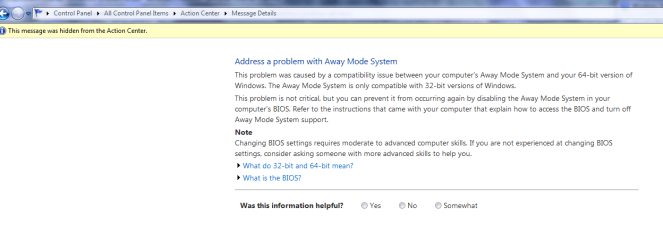
I found this tonight I thought was very interesting
 

Attachments

  • away.PNG
    away.PNG
    27.1 KB · Views: 231

My Computer

Computer Manufacturer/Model Number
Gigabyte Asus
OS
,Windows 7-64.7600.16385 Ultimate
CPU
AMD Athlon(tm) 64 X2 Dual Core Processor 4800+, 2500
Motherboard
GA-MA78G-DS3H
Memory
Geil 4 Gig DDR2 800 PC2-6400 (400 MHz)
Graphics Card(s)
ATI Onboard 3200
Sound Card
ATI High Definition Audio Device
Monitor(s) Displays
Acer 22"
Screen Resolution
1680x1050
Hard Drives
1 x120 Gig
1 X 80 Gig
PSU
550 watt
Case
Cooler Master
Keyboard
Wireless Microsoft
Mouse
Wireless Microsoft
Internet Speed
3 Meg down .5 up
Other Info
BIOS Version/Date Award Software International, Inc. F8, 12/08/2009
But I wonder if the computer was on away mode since most of the time we got kicked out from the next is when we used it most and this net as well. But, even so I can do nothing with my bios (thanks Asus >.<)
 

My Computer

Computer Manufacturer/Model Number
Laptop Asus X51a
OS
windows 7
CPU
T9400
Motherboard
M51A
Memory
4gb
Graphics Card(s)
intel GMAX4500HD
Still does it some guru must have the answers
 

My Computer

Computer Manufacturer/Model Number
Gigabyte Asus
OS
,Windows 7-64.7600.16385 Ultimate
CPU
AMD Athlon(tm) 64 X2 Dual Core Processor 4800+, 2500
Motherboard
GA-MA78G-DS3H
Memory
Geil 4 Gig DDR2 800 PC2-6400 (400 MHz)
Graphics Card(s)
ATI Onboard 3200
Sound Card
ATI High Definition Audio Device
Monitor(s) Displays
Acer 22"
Screen Resolution
1680x1050
Hard Drives
1 x120 Gig
1 X 80 Gig
PSU
550 watt
Case
Cooler Master
Keyboard
Wireless Microsoft
Mouse
Wireless Microsoft
Internet Speed
3 Meg down .5 up
Other Info
BIOS Version/Date Award Software International, Inc. F8, 12/08/2009
A while back I posted about my network connection problems, and steps I've taken to resolve them. Since then, I've moved and thus acquired a new service provider. I've also installed a Netgear WPN311 RangeMax Wireless PCI Network Adapter in place of my wired Realtek.

My connection has performed flawlessly with the new wireless adapter, except for one thing. I installed NOD32 Antivirus v4 and it caused my connection to drop almost every 24 hours. I went back to NOD32 v3, and all is well.

I doubt everyone here is running NOD32, and I realize that, but if you have a security suite installed maybe try uninstalling it as simply disabling NOD32 on my computer didn't work.

Good luck!
 

My Computer

OS
Windows 7
Thanks for coming back to let us know.
 

My Computer

Computer Manufacturer/Model Number
Self Build 64bit
OS
Vista Ult64, Win7600
CPU
Intel Core 2 Quad Q6600 @ 2400 MHz 64bit OS
Motherboard
Asus P5E3 Deluxe WiFi @p 64 bit OS
Memory
4096 MB DDR3-SDRAM
Graphics Card(s)
ATI Radeon HD 3870 Series x2 Crossfired
Sound Card
Realtek on board
Monitor(s) Displays
Samsung SyncMaster - 23 inches
Screen Resolution
1680x1050 pixels at 60 Hz in True Colors
Hard Drives
Hitachi (250 GB)/Samsung 750 GB. /Barracuda 160 GB.
My Book 1 TB external..
PSU
Cooler Master 1000w
Case
Cooler Master Cosmos 1000.
Cooling
Fans and fresh air,
Keyboard
Wireless
Mouse
Wireless
Internet Speed
Never fast enough
Other Info
I use a Magnum.
A while back I posted about my network connection problems, and steps I've taken to resolve them. Since then, I've moved and thus acquired a new service provider. I've also installed a Netgear WPN311 RangeMax Wireless PCI Network Adapter in place of my wired Realtek.

My connection has performed flawlessly with the new wireless adapter, except for one thing. I installed NOD32 Antivirus v4 and it caused my connection to drop almost every 24 hours. I went back to NOD32 v3, and all is well.

I doubt everyone here is running NOD32, and I realize that, but if you have a security suite installed maybe try uninstalling it as simply disabling NOD32 on my computer didn't work.

Good luck!

Thanks for letting us know. Now I wonder why your ISP does not like ESET - NOD32 v.4.0 I use it all the time - never have a problem with it.
I installed NOD32 Antivirus v4 and it caused my connection to drop almost every 24 hours.
that sounds like you do not have it configured correctly. (24 hours -huummm seems to be a config problem.)
 
Back
Top