Event Viewer Logging

WyattWhiteEagle

Member
Member
VIP
Local time
11:42 AM
Messages
166
I recently noticed some changes in performance after enabling all logs in Event Viewer. Is there any way possible I can get a list of the enable/disable default and customized settings for all of the logs in Event Viewer?
 

My Computer

Computer type
Laptop
Computer Manufacturer/Model Number
Acer Aspire E1-532
OS
Microsoft Windows 7 Home Premium 64-bit 7601 Multiprocessor Free Service Pack 1
CPU
Intel(R) Celeron(R) 2957U @ 1.40GHz
Motherboard
Acer EA50_HW
Memory
8.00 GB
Graphics Card(s)
Intel(R) HD Graphics
Sound Card
High Definition Audio Device
Screen Resolution
1366 x 768 x 32 bits (4294967296 colors) @ 59 Hz
Hard Drives
TOSHIBA MQ01ABD100 ATA Device
Hello Wyatt, if I understand your question, The technet wiki shows you how to retreive a list of all windows 7 event logs

and use the Windows Events Command Line Utility ( WEVTUTIL.exe ) from cmd prompt to interrogate each log customisation.
.
 

My Computer

Computer type
PC/Desktop
OS
Windows 7 x64, Vista x64, 8.1 smartphone
CPU
Intel E8400 65W 64-bit
Motherboard
Gigabyte EP45-UD3LR
Memory
DDR2 2 x 2GB, 1GB x 2
Graphics Card(s)
XFX Radeon HD5750
Sound Card
AMD High Definition Audio; Realtek High Definition Audio
Monitor(s) Displays
iiyama prolite X2377HDS
Screen Resolution
1920 x 1080
Hard Drives
500GB 7200 rpm Seagate ST3500413AS 16MB, 500GB 5400 rpm Toshiba MQ02ABF050H 32MB, 200GB 7200 rpm Seagate ST3200820AS 8MB, 2TB 7200 rpm Western Digital WD20EZRX 64MB
PSU
Enermax Liberty Modular
Case
Antec P193 Midi Tower
Keyboard
Mionix ZIBAL 60
Mouse
Razer USB 2.0 Diamondback Mouse or Huion Graphics Tablet
Browser
Internet Explorer, Lunascape, Firefox, Opera, Avast Safezone
Is there a way to get a list like this that reflects whether the files are enabled or disabled?

How may I export it as a text file?
 

My Computer

Computer type
Laptop
Computer Manufacturer/Model Number
Acer Aspire E1-532
OS
Microsoft Windows 7 Home Premium 64-bit 7601 Multiprocessor Free Service Pack 1
CPU
Intel(R) Celeron(R) 2957U @ 1.40GHz
Motherboard
Acer EA50_HW
Memory
8.00 GB
Graphics Card(s)
Intel(R) HD Graphics
Sound Card
High Definition Audio Device
Screen Resolution
1366 x 768 x 32 bits (4294967296 colors) @ 59 Hz
Hard Drives
TOSHIBA MQ01ABD100 ATA Device
I can get something like what you want with creating a batch file. The batch file can be created with notepad and saved to your computer, in the usual way.

The batch file assumes some D:\ drive that the user has access rights. The batch file basically outputs a list of event logs to D:\logfile.txt and then for each event log, outputs the configuration information to another list called D:\WEVLIST.TXT. The results you are looking for are in WEVLIST.TXT.

Here is the batch file (version 1.0):

Code:
WEVTUTIL EL > D:\LOGLIST.TXT
for /f %%A in ( D:\LOGLIST.TXT ) do WEVTUTIL GL %%A >> D:\WEVLIST.TXT
 

My Computer

Computer type
PC/Desktop
OS
Windows 7 x64, Vista x64, 8.1 smartphone
CPU
Intel E8400 65W 64-bit
Motherboard
Gigabyte EP45-UD3LR
Memory
DDR2 2 x 2GB, 1GB x 2
Graphics Card(s)
XFX Radeon HD5750
Sound Card
AMD High Definition Audio; Realtek High Definition Audio
Monitor(s) Displays
iiyama prolite X2377HDS
Screen Resolution
1920 x 1080
Hard Drives
500GB 7200 rpm Seagate ST3500413AS 16MB, 500GB 5400 rpm Toshiba MQ02ABF050H 32MB, 200GB 7200 rpm Seagate ST3200820AS 8MB, 2TB 7200 rpm Western Digital WD20EZRX 64MB
PSU
Enermax Liberty Modular
Case
Antec P193 Midi Tower
Keyboard
Mionix ZIBAL 60
Mouse
Razer USB 2.0 Diamondback Mouse or Huion Graphics Tablet
Browser
Internet Explorer, Lunascape, Firefox, Opera, Avast Safezone
I can get something like what you want with creating a batch file. The batch file can be created with notepad and saved to your computer, in the usual way.

The batch file assumes some D:\ drive that the user has access rights. The batch file basically outputs a list of event logs to D:\logfile.txt and then for each event log, outputs the configuration information to another list called D:\WEVLIST.TXT. The results you are looking for are in WEVLIST.TXT.

Here is the batch file (version 1.0):

Code:
WEVTUTIL EL > D:\LOGLIST.TXT
for /f %%A in ( D:\LOGLIST.TXT ) do WEVTUTIL GL %%A >> D:\WEVLIST.TXT

What am I doing wrong? I used Windows Powershell and it returned the following...

Windows PowerShell
Copyright (C) 2009 Microsoft Corporation. All rights reserved.

PS C:\Users\Wyatt> WEVTUTIL EL > D:\LOGLIST.TXT
The device is not ready.
At line:1 char:14
+ WEVTUTIL EL > <<<< D:\LOGLIST.TXT
+ CategoryInfo : OpenError: (:) [], IOException
+ FullyQualifiedErrorId : FileOpenFailure

PS C:\Users\Wyatt> for /f %%A in ( D:\LOGLIST.TXT ) do WEVTUTIL GL %%A >> D:\WEVLIST.TXT
Missing opening '(' after keyword 'for'.
At line:1 char:5
+ for <<<< /f %%A in ( D:\LOGLIST.TXT ) do WEVTUTIL GL %%A >> D:\WEVLIST.TXT
+ CategoryInfo : ParserError: (OpenParenToken:TokenId) [], ParentContainsErrorRecordException
+ FullyQualifiedErrorId : MissingOpenParenthesisAfterKeyword

PS C:\Users\Wyatt>
 

My Computer

Computer type
Laptop
Computer Manufacturer/Model Number
Acer Aspire E1-532
OS
Microsoft Windows 7 Home Premium 64-bit 7601 Multiprocessor Free Service Pack 1
CPU
Intel(R) Celeron(R) 2957U @ 1.40GHz
Motherboard
Acer EA50_HW
Memory
8.00 GB
Graphics Card(s)
Intel(R) HD Graphics
Sound Card
High Definition Audio Device
Screen Resolution
1366 x 768 x 32 bits (4294967296 colors) @ 59 Hz
Hard Drives
TOSHIBA MQ01ABD100 ATA Device
Change the destination path. :zip:

:zip: Where "D:" occurs in batch file, substitute for a valid pathname or use "C:\Users\Wyatt\Desktop".
 

My Computer

Computer type
PC/Desktop
OS
Windows 7 x64, Vista x64, 8.1 smartphone
CPU
Intel E8400 65W 64-bit
Motherboard
Gigabyte EP45-UD3LR
Memory
DDR2 2 x 2GB, 1GB x 2
Graphics Card(s)
XFX Radeon HD5750
Sound Card
AMD High Definition Audio; Realtek High Definition Audio
Monitor(s) Displays
iiyama prolite X2377HDS
Screen Resolution
1920 x 1080
Hard Drives
500GB 7200 rpm Seagate ST3500413AS 16MB, 500GB 5400 rpm Toshiba MQ02ABF050H 32MB, 200GB 7200 rpm Seagate ST3200820AS 8MB, 2TB 7200 rpm Western Digital WD20EZRX 64MB
PSU
Enermax Liberty Modular
Case
Antec P193 Midi Tower
Keyboard
Mionix ZIBAL 60
Mouse
Razer USB 2.0 Diamondback Mouse or Huion Graphics Tablet
Browser
Internet Explorer, Lunascape, Firefox, Opera, Avast Safezone
I can get something like what you want with creating a batch file. The batch file can be created with notepad and saved to your computer, in the usual way.

The batch file assumes some D:\ drive that the user has access rights. The batch file basically outputs a list of event logs to D:\logfile.txt and then for each event log, outputs the configuration information to another list called D:\WEVLIST.TXT. The results you are looking for are in WEVLIST.TXT.

Here is the batch file (version 1.0):

Code:
WEVTUTIL EL > D:\LOGLIST.TXT
for /f %%A in ( D:\LOGLIST.TXT ) do WEVTUTIL GL %%A >> D:\WEVLIST.TXT

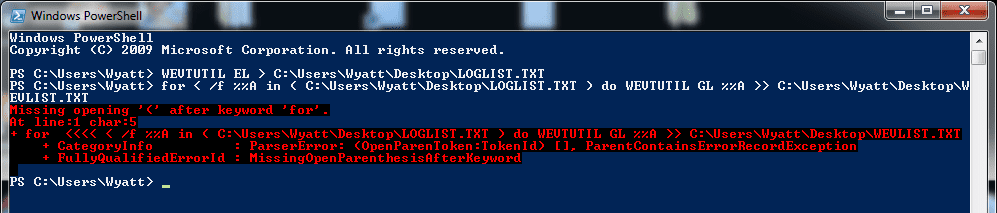
Entering only the first line I get an export listing only the Event Viewer log names.

Entering the second line I get this...
 

Attachments

  • PS ScreenShot.png
    PS ScreenShot.png
    12.6 KB · Views: 0

My Computer

Computer type
Laptop
Computer Manufacturer/Model Number
Acer Aspire E1-532
OS
Microsoft Windows 7 Home Premium 64-bit 7601 Multiprocessor Free Service Pack 1
CPU
Intel(R) Celeron(R) 2957U @ 1.40GHz
Motherboard
Acer EA50_HW
Memory
8.00 GB
Graphics Card(s)
Intel(R) HD Graphics
Sound Card
High Definition Audio Device
Screen Resolution
1366 x 768 x 32 bits (4294967296 colors) @ 59 Hz
Hard Drives
TOSHIBA MQ01ABD100 ATA Device
Back
Top