excellent wireless connection, no internet access

jikot

New member
Member
Local time
6:53 AM
Messages
12
Hello all,

Long time lurker, first time poster here.

I just installed 32-bit win7 ultimate on my laptop, and am (still) having a spot of bother getting my internets from a public router located near my girlfriend's place.

My problem is the following: I connect to the router fine and the signal quality is excellent, but there is no internet access at all.
The wireless connection icon in the taskbar shows a yellow warning triangle, and when hovering over it with my mouse pointer I read the following: "no internet access".

Last week when I still had xp on the laptop I had the exact same problem: excellent connection, no internet access.
Both with xp and win7 I had no problems at all connecting to my router at home.

I have been connecting to the troublesome router for months on my iphone, without any issues. Any random macbook also connects to it without any problems.

When I run diagnostics I am told the following: "wireless network connection doesn't have a valid IP configuration".

TCP/IPv4 is set to "obtain an IP address/DNS server automatically", and has been since the beginning, with DHCP enabled.

I've tried anything and everything I found floating around on the internet (including disabling TCP/IPv6 as well as a whole slew of other settings), but to no avail.

Obviously, my wireless card (Intel wireless wifi link 4965AGN) works perfectly (works great on my home router), and so does the public router from which I'm trying to get internet access (works admirably on anything mac: iphone, macbooks).

My guess is the problem lies somewhere in my settings, and I have been going over all of the relevant settings I could find some twenty times. No love.

I really hope any of you can offer some advice, I'm getting super angry!

Thanks in advance!

EDIT: I also updated the wireless card driver to the very latest, no worky
 

My Computer My Computer

At a glance

windows 7 ultimate 64 bitIntel Core 2 Quad-Core Q9300 2.50GHzNvidia GeForce 9800 GX2
Computer Manufacturer/Model Number
Dell XPS 630i
OS
windows 7 ultimate 64 bit
CPU
Intel Core 2 Quad-Core Q9300 2.50GHz
Graphics Card(s)
Nvidia GeForce 9800 GX2
Sound Card
Creative SoundBlaster X-Fi extreme
Hard Drives
1 TB
Hello all,

Long time lurker, first time poster here.

I just installed 32-bit win7 ultimate on my laptop, and am (still) having a spot of bother getting my internets from a public router located near my girlfriend's place.

My problem is the following: I connect to the router fine and the signal quality is excellent, but there is no internet access at all.
The wireless connection icon in the taskbar shows a yellow warning triangle, and when hovering over it with my mouse pointer I read the following: "no internet access".

Last week when I still had xp on the laptop I had the exact same problem: excellent connection, no internet access.
Both with xp and win7 I had no problems at all connecting to my router at home.

I have been connecting to the troublesome router for months on my iphone, without any issues. Any random macbook also connects to it without any problems.

When I run diagnostics I am told the following: "wireless network connection doesn't have a valid IP configuration".

TCP/IPv4 is set to "obtain an IP address/DNS server automatically", and has been since the beginning, with DHCP enabled.

I've tried anything and everything I found floating around on the internet (including disabling TCP/IPv6 as well as a whole slew of other settings), but to no avail.

Obviously, my wireless card (Intel wireless wifi link 4965AGN) works perfectly (works great on my home router), and so does the public router from which I'm trying to get internet access (works admirably on anything mac: iphone, macbooks).

My guess is the problem lies somewhere in my settings, and I have been going over all of the relevant settings I could find some twenty times. No love.

I really hope any of you can offer some advice, I'm getting super angry!

Thanks in advance!

EDIT: I also updated the wireless card driver to the very latest, no worky

Hi and welcome

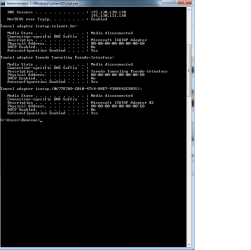
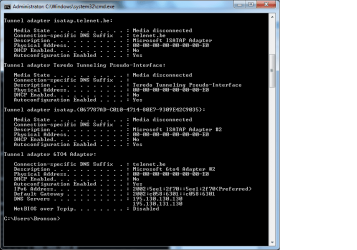
can you type cmd in search>type ipconfig /all> make a screen shot>upload it to us.

Let us know if you need help with any of that


Ken J+
 

My Computer My Computer

At a glance

Win 8 Release candidate 8400[email protected]4 gigsNvidia 9600M
Computer Manufacturer/Model Number
HP Pavillion dv-7 1005 Tx
OS
Win 8 Release candidate 8400
CPU
[email protected]
Memory
4 gigs
Graphics Card(s)
Nvidia 9600M
Sound Card
HD built-in
Monitor(s) Displays
17" Wxga
Screen Resolution
1440x900
Cooling
none
Internet Speed
45Mb down 5Mb up
Thanks for the quick reply, hope this helps!!

And I hope I attached the pic properly :p
 

Attachments

  • ipconfig.png
    ipconfig.png
    15.6 KB · Views: 462

My Computer My Computer

At a glance

windows 7 ultimate 64 bitIntel Core 2 Quad-Core Q9300 2.50GHzNvidia GeForce 9800 GX2
Computer Manufacturer/Model Number
Dell XPS 630i
OS
windows 7 ultimate 64 bit
CPU
Intel Core 2 Quad-Core Q9300 2.50GHz
Graphics Card(s)
Nvidia GeForce 9800 GX2
Sound Card
Creative SoundBlaster X-Fi extreme
Hard Drives
1 TB
Hi jikot, the image is missing the top bit, we need to know all the details of your ipconfig /all.

Sounds like you have a DNS issue or the router doesn't know the MAC details of your wireless card. Is this the first time it happened?
 

My Computer My Computer

At a glance

Windows 7 Ultimate 64BitGenuineIntel Intel(R) Core(TM) DuoCore T2400 ...2.00 GBMobile Intel(R) 945 Express Chipset
Computer Manufacturer/Model Number
Lenovo ThinkPad T60
OS
Windows 7 Ultimate 64Bit
CPU
GenuineIntel Intel(R) Core(TM) DuoCore T2400 @ 1.83GHz
Motherboard
Intel(R) 82801G (ICH7 Family)
Memory
2.00 GB
Graphics Card(s)
Mobile Intel(R) 945 Express Chipset
Sound Card
SoundMAX Integrated Digital HD Audio
Monitor(s) Displays
ThinkPad Display
Screen Resolution
1400x1050
Hard Drives
100Gb SATA
Keyboard
Standard Keyboard
Mouse
HID-compliant Mouse
Internet Speed
Cable Broadband - 54Mbps
Other Info
Intel(R) PRO/1000 PL Network Connection
11a/b/g Wireless LAN Mini PCI Express Adapter
Yeah, really sorry about that, that's the way it showed up.

As I can't take the whole thing in one screenshot, I had to divide in two rather neat halves.

Everything is on these two images. Thanks in advance!!

EDIT: @aem: This is the first time, yes. When the laptop was still on xp I got all kinds of wireless action in all sorts of places, and I imagine win7 will treat me right as well (only installed win7 last week).
Just this particular router is giving me grief now (both when it was xp and now with win7). Makes me look like a darn fool for mocking my girlfriend's mac for the past few months :(
 

Attachments

  • ipconfig.png
    ipconfig.png
    20.6 KB · Views: 167
  • ipconfig2.png
    ipconfig2.png
    18.7 KB · Views: 96

My Computer My Computer

At a glance

windows 7 ultimate 64 bitIntel Core 2 Quad-Core Q9300 2.50GHzNvidia GeForce 9800 GX2
Computer Manufacturer/Model Number
Dell XPS 630i
OS
windows 7 ultimate 64 bit
CPU
Intel Core 2 Quad-Core Q9300 2.50GHz
Graphics Card(s)
Nvidia GeForce 9800 GX2
Sound Card
Creative SoundBlaster X-Fi extreme
Hard Drives
1 TB
What model router do you have? Are you able to go into your router's control panel and look for MAC clone option?

Has this wireless adapter been working previously?
 

My Computer My Computer

At a glance

Windows 7 Ultimate 64BitGenuineIntel Intel(R) Core(TM) DuoCore T2400 ...2.00 GBMobile Intel(R) 945 Express Chipset
Computer Manufacturer/Model Number
Lenovo ThinkPad T60
OS
Windows 7 Ultimate 64Bit
CPU
GenuineIntel Intel(R) Core(TM) DuoCore T2400 @ 1.83GHz
Motherboard
Intel(R) 82801G (ICH7 Family)
Memory
2.00 GB
Graphics Card(s)
Mobile Intel(R) 945 Express Chipset
Sound Card
SoundMAX Integrated Digital HD Audio
Monitor(s) Displays
ThinkPad Display
Screen Resolution
1400x1050
Hard Drives
100Gb SATA
Keyboard
Standard Keyboard
Mouse
HID-compliant Mouse
Internet Speed
Cable Broadband - 54Mbps
Other Info
Intel(R) PRO/1000 PL Network Connection
11a/b/g Wireless LAN Mini PCI Express Adapter
What model router do you have? Are you able to go into your router's control panel and look for MAC clone option?

Has this wireless adapter been working previously?

It's a public router from a municipal service down the street from my girlfriend's place, it's open for use to anyone close enough. I don't think I can access its control panel.

The wireless adapter itself works flawlessly at my place with my trusty little sweex router, and has worked perfectly in a variety of environments from airports, residences, government buildings, etc.
 

My Computer My Computer

At a glance

windows 7 ultimate 64 bitIntel Core 2 Quad-Core Q9300 2.50GHzNvidia GeForce 9800 GX2
Computer Manufacturer/Model Number
Dell XPS 630i
OS
windows 7 ultimate 64 bit
CPU
Intel Core 2 Quad-Core Q9300 2.50GHz
Graphics Card(s)
Nvidia GeForce 9800 GX2
Sound Card
Creative SoundBlaster X-Fi extreme
Hard Drives
1 TB
It's worthwhile ringing up and ask the council if they can help. As it stands, you adapter is working fine. I must be something at the that public router's end.
 

My Computer My Computer

At a glance

Windows 7 Ultimate 64BitGenuineIntel Intel(R) Core(TM) DuoCore T2400 ...2.00 GBMobile Intel(R) 945 Express Chipset
Computer Manufacturer/Model Number
Lenovo ThinkPad T60
OS
Windows 7 Ultimate 64Bit
CPU
GenuineIntel Intel(R) Core(TM) DuoCore T2400 @ 1.83GHz
Motherboard
Intel(R) 82801G (ICH7 Family)
Memory
2.00 GB
Graphics Card(s)
Mobile Intel(R) 945 Express Chipset
Sound Card
SoundMAX Integrated Digital HD Audio
Monitor(s) Displays
ThinkPad Display
Screen Resolution
1400x1050
Hard Drives
100Gb SATA
Keyboard
Standard Keyboard
Mouse
HID-compliant Mouse
Internet Speed
Cable Broadband - 54Mbps
Other Info
Intel(R) PRO/1000 PL Network Connection
11a/b/g Wireless LAN Mini PCI Express Adapter
I'm 100% sure the router I'm trying to access is working perfectly. Other people's windows machines have no problems accessing it.
So both my wireless adapter and the router work, but I still cannot get internet access even though the connection is excellent.
My guess is there is something wrong with a setting of mine somewhere.

Either that or there are routers out there which some windows machines just cannot access.
 

My Computer My Computer

At a glance

windows 7 ultimate 64 bitIntel Core 2 Quad-Core Q9300 2.50GHzNvidia GeForce 9800 GX2
Computer Manufacturer/Model Number
Dell XPS 630i
OS
windows 7 ultimate 64 bit
CPU
Intel Core 2 Quad-Core Q9300 2.50GHz
Graphics Card(s)
Nvidia GeForce 9800 GX2
Sound Card
Creative SoundBlaster X-Fi extreme
Hard Drives
1 TB
I'm glad to inform you that the problem resolved itself!

While working on a document in word I was suddenly prompted to identify the network I have been trying to join for two weeks as a home, work or public network, and I now have access to it.

To anyone suffering the same problem: I did not change any setting for at least 24 hours; the issue literally just resolved itself.

Thanks aem for the help anyway!
 

My Computer My Computer

At a glance

windows 7 ultimate 64 bitIntel Core 2 Quad-Core Q9300 2.50GHzNvidia GeForce 9800 GX2
Computer Manufacturer/Model Number
Dell XPS 630i
OS
windows 7 ultimate 64 bit
CPU
Intel Core 2 Quad-Core Q9300 2.50GHz
Graphics Card(s)
Nvidia GeForce 9800 GX2
Sound Card
Creative SoundBlaster X-Fi extreme
Hard Drives
1 TB
Hi,
I have a question regarding my wifi.
how can i get connected my digital phone adapter throu gh wifi in windows 7. I know it will work with sharing point somewhere. I need to know step by step connecting adapter through wifi. It is connecting easily with windows vista. but it is not with windows 7.
Anybody can help me in this regard please.

Antony Maliakal
canada
 

My Computer My Computer

At a glance

windows 7 home premiun 32 bit
Computer Manufacturer/Model Number
vpceb32fm
OS
windows 7 home premiun 32 bit
You should start your own post.
 

My Computer My Computer

At a glance

Windows 10 Pro x64Intel Core i7 6700KGSkill TridentZ RGB 16GB 3600 16-16-16-36EVGA GTX 980 Ti SC x2
Computer type
PC/Desktop
Computer Manufacturer/Model Number
Skylake Special #666
OS
Windows 10 Pro x64
CPU
Intel Core i7 6700K
Motherboard
Asus Sabertooth Z170 Mark 1
Memory
GSkill TridentZ RGB 16GB 3600 16-16-16-36
Graphics Card(s)
EVGA GTX 980 Ti SC x2
Sound Card
Realtek High Definition
Monitor(s) Displays
AOC G2460PG
Screen Resolution
1920 x 1080 144Hz
Hard Drives
Samsung 860 Pro 256GB, Seagate Barracuda 4TB x2
PSU
EVGA 1000 P2, EVGA White Custom Braided Cables
Case
Corsair Vengeance C70 Gunmetal Black
Cooling
Corsair H100i v2, Corsair ML120 x2, Thermal Grizzly Kryonaut
Keyboard
Logitech G910 Orion Spectrum
Mouse
Logitech G700s
Internet Speed
Verizon Fios Quantum Gateway 75/75
Antivirus
Windows Defender, Malwarebytes Free 3.8.3
Browser
Chrome
Other Info
Corsair SP120 x4, LG Blu-ray Drive, Durabrand HT-395 100 Watt Dolby Digital Amp, Corsair H2100 Wireless 7.1 Headset
Back
Top