Explorer.exe keeps crashing

Good idea haha. Well in case it really is solved, I just wanna say thank you so much for all the help you've given me. This has been my first time getting advice on a forum so it's been really cool. You saved me $80 at the local computer repair shop lol. You're awesome. (:
 

My Computer

Computer type
PC/Desktop
Computer Manufacturer/Model Number
Custom Build
OS
Windows 7 Ultimate x64
CPU
AMD FX 8350
Motherboard
ECS A990FXM-A
Memory
12GB
Graphics Card(s)
nVidia Geforce GTX 550 ti 2GB
Hard Drives
1x 500GB
Antivirus
Microsoft Security Essentials
Browser
Chrome
Well it seems to be fixed completely so thank you for all your help. So I just mark it as solved now and that's it? (:
 

My Computer

Computer type
PC/Desktop
Computer Manufacturer/Model Number
Custom Build
OS
Windows 7 Ultimate x64
CPU
AMD FX 8350
Motherboard
ECS A990FXM-A
Memory
12GB
Graphics Card(s)
nVidia Geforce GTX 550 ti 2GB
Hard Drives
1x 500GB
Antivirus
Microsoft Security Essentials
Browser
Chrome
Great news! Well that's it unless you want help with undoing some of the changes that you made during troubleshooting.

Example:

Uninstall UVK Portable. Or keep it if you found it useful: UVK Help - Uninstall

The reg file you downloaded. You can leave the registry as it is. It will not cause any harm and at least you will get Explorer crash dumps if there are any problems in future. If you want help to remove the entries - let me know.

WinRAR - suggest reinstalling to recreate missing context menu entries.

PushBullet - try enabling if you need it by doing the reverse of what you did via msconfig.

Actual Multiple Monitors - consider reinstalling it.
 

My Computer

Computer type
Laptop
Computer Manufacturer/Model Number
ASUS
OS
Microsoft Windows 7 Home Premium 64-bit 7601 Multiprocessor Free Service Pack 1
CPU
AMD C-60 APU with Radeon(tm) HD Graphics
Motherboard
ASUSTeK COMPUTER INC. X501U
Memory
4.00 GB
Graphics Card(s)
AMD Radeon HD 6290 Graphics
Sound Card
(1) AMD High Definition Audio Device (2) Realtek High Defi
Screen Resolution
1366 x 768 x 32 bits (4294967296 colors) @ 60 Hz
Hard Drives
Hitachi HTS545050A7E380 SATA Disk Device
Antivirus
Comodo CIS & FW, SecureAplus App Whitelisting, Threatfire
Browser
Cyberfox 64bit, Opera 64bit, Airfox
Other Info
Spy-The-Spy, HitmanPro.Alert, Norton Connect Safe, MJRegWatcher, BitDefender TrafficLight, Voodoo Shield, Zemana AntiMalware
Well UVK asked me to uninstall it when I closed it so I just did that. And the WinRAR menus are still there so I guess there's no need for that. I actually replaced AMM with another program that does something similar. It's also a bit less laggy so that's nice (: So overall I think everything is good (: Thank you again so much for your help. :D
 

My Computer

Computer type
PC/Desktop
Computer Manufacturer/Model Number
Custom Build
OS
Windows 7 Ultimate x64
CPU
AMD FX 8350
Motherboard
ECS A990FXM-A
Memory
12GB
Graphics Card(s)
nVidia Geforce GTX 550 ti 2GB
Hard Drives
1x 500GB
Antivirus
Microsoft Security Essentials
Browser
Chrome
Welp update. Explorer crashed yet again. Weird that it hadn't for so long and now started again.
 

My Computer

Computer type
PC/Desktop
Computer Manufacturer/Model Number
Custom Build
OS
Windows 7 Ultimate x64
CPU
AMD FX 8350
Motherboard
ECS A990FXM-A
Memory
12GB
Graphics Card(s)
nVidia Geforce GTX 550 ti 2GB
Hard Drives
1x 500GB
Antivirus
Microsoft Security Essentials
Browser
Chrome
Have you got another explorer crash dump?
 

My Computer

Computer type
Laptop
Computer Manufacturer/Model Number
ASUS
OS
Microsoft Windows 7 Home Premium 64-bit 7601 Multiprocessor Free Service Pack 1
CPU
AMD C-60 APU with Radeon(tm) HD Graphics
Motherboard
ASUSTeK COMPUTER INC. X501U
Memory
4.00 GB
Graphics Card(s)
AMD Radeon HD 6290 Graphics
Sound Card
(1) AMD High Definition Audio Device (2) Realtek High Defi
Screen Resolution
1366 x 768 x 32 bits (4294967296 colors) @ 60 Hz
Hard Drives
Hitachi HTS545050A7E380 SATA Disk Device
Antivirus
Comodo CIS & FW, SecureAplus App Whitelisting, Threatfire
Browser
Cyberfox 64bit, Opera 64bit, Airfox
Other Info
Spy-The-Spy, HitmanPro.Alert, Norton Connect Safe, MJRegWatcher, BitDefender TrafficLight, Voodoo Shield, Zemana AntiMalware
Oh right yep sorry here it is. Just got this one actually.
 

My Computer

Computer type
PC/Desktop
Computer Manufacturer/Model Number
Custom Build
OS
Windows 7 Ultimate x64
CPU
AMD FX 8350
Motherboard
ECS A990FXM-A
Memory
12GB
Graphics Card(s)
nVidia Geforce GTX 550 ti 2GB
Hard Drives
1x 500GB
Antivirus
Microsoft Security Essentials
Browser
Chrome
Okay thanks. I will look at it later. Currently I'm at work.
 

My Computer

Computer type
Laptop
Computer Manufacturer/Model Number
ASUS
OS
Microsoft Windows 7 Home Premium 64-bit 7601 Multiprocessor Free Service Pack 1
CPU
AMD C-60 APU with Radeon(tm) HD Graphics
Motherboard
ASUSTeK COMPUTER INC. X501U
Memory
4.00 GB
Graphics Card(s)
AMD Radeon HD 6290 Graphics
Sound Card
(1) AMD High Definition Audio Device (2) Realtek High Defi
Screen Resolution
1366 x 768 x 32 bits (4294967296 colors) @ 60 Hz
Hard Drives
Hitachi HTS545050A7E380 SATA Disk Device
Antivirus
Comodo CIS & FW, SecureAplus App Whitelisting, Threatfire
Browser
Cyberfox 64bit, Opera 64bit, Airfox
Other Info
Spy-The-Spy, HitmanPro.Alert, Norton Connect Safe, MJRegWatcher, BitDefender TrafficLight, Voodoo Shield, Zemana AntiMalware
Your latest dump again point to clr.dll (.NET Framework)

What software (if any) did you install after the crashes stopped?

It might be necessary to remove all .NET Framework versions other than 3.5 then reboot and run Advanced Disk Cleanup (to include windows update cleanup) then reinstall the missing versions. However, before attempting that, would you try running a scan with Secunia PSI. I will send you a personal message containing a link to download an older version of Secunia PSI as it allows the user much more control than the current release.

Secunia PSI 2.0 - it will check most of your installed software to see if there are updates available and provide links to download any missing updates. It's better to use Secunia PSI 2.0 rather than the current version as it gives you more control over updates and doesn't run in the background at all times.

Once installed it should start a scan automatically. Also check the following settings and apply them.

Ignore this warning - it doesn't apply to Windows 7:
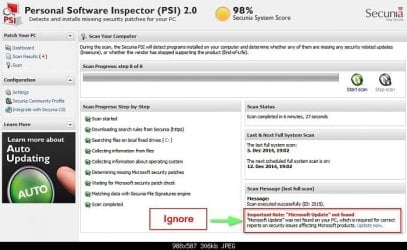
Secunia PSI Ignore.jpg

Click the drop down arrow next to "Configuration" then click "Settings" then on th and settings tab apply the ones shown in the screenshot below:
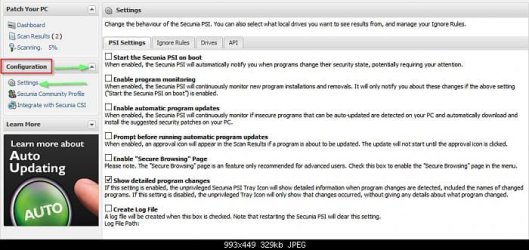
Secunia PSI Settings.jpg

On the "Drives" tab choose the following:
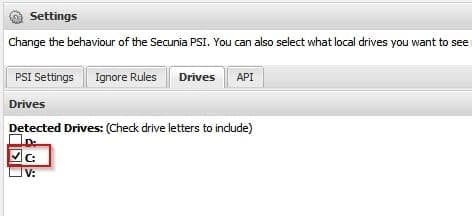
Secunia PSI Drives.jpg

When the scan is complete apply any updates one at a time by clicking on the "Install Solution" link.

Note: If you see a warning that Microsoft XML Core Services 4.x is insecure - ignore it for now but install any other updates.

If a reboot is requested at any point - reboot then continue with another scan.
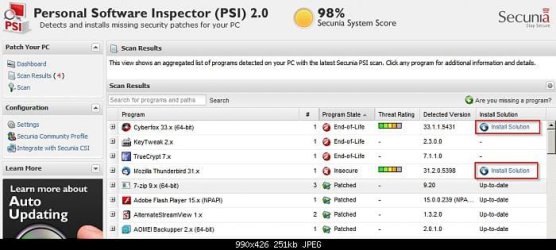
Secunia PSI Install Updates.jpg

There are still more steps to take if the issue is not resolved.

 

My Computer

Computer type
Laptop
Computer Manufacturer/Model Number
ASUS
OS
Microsoft Windows 7 Home Premium 64-bit 7601 Multiprocessor Free Service Pack 1
CPU
AMD C-60 APU with Radeon(tm) HD Graphics
Motherboard
ASUSTeK COMPUTER INC. X501U
Memory
4.00 GB
Graphics Card(s)
AMD Radeon HD 6290 Graphics
Sound Card
(1) AMD High Definition Audio Device (2) Realtek High Defi
Screen Resolution
1366 x 768 x 32 bits (4294967296 colors) @ 60 Hz
Hard Drives
Hitachi HTS545050A7E380 SATA Disk Device
Antivirus
Comodo CIS & FW, SecureAplus App Whitelisting, Threatfire
Browser
Cyberfox 64bit, Opera 64bit, Airfox
Other Info
Spy-The-Spy, HitmanPro.Alert, Norton Connect Safe, MJRegWatcher, BitDefender TrafficLight, Voodoo Shield, Zemana AntiMalware
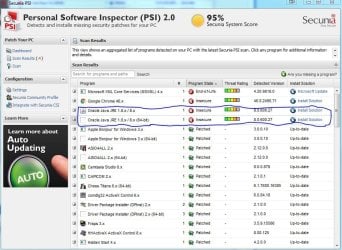
Well I got this when I ran the scan.

PSI.JPG

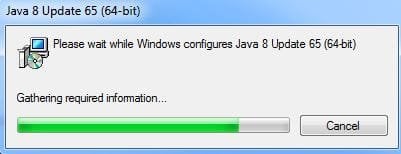
But when I go to Install the Solution for Java it runs and I get this

PSI 2.JPG

And then it closes and nothing happens. So I don't really know what to do.
 

My Computer

Computer type
PC/Desktop
Computer Manufacturer/Model Number
Custom Build
OS
Windows 7 Ultimate x64
CPU
AMD FX 8350
Motherboard
ECS A990FXM-A
Memory
12GB
Graphics Card(s)
nVidia Geforce GTX 550 ti 2GB
Hard Drives
1x 500GB
Antivirus
Microsoft Security Essentials
Browser
Chrome
Okay so you need to update Goolge Chrome. I take it that you already did.

As for Java - do you know why you have the 64bit Java version installed? Generally for Windows 7 you don't need Java at all but if you are going to use it the 32bit version is recommended.

See: https://www.java.com/en/download/faq/java_win64bit.xml

64-bit Windows operating systems (such as Windows 7, Vista or XP) come with a 32-bit Internet Explorer (IE) browser as the standard (default) for viewing web pages. These operating systems also include a 64-bit Internet Explorer browser, however using it is optional and it must be explicitly selected to view web pages. Note that because some web content may not work properly in a 64-bit browser, we recommend using the default 32-bit browser and downloading 32-bit Java.

Personally I don't have Java installed and have not needed it for the last couple of years.

RE: Java and browser security. If you must have Java to run a program that requires it consider the following:

How to turn off Java in your browser - and why you should do it now.

Suggest running GeekUninstaller (portable) and select both versions of Java for removal - one at a time with a reboot between each removal. Let GeekUnistaller scan for remnants and delete them.

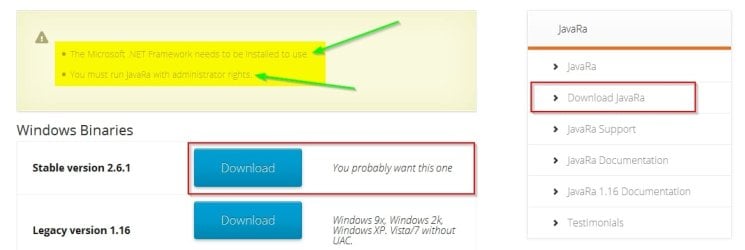
Once both Java versions have been removed download JavaRa

Make sure that you get the correct download link as the page may show a big green download button for something else that you want to avoid!

Download JavaRa - SingularLabs - Cyberfox.jpg

I note the requirement for .NET Framework to be installed. Maybe it is required to remove Java and maybe a .NET Framework issue prevents removal. However try JavaRa and see if it will run.

Extract JavaRa files to a folder on your desktop.

Right click JavaRa.exe and choose run as administrator.

Configure JavaRa settings to "Do not check for updates"

Click the Remove Java Runtime button and select version(s) for removal. Run more than once if required. Reboot when completed.

RE: Java re-installation.

Personally I'd avoid installing it but if you need it begin with the 32bit version only. Unless you really need Java running in your Chrome 64bit browser or IE64bit version.

Java Downloads.jpg


Java Downloads
 
Last edited:

My Computer

Computer type
Laptop
Computer Manufacturer/Model Number
ASUS
OS
Microsoft Windows 7 Home Premium 64-bit 7601 Multiprocessor Free Service Pack 1
CPU
AMD C-60 APU with Radeon(tm) HD Graphics
Motherboard
ASUSTeK COMPUTER INC. X501U
Memory
4.00 GB
Graphics Card(s)
AMD Radeon HD 6290 Graphics
Sound Card
(1) AMD High Definition Audio Device (2) Realtek High Defi
Screen Resolution
1366 x 768 x 32 bits (4294967296 colors) @ 60 Hz
Hard Drives
Hitachi HTS545050A7E380 SATA Disk Device
Antivirus
Comodo CIS & FW, SecureAplus App Whitelisting, Threatfire
Browser
Cyberfox 64bit, Opera 64bit, Airfox
Other Info
Spy-The-Spy, HitmanPro.Alert, Norton Connect Safe, MJRegWatcher, BitDefender TrafficLight, Voodoo Shield, Zemana AntiMalware
I have Java because it is required to play Minecraft and use Minecraft related tools, and having the 64-bit version allows for multi-threaded utilization in the game as well as performance increase. And okay I will try doing this tomorrow. And I'll report back what happens.
 

My Computer

Computer type
PC/Desktop
Computer Manufacturer/Model Number
Custom Build
OS
Windows 7 Ultimate x64
CPU
AMD FX 8350
Motherboard
ECS A990FXM-A
Memory
12GB
Graphics Card(s)
nVidia Geforce GTX 550 ti 2GB
Hard Drives
1x 500GB
Antivirus
Microsoft Security Essentials
Browser
Chrome
I have Java because it is required to play Minecraft and use Minecraft related tools, and having the 64-bit version allows for multi-threaded utilization in the game as well as performance increase. And okay I will try doing this tomorrow. And I'll report back what happens.

If you need Java - fair enough. Try the GeekUninstaller method of removal followed by a reboot then use JavaRa to cleanup. Reboot again and reinstall Java.

Any problems with removal and we can look again at .NET Framework issues.

[EDIT]

With all of these changes it might be wise to run a full disk check:

Start> Run

then type:

chkdsk /r /f

include spaces. Choose "Y" when prompted. Then reboot. The check will take some time. Suggest only doing this when you have finished using your computer.
 
Last edited:

My Computer

Computer type
Laptop
Computer Manufacturer/Model Number
ASUS
OS
Microsoft Windows 7 Home Premium 64-bit 7601 Multiprocessor Free Service Pack 1
CPU
AMD C-60 APU with Radeon(tm) HD Graphics
Motherboard
ASUSTeK COMPUTER INC. X501U
Memory
4.00 GB
Graphics Card(s)
AMD Radeon HD 6290 Graphics
Sound Card
(1) AMD High Definition Audio Device (2) Realtek High Defi
Screen Resolution
1366 x 768 x 32 bits (4294967296 colors) @ 60 Hz
Hard Drives
Hitachi HTS545050A7E380 SATA Disk Device
Antivirus
Comodo CIS & FW, SecureAplus App Whitelisting, Threatfire
Browser
Cyberfox 64bit, Opera 64bit, Airfox
Other Info
Spy-The-Spy, HitmanPro.Alert, Norton Connect Safe, MJRegWatcher, BitDefender TrafficLight, Voodoo Shield, Zemana AntiMalware
RE: Minecraft. I've never used it so do not know much about it. However I found this information. See if it makes sense to you:

Minecraft Doesn?t Need Java Installed Anymore; It?s Time to Uninstall Java

If you take a look at the Secunia PSI entry for Java and expand it by clicking the [+] sign it should show the file location for the detected version of Java.

If it shows this location:

img_54f0f9b00a8ee.png

Go ahead and remove Java as in the previous posts. Make sure that you are using the latest version of Minecraft and configure it as shown below.

If it shows this location:

img_54f0fcd67ec53.png

Check your Minecraft settings.and check that you are using the latest version of Minecraft that includes built in Java.

[Edited post]
 
Last edited:

My Computer

Computer type
Laptop
Computer Manufacturer/Model Number
ASUS
OS
Microsoft Windows 7 Home Premium 64-bit 7601 Multiprocessor Free Service Pack 1
CPU
AMD C-60 APU with Radeon(tm) HD Graphics
Motherboard
ASUSTeK COMPUTER INC. X501U
Memory
4.00 GB
Graphics Card(s)
AMD Radeon HD 6290 Graphics
Sound Card
(1) AMD High Definition Audio Device (2) Realtek High Defi
Screen Resolution
1366 x 768 x 32 bits (4294967296 colors) @ 60 Hz
Hard Drives
Hitachi HTS545050A7E380 SATA Disk Device
Antivirus
Comodo CIS & FW, SecureAplus App Whitelisting, Threatfire
Browser
Cyberfox 64bit, Opera 64bit, Airfox
Other Info
Spy-The-Spy, HitmanPro.Alert, Norton Connect Safe, MJRegWatcher, BitDefender TrafficLight, Voodoo Shield, Zemana AntiMalware
Oh wow that's pretty cool! I never saw that Minecraft didn't need Java anymore. I just uninstalled it and it still runs so I guess I don't need it then. Good to know. I'll see if it clears up my explorer problem and report back if and when it crashes again.
 

My Computer

Computer type
PC/Desktop
Computer Manufacturer/Model Number
Custom Build
OS
Windows 7 Ultimate x64
CPU
AMD FX 8350
Motherboard
ECS A990FXM-A
Memory
12GB
Graphics Card(s)
nVidia Geforce GTX 550 ti 2GB
Hard Drives
1x 500GB
Antivirus
Microsoft Security Essentials
Browser
Chrome
Probably it won't clear up the explorer problem but maybe you'll get lucky! Just in case it doesn't the next steps would involve .NET Framework repairs and more troubleshooting steps for shell extensions.
 

My Computer

Computer type
Laptop
Computer Manufacturer/Model Number
ASUS
OS
Microsoft Windows 7 Home Premium 64-bit 7601 Multiprocessor Free Service Pack 1
CPU
AMD C-60 APU with Radeon(tm) HD Graphics
Motherboard
ASUSTeK COMPUTER INC. X501U
Memory
4.00 GB
Graphics Card(s)
AMD Radeon HD 6290 Graphics
Sound Card
(1) AMD High Definition Audio Device (2) Realtek High Defi
Screen Resolution
1366 x 768 x 32 bits (4294967296 colors) @ 60 Hz
Hard Drives
Hitachi HTS545050A7E380 SATA Disk Device
Antivirus
Comodo CIS & FW, SecureAplus App Whitelisting, Threatfire
Browser
Cyberfox 64bit, Opera 64bit, Airfox
Other Info
Spy-The-Spy, HitmanPro.Alert, Norton Connect Safe, MJRegWatcher, BitDefender TrafficLight, Voodoo Shield, Zemana AntiMalware
Well you're right, it didn't solve the problem. It crashed again. So what's the next step?
 

My Computer

Computer type
PC/Desktop
Computer Manufacturer/Model Number
Custom Build
OS
Windows 7 Ultimate x64
CPU
AMD FX 8350
Motherboard
ECS A990FXM-A
Memory
12GB
Graphics Card(s)
nVidia Geforce GTX 550 ti 2GB
Hard Drives
1x 500GB
Antivirus
Microsoft Security Essentials
Browser
Chrome

My Computer

Computer type
Laptop
Computer Manufacturer/Model Number
ASUS
OS
Microsoft Windows 7 Home Premium 64-bit 7601 Multiprocessor Free Service Pack 1
CPU
AMD C-60 APU with Radeon(tm) HD Graphics
Motherboard
ASUSTeK COMPUTER INC. X501U
Memory
4.00 GB
Graphics Card(s)
AMD Radeon HD 6290 Graphics
Sound Card
(1) AMD High Definition Audio Device (2) Realtek High Defi
Screen Resolution
1366 x 768 x 32 bits (4294967296 colors) @ 60 Hz
Hard Drives
Hitachi HTS545050A7E380 SATA Disk Device
Antivirus
Comodo CIS & FW, SecureAplus App Whitelisting, Threatfire
Browser
Cyberfox 64bit, Opera 64bit, Airfox
Other Info
Spy-The-Spy, HitmanPro.Alert, Norton Connect Safe, MJRegWatcher, BitDefender TrafficLight, Voodoo Shield, Zemana AntiMalware
Here's the next steps to fully sort out .NET Framework and rule it out as the culprit. I strongly suggest making a system image backup that you can restore before going ahead.

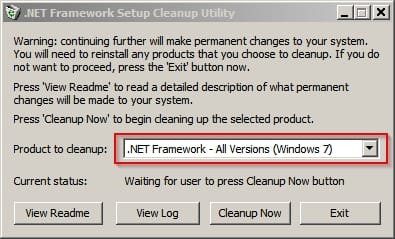
Run the .NET Framework Cleanup Utility again and choose "All versions"

NET Framework Cleanup All.jpg

Reboot when done. Then use Extended Disk Cleanup:

http://www.sevenforums.com/tutorials/76383-disk-cleanup-extended.html

Basically run cmd.exd as administrator and copy the following then press enter.

%SystemRoot%\System32\Cmd.exe /c Cleanmgr /sageset:65535 & Cleanmgr /sagerun:65535

In the window that opens up select everything for cleanup except "Service Pack Backup Files"

Click Ok and reboot once cleanup is complete. If you see a screen with a message like "Windows is configuring Updates" wait for it to complete and do not be tempted to switch off your computer.

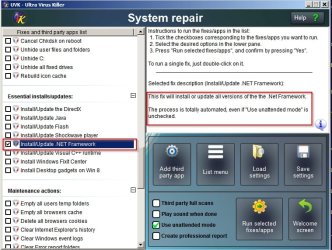
Then once rebooted you could run UVK again and install all required versions of .NET Framework silently:

UVK - NET Framework 2.jpg

Or you can let Windows Update take care of it. Is there some reason why you can't use Windows Update? You mentioned something before about downloading .NET Framework rather than letting Windows Update take care of it.
 

My Computer

Computer type
Laptop
Computer Manufacturer/Model Number
ASUS
OS
Microsoft Windows 7 Home Premium 64-bit 7601 Multiprocessor Free Service Pack 1
CPU
AMD C-60 APU with Radeon(tm) HD Graphics
Motherboard
ASUSTeK COMPUTER INC. X501U
Memory
4.00 GB
Graphics Card(s)
AMD Radeon HD 6290 Graphics
Sound Card
(1) AMD High Definition Audio Device (2) Realtek High Defi
Screen Resolution
1366 x 768 x 32 bits (4294967296 colors) @ 60 Hz
Hard Drives
Hitachi HTS545050A7E380 SATA Disk Device
Antivirus
Comodo CIS & FW, SecureAplus App Whitelisting, Threatfire
Browser
Cyberfox 64bit, Opera 64bit, Airfox
Other Info
Spy-The-Spy, HitmanPro.Alert, Norton Connect Safe, MJRegWatcher, BitDefender TrafficLight, Voodoo Shield, Zemana AntiMalware
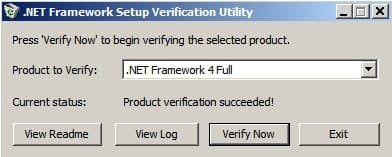
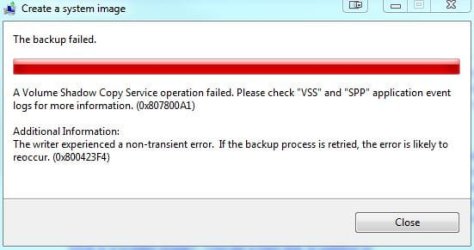
Well I verified them and they were all good. I then tried to take a system image backup and this happened.

System Image.JPG

What does that mean?
 

My Computer

Computer type
PC/Desktop
Computer Manufacturer/Model Number
Custom Build
OS
Windows 7 Ultimate x64
CPU
AMD FX 8350
Motherboard
ECS A990FXM-A
Memory
12GB
Graphics Card(s)
nVidia Geforce GTX 550 ti 2GB
Hard Drives
1x 500GB
Antivirus
Microsoft Security Essentials
Browser
Chrome
Back
Top