
Explorer.exe keeps crashing

Well I'm not sure what that means. Is Volume Shadow Copy service set to either manual or automatic in services configuration?

Start> Run

type services.msc

Press Enter

Scroll down to the service and check.

Did you also run the full disk check yet?

What are you using for backup? Is the destination drive NTFS formatted?
 

My Computer

Computer type
Laptop
Computer Manufacturer/Model Number
ASUS
OS
Microsoft Windows 7 Home Premium 64-bit 7601 Multiprocessor Free Service Pack 1
CPU
AMD C-60 APU with Radeon(tm) HD Graphics
Motherboard
ASUSTeK COMPUTER INC. X501U
Memory
4.00 GB
Graphics Card(s)
AMD Radeon HD 6290 Graphics
Sound Card
(1) AMD High Definition Audio Device (2) Realtek High Defi
Screen Resolution
1366 x 768 x 32 bits (4294967296 colors) @ 60 Hz
Hard Drives
Hitachi HTS545050A7E380 SATA Disk Device
Antivirus
Comodo CIS & FW, SecureAplus App Whitelisting, Threatfire
Browser
Cyberfox 64bit, Opera 64bit, Airfox
Other Info
Spy-The-Spy, HitmanPro.Alert, Norton Connect Safe, MJRegWatcher, BitDefender TrafficLight, Voodoo Shield, Zemana AntiMalware
My Computer

Computer type
Laptop
Computer Manufacturer/Model Number
ASUS
OS
Microsoft Windows 7 Home Premium 64-bit 7601 Multiprocessor Free Service Pack 1
CPU
AMD C-60 APU with Radeon(tm) HD Graphics
Motherboard
ASUSTeK COMPUTER INC. X501U
Memory
4.00 GB
Graphics Card(s)
AMD Radeon HD 6290 Graphics
Sound Card
(1) AMD High Definition Audio Device (2) Realtek High Defi
Screen Resolution
1366 x 768 x 32 bits (4294967296 colors) @ 60 Hz
Hard Drives
Hitachi HTS545050A7E380 SATA Disk Device
Antivirus
Comodo CIS & FW, SecureAplus App Whitelisting, Threatfire
Browser
Cyberfox 64bit, Opera 64bit, Airfox
Other Info
Spy-The-Spy, HitmanPro.Alert, Norton Connect Safe, MJRegWatcher, BitDefender TrafficLight, Voodoo Shield, Zemana AntiMalware
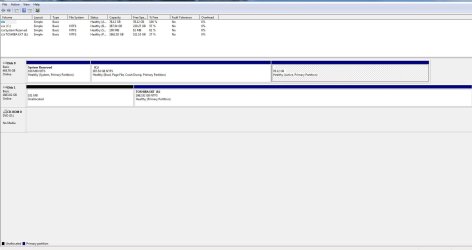
That service is set to Manual. Should it be automatic? And yes my drive is NTFS and has plenty of free space for it as you can see here.

Disks.JPG

I just used the default windows backup. And no I haven't run the disk check yet. Should I first?
 
Last edited:

My Computer

Computer type
PC/Desktop
Computer Manufacturer/Model Number
Custom Build
OS
Windows 7 Ultimate x64
CPU
AMD FX 8350
Motherboard
ECS A990FXM-A
Memory
12GB
Graphics Card(s)
nVidia Geforce GTX 550 ti 2GB
Hard Drives
1x 500GB
Antivirus
Microsoft Security Essentials
Browser
Chrome
That service is set to Manual. Should it be automatic? And yes my drive is NTFS and has plenty of free space for it as you can see here.

That looks okay to me and manual is fine for that service.

I just used the default windows backup. And no I haven't run the disk check yet. Should I first?

Well the best idea is to scheduled a disk check when you have finished using your computer and don't need it for a few hours. Just set the disk check to run and reboot.

If any other forum members have an idea why this might happen (image below) please post.

374338d1445717926-explorer-exe-keeps-crashing-system-image.jpg


I wonder if you'd get the same issue using another backup method like Macrium Reflect or Aomei One Click Recovery. Maybe someone will jump in with a suggestion on the VSS issue.

I guess we could move onto troubleshooting shell extensions in more detail if there are no suggestions.
 
Last edited:

My Computer

Computer type
Laptop
Computer Manufacturer/Model Number
ASUS
OS
Microsoft Windows 7 Home Premium 64-bit 7601 Multiprocessor Free Service Pack 1
CPU
AMD C-60 APU with Radeon(tm) HD Graphics
Motherboard
ASUSTeK COMPUTER INC. X501U
Memory
4.00 GB
Graphics Card(s)
AMD Radeon HD 6290 Graphics
Sound Card
(1) AMD High Definition Audio Device (2) Realtek High Defi
Screen Resolution
1366 x 768 x 32 bits (4294967296 colors) @ 60 Hz
Hard Drives
Hitachi HTS545050A7E380 SATA Disk Device
Antivirus
Comodo CIS & FW, SecureAplus App Whitelisting, Threatfire
Browser
Cyberfox 64bit, Opera 64bit, Airfox
Other Info
Spy-The-Spy, HitmanPro.Alert, Norton Connect Safe, MJRegWatcher, BitDefender TrafficLight, Voodoo Shield, Zemana AntiMalware
Should I try running one of those other backup methods you just said? To see if that works any better than the Windows one?
 

My Computer

Computer type
PC/Desktop
Computer Manufacturer/Model Number
Custom Build
OS
Windows 7 Ultimate x64
CPU
AMD FX 8350
Motherboard
ECS A990FXM-A
Memory
12GB
Graphics Card(s)
nVidia Geforce GTX 550 ti 2GB
Hard Drives
1x 500GB
Antivirus
Microsoft Security Essentials
Browser
Chrome

My Computer

Computer type
Laptop
Computer Manufacturer/Model Number
ASUS
OS
Microsoft Windows 7 Home Premium 64-bit 7601 Multiprocessor Free Service Pack 1
CPU
AMD C-60 APU with Radeon(tm) HD Graphics
Motherboard
ASUSTeK COMPUTER INC. X501U
Memory
4.00 GB
Graphics Card(s)
AMD Radeon HD 6290 Graphics
Sound Card
(1) AMD High Definition Audio Device (2) Realtek High Defi
Screen Resolution
1366 x 768 x 32 bits (4294967296 colors) @ 60 Hz
Hard Drives
Hitachi HTS545050A7E380 SATA Disk Device
Antivirus
Comodo CIS & FW, SecureAplus App Whitelisting, Threatfire
Browser
Cyberfox 64bit, Opera 64bit, Airfox
Other Info
Spy-The-Spy, HitmanPro.Alert, Norton Connect Safe, MJRegWatcher, BitDefender TrafficLight, Voodoo Shield, Zemana AntiMalware
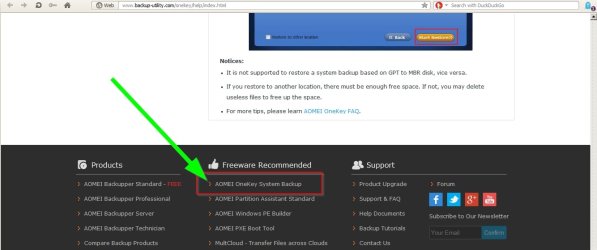
Forgot to mention that the download link is at the bottom of the page.

AOMEI OneKey Recovery.jpg
 

My Computer

Computer type
Laptop
Computer Manufacturer/Model Number
ASUS
OS
Microsoft Windows 7 Home Premium 64-bit 7601 Multiprocessor Free Service Pack 1
CPU
AMD C-60 APU with Radeon(tm) HD Graphics
Motherboard
ASUSTeK COMPUTER INC. X501U
Memory
4.00 GB
Graphics Card(s)
AMD Radeon HD 6290 Graphics
Sound Card
(1) AMD High Definition Audio Device (2) Realtek High Defi
Screen Resolution
1366 x 768 x 32 bits (4294967296 colors) @ 60 Hz
Hard Drives
Hitachi HTS545050A7E380 SATA Disk Device
Antivirus
Comodo CIS & FW, SecureAplus App Whitelisting, Threatfire
Browser
Cyberfox 64bit, Opera 64bit, Airfox
Other Info
Spy-The-Spy, HitmanPro.Alert, Norton Connect Safe, MJRegWatcher, BitDefender TrafficLight, Voodoo Shield, Zemana AntiMalware
So I'm not quite sure I understand this right. Does this say I have to create a partition to do this?
 

My Computer

Computer type
PC/Desktop
Computer Manufacturer/Model Number
Custom Build
OS
Windows 7 Ultimate x64
CPU
AMD FX 8350
Motherboard
ECS A990FXM-A
Memory
12GB
Graphics Card(s)
nVidia Geforce GTX 550 ti 2GB
Hard Drives
1x 500GB
Antivirus
Microsoft Security Essentials
Browser
Chrome
Sorry for the delay in answering. If you just stick with the "recommended" options when running for the first time it should create it's own partition to save the backup.

I have to confess that I personally use Macrium Reflect but Aomei looks like an easier solution.

[Edit] Here is a video to watch. although the video is for Windows 8 - it is the same on Windows 7


or try:

https://www.youtube.com/embed/gukKC7SsA8I
 
Last edited:

My Computer

Computer type
Laptop
Computer Manufacturer/Model Number
ASUS
OS
Microsoft Windows 7 Home Premium 64-bit 7601 Multiprocessor Free Service Pack 1
CPU
AMD C-60 APU with Radeon(tm) HD Graphics
Motherboard
ASUSTeK COMPUTER INC. X501U
Memory
4.00 GB
Graphics Card(s)
AMD Radeon HD 6290 Graphics
Sound Card
(1) AMD High Definition Audio Device (2) Realtek High Defi
Screen Resolution
1366 x 768 x 32 bits (4294967296 colors) @ 60 Hz
Hard Drives
Hitachi HTS545050A7E380 SATA Disk Device
Antivirus
Comodo CIS & FW, SecureAplus App Whitelisting, Threatfire
Browser
Cyberfox 64bit, Opera 64bit, Airfox
Other Info
Spy-The-Spy, HitmanPro.Alert, Norton Connect Safe, MJRegWatcher, BitDefender TrafficLight, Voodoo Shield, Zemana AntiMalware
Well I haven't gotten around to doing the backup yet. Yesterday was a bit hectic for me and now I have class today. But something interesting I noticed. So before explorer crashes the icons in my taskbar like the volume icon and the ethernet icon disappear and once that happens explorer doesn't crash until I either try to access the start menu or I hover my mouse over the invisible taskbar icons and then it crashes. Just thought that was interesting. Oh also I don't see a video on your post?
 

My Computer

Computer type
PC/Desktop
Computer Manufacturer/Model Number
Custom Build
OS
Windows 7 Ultimate x64
CPU
AMD FX 8350
Motherboard
ECS A990FXM-A
Memory
12GB
Graphics Card(s)
nVidia Geforce GTX 550 ti 2GB
Hard Drives
1x 500GB
Antivirus
Microsoft Security Essentials
Browser
Chrome
RE: Your observations on taskbar icons. That is interesting indeed. Try the following:

How to Reset the Notification Area Icons Cache in Vista, Windows 7, and Windows 8

Run the script and wait for the prompt to reboot.

Then for good measure rebuild the icon cache as well:

How to Rebuild the Icon Cache in Windows

When you've finished you will need to reconfigure the icons that you wish to display.

Right click "Start" and choose "Properties"

On the "Taskbar" tab choose "Customise" under "Notification" area and set it to display icons in whatever way siuts you.

Tried adding the video so hopefully you will see it now!
 

My Computer

Computer type
Laptop
Computer Manufacturer/Model Number
ASUS
OS
Microsoft Windows 7 Home Premium 64-bit 7601 Multiprocessor Free Service Pack 1
CPU
AMD C-60 APU with Radeon(tm) HD Graphics
Motherboard
ASUSTeK COMPUTER INC. X501U
Memory
4.00 GB
Graphics Card(s)
AMD Radeon HD 6290 Graphics
Sound Card
(1) AMD High Definition Audio Device (2) Realtek High Defi
Screen Resolution
1366 x 768 x 32 bits (4294967296 colors) @ 60 Hz
Hard Drives
Hitachi HTS545050A7E380 SATA Disk Device
Antivirus
Comodo CIS & FW, SecureAplus App Whitelisting, Threatfire
Browser
Cyberfox 64bit, Opera 64bit, Airfox
Other Info
Spy-The-Spy, HitmanPro.Alert, Norton Connect Safe, MJRegWatcher, BitDefender TrafficLight, Voodoo Shield, Zemana AntiMalware
Sorry for taking so long to reply. I've been swamped with college school work ugh. Anyways, the icon cache thing didn't make any difference so I guess my next step would be making a backup and reinstalling all the .NET framework then. But just wanted you to know I'm still here. I'll probably do that tomorrow as it's a bit late and I kinda wanna relax right now.
 

My Computer

Computer type
PC/Desktop
Computer Manufacturer/Model Number
Custom Build
OS
Windows 7 Ultimate x64
CPU
AMD FX 8350
Motherboard
ECS A990FXM-A
Memory
12GB
Graphics Card(s)
nVidia Geforce GTX 550 ti 2GB
Hard Drives
1x 500GB
Antivirus
Microsoft Security Essentials
Browser
Chrome
Well that backup program broke my bootloader which luckily I had a mac installation USB which has it's own bootloader so I could still boot Windows but hopefully I won't have to use that program again.
 

My Computer

Computer type
PC/Desktop
Computer Manufacturer/Model Number
Custom Build
OS
Windows 7 Ultimate x64
CPU
AMD FX 8350
Motherboard
ECS A990FXM-A
Memory
12GB
Graphics Card(s)
nVidia Geforce GTX 550 ti 2GB
Hard Drives
1x 500GB
Antivirus
Microsoft Security Essentials
Browser
Chrome
Sorry about that. It shouldn't break it - it just adds an entry to the boot menu but if it proved to be problematic then obviously don't use it.

I will avoid suggesting that software in future.
 

My Computer

Computer type
Laptop
Computer Manufacturer/Model Number
ASUS
OS
Microsoft Windows 7 Home Premium 64-bit 7601 Multiprocessor Free Service Pack 1
CPU
AMD C-60 APU with Radeon(tm) HD Graphics
Motherboard
ASUSTeK COMPUTER INC. X501U
Memory
4.00 GB
Graphics Card(s)
AMD Radeon HD 6290 Graphics
Sound Card
(1) AMD High Definition Audio Device (2) Realtek High Defi
Screen Resolution
1366 x 768 x 32 bits (4294967296 colors) @ 60 Hz
Hard Drives
Hitachi HTS545050A7E380 SATA Disk Device
Antivirus
Comodo CIS & FW, SecureAplus App Whitelisting, Threatfire
Browser
Cyberfox 64bit, Opera 64bit, Airfox
Other Info
Spy-The-Spy, HitmanPro.Alert, Norton Connect Safe, MJRegWatcher, BitDefender TrafficLight, Voodoo Shield, Zemana AntiMalware
To be honest I think it was a problem that was only on my end. Basically I had tried to install Hackintosh on a partition of my harddrive a while ago and it didn't end up working and it messed up my bootlist so I just installed it with the bootloader that it has on it and then deleted the mac portion. I guess that program just didn't agree with the Chameleon bootloader I think it's called. I don't think it would mess up other peoples' bootloader. It just won't be a viable option for me unfortunately. Unless I can somehow fix my bootloader to work normally the way it should. But anyways what was it that I should do next? Sorry I can't remember which thing I was going to do cause there were a few things.
 

My Computer

Computer type
PC/Desktop
Computer Manufacturer/Model Number
Custom Build
OS
Windows 7 Ultimate x64
CPU
AMD FX 8350
Motherboard
ECS A990FXM-A
Memory
12GB
Graphics Card(s)
nVidia Geforce GTX 550 ti 2GB
Hard Drives
1x 500GB
Antivirus
Microsoft Security Essentials
Browser
Chrome
Thanks for letting me know about the bootloader. I'm still not convinced that it's a .NET Framework issue but as it keeps showing up in Explorer crash dumps try the steps in this post:

http://www.sevenforums.com/general-...e-keeps-crashing-post3166354.html#post3166354

Including the disk cleanup. If you see a screen with a message like "Windows is configuring updates" and it seems to be stuck - just let it complete and do not switch off your computer.

I'd suggest downloading the required versions of .NET Framework first so that you've got them ready to install.

NET Framework 3.5 Service Pack 1 setup:

Code:
http://www.microsoft.com/downloads/info.aspx?na=41&srcfamilyid=ab99342f-5d1a-413d-8319-81da479ab0d7&srcdisplaylang=en&u=http%3a%2f%2fdownload.microsoft.com%2fdownload%2f0%2f6%2f1%2f061F001C-8752-4600-A198-53214C69B51F%2fdotnetfx35setup.exe

NET Framework 4 setup:

Code:
DotNet4=http://download.microsoft.com/download/E/2/1/E21644B5-2DF2-47C2-91BD-63C560427900/NDP452-KB2901907-x86-x64-AllOS-ENU.exe
 

My Computer

Computer type
Laptop
Computer Manufacturer/Model Number
ASUS
OS
Microsoft Windows 7 Home Premium 64-bit 7601 Multiprocessor Free Service Pack 1
CPU
AMD C-60 APU with Radeon(tm) HD Graphics
Motherboard
ASUSTeK COMPUTER INC. X501U
Memory
4.00 GB
Graphics Card(s)
AMD Radeon HD 6290 Graphics
Sound Card
(1) AMD High Definition Audio Device (2) Realtek High Defi
Screen Resolution
1366 x 768 x 32 bits (4294967296 colors) @ 60 Hz
Hard Drives
Hitachi HTS545050A7E380 SATA Disk Device
Antivirus
Comodo CIS & FW, SecureAplus App Whitelisting, Threatfire
Browser
Cyberfox 64bit, Opera 64bit, Airfox
Other Info
Spy-The-Spy, HitmanPro.Alert, Norton Connect Safe, MJRegWatcher, BitDefender TrafficLight, Voodoo Shield, Zemana AntiMalware
Back
Top