

Thanks to D3ftOn3Z for the inspiration. 
Simple script I've been writing for the past 3 hours. It gives you s few options to help with restarting Explorer.exe.
It gives the options to Restart Explorer, Start Explorer if it is not running, and can automatically (so tempted to say automagically) close Explorer, open Task Manager, and open the Browse dialog, so you can edit your Explorer files in maybe 2-3 clicks...
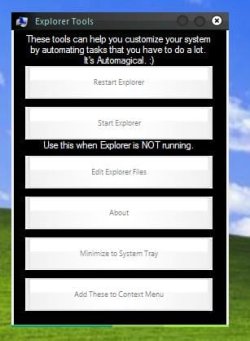
(Typed the text at the top wrong, but it doesn't matter too much)
Please report any bugs, especially with the Context Menu instructions. I read those off from D3ft0n3Z, so blame him! :devil: (kidding)
And the "Installer" at the beginning is an annoying, but crucial process. Can't help it, sorry.
Aaaand here's the download link. View attachment Explorer Tools.exe
I got rid of the setup screen at the beginning, in favor of a silent one that would load faster.
Simple script I've been writing for the past 3 hours. It gives you s few options to help with restarting Explorer.exe.
It gives the options to Restart Explorer, Start Explorer if it is not running, and can automatically (so tempted to say automagically) close Explorer, open Task Manager, and open the Browse dialog, so you can edit your Explorer files in maybe 2-3 clicks...
(Typed the text at the top wrong, but it doesn't matter too much)
Please report any bugs, especially with the Context Menu instructions. I read those off from D3ft0n3Z, so blame him! :devil: (kidding)
And the "Installer" at the beginning is an annoying, but crucial process. Can't help it, sorry.
Aaaand here's the download link. View attachment Explorer Tools.exe
I got rid of the setup screen at the beginning, in favor of a silent one that would load faster.
Last edited:
My Computer
- Computer type
- PC/Desktop
- Computer Manufacturer/Model Number
- Custom built
- OS
- Windows 8 Pro 64-bit
- CPU
- Intel Core i7 950 @4.4GHz
- Motherboard
- EVGA 131-GT-E767
- Memory
- 12GB DDR3 1333MHz @1400 (9-9-9-24)
- Graphics Card(s)
- 2x AMD Radeon HD 6770
- Sound Card
- Sound Blaster Audigy
- Monitor(s) Displays
- Acer S231HL + Acer E19T5W
- Screen Resolution
- 1920x1080 + 1440x900
- Hard Drives
- 128GB Samsung 840 Pro
1TB Seagate Barracuda 7200RPM 64mb
500GB Seagate Barracuda 7200RPM 16mb
- PSU
- Corsair GS800
- Case
- Custom-made
- Cooling
- CM Hyper212+, lots of fans
- Keyboard
- NMB RT8255C+
- Mouse
- Func MS-3
- Internet Speed
- 30/1.5
- Antivirus
- Microsoft Security Essentials/Spybot SD/Malwarebytes
- Browser
- Google Chrome
- Other Info
- Onkyo TX-27 receiver & two Realistic Optimus T100s.


 Good job.


