theoldwizard1
New member
- Local time
- 8:13 AM
- Messages
- 26
External drive NOT Removable
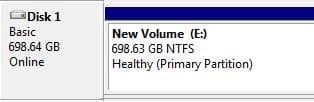
I have a NexStar CX external housing with a Toshiba MQ01ABD075 that a pull out of something. Slapped the 2 together an plugged it into a spare USB2 port on my laptop. Then is used [FONT=""Arial Black"]DISKPART[/FONT] from a [FONT="Courier New"Arial Black"]CMD[/FONT] window (running as Administrator) and after [FONT=""Arial Black"]SELECT[/FONT]ing the drive, I did a [FONT=""Arial Black"]CLEAN[/FONT] and [FONT=""Arial Black"]PARTITION[/FONT] making one partition on the drive. Then from [FONT=""Arial Black"]DISK MANAGEMENT[/FONT] I did a Quick Format. I have also set the USB Device Properties Policy for Better Performance.
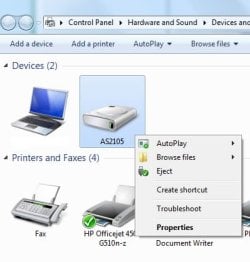
Every thing is fine, but the disk can NOT be EJECTed.
Using the Safely Remove Hardware FAILS because it says the device is NOT removable.
I have researched this issue and I am not the first to encounter it. I am looking for a definitive answer so please, no SWAGs.
I have a NexStar CX external housing with a Toshiba MQ01ABD075 that a pull out of something. Slapped the 2 together an plugged it into a spare USB2 port on my laptop. Then is used [FONT=""Arial Black"]DISKPART[/FONT] from a [FONT="Courier New"Arial Black"]CMD[/FONT] window (running as Administrator) and after [FONT=""Arial Black"]SELECT[/FONT]ing the drive, I did a [FONT=""Arial Black"]CLEAN[/FONT] and [FONT=""Arial Black"]PARTITION[/FONT] making one partition on the drive. Then from [FONT=""Arial Black"]DISK MANAGEMENT[/FONT] I did a Quick Format. I have also set the USB Device Properties Policy for Better Performance.
Every thing is fine, but the disk can NOT be EJECTed.
Using the Safely Remove Hardware FAILS because it says the device is NOT removable.
I have researched this issue and I am not the first to encounter it. I am looking for a definitive answer so please, no SWAGs.
Attachments

Last edited:
My Computer
- OS
- Windows 7 Home Premium 64bit