

ericksb
New member
- Local time
- 3:15 PM
- Messages
- 2
Hi guys, firstly I'm new to this forum.
I currently have an issue on my notebook. When I plug in any external hard drive it appears in disk management as well as "my computer" ie.:
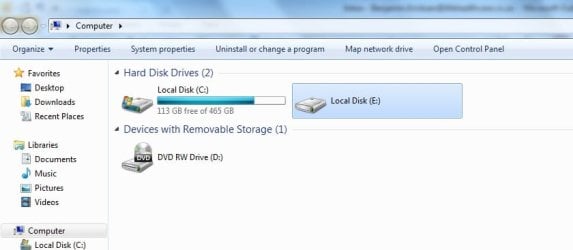
However when I try to access the hard drive I get this message:
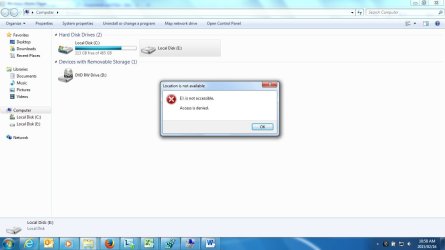
I have researched this, but can't find anything posted anywhere. I have tried resetting ownership, but when I try to do that I get the same message. Access denied. This is not related to the drive as all external's I plug in has the same result and I get the same result regardless of the usb port I plug the drives in to. I have also tried restarting the laptop a few times. Also, I did not change any settings or anything. I plugged in a friend's external and it started doing this. I unplugged it and tried my external which was working fine and had the same result with that and every other external I've tried since. Could it be a corrupt registry file? Please assist urgently. Thanks in advance.
I currently have an issue on my notebook. When I plug in any external hard drive it appears in disk management as well as "my computer" ie.:
However when I try to access the hard drive I get this message:
I have researched this, but can't find anything posted anywhere. I have tried resetting ownership, but when I try to do that I get the same message. Access denied. This is not related to the drive as all external's I plug in has the same result and I get the same result regardless of the usb port I plug the drives in to. I have also tried restarting the laptop a few times. Also, I did not change any settings or anything. I plugged in a friend's external and it started doing this. I unplugged it and tried my external which was working fine and had the same result with that and every other external I've tried since. Could it be a corrupt registry file? Please assist urgently. Thanks in advance.
My Computer
- Computer type
- Laptop
- Computer Manufacturer/Model Number
- HP
- OS
- Windows 7 Enterprise 32 bit


