External Hard drive doesn't show up!

Pimjong

New member
Local time
7:52 AM
Messages
10
Hello guys,

I have a problem. Whenever i plug in my external hard drive (1TB Maxtor) in my pc, it doesn't show up. It has always been working, but since i've installed Windows 7 yesterday it doesn't work anymore. So it HAS to be something to do with Windows 7.

Anyone knows any solution? Please help me, because all my documents are stored on this external hard drive and i need them on this pc.

Thanks,
Pim

EDIT:
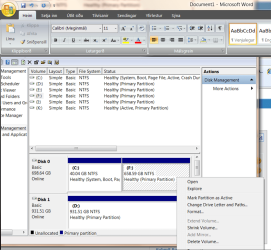
It does show up in disk manager (don't know how it's called in english, i use dutch windows 7) and it even shows the model and brand name of the drive. So i am wondering why it won't show up in explorer?
 
Last edited:

My Computer

Computer Manufacturer/Model Number
Packard Bell
OS
Windows 7
CPU
AMD Athlon 64 X2
Memory
3,00 GB RAM
Graphics Card(s)
NVIDIA GeForce 8400 GS
Sound Card
High Definition Audio-device
Monitor(s) Displays
Packard Bell
Screen Resolution
1680*1040
Hard Drives
350 GB SATA hard drive
Welcome aboard. Did you try with a diff USB port?
 

My Computer

Computer Manufacturer/Model Number
MacBook Pro
OS
Lion
CPU
i5
Memory
4GB
Graphics Card(s)
Intel
Screen Resolution
1200x800
Hard Drives
Seagate FreeAgent GO 250GB Ext. HDD
Thanks ;).

Yes, i've tried 4 different USB ports, but nothing changes. Strange thing is, i can 'safely remove' my hard drive. So my pc does really recognize it, but it just doesn't show up.
 

My Computer

Computer Manufacturer/Model Number
Packard Bell
OS
Windows 7
CPU
AMD Athlon 64 X2
Memory
3,00 GB RAM
Graphics Card(s)
NVIDIA GeForce 8400 GS
Sound Card
High Definition Audio-device
Monitor(s) Displays
Packard Bell
Screen Resolution
1680*1040
Hard Drives
350 GB SATA hard drive
When u insert the device, does it look like W7 is scanning it, or it doesn't even scan (knows that a USB device has been inserted)?
 

My Computer

Computer Manufacturer/Model Number
Lenovo ThinkPad T60
OS
Windows 7 Ultimate 64Bit
CPU
GenuineIntel Intel(R) Core(TM) DuoCore T2400 @ 1.83GHz
Motherboard
Intel(R) 82801G (ICH7 Family)
Memory
2.00 GB
Graphics Card(s)
Mobile Intel(R) 945 Express Chipset
Sound Card
SoundMAX Integrated Digital HD Audio
Monitor(s) Displays
ThinkPad Display
Screen Resolution
1400x1050
Hard Drives
100Gb SATA
Keyboard
Standard Keyboard
Mouse
HID-compliant Mouse
Internet Speed
Cable Broadband - 54Mbps
Other Info
Intel(R) PRO/1000 PL Network Connection
11a/b/g Wireless LAN Mini PCI Express Adapter
When u insert the device, does it look like W7 is scanning it, or it doesn't even scan (knows that a USB device has been inserted)?
It does know that a USB device has been inserted because it does show up in disk manager, hardware manager or however thats called in english. Also, when i insert the external hard drive, the button with the 'safe remove' thing shows up in my taskbar.
 

My Computer

Computer Manufacturer/Model Number
Packard Bell
OS
Windows 7
CPU
AMD Athlon 64 X2
Memory
3,00 GB RAM
Graphics Card(s)
NVIDIA GeForce 8400 GS
Sound Card
High Definition Audio-device
Monitor(s) Displays
Packard Bell
Screen Resolution
1680*1040
Hard Drives
350 GB SATA hard drive
Hi there
Quite a common problem

Just go into Control panel===>administrative tools==>Computer management==>Disk management

Now you'll probably see your disk WITHOUT a Letter

Give it a drive letter and you are up and running.

This often happens if you swap different usb disks especially between systems as the Drive letter sometimes gets "hosed up".

Cheers
jimbo
 

My Computer

Computer type
PC/Desktop
Computer Manufacturer/Model Number
Custom built, several laptops HP/ASUS
OS
Linux CENTOS 7 / various Windows OS'es and servers
CPU
Intel i7 Intel i5
Memory
8GB, 16GB
Graphics Card(s)
On Motherboard
Sound Card
Realtek HD audio
Monitor(s) Displays
Apple Cinema display, Samsung LCD
Screen Resolution
1920 X 1080
Hard Drives
4 X 1TB SATA
Mouse
Toshiba wireless laser
Internet Speed
> 20MB up
Thanks, but didn't work. Maybe it's just me, but i can't give it a drive letter?

Here's a screenshot (in Dutch xD):
206e8h4.gif
 

My Computer

Computer Manufacturer/Model Number
Packard Bell
OS
Windows 7
CPU
AMD Athlon 64 X2
Memory
3,00 GB RAM
Graphics Card(s)
NVIDIA GeForce 8400 GS
Sound Card
High Definition Audio-device
Monitor(s) Displays
Packard Bell
Screen Resolution
1680*1040
Hard Drives
350 GB SATA hard drive
Hi Pim Welcome to SevenForums

Not sure why you are looking at it in disk mgt, if you want to see whats on it shouldn't you be in IE, open IE then plug in USB cable (makeing sure connections are good) it will recognize the drive and you can open the tree.
 

My Computer

Computer Manufacturer/Model Number
Dell XPS 730
OS
Windows 7 Home Premium 64 bit
CPU
Intel Core 2 quad Extreme Q9770 @ 3.2 GHz
Memory
4x2 GB Muskin 1600 MHz ram
Graphics Card(s)
NVidia GTX 250
Sound Card
Soundblaster X-Fi Fatality Champion
Monitor(s) Displays
2 Dell 2007WFP Ultrascans
Screen Resolution
3360 x 1050
Hard Drives
WD Black 1TB sata, 2-WD Black 500 sata, 2-Seagate 500 Go external
PSU
1000 Watt
Cooling
air
Keyboard
MS Natrual Keyboard Pro
Mouse
Logitech Wireless Trackball
Internet Speed
DSL Elite
Hi there
Right mouse click on the 931 GB partition and then assign drive and letter

I assume that's a Primary partition and it's already been formatted .

It should work.

Here's a screen dump of what you should get.

Cheers
jimbo
 

Attachments

  • partition.png
    partition.png
    82.3 KB · Views: 2,810

My Computer

Computer type
PC/Desktop
Computer Manufacturer/Model Number
Custom built, several laptops HP/ASUS
OS
Linux CENTOS 7 / various Windows OS'es and servers
CPU
Intel i7 Intel i5
Memory
8GB, 16GB
Graphics Card(s)
On Motherboard
Sound Card
Realtek HD audio
Monitor(s) Displays
Apple Cinema display, Samsung LCD
Screen Resolution
1920 X 1080
Hard Drives
4 X 1TB SATA
Mouse
Toshiba wireless laser
Internet Speed
> 20MB up
Hi Pim Welcome to SevenForums

Not sure why you are looking at it in disk mgt, if you want to see whats on it shouldn't you be in IE, open IE then plug in USB cable (makeing sure connections are good) it will recognize the drive and you can open the tree.

Sorry for being such a dumbass :P, but what do you mean by IE? 'cause I'm pretty sure you dont meant internet explorer xD.

Hi there
Right mouse click on the 931 GB partition and then assign drive and letter

I assume that's a Primary partition and it's already been formatted .

It should work.

Here's a screen dump of what you should get.

Cheers
jimbo

It's a primary partition, and it's been formatted to NTFS. The problem is, when i right click the partition, all the options are unclickable. All i can do is remove it, but i don't know if that is a good idea :P.
 

My Computer

Computer Manufacturer/Model Number
Packard Bell
OS
Windows 7
CPU
AMD Athlon 64 X2
Memory
3,00 GB RAM
Graphics Card(s)
NVIDIA GeForce 8400 GS
Sound Card
High Definition Audio-device
Monitor(s) Displays
Packard Bell
Screen Resolution
1680*1040
Hard Drives
350 GB SATA hard drive
Hi there
I think the EFI system partition (whatever that is) is hosing this up.

What I would do is download GPARTED and re-partition the HDD with NTFS - you can split into different partitions.

GParted -- Download

Burn GPARTED to CD and then boot it with your external disk plugged in.

(Note save any data before you re-format -- if you've got a laptop with XP or whatever save any data on to that).

Re-partition the HDD and then boot again into windows.

There's no problem with W7 and large HDD's -- I've got 2 X 1.5 TB's no prob.

Cheers
jimbo
 

My Computer

Computer type
PC/Desktop
Computer Manufacturer/Model Number
Custom built, several laptops HP/ASUS
OS
Linux CENTOS 7 / various Windows OS'es and servers
CPU
Intel i7 Intel i5
Memory
8GB, 16GB
Graphics Card(s)
On Motherboard
Sound Card
Realtek HD audio
Monitor(s) Displays
Apple Cinema display, Samsung LCD
Screen Resolution
1920 X 1080
Hard Drives
4 X 1TB SATA
Mouse
Toshiba wireless laser
Internet Speed
> 20MB up
Jimbo45 unless i'm misunderstanding his first post he's trying to plug in a USB drive? The one he's looking at in disk mgmt is an internal drive. I've never seen a usb drive that big. Just a question that can be answered by thread starter:confused:
 

My Computer

Computer Manufacturer/Model Number
Dell XPS 730
OS
Windows 7 Home Premium 64 bit
CPU
Intel Core 2 quad Extreme Q9770 @ 3.2 GHz
Memory
4x2 GB Muskin 1600 MHz ram
Graphics Card(s)
NVidia GTX 250
Sound Card
Soundblaster X-Fi Fatality Champion
Monitor(s) Displays
2 Dell 2007WFP Ultrascans
Screen Resolution
3360 x 1050
Hard Drives
WD Black 1TB sata, 2-WD Black 500 sata, 2-Seagate 500 Go external
PSU
1000 Watt
Cooling
air
Keyboard
MS Natrual Keyboard Pro
Mouse
Logitech Wireless Trackball
Internet Speed
DSL Elite
Jimbo45 unless i'm misunderstanding his first post he's trying to plug in a USB drive? The one he's looking at in disk mgmt is an internal drive. I've never seen a usb drive that big. Just a question that can be answered by thread starter:confused:
It's a 1TB external hard drive, so it's the right one :P.

Anyway, i might try to format / partition it later, but i dont have any computer at the moment to work with. Maybe ill just load ubuntu on this pc, put the files from the external hard drive (if it does work with ubuntu) on the internal hard drive and then format it and stuff. But maybe someone knows some other options, because i am affraid it wont solve it. I've used the hard drive the same day i installed windows 7, so it pretty much has to have something to do with windows 7.
 

My Computer

Computer Manufacturer/Model Number
Packard Bell
OS
Windows 7
CPU
AMD Athlon 64 X2
Memory
3,00 GB RAM
Graphics Card(s)
NVIDIA GeForce 8400 GS
Sound Card
High Definition Audio-device
Monitor(s) Displays
Packard Bell
Screen Resolution
1680*1040
Hard Drives
350 GB SATA hard drive
Jimbo45 unless i'm misunderstanding his first post he's trying to plug in a USB drive? The one he's looking at in disk mgmt is an internal drive. I've never seen a usb drive that big. Just a question that can be answered by thread starter:confused:

Hi there
There's plenty of USB 1TB external drives around these days - quite cheap as well.

BTW Disk Mgmt screen doesn't distinguish between internal and external HDD's - just numbers the drives sequentially.


Shouldn't be any problem having a Linux OS also on the HDD -- W7 normally hasn't got any problem with USB external drives apart from sometimes losing the Drive letter which should be fixed as in my previous posts.

I've run out of ideas now I'm afraid.

Cheers
jimbo
 

My Computer

Computer type
PC/Desktop
Computer Manufacturer/Model Number
Custom built, several laptops HP/ASUS
OS
Linux CENTOS 7 / various Windows OS'es and servers
CPU
Intel i7 Intel i5
Memory
8GB, 16GB
Graphics Card(s)
On Motherboard
Sound Card
Realtek HD audio
Monitor(s) Displays
Apple Cinema display, Samsung LCD
Screen Resolution
1920 X 1080
Hard Drives
4 X 1TB SATA
Mouse
Toshiba wireless laser
Internet Speed
> 20MB up
Jimbo45 unless i'm misunderstanding his first post he's trying to plug in a USB drive? The one he's looking at in disk mgmt is an internal drive. I've never seen a usb drive that big. Just a question that can be answered by thread starter:confused:

Hi there
There's plenty of USB 1TB external drives around these days - quite cheap as well.

BTW Disk Mgmt screen doesn't distinguish between internal and external HDD's - just numbers the drives sequentially.


Shouldn't be any problem having a Linux OS also on the HDD -- W7 normally hasn't got any problem with USB external drives apart from sometimes losing the Drive letter which should be fixed as in my previous posts.

I've run out of ideas now I'm afraid.

Cheers
jimbo

Ok then, i'll try it with linux os and then formatting it. I'll post if it worked!

Cheers ;)
 

My Computer

Computer Manufacturer/Model Number
Packard Bell
OS
Windows 7
CPU
AMD Athlon 64 X2
Memory
3,00 GB RAM
Graphics Card(s)
NVIDIA GeForce 8400 GS
Sound Card
High Definition Audio-device
Monitor(s) Displays
Packard Bell
Screen Resolution
1680*1040
Hard Drives
350 GB SATA hard drive
UPDATE:
I just started Ubuntu from a live-cd and checked the external hard drive. It does work, and i can acces my files, but apparently it has a lot of bad sectors. Luckily ubuntu told me that :P.
So, i'm now copying all the files to the internal hard drive, and will totally format the external hard drive after that. That will be, after about 5 hours (yes, there's a lot of stuff on my external hard drive :P). Anyone knows if that will solve the problem, or that i have to just buy a new hard drive because this one is about to fail?
 

My Computer

Computer Manufacturer/Model Number
Packard Bell
OS
Windows 7
CPU
AMD Athlon 64 X2
Memory
3,00 GB RAM
Graphics Card(s)
NVIDIA GeForce 8400 GS
Sound Card
High Definition Audio-device
Monitor(s) Displays
Packard Bell
Screen Resolution
1680*1040
Hard Drives
350 GB SATA hard drive
Pimjong i have a 500 gig external hd and i just plug it in, it gets recognized, i go to Windows Explorer and read, move, etc without prob's. Might be worth a try before moving everything.
 

My Computer

Computer Manufacturer/Model Number
Dell XPS 730
OS
Windows 7 Home Premium 64 bit
CPU
Intel Core 2 quad Extreme Q9770 @ 3.2 GHz
Memory
4x2 GB Muskin 1600 MHz ram
Graphics Card(s)
NVidia GTX 250
Sound Card
Soundblaster X-Fi Fatality Champion
Monitor(s) Displays
2 Dell 2007WFP Ultrascans
Screen Resolution
3360 x 1050
Hard Drives
WD Black 1TB sata, 2-WD Black 500 sata, 2-Seagate 500 Go external
PSU
1000 Watt
Cooling
air
Keyboard
MS Natrual Keyboard Pro
Mouse
Logitech Wireless Trackball
Internet Speed
DSL Elite
Well, the problem is, i can't open it up in Explorer since i've installed Windows 7... So i dont think i have many choices left... Anyway, just 45 minutes left and everything is on my internal hd. Then HOPEFULLY it works in 7 after formatting..!
 

My Computer

Computer Manufacturer/Model Number
Packard Bell
OS
Windows 7
CPU
AMD Athlon 64 X2
Memory
3,00 GB RAM
Graphics Card(s)
NVIDIA GeForce 8400 GS
Sound Card
High Definition Audio-device
Monitor(s) Displays
Packard Bell
Screen Resolution
1680*1040
Hard Drives
350 GB SATA hard drive
Sorry i couldn't be more help Pimjong just one of those probs with no simple fix. Good luck with the move and format.
 

My Computer

Computer Manufacturer/Model Number
Dell XPS 730
OS
Windows 7 Home Premium 64 bit
CPU
Intel Core 2 quad Extreme Q9770 @ 3.2 GHz
Memory
4x2 GB Muskin 1600 MHz ram
Graphics Card(s)
NVidia GTX 250
Sound Card
Soundblaster X-Fi Fatality Champion
Monitor(s) Displays
2 Dell 2007WFP Ultrascans
Screen Resolution
3360 x 1050
Hard Drives
WD Black 1TB sata, 2-WD Black 500 sata, 2-Seagate 500 Go external
PSU
1000 Watt
Cooling
air
Keyboard
MS Natrual Keyboard Pro
Mouse
Logitech Wireless Trackball
Internet Speed
DSL Elite
Hehe yeah no problem ;). Maybe i'll buy a new internal hd soon, these hd movie's really are huge :P.

UPDATE:
Just 30 minutes left xD. Then i can finally format the hard drive and get on Windows 7 again :).
 

My Computer

Computer Manufacturer/Model Number
Packard Bell
OS
Windows 7
CPU
AMD Athlon 64 X2
Memory
3,00 GB RAM
Graphics Card(s)
NVIDIA GeForce 8400 GS
Sound Card
High Definition Audio-device
Monitor(s) Displays
Packard Bell
Screen Resolution
1680*1040
Hard Drives
350 GB SATA hard drive
Back
Top