Solved External Hard Drive error ~$WV.FAT32

Flippylumpy

New member
Local time
8:08 PM
Messages
18
Hi,

I'm having troubles on opening my hard drive. 1st, there was this Shortcut virus that affected my external, i thought it was just a simple virus cause it just creates shortcuts of your files instead of getting to it directly. So after a day, i decided to fix it my self. But as always without asking, my Norton anti virus deleted the infected files right away when i plugged in the drive.

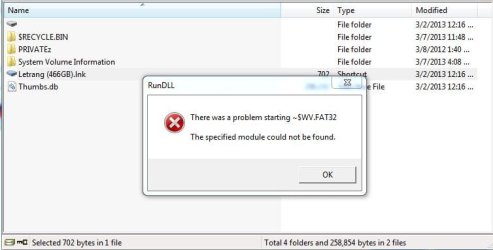
Now I can't open my Hard Drive, it states that "There was a problem starting ~$WV.FAT32, The specified module could not be found."

I've tried chkdsk/r x: but it always hangs or stops at 21 percent stage 4 of 5.


If possible, i really need to fix my external without losing the files. PLEASE help. :cry:
 

My Computer

Computer type
Laptop
Computer Manufacturer/Model Number
acer
OS
windows 7 ultimate 32bit

My Computer

Computer type
PC/Desktop
Computer Manufacturer/Model Number
Own build (new) Desk1 / Asus ROG Win 7 / Desk2 1st build
OS
Desk1 7 Home Prem / Desk2 10 Pro / Main lap Asus ROG 10 Pro 2 laptop Toshiba 7 Pro Asus P2520 7 & 10
CPU
Desk1 i5 3750K / Laptop i7 GTX 860M / Desk2 i5 2500
Motherboard
Desk1 Asus P877-V / Desk2 Gigabyte H67 UD3H / Laptop ?
Memory
Desk1 8GB (1866) / Desk2 16GB (1333) / Laptop 8Gb DDR3
Graphics Card(s)
Desk 1& 2NVidia GTX 650 & Laptops on board Intel
Sound Card
Desk 1 & 2 -XONAR DG Realtek High Def audio Laptop
Monitor(s) Displays
Desk 1 Benq HD 2450 / Desk2 Philips 24" / Laptop 17.5"
Screen Resolution
1920x1080 D1 & D2 & Laptop 1
Hard Drives
Desk1 Samsung 120GB 830 SSD
Asus ROG 256GB 850 Pro SSD
Desk2 Samsung 840 256 SSD
Toshiba 120GB EVO
PSU
Desk 1 Corsair HX 1050/ Laptop ? / Desk 2 Corsair HX 650
Case
Desk 1 Cooler HAF XM ? Toshiba laptop / Desk2 Coolermaster
Cooling
Fans on all Desk1 -2 Desk2 - all Coolermasters 5 Laptop ?
Keyboard
Desk 1 MS Sidewinder X6 Desk 2 MS Sidewinder X 4
Mouse
Desk 1&2 - Gigabyte MS 900 gamer - laptop - Logitec wireless
Internet Speed
ADSL2+
Other Info
One other Desktop (tester) and spare Toshba laptop both with SSD's
Running Kaspersky 2016 ISS on all machines config'd identically
Logitec audio stereo systems on each machine (x3)
Canon MG5250MFC
Router/modem TP-Link running WPA2SK
H........Now I can't open my Hard Drive, it states that "There was a problem starting ~$WV.FAT32, The specified module could not be found."....... :cry:

Can you please elaborate?

1. Does the external drive show in Disk Management?

2. Does the above error message display when you click on the drive to open it in Explorer or when you try to open a file/folder in the external drive?

Removing the shortcut virus would have been a simple job but Norton by deleting only the specified module without really deleting the autorun.inf file in the external drive has complicated it. Or so, I would think.

If you can see the autorun.inf file, select it press Shift+delete and send it to oblivion.

I would think if somehow we can see the file and delete it half the problem is solved.
 

My Computer

OS
Windows 7 Home Premium 32 bit
ICit2lol -- Uhm yeah, the first time that i plug it on my laptop i conducted a virus scan which deleted some infected files. As i recall, i didn't see any complicated files infected. But the other day that i plug it, Norton has already deleted that FAT32.dll file, i can't remember much how the name goes. Can't open my norton right now to see the history. There's something wrong i guess, but it's something about the FAT32 file.

sorry for my bad English.
 

My Computer

Computer type
Laptop
Computer Manufacturer/Model Number
acer
OS
windows 7 ultimate 32bit
H........Now I can't open my Hard Drive, it states that "There was a problem starting ~$WV.FAT32, The specified module could not be found."....... :cry:

Can you please elaborate?

1. Does the external drive show in Disk Management?

2. Does the above error message display when you click on the drive to open it in Explorer or when you try to open a file/folder in the external drive?

Removing the shortcut virus would have been a simple job but Norton by deleting only the specified module without really deleting the autorun.inf file in the external drive has complicated it. Or so, I would think.

If you can see the autorun.inf file, select it press Shift+delete and send it to oblivion.

I would think if somehow we can see the file and delete it half the problem is solved.

1. Yes! Status is: Healthy (Active, Primary Partition)

2. Yes it does, here how it looks like from the directory. http://tinypic.com/view.php?pic=fd69sm&s=6
and whenever i want to open it, http://tinypic.com/view.php?pic=2wmjadv&s=6

There's no autorun.inf on my drive, can't find it..even using CMD. But the autorun of my drive still Runs every time.


Sorry for my bad English.
 

My Computer

Computer type
Laptop
Computer Manufacturer/Model Number
acer
OS
windows 7 ultimate 32bit
Well Flippy Lumpy I am not acquainted with that brand hard drive so I don't know what software came with it plus (I don't know if jumanji would agree) that - I would be tempted to completely wipe and reformat that drive.

But I would like first to see what jumanji has to say to that so hold off for a while.

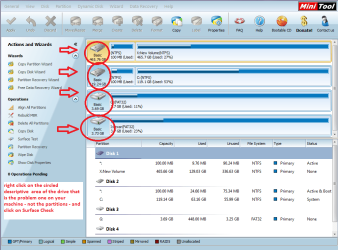
Now one thing you could do in the meantime to check the drive physically would be to run a surface check with the Partition Wizard.

Best Free Partition Manager Freeware and free partition magic for Windows 7, Windows 8, Windows Vista and Windows XP 32 bit & 64 bit. MiniTool Free Partition Manager Software Home Edition.

See my pic to see how the drives will line up

As a by the by an easy way of making / loading pics is this How to Use the Snipping Tool in Vista
 

Attachments

  • SURFACE.PNG
    SURFACE.PNG
    64.3 KB · Views: 69

My Computer

Computer type
PC/Desktop
Computer Manufacturer/Model Number
Own build (new) Desk1 / Asus ROG Win 7 / Desk2 1st build
OS
Desk1 7 Home Prem / Desk2 10 Pro / Main lap Asus ROG 10 Pro 2 laptop Toshiba 7 Pro Asus P2520 7 & 10
CPU
Desk1 i5 3750K / Laptop i7 GTX 860M / Desk2 i5 2500
Motherboard
Desk1 Asus P877-V / Desk2 Gigabyte H67 UD3H / Laptop ?
Memory
Desk1 8GB (1866) / Desk2 16GB (1333) / Laptop 8Gb DDR3
Graphics Card(s)
Desk 1& 2NVidia GTX 650 & Laptops on board Intel
Sound Card
Desk 1 & 2 -XONAR DG Realtek High Def audio Laptop
Monitor(s) Displays
Desk 1 Benq HD 2450 / Desk2 Philips 24" / Laptop 17.5"
Screen Resolution
1920x1080 D1 & D2 & Laptop 1
Hard Drives
Desk1 Samsung 120GB 830 SSD
Asus ROG 256GB 850 Pro SSD
Desk2 Samsung 840 256 SSD
Toshiba 120GB EVO
PSU
Desk 1 Corsair HX 1050/ Laptop ? / Desk 2 Corsair HX 650
Case
Desk 1 Cooler HAF XM ? Toshiba laptop / Desk2 Coolermaster
Cooling
Fans on all Desk1 -2 Desk2 - all Coolermasters 5 Laptop ?
Keyboard
Desk 1 MS Sidewinder X6 Desk 2 MS Sidewinder X 4
Mouse
Desk 1&2 - Gigabyte MS 900 gamer - laptop - Logitec wireless
Internet Speed
ADSL2+
Other Info
One other Desktop (tester) and spare Toshba laptop both with SSD's
Running Kaspersky 2016 ISS on all machines config'd identically
Logitec audio stereo systems on each machine (x3)
Canon MG5250MFC
Router/modem TP-Link running WPA2SK
hmmmm.....ICit2, I don't think Letang is the brand name of the hard drive. It could be the name given by the virus.

And Flippylumpy, don't panic. I am still hopeful that all your files may be safe. We only have to find a way to get rid of the virus and then recover them.

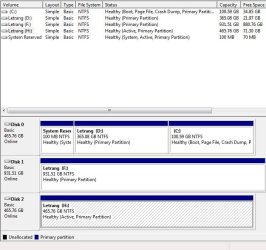
1. Please upload the screenshot of how your external hard drive looks in Windows Disk Management. http://www.sevenforums.com/tutorials/274797-disk-management-post-screen-capture-image.html

(For any other screenshots too, please use the Windows Snipping Tool and upload it. http://www.sevenforums.com/tutorials/9733-screenshots-files-upload-post-seven-forums.html )

2. Was it FAT32 formatted by you in Windows 7?

These just to get the full picture.

Now just do this and report with screenshots.

Shut down your computer, unplug your external drive( if not done already ) and then boot.

Plug-in your external drive while pressing the left Shift key so that autorun is disabled.

Now run WinRAR and explore your external drive with it.

Post a screenshot of the contents.

( You may find autorun.inf file and other virus files which you need to delete selecting all those. But first let us see it.)

Well, I have done quite a bit of research on your problem and have chosen this as the easiest and best way to get rid of the rogues. If it does not work, we can try other methods.
 
Last edited:

My Computer

OS
Windows 7 Home Premium 32 bit
hmmmm.....ICit2, I don't think Letang is the brand name of the hard drive. It could be the name given by the virus.

Yep J I wasn't real happy with it being called that unless it was some obscure brand eh?

John
 

My Computer

Computer type
PC/Desktop
Computer Manufacturer/Model Number
Own build (new) Desk1 / Asus ROG Win 7 / Desk2 1st build
OS
Desk1 7 Home Prem / Desk2 10 Pro / Main lap Asus ROG 10 Pro 2 laptop Toshiba 7 Pro Asus P2520 7 & 10
CPU
Desk1 i5 3750K / Laptop i7 GTX 860M / Desk2 i5 2500
Motherboard
Desk1 Asus P877-V / Desk2 Gigabyte H67 UD3H / Laptop ?
Memory
Desk1 8GB (1866) / Desk2 16GB (1333) / Laptop 8Gb DDR3
Graphics Card(s)
Desk 1& 2NVidia GTX 650 & Laptops on board Intel
Sound Card
Desk 1 & 2 -XONAR DG Realtek High Def audio Laptop
Monitor(s) Displays
Desk 1 Benq HD 2450 / Desk2 Philips 24" / Laptop 17.5"
Screen Resolution
1920x1080 D1 & D2 & Laptop 1
Hard Drives
Desk1 Samsung 120GB 830 SSD
Asus ROG 256GB 850 Pro SSD
Desk2 Samsung 840 256 SSD
Toshiba 120GB EVO
PSU
Desk 1 Corsair HX 1050/ Laptop ? / Desk 2 Corsair HX 650
Case
Desk 1 Cooler HAF XM ? Toshiba laptop / Desk2 Coolermaster
Cooling
Fans on all Desk1 -2 Desk2 - all Coolermasters 5 Laptop ?
Keyboard
Desk 1 MS Sidewinder X6 Desk 2 MS Sidewinder X 4
Mouse
Desk 1&2 - Gigabyte MS 900 gamer - laptop - Logitec wireless
Internet Speed
ADSL2+
Other Info
One other Desktop (tester) and spare Toshba laptop both with SSD's
Running Kaspersky 2016 ISS on all machines config'd identically
Logitec audio stereo systems on each machine (x3)
Canon MG5250MFC
Router/modem TP-Link running WPA2SK
Icit2lol

-Yeah, it's a Seagate external drive. I'm doing the surface check right now...but the calculated time remaining is 4 hours. I'll just post the screen shot after with the snipping tool sir.
 

My Computer

Computer type
Laptop
Computer Manufacturer/Model Number
acer
OS
windows 7 ultimate 32bit
Jumanji

Oh haven't said this...i renamed my drive to "Letrang", it is "Letter" in English. Sorry for the confusion.

yeah, thanks!
1.Here, it is the one named LETRANG (H)
3.JPG
% Free: 15%, Fault Tolerance: No, Overhead: 0%

2. Hm, nope. Never been formatted since i bought it last year.

What i did was by Open Archived, then changed the search by type to All archive to All format.
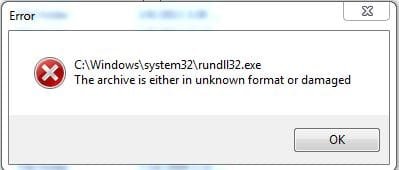
Then the shortcut to my drive showed up, when i try to open it. This error shows up 4.JPG

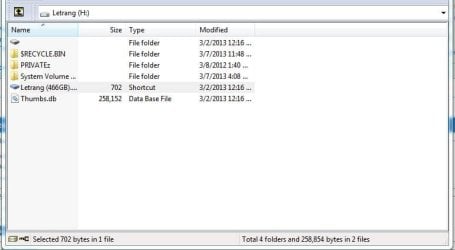
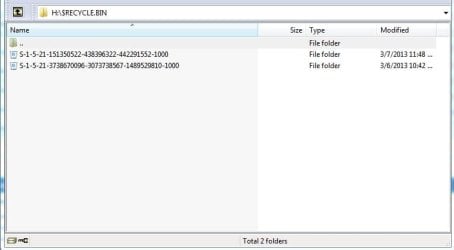
Now using the WinRar Navigation from the main screen, this what shows up. 5.JPG

The $RECYCLE.BIN was the only folder that i can open.
6.JPG

And by opening the The Shortcut file to my directory which is Letrang (466GB).Ink, this pops up again.
7.JPG
 

My Computer

Computer type
Laptop
Computer Manufacturer/Model Number
acer
OS
windows 7 ultimate 32bit
OK, you have done a good job.

By way of explanation, we are using WinRAR just to explore the drive in question, since it can show all hidden and even superhidden files and enable us to delete any unwanted files. No other WinRAR operation is required.

Just doubleclick on the selected drive to show its contents.

09-03-2013 10-06-05.jpg

Getting back to your screenshots,

1. Remove any other external drive/s and have only the drive on which we operate.( I see another Letrang external drive.)

2. Explore the problem drive. I think PRIVATEz is the only folder that contains all your data. Leave it alone. Select Letrang Shortcut , right click and "Delete files". Select Thumbs db and do the same. Next select System Volume Information and ditto. This will clear its contents to the Recycle Bin but the folder itself will remain. Let it. Finally repeat the operation on the Recycle Bin. First it will clear its contents. Repeat the operation again to delete the Recycle Bin itself. Give administrator permission if required. ( A new Recycle Bin will be created). Close WinRAR.

3. Now safely remove your external drive. (If need be shut down your computer, plug it out and reboot..)

4. Plug-in your external drive and check whether you are able to gain access to your data.

If not, we shall then get into Recovery mode.

I have other observations on the screenshots but for now I shall take a break, have a shave and shower and be back.
 

My Computer

OS
Windows 7 Home Premium 32 bit
Jumanji

1. Alright, done!

2. oooohh i'm nervous bout this deletin. haha! Letrang shortcut and Thumbs.db has been deleted. Selecting the System volume information, what do you mean by "ditto"?
 

My Computer

Computer type
Laptop
Computer Manufacturer/Model Number
acer
OS
windows 7 ultimate 32bit
Jumanji

1. Alright, done!

2. oooohh i'm nervous bout this deletin. haha! Letrang shortcut and Thumbs.db has been deleted. Selecting the System volume information, what do you mean by "ditto"?
I expect so Flippy but best wait to see what Jumanji says as I am not really sure he is a lot more clued up on this than me:)
 

My Computer

Computer type
PC/Desktop
Computer Manufacturer/Model Number
Own build (new) Desk1 / Asus ROG Win 7 / Desk2 1st build
OS
Desk1 7 Home Prem / Desk2 10 Pro / Main lap Asus ROG 10 Pro 2 laptop Toshiba 7 Pro Asus P2520 7 & 10
CPU
Desk1 i5 3750K / Laptop i7 GTX 860M / Desk2 i5 2500
Motherboard
Desk1 Asus P877-V / Desk2 Gigabyte H67 UD3H / Laptop ?
Memory
Desk1 8GB (1866) / Desk2 16GB (1333) / Laptop 8Gb DDR3
Graphics Card(s)
Desk 1& 2NVidia GTX 650 & Laptops on board Intel
Sound Card
Desk 1 & 2 -XONAR DG Realtek High Def audio Laptop
Monitor(s) Displays
Desk 1 Benq HD 2450 / Desk2 Philips 24" / Laptop 17.5"
Screen Resolution
1920x1080 D1 & D2 & Laptop 1
Hard Drives
Desk1 Samsung 120GB 830 SSD
Asus ROG 256GB 850 Pro SSD
Desk2 Samsung 840 256 SSD
Toshiba 120GB EVO
PSU
Desk 1 Corsair HX 1050/ Laptop ? / Desk 2 Corsair HX 650
Case
Desk 1 Cooler HAF XM ? Toshiba laptop / Desk2 Coolermaster
Cooling
Fans on all Desk1 -2 Desk2 - all Coolermasters 5 Laptop ?
Keyboard
Desk 1 MS Sidewinder X6 Desk 2 MS Sidewinder X 4
Mouse
Desk 1&2 - Gigabyte MS 900 gamer - laptop - Logitec wireless
Internet Speed
ADSL2+
Other Info
One other Desktop (tester) and spare Toshba laptop both with SSD's
Running Kaspersky 2016 ISS on all machines config'd identically
Logitec audio stereo systems on each machine (x3)
Canon MG5250MFC
Router/modem TP-Link running WPA2SK
I guess Jumanji means bout ditto is delete too. haha

Aw men, opening "My Computer"...the amount of files on my external is still there. But when i open it, It's empty.

Here's the weird and happy part for me, using winrar, i can view all of my files again! wow! hha

What should i do next to return it to normal?
 

My Computer

Computer type
Laptop
Computer Manufacturer/Model Number
acer
OS
windows 7 ultimate 32bit
Yep, Flippylumpy,

As I said WinRAR is used here to view and delete all unwanted/suspicious files even the superhidden files.. So here it is just delete all except your data folders/files.

Ok, I knew that you may see an empty drive.:) ( If you go into Disk Management, can you see that it still shows only about 70 GB free? Rest your data.)

The virus has hidden all your files. WinRAR shows you all.

OK I think the job now is simpler. Just unhide all files and change the attributes.

1)Click on "Start"

2) In the Search field type run

3) In the dialog box click on Run to bring the run dialog box.

4) Enter the following command .

attrib -h -r -s /s /d h:\*.*

( Here h: is your external drive. Check the drive letter of your external drive and substitute with the correct drive letter. For example if your drive letter is J then

attrib -h -r -s /s /d j:\*.*

Click on OK.

Now you should be able to see all the files.

Once these are unhidden, thoroughly check the drive with an antivirus program.

Do report when done. ( I am very poor in writing commands.:))

.
 
Last edited:

My Computer

OS
Windows 7 Home Premium 32 bit
Hi! I'm very sorry for this soo late reply, schedules has been so hectic.

after doing what you have said, all the hidden files that i can only see through WinRar has been shown, into two folders.

One is, a blank folder, which all of my files are in.
The other is $RECYCLE.BIN

And I'm done on scanning them all and detected some virus, which is just some game cracks and unimportant stuffs. What should i do next master? :)
 

My Computer

Computer type
Laptop
Computer Manufacturer/Model Number
acer
OS
windows 7 ultimate 32bit
That's about all.

I hope you can access all the files/folders you want and those are ok.

What I say here now is optional but recommended.

1. Backup all your wanted data into another drive.

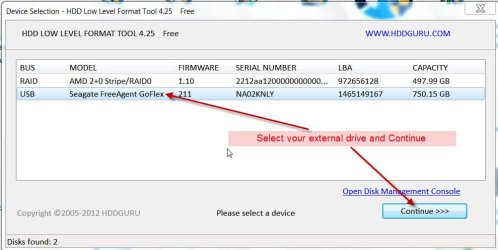
2. Download Windows Executable (works without installation) version of HDD Lowlevel format tool from HDDGURU: HDD LLF Low Level Format Tool

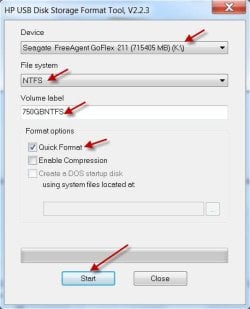
3.Also download the HP USB Disk Storage Format Tool 2.2.3 from Download HP USB Disk Storage Format Tool 2.2.3 Free - Windows-based Format Utility for HP Drive Key or DiskOnKey USB Device - Softpedia This is again a Windows executable requiring no installation.

4. Reboot and plug-in only this external drive which you want to sanitise. ( Remove all other external drives/pendrives so that you don't make a mistake of selecting a wrong drive)


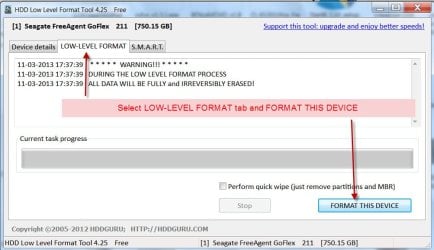
5. Run the lowlevel format Tool and do the lowlevel format. This will write zeroes on all sectors and initialise the drive to the factory condition. You will see the progress bar and wait till it completes. Close the tool when done.

1Select drive.jpg

2LLFormat.jpg

6. Now do a regular format with the HP Tool. Right click on the executable and Run as administrator. When format is complete , close the tool

3.Format .jpg

Now your drive is as clean and new as fresh from the factory.

You may transfer all your data back to it.

( Do ensure that your computer and other drives attached to it are virus-free)

If your problems are resolved mark this thread as solved.

What we have done thus far:

1. Check for any suspicious and other files/ folders and delete them keeping only the wanted folders/files using WinRAR (which can show even superhidden files)

2. Unhide the rest of the files/folders which the virus had hidden

3. Sanitise the drive leaving nothing to chance.
 

My Computer

OS
Windows 7 Home Premium 32 bit
jumanji job well done. I do have a question if I may.

In the OP post #16

**And I'm done on scanning them all and detected some virus, which is just some game cracks and unimportant stuffs. What should i do next master? :)**

Could such things be the beginning of the problem you just helped the OP fix?
 

My Computer

Computer type
PC/Desktop
Computer Manufacturer/Model Number
Home made Desktop
OS
Windows 10 Pro. 64/ version 1709 Windows 7 Pro/64
CPU
Intel i7-6800K @ 4.3
Motherboard
ASUS X-99 Deluxe II
Memory
Corsair Platinum 16 gig @2400
Graphics Card(s)
EVGA GTX 1070 OC
Monitor(s) Displays
Asus 27" LED LCD/VE278Q
Screen Resolution
1920-1080 or 1280-720 HDMI
Hard Drives
INTEL SSD 730-240 Gb Sata 3.0/
PSU
EVGA Platium 1200W
Case
Phanteks Luxe Tempered Glass 8 fans/ one radiator
Cooling
XSPC/ Water Cooled CPU
Keyboard
Das 4 Professional
Mouse
Logitech M705/MX Anywhere 2-S
Internet Speed
100 mbits
Antivirus
Microsoft Security Essentials/ Malwarebytes Premium 3.0/ SAS
Browser
I.E. 11 default/Firefox/ ISP Time Warner Cable/Spectrum
Other Info
LG BluRay Burner/
Sound system-KLipsch-THX/
Icy Dock ssd Hot Swap bays.
Quite possible. These were in his data folder presumably, which we did not touch and exactly the reason why I had recommended that after unhiding, he should run a virus check.

We have no details of what virus he found. ( Even if he had given, I would have no clue about the nature of the virus - for I had never encountered a virus in my computer life plus I know nothing of game cracks he had mentioned. At best I can only refer him to Virus Specialists and the System Security sub-forum. :))

Having said that, since he had mentioned about the shortcut virus I made a quick search on it and I was intent on looking for the autorun.inf file and that was the intention of using WinRAR. Fortunately it was not there. Then I had to work on the basic theory of eliminating anything other than his data files and he only had the shortcut, apart from the System Volume Information and Recycle Bin which can also host any virus.

Honestly, I still do not know what created the ~$WV.FAT32 error. My web search proved futile with no tangible info on it but once the addendums were deleted he was able to open his data folder in WinRAR without the error message. So my delete theory worked.:) Obvious now that they indeed were hosting some malware. Initially I believed he had a FAT32 format and the virus whatever it was had destroyed the file system or Norton which took control had destroyed it. But when he put the screenshot, I saw NTFS - so the file system was intact.

Well, it was quite an interesting problem I had worked upon and yep, it gives me great satisfaction that I have done what best I can do to help the OP. I would think the OP is more educated now and can deal with problems of this nature on his own.

Now a question to the OP which I always wanted to ask but always forgot

"Was the Letrang shortcut created by you or was it created by the virus?"
 

My Computer

OS
Windows 7 Home Premium 32 bit
For the information the OP gave you to work with you did get the problem fixed. I'm not sure what unimportant stuffs means. If a virus scan found it and removed it it must be important. Would be nice to know what that unimportant stuff was.
 

My Computer

Computer type
PC/Desktop
Computer Manufacturer/Model Number
Home made Desktop
OS
Windows 10 Pro. 64/ version 1709 Windows 7 Pro/64
CPU
Intel i7-6800K @ 4.3
Motherboard
ASUS X-99 Deluxe II
Memory
Corsair Platinum 16 gig @2400
Graphics Card(s)
EVGA GTX 1070 OC
Monitor(s) Displays
Asus 27" LED LCD/VE278Q
Screen Resolution
1920-1080 or 1280-720 HDMI
Hard Drives
INTEL SSD 730-240 Gb Sata 3.0/
PSU
EVGA Platium 1200W
Case
Phanteks Luxe Tempered Glass 8 fans/ one radiator
Cooling
XSPC/ Water Cooled CPU
Keyboard
Das 4 Professional
Mouse
Logitech M705/MX Anywhere 2-S
Internet Speed
100 mbits
Antivirus
Microsoft Security Essentials/ Malwarebytes Premium 3.0/ SAS
Browser
I.E. 11 default/Firefox/ ISP Time Warner Cable/Spectrum
Other Info
LG BluRay Burner/
Sound system-KLipsch-THX/
Icy Dock ssd Hot Swap bays.
Back
Top