External Hard Drive no longer recognized

LA Fred

New member
Local time
10:32 PM
Messages
8
My HP Pavilion dv7-4065cx laptop no longer recognizes the external hard drive.

It worked fine until the internal drive died and I had to replace it.

The first time I hooked up the external drive after the new internal was up and running, a message appeared acknowledging the external drive and said that something needed changing to make it run faster. It also said that it would make the change in a few seconds unless I told it to stop.

Who doesn’t want a faster drive? I let it run.

Now I cannot access the drive at all.

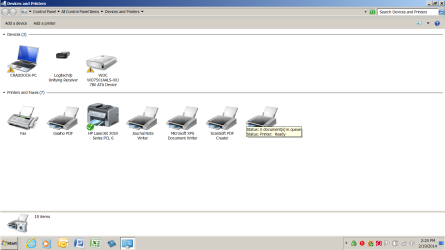
It appears in “Device Manager” but not in “Computer.”

I have been searching and searching for an answer. I tried changing the drive letter from “H” to “G” but ended up with both “H” and “G” as its name.

There is probably a simple solution to this problem. However, with my luck, I might do something terribly wrong if I keep on fiddling around with this thing.

Any help would be appreciated.


My Computer

Computer type
Laptop
Computer Manufacturer/Model Number
HP Pavilion dv7-4065dx
OS
Windows 7 Home Premium x64
CPU
AMD Phenom II N830 / 2.1 GHz
Memory
8 GB
Graphics Card(s)
ATI Mobility Radeon HD 4250 - 128.0 MB
Hard Drives
C: WD 500GB
H?: WD 750 GB
Antivirus
Norton
Browser
IE 10
Have you checked to see if it shows up in device manager; and if it does; is there a ? mark or ! by it? Cause if that is the case; then that means there is either a driver issue and or a possible hardware issue. If not i would try updating the driver(s) for it; if it shows up in device manager.
 

My Computer

Computer type
PC/Desktop
Computer Manufacturer/Model Number
custom built
OS
Windows 7 ultimate 64-bit
CPU
Intel I7 2600K 3.4ghz
Motherboard
Asus Evo P8P67
Memory
Corsair 16gb ddr3 1600mhz
Graphics Card(s)
Nvidia Geforce gt 430
Sound Card
Sound Blaster Titanium x-fi pci express
Monitor(s) Displays
Dell E198WFP
Hard Drives
1 western digital 2TB drive.
PSU
Antec 1200 watt
Case
Inwin Dragon Rider
Cooling
6 case supplied cooling fans
Keyboard
logitech mk700
Mouse
logitech m705
Internet Speed
25-50mbps download; 10mbps upload(i think)
Antivirus
avg free 2014
Browser
mozilla firefox
Other Info
Also have a pretty bad speaker setup which is a klipsch promedia 5.1 surround speaker setup with huge subwoofer and lg blu ray player/writer. Also a hp officejet pro 8600 plus wireless all in one and a logitech s7500 webcam.
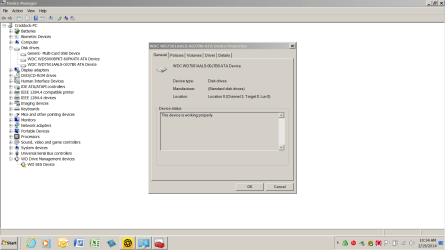
It shows up in DEVICE MANAGER with no question mark.

Checking the driver, I uninstalled and reinstalled the drivers. Upon completion, the message popped up asking if I wanted to Open Folder to View Using Windows Explorer’

I clicked and the message disappeared but I still cannot view the contents of the drive.
 

My Computer

Computer type
Laptop
Computer Manufacturer/Model Number
HP Pavilion dv7-4065dx
OS
Windows 7 Home Premium x64
CPU
AMD Phenom II N830 / 2.1 GHz
Memory
8 GB
Graphics Card(s)
ATI Mobility Radeon HD 4250 - 128.0 MB
Hard Drives
C: WD 500GB
H?: WD 750 GB
Antivirus
Norton
Browser
IE 10
same problem for me. buffalo 1 tb hard disk not showing in my computer. its showing in device manage. disk manager is not opening. what to do?
 

My Computer

Computer type
Laptop
Computer Manufacturer/Model Number
Asus
OS
windows 7 32 bit
kcube: please open a new thread for the issue on your machine. It gets confusing when two people are trying to solve a similar issue in one thread.

Thanks.
 

My Computer

Computer type
Laptop
Computer Manufacturer/Model Number
HP Pavilion dv6-6c10us
OS
x64 (6.3.9600) Win8.1 Pro & soon dual boot x64 (6.1.7601) Win7_SP1 HomePrem
CPU
AMD A6-3420M APU with Radeon(tm) HD Graphics
Motherboard
Hewlett-Packard 1805
Memory
6.00 GB
Graphics Card(s)
AMD Radeon(TM) HD 6520G
Sound Card
(1) AMD High Definition Audio Device (2) IDT High Definiti
Monitor(s) Displays
HP W2072a 20" LCD (1600 x 900) @ 60 Hz
Screen Resolution
1366 x 768 x 32 bits (4294967296 colors) @ 60 Hz
Hard Drives
ST640LM0 00 HM641JI SATA Disk Device
Keyboard
Logitech k520 wireless KB
Mouse
Logitech m320 wireless mouse (bundled with KB)
Internet Speed
15/5 | 54 MB Wireless 'n'
Antivirus
Realtime: Defender or Avast | On-demand: Malwarebytes, ESET
Browser
IE 11 on Win8, IE 10 on win 7
Other Info
Media: [Gimp, Audacity, VLC] || Comm: [WEmail 2012, Skype] || Productivity: [OpenOffice,| Textpad] || Utils: [Sysinternals, cCleaner, Speccy, Defraggler]

My Computer

Computer type
Laptop
Computer Manufacturer/Model Number
HP Pavilion dv6-6c10us
OS
x64 (6.3.9600) Win8.1 Pro & soon dual boot x64 (6.1.7601) Win7_SP1 HomePrem
CPU
AMD A6-3420M APU with Radeon(tm) HD Graphics
Motherboard
Hewlett-Packard 1805
Memory
6.00 GB
Graphics Card(s)
AMD Radeon(TM) HD 6520G
Sound Card
(1) AMD High Definition Audio Device (2) IDT High Definiti
Monitor(s) Displays
HP W2072a 20" LCD (1600 x 900) @ 60 Hz
Screen Resolution
1366 x 768 x 32 bits (4294967296 colors) @ 60 Hz
Hard Drives
ST640LM0 00 HM641JI SATA Disk Device
Keyboard
Logitech k520 wireless KB
Mouse
Logitech m320 wireless mouse (bundled with KB)
Internet Speed
15/5 | 54 MB Wireless 'n'
Antivirus
Realtime: Defender or Avast | On-demand: Malwarebytes, ESET
Browser
IE 11 on Win8, IE 10 on win 7
Other Info
Media: [Gimp, Audacity, VLC] || Comm: [WEmail 2012, Skype] || Productivity: [OpenOffice,| Textpad] || Utils: [Sysinternals, cCleaner, Speccy, Defraggler]
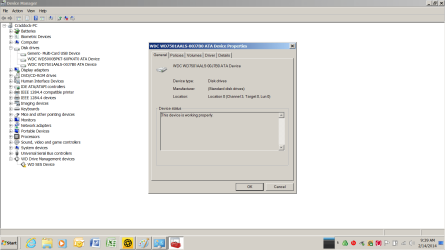
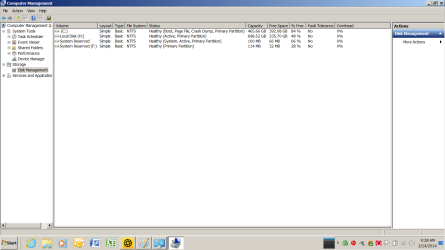
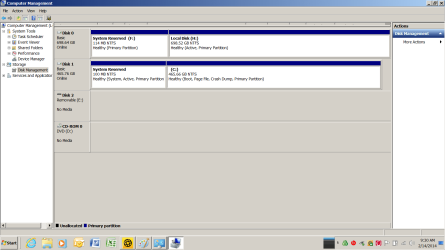
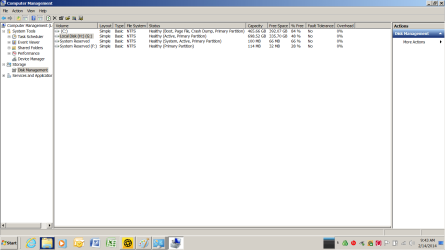
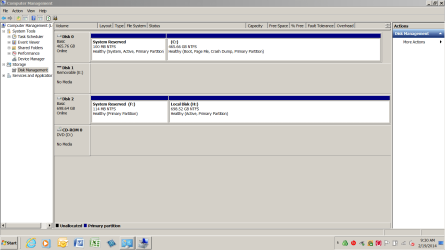
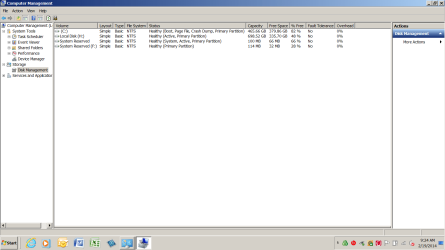
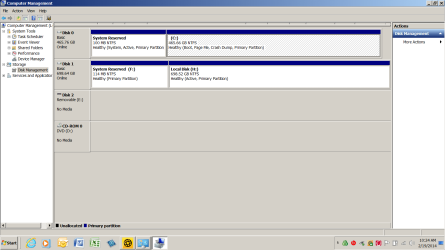
I hope I have attached some screen shots that will get us started. (I don't see them)
 

Attachments

  • Device manager showing that WD750 is working properly.png
    Device manager showing that WD750 is working properly.png
    44 KB · Views: 8
  • Disk Management - top half of screen showing that Drive H is active and healthy.png
    Disk Management - top half of screen showing that Drive H is active and healthy.png
    35.3 KB · Views: 6
  • Disk Management - Bottom half of Screen is healthy and active.png
    Disk Management - Bottom half of Screen is healthy and active.png
    38.7 KB · Views: 3
  • Attempt to change drive letter from H to G - top half of screen.png
    Attempt to change drive letter from H to G - top half of screen.png
    35.6 KB · Views: 3
  • Attempt to change drive letter from H to G - bottom half of screen.png
    Attempt to change drive letter from H to G - bottom half of screen.png
    39 KB · Views: 4
Last edited by a moderator:

My Computer

Computer type
Laptop
Computer Manufacturer/Model Number
HP Pavilion dv7-4065dx
OS
Windows 7 Home Premium x64
CPU
AMD Phenom II N830 / 2.1 GHz
Memory
8 GB
Graphics Card(s)
ATI Mobility Radeon HD 4250 - 128.0 MB
Hard Drives
C: WD 500GB
H?: WD 750 GB
Antivirus
Norton
Browser
IE 10
Is Disk1 the new Hard drive you installed WIn7 upon?

And is Disk0 the old Win7 HD which is no longer being used? If not then I would unplug it, swap its cable to the new HD so it becomes Disk0.

In the new Win7 install enable Automatically deliver drivers via Windows Update (Step 3),
check for Windows Updates, then install all Important and Optional Windows Updates to make sure you have all of your drivers and critical patches.

Now plug in the external and watch for activity in your System Tray. Does it install a driver? It needs the WD SES Device driver shown in error in the Device Manager picture above. It should load automatically once you have enabled for this and your system is fully updated and patched.
 
Wow, Greg! That was a fast reply.

Yes, Disk 1 is the one on which C drive is installed. It is inside my laptop.

And yes, occupying Disk 0 is an backup drive I have used for years - it contains all of my old backup information that I refer to often. It is external and connected by an E-SATA cable.

I did not reconnect it to the laptop until about two weeks after I had installed and updated the new internal drive in the laptop. Shortly after reconnecting it, a message popped up asking if I wanted to make the external drive run faster. It gave me about 10 seconds to stop the process, or it was going to do it automatically. In that short countdown period, I thought “Why not - faster is better, isn’t it?

And that is when my trouble started. I never could access it after that.

Not being a computer whiz like you, I’ll have to think my way through what you just told several times before I will be brave enough to do it.

But, now, I do realize that the wrong disk is being called drive 0.

I’ll be out of town most of this weekend, but I’ll get to it ASAP.

I thank you for helping me on this. I feel sure that you have this problem already solved in your mind.

LA Fred
 

My Computer

Computer type
Laptop
Computer Manufacturer/Model Number
HP Pavilion dv7-4065dx
OS
Windows 7 Home Premium x64
CPU
AMD Phenom II N830 / 2.1 GHz
Memory
8 GB
Graphics Card(s)
ATI Mobility Radeon HD 4250 - 128.0 MB
Hard Drives
C: WD 500GB
H?: WD 750 GB
Antivirus
Norton
Browser
IE 10
It looks like DISK0 once had a Win7 install on it. Nothing shows it is an external HD. It's rare one will show up in DISK0, which would be better to have as the OS. But that is determined by which port on the mobo the drive is plugged into.

But if DISK0 no longer has an OS then it should not be marked Active at all. So I would mark it Inactive at the minimum: Partition - Mark as Inactive - Windows 7 Forums

Even better would be to move the data off temporarily and wipe it with Diskpart Clean Command
to clear the external HD of boot code from the old install, then repartition it as a Logical drive: Partition / Extended : Logical Drives - Windows 7 Forums. As a Logical drive it cannot be marked Active or in any other way interfere with Win7 which makes it ideal for data.
 
A curiosity question, as gregrocker pointed out, it's odd your external is marked Disk 0. What's your BIOS boot sequence? Does it happen to try to boot USB before the internal disk drive?

You can also try How to Cleanup and Remove old USB Mass Storage Drivers

/* EDIT */
p.s. That will also assure a clean driver reinstall when you replug your external drive
 
Last edited:

My Computer

Computer type
PC/Desktop
Computer Manufacturer/Model Number
Dell Optiplex 360 and Optiplex 755
OS
Desk 1: Win 7 Pro x32; Desk 2: Windows 10 x64
Hard Drives
500GB Crucial SSD in both Desktops
Other Info
Buffalo 6TB NAS, Raid 1
Hi Fred,

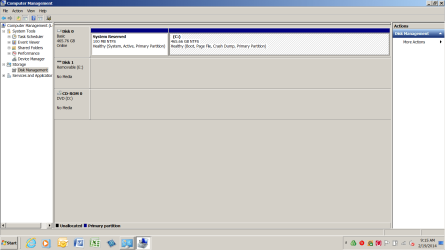
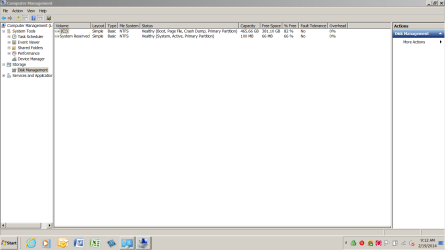
I'd like to see another Disk Management screen shot with only the internal drive (safely remove, eject, disconnect the external drive - then do the disk management screenshot).

It's odd that the internal drive is disk 1 and also odd that in the 4th and 5th screenshots you previlously posted there is a partition ( H: ) ( G: )

I agree with Greg about the multiple active partitons and that does need to be resolved.

I need to do some research on E-SATA to offer any ready advice on how this might affect the disk order.

Thanks,

Bill
.
 

My Computer

Computer type
Laptop
Computer Manufacturer/Model Number
HP Pavilion dv6-6c10us
OS
x64 (6.3.9600) Win8.1 Pro & soon dual boot x64 (6.1.7601) Win7_SP1 HomePrem
CPU
AMD A6-3420M APU with Radeon(tm) HD Graphics
Motherboard
Hewlett-Packard 1805
Memory
6.00 GB
Graphics Card(s)
AMD Radeon(TM) HD 6520G
Sound Card
(1) AMD High Definition Audio Device (2) IDT High Definiti
Monitor(s) Displays
HP W2072a 20" LCD (1600 x 900) @ 60 Hz
Screen Resolution
1366 x 768 x 32 bits (4294967296 colors) @ 60 Hz
Hard Drives
ST640LM0 00 HM641JI SATA Disk Device
Keyboard
Logitech k520 wireless KB
Mouse
Logitech m320 wireless mouse (bundled with KB)
Internet Speed
15/5 | 54 MB Wireless 'n'
Antivirus
Realtime: Defender or Avast | On-demand: Malwarebytes, ESET
Browser
IE 11 on Win8, IE 10 on win 7
Other Info
Media: [Gimp, Audacity, VLC] || Comm: [WEmail 2012, Skype] || Productivity: [OpenOffice,| Textpad] || Utils: [Sysinternals, cCleaner, Speccy, Defraggler]
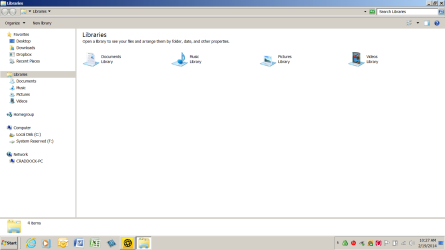
Here are screen shots of every thing I can think of. The important point to remember is that this setup worked fine for over two years until I had to replace the hard drive. Then, it worked fine until one day the message popped up asking me if I wanted the drive to run faster. I clicked YES and have never been able to access it again.
 

Attachments

  • 05 Disk Management - top half of screen; rebooted with external drive attached.png
    05 Disk Management - top half of screen; rebooted with external drive attached.png
    33.5 KB · Views: 1
  • 04 Disk Management - Bottom half of screen with external drive attahed but not rebooted; View fi.png
    04 Disk Management - Bottom half of screen with external drive attahed but not rebooted; View fi.png
    36.5 KB · Views: 1
  • 03 Disk Management - Top half of screen with external drive attahed but not rebooted; View files.png
    03 Disk Management - Top half of screen with external drive attahed but not rebooted; View files.png
    32.8 KB · Views: 1
  • 02 Bottom Half of Disk Management; No external disk attached.png
    02 Bottom Half of Disk Management; No external disk attached.png
    33.7 KB · Views: 1
  • 01 Top Half of Disk Management; no External Disk Connected.png
    01 Top Half of Disk Management; no External Disk Connected.png
    28.7 KB · Views: 1
  • 06 Disk Management - Bottom half of screen after rebooting with external screen attached.png
    06 Disk Management - Bottom half of screen after rebooting with external screen attached.png
    38.2 KB · Views: 2
  • 07 Screen Shot of Windows Explorer after booting with external disk attached.png
    07 Screen Shot of Windows Explorer after booting with external disk attached.png
    38.2 KB · Views: 1
  • 08 Device manager showing that external drive is workin properly - but it cannot be accessed.png
    08 Device manager showing that external drive is workin properly - but it cannot be accessed.png
    40.9 KB · Views: 1

My Computer

Computer type
Laptop
Computer Manufacturer/Model Number
HP Pavilion dv7-4065dx
OS
Windows 7 Home Premium x64
CPU
AMD Phenom II N830 / 2.1 GHz
Memory
8 GB
Graphics Card(s)
ATI Mobility Radeon HD 4250 - 128.0 MB
Hard Drives
C: WD 500GB
H?: WD 750 GB
Antivirus
Norton
Browser
IE 10
Remove the Active flag from H now: Partition - Mark as Inactive - Windows 7 Forums

Reboot to see if you can access the data. If not follow the steps given so far to resolve the erroring storage driver.

If this fails browse into the drive from the booted Win7 installation media to attempt to Copy & Paste - in Windows Recovery Console your files to another HD or an external flash drive. An alternate method is Paragon Rescue Kit Free Edition 11.0 Free CD.

Then try running a full Disk Check.

If Disk Check will not run try running from Win7 Partition Wizard Check File System
 
Fred,

After following Greg's advice, take a look at this tutorial: http://www.sevenforums.com/tutorials/33289-readyboost-setup-use.html

Is this what you saw when you state in post# 1:
The first time I hooked up the external drive after the new internal was up and running, a message appeared acknowledging the external drive and said that something needed changing to make it run faster. It also said that it would make the change in a few seconds unless I told it to stop.

Who doesn’t want a faster drive? I let it run.
.....

If that looks like what you saw, follow steps 3,5, & 6 in the tutorial above to turn off Readyboost on that drive
The tutorial says flash drive - just think external drive.

Bill
.
 

My Computer

Computer type
Laptop
Computer Manufacturer/Model Number
HP Pavilion dv6-6c10us
OS
x64 (6.3.9600) Win8.1 Pro & soon dual boot x64 (6.1.7601) Win7_SP1 HomePrem
CPU
AMD A6-3420M APU with Radeon(tm) HD Graphics
Motherboard
Hewlett-Packard 1805
Memory
6.00 GB
Graphics Card(s)
AMD Radeon(TM) HD 6520G
Sound Card
(1) AMD High Definition Audio Device (2) IDT High Definiti
Monitor(s) Displays
HP W2072a 20" LCD (1600 x 900) @ 60 Hz
Screen Resolution
1366 x 768 x 32 bits (4294967296 colors) @ 60 Hz
Hard Drives
ST640LM0 00 HM641JI SATA Disk Device
Keyboard
Logitech k520 wireless KB
Mouse
Logitech m320 wireless mouse (bundled with KB)
Internet Speed
15/5 | 54 MB Wireless 'n'
Antivirus
Realtime: Defender or Avast | On-demand: Malwarebytes, ESET
Browser
IE 11 on Win8, IE 10 on win 7
Other Info
Media: [Gimp, Audacity, VLC] || Comm: [WEmail 2012, Skype] || Productivity: [OpenOffice,| Textpad] || Utils: [Sysinternals, cCleaner, Speccy, Defraggler]
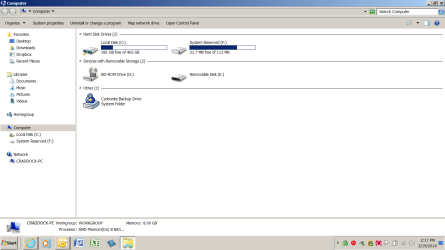
Being pressed for time, I thought I would run the shorter suggestion of Bill. Since the computer was already running with the H drive attached, I pulled up COMPUTER - the H drive was not showing.

Then I disconnected the H drive (using the little “thing” at the bottom of the screen),
and rebooted. After rebooting, I reconnected the H drive. It now shows on the COMPUTER page, but has a Question mark.

I tried every way I could think of to find out why the question mark was there, but no luck.

Gran

P.S. I just went back to the COMPUTER screen and the H drive was not showing on it (as before). I don’t know why it disappeared, unless the display is on a timer.
 

Attachments

  • Computer Screen - drive H not appearing.png
    Computer Screen - drive H not appearing.png
    44.1 KB · Views: 2
  • H drive reloaded after restart.png
    H drive reloaded after restart.png
    50.9 KB · Views: 1

My Computer

Computer type
Laptop
Computer Manufacturer/Model Number
HP Pavilion dv7-4065dx
OS
Windows 7 Home Premium x64
CPU
AMD Phenom II N830 / 2.1 GHz
Memory
8 GB
Graphics Card(s)
ATI Mobility Radeon HD 4250 - 128.0 MB
Hard Drives
C: WD 500GB
H?: WD 750 GB
Antivirus
Norton
Browser
IE 10
Greg,
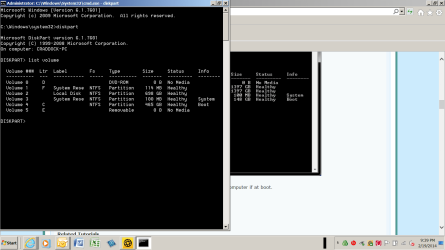
I think you might be in the right ballpark with you suggestion to mark the H drive as inactive. When I pulled up the screen to do so, I saw that the 250GB WD drive did not have any letter assigned to it. I started to give it an "H" but thought I had better check with you first.
 

Attachments

  • Screen used to mark disk inactive.png
    Screen used to mark disk inactive.png
    35.1 KB · Views: 3

My Computer

Computer type
Laptop
Computer Manufacturer/Model Number
HP Pavilion dv7-4065dx
OS
Windows 7 Home Premium x64
CPU
AMD Phenom II N830 / 2.1 GHz
Memory
8 GB
Graphics Card(s)
ATI Mobility Radeon HD 4250 - 128.0 MB
Hard Drives
C: WD 500GB
H?: WD 750 GB
Antivirus
Norton
Browser
IE 10
Yes, it would need a letter to be seen in Disk Mgmt. But it had one in the screenshot. Post another screenshot of Disk Mgmt showing all drives including any which require you to scroll down. If you see the External there without a drive letter, rightclick on it to assign one: Drive Letter - Add, Change, or Remove in Windows 7 - Windows 7 Forums.

If this fails, you can start the steps I have given you which are stacking up. There are others if those don't help.
 
Greg: It looks as though D: is a virtual ODD, perhaps Deamon tools which is known to cause issues.

The ext HD is presented as Local Disk - this might simply be due to it having no label. I've seen ext HDs with a label be presented as Local Disk and can often be 'recovered' with a chkdsk.

Food for thought.

Hopefully the next Disk Mgmt screen shot and drive letter change will show this issue as resolved.

Bill
.
 

My Computer

Computer type
Laptop
Computer Manufacturer/Model Number
HP Pavilion dv6-6c10us
OS
x64 (6.3.9600) Win8.1 Pro & soon dual boot x64 (6.1.7601) Win7_SP1 HomePrem
CPU
AMD A6-3420M APU with Radeon(tm) HD Graphics
Motherboard
Hewlett-Packard 1805
Memory
6.00 GB
Graphics Card(s)
AMD Radeon(TM) HD 6520G
Sound Card
(1) AMD High Definition Audio Device (2) IDT High Definiti
Monitor(s) Displays
HP W2072a 20" LCD (1600 x 900) @ 60 Hz
Screen Resolution
1366 x 768 x 32 bits (4294967296 colors) @ 60 Hz
Hard Drives
ST640LM0 00 HM641JI SATA Disk Device
Keyboard
Logitech k520 wireless KB
Mouse
Logitech m320 wireless mouse (bundled with KB)
Internet Speed
15/5 | 54 MB Wireless 'n'
Antivirus
Realtime: Defender or Avast | On-demand: Malwarebytes, ESET
Browser
IE 11 on Win8, IE 10 on win 7
Other Info
Media: [Gimp, Audacity, VLC] || Comm: [WEmail 2012, Skype] || Productivity: [OpenOffice,| Textpad] || Utils: [Sysinternals, cCleaner, Speccy, Defraggler]
Back
Top