
paragbhandari
New member
- Local time
- 5:35 AM
- Messages
- 2
Hi All,
External Hard drive not accessible...?
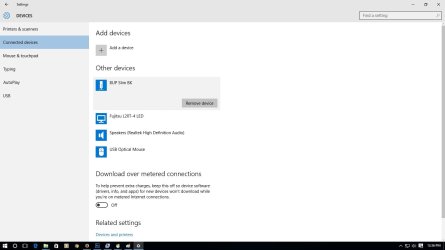
I have 1TB Seagate Backup Plus Slim 200gb cloud Hard Drive. It was working fine on Win 7 earlier, I formatted my desktop and installed win 7 OS since then my exernal hard drive is not initializing. My external hdd was not connected while the formatting n installation process. I tried all the possibilities which i can do to detect the hdd, it is not detected in My Computer-Device Manager-Drive-Disk Management , but it can be seen in device&printer.
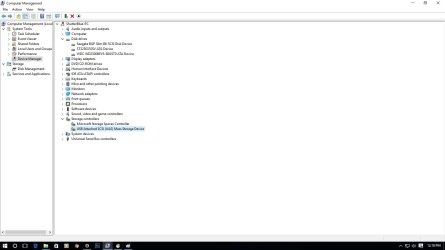
Finally, I updated win 7 to win 10 still is was not detecting. Then, in Device manager - Storage Controller - Right Clicked USB ATTACHED SCSI (UAS) Mass Storage Device and Clicked Enable option on dropdown menu and then Seagate BUP Plus Slim BK SCSI Disk Device shown in Device Manager - Drive & Disk Management.
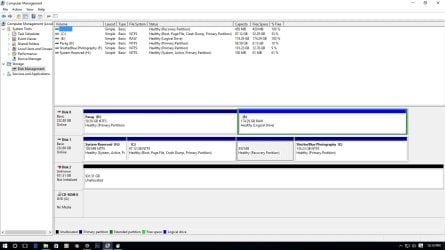
Now in Disk management it displays Disk2 unknown Not Initialized - Unallocated.
I need help as i m Photographer n all my important data is stored in this external drive.

External Hard drive not accessible...?
I have 1TB Seagate Backup Plus Slim 200gb cloud Hard Drive. It was working fine on Win 7 earlier, I formatted my desktop and installed win 7 OS since then my exernal hard drive is not initializing. My external hdd was not connected while the formatting n installation process. I tried all the possibilities which i can do to detect the hdd, it is not detected in My Computer-Device Manager-Drive-Disk Management , but it can be seen in device&printer.
Finally, I updated win 7 to win 10 still is was not detecting. Then, in Device manager - Storage Controller - Right Clicked USB ATTACHED SCSI (UAS) Mass Storage Device and Clicked Enable option on dropdown menu and then Seagate BUP Plus Slim BK SCSI Disk Device shown in Device Manager - Drive & Disk Management.
Now in Disk management it displays Disk2 unknown Not Initialized - Unallocated.
I need help as i m Photographer n all my important data is stored in this external drive.
Attachments

My Computer
- Computer type
- PC/Desktop
- Computer Manufacturer/Model Number
- custom build
- OS
- Windows 7 Ultimate x64
- CPU
- AMD A4 7300 3.8ghz
- Motherboard
- gigabyte f2a58m-s1
- Memory
- 4gb 1600mhz
- Graphics Card(s)
- in built radeon r3 with 128 shades
- Hard Drives
- 250 gb
- Antivirus
- kaspersky
- Browser
- firefox


