
External Hard drive (of 2 TB) was connected to my Laptop (Running Windows 7 Home Premium).
System was shut down abruptly (I guess something was being read/write from the external HDD). I tried restarting (with the external HDD connected) and the system would not proceed from the "Windows is Shutting Down" screen. As soon as I remove the external HDD cable the system shut downs and restarts. When the Operating system is up, I connect the external HDD but cannot see the external HDD drive.
I did a restart again, but no luck.
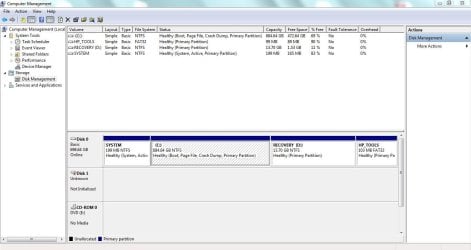
When I open 'Disk Management' it asks me to Initialize the drive. I am not willing to loose the data on it. (data is approx of 600 GB).
Files that I have in are .vmdk images, .iso files & Executable files. There are hardly any media/photo files. (I am concerned about the executable's.)
I have attached screenshot from 'Disk Management' view.
System was shut down abruptly (I guess something was being read/write from the external HDD). I tried restarting (with the external HDD connected) and the system would not proceed from the "Windows is Shutting Down" screen. As soon as I remove the external HDD cable the system shut downs and restarts. When the Operating system is up, I connect the external HDD but cannot see the external HDD drive.
I did a restart again, but no luck.
When I open 'Disk Management' it asks me to Initialize the drive. I am not willing to loose the data on it. (data is approx of 600 GB).
Files that I have in are .vmdk images, .iso files & Executable files. There are hardly any media/photo files. (I am concerned about the executable's.)
I have attached screenshot from 'Disk Management' view.
Attachments
Last edited:
My Computer
- Computer type
- Laptop
- Computer Manufacturer/Model Number
- HP
- OS
- Windows 7 Home Premium 64-Bit
- CPU
- Intel Core i7-2670QM CPU@ 2.20GHz
- Memory
- 8 GB


