External Hard Drive not showing up.

jimithing33

New member
Local time
3:20 AM
Messages
4
I usually use the hard drive with the desktop, however the other day I plugged it into the laptop, it was running at the time, and was accidentally unplugged, since then it doesn't seem to be recognized in either computer. The laptop will make the noise when I plug in the external drive, and it shows up in device and printers. It does not show up in computer management though. I have tried the chkdsk, but it wont work, I am pretty sure I have the right letter, but says no volume. Please help.

Just an add on, the hard drive does light up, but does not spin. I did try installing it in the desktop, but it was not recognized when I tried that.

After awhile of being plugged in the hard drive shows up in disk managment, however when I try to Initialize it, it says I/O Error
 

My Computer My Computer

Computer type
PC/Desktop
OS
PA
Hello jimithing33 ,

Getting an I/o error usually isn't a good sign as often it's related to failed hardware. I guess you already tried using different USB port and cable. What model is this HDD? Is it power fed through the USB cable? You could run the manufacturer’s diagnostics tool to see if it will detect it.
 

My Computer My Computer

Computer type
PC/Desktop
OS
Windows
..... I did try installing it in the desktop, but it was not recognized when I tried that.

After awhile of being plugged in the hard drive shows up in disk managment, however when I try to Initialize it, it says I/O Error

When it shows up in Windows Disk Management capture and post the screenshot.

http://www.sevenforums.com/tutorials/274797-disk-management-post-screen-capture-image.html

Note: Please plugin only your problem external drive. Remove any other USB Storage Device. Make sure to hide the Console Tree and Action Pane as indicated in the above tutorial so that we get a full screen, untruncated Disk Management Window.
 

My Computer My Computer

OS
Windows 7 Home Premium 32 bit
today I took the top of the hard drive off, and it spins manually no problem. One of the heads did look a little banged up, but nothing too bad. I looked at the circuit boards, and I don't see any burn marks, not sure what else it can be. I found a new circuit board online for 50.00, but not sure I want to take the gamble on that not working. I just plugged the hard drive in to load up, and see if it will show up in device manager again, if so I will take a screen shot.


I don't think this is even possible, but is there a way to take the platters out, and into a new hard drive? that would be too good to be true.
 

My Computer My Computer

Computer type
PC/Desktop
OS
PA
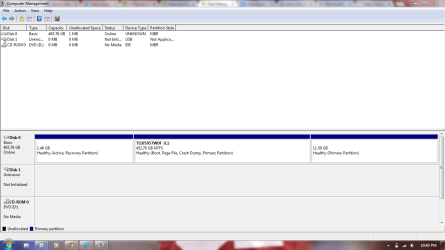
here is the screen shot
 

Attachments

  • Capture.PNG
    Capture.PNG
    37.9 KB · Views: 3

My Computer My Computer

Computer type
PC/Desktop
OS
PA
Click on the drive 1 icon with the red arrow and try to initialise it.

If initialisation goes through, stop with that. That is if the screen asking you whether you want to it to be a MBR disk or GPT disk, close it.

If on the other hand if you get an error message post that error message.
 

My Computer My Computer

OS
Windows 7 Home Premium 32 bit
I get I/O device error when I tried that the other day
 

My Computer My Computer

Computer type
PC/Desktop
OS
PA
OK, I missed my track on this thread. :D

You already said that you got an I/O error message. Unknown, Not initialised, capacity not shown, I/O error - not a good prognosis.

Did you expose the drive platters to the outside world? It is a sure recipe for disaster. A drive should be disassembled only in a clean room by experts who know the job. Even a minute microscopic dust particle entering into the assembly can kill it. You had done something else than what was asked for.

Anyway, now take out the drive , and hook it up as a second internal drive on your desktop, and post a screenshot of Windows Disk Management.

Also let us know the make/manufacturer/ model number of the HDD when you take it out of the external case as well as the make/ manufacturer/model number of the external casing.
 

My Computer My Computer

OS
Windows 7 Home Premium 32 bit
today I took the top of the hard drive off, and it spins manually no problem. One of the heads did look a little banged up, but nothing too bad.
Seriously?
Unless you have absolutely priceless information on this HDD I'd simply write it off. Never open a HDD - even changing the torque on the screws can foul it up.
 

My Computer My Computer

Computer type
PC/Desktop
Computer Manufacturer/Model Number
Own build
OS
Windows 7x64 Home Premium SP1
CPU
Intel i7 2600k
Motherboard
ASUS P8Z68 Deluxe
Memory
G.Skill Ripjaws (DDR3-1600) 2x4GB
Graphics Card(s)
Nvidia GeForce GTS 450; Intel HD Graphics 3000(GT2+)
Monitor(s) Displays
Dell Ultrasharp IPS panel U2311H, Samsung SyncMaster P2350
Screen Resolution
1920x1080
Hard Drives
Samsung 850 Pro SSD 256GB, Samsung SSD 840 120GB, Seagates 1TB Barracuda ST31000528AS x2
PSU
Seasonic M12II 520W
Case
Lian Li Lancool PC-K60
Cooling
Case: 1x120mm, 3x140mm CPU: Hyper 212+
Keyboard
Logitech MK520 (wireless)
Mouse
Logitech MK520
Internet Speed
6-7 Mbps
Antivirus
Norton Security Premium, Malwarebytes on 2 (MSE on 3rd PC)
Browser
FireFox
Other Info
Audio: Logitech Z523 2.1
Back
Top