
external HD not showing in MY Computer

phenix

New member
Member
VIP
Local time
10:42 AM
Messages
254
WD 1Tb sitting in a BlackX box.
Not sure if this is in the correct place.
Had this problem before but just can't remember how I fixed it.
I took the HD to Wiffies computer and it worked fine there running Windows 7 Pro 32-bit.
I am running Windows 7 Pro 64-bit.
When looking in "Devices and Printers", it states that the HD is working properly.
It also states that it has the latest driver.
Thanks for this site and any help.
 

My Computer My Computer

Computer type
PC/Desktop
Computer Manufacturer/Model Number
had the system built by PCsandParts
OS
windows 7 Pro 64 bit
CPU
mini tower
Motherboard
h110m-k (lga1151)
Memory
4g
Graphics Card(s)
nvidia geforce gt730 graphics card
Sound Card
high definition audio device
Monitor(s) Displays
19" dell ultra sharp
Screen Resolution
1280 x 800
Hard Drives
Kingston SSD
PSU
?
Case
?
Cooling
?
Keyboard
standard ps/2 keyboard
Mouse
ps/2 compatible optical
Internet Speed
fiber optics
Antivirus
ESET Smart Security
Browser
IE11
Other Info
no Wifi. Bose speakers, optical drive tsstcorp dvd+-RW
Thank you for replying.
As you can see from the attached file, it is not showing up in Disk Management.
 

Attachments

  • 2014-01-07_125424.png
    2014-01-07_125424.png
    10.3 KB · Views: 1

My Computer My Computer

Computer type
PC/Desktop
Computer Manufacturer/Model Number
had the system built by PCsandParts
OS
windows 7 Pro 64 bit
CPU
mini tower
Motherboard
h110m-k (lga1151)
Memory
4g
Graphics Card(s)
nvidia geforce gt730 graphics card
Sound Card
high definition audio device
Monitor(s) Displays
19" dell ultra sharp
Screen Resolution
1280 x 800
Hard Drives
Kingston SSD
PSU
?
Case
?
Cooling
?
Keyboard
standard ps/2 keyboard
Mouse
ps/2 compatible optical
Internet Speed
fiber optics
Antivirus
ESET Smart Security
Browser
IE11
Other Info
no Wifi. Bose speakers, optical drive tsstcorp dvd+-RW
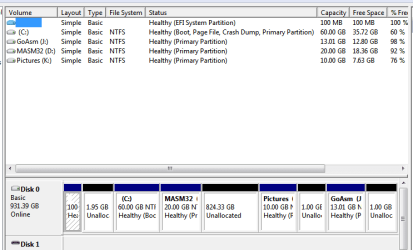
Yes, I see that. Seems to conflict with the report that its showing up in Devices and Printers. Can you right click it there to run Troubleshooter or Diagnose? What options are available. Can we see a Properties box?

You have problems with your Disk Mgmt which is a mess. What I would do is use Partition Wizard
bootable CD to Extend partition easily with Partition Wizard - video help.

This is the coolest feature on the hottest tool we use here. All you need to do is click a partiiton you want to extend, then select where you want to extend it as shown in the video above. It will even borrow space from non-adjacent partitions.

I would rightclick C to extend into the 1.95 wasted space, click OK, then again rightclick C to take as much of the 823gb space as you want into C as well. Then click the other partitions to borrow any of the remaining Unallocated wasted space as you want into them.

Finally, if this is the original HP preinstalled WIn7 that is a corrupt bloated mess that no tech enthusiast would run. I suggest you look over the steps to get a perfect Clean Reinstall - Factory OEM Windows 7, make the preparations given, ask back any questions, then after backing everything up boot the WIn7 installer as a UEFI device, delete all partitions as shown in Steps 7 and 8 of Clean Install Windows 7 to create new ones as you wish, install Win7 to the first partition after the UEFI boot partition the installer will create for you.
 
It just started to work without me doing anything.
So I consider this thread solved....
 

My Computer My Computer

Computer type
PC/Desktop
Computer Manufacturer/Model Number
had the system built by PCsandParts
OS
windows 7 Pro 64 bit
CPU
mini tower
Motherboard
h110m-k (lga1151)
Memory
4g
Graphics Card(s)
nvidia geforce gt730 graphics card
Sound Card
high definition audio device
Monitor(s) Displays
19" dell ultra sharp
Screen Resolution
1280 x 800
Hard Drives
Kingston SSD
PSU
?
Case
?
Cooling
?
Keyboard
standard ps/2 keyboard
Mouse
ps/2 compatible optical
Internet Speed
fiber optics
Antivirus
ESET Smart Security
Browser
IE11
Other Info
no Wifi. Bose speakers, optical drive tsstcorp dvd+-RW
Back
Top